






Patchcord Comprehensive Guide: Types, Applications, and Standards
Patchcord plays a vital role in network connectivity by linking devices for seamless data transfer. When you select the correct patchcord for your environment, you help ensure reliable connections, fast speeds, and compliance with industry standards.
Physical management issues, such as patch cord problems, cause about 50% of network problems and downtime. High-performance cables like Cat6A or Cat7 boost bandwidth and resist interference, which is essential for stable, high-speed connections.
You should always consider your network's unique needs and environment to achieve optimal performance and minimize disruptions.
Key Takeaways
- Patchcords are essential for connecting devices in networks, ensuring reliable data transfer and minimizing downtime.
- Choosing the right patchcord type, such as Ethernet or fiber optic, is crucial for meeting your network's speed and performance needs.
- High-quality materials and connectors in patchcords enhance signal transmission and reduce the risk of network failures.
- Regular inspection and cleaning of patchcord connectors prevent signal degradation and extend the lifespan of your network.
- Understanding the differences between patchcords and standard cables helps you select the best option for your specific application.
- Always match patchcord specifications with your network equipment to avoid compatibility issues and ensure optimal performance.
- Investing in certified patchcords guarantees compliance with industry standards, enhancing reliability and performance.
- Selecting the shortest patchcord that meets your needs reduces latency and improves overall network efficiency.
Patchcord Basics

What Is a Patchcord
You use a patchcord to connect two electronic devices for signal transmission. This cable serves as a bridge in your network, linking equipment such as computers, switches, or routers. You often see patchcords in server rooms, offices, and data centers. Their main purpose is to provide a reliable, short-distance connection that supports fast data transfer and easy reconfiguration.
Tip: Choosing the right patchcord helps you maintain network speed and reduce downtime.
Key Components
A patchcord consists of several essential parts that determine its performance and reliability:
- Cable Material: Manufacturers use different materials for patchcords. High-quality copper or fiber ensures better signal transmission. Some companies use inferior materials, like scrap cable, which can cause performance issues.
- Connectors: Each end of the patchcord has a connector, such as RJ45 for Ethernet or LC/SC for fiber optic. The quality of these connectors affects how well the cable transmits data.
- Assembly Techniques: The way the cable and connectors are joined matters. Poor assembly can lead to weak connections and signal loss.
- Testing: Reliable patchcords undergo individual testing to guarantee performance before reaching you.
If you select a patchcord with poor materials or connectors, you risk lower data rates and reduced bandwidth, even if the rest of your network uses high-quality components.
Patchcord vs. Other Cables
You might wonder how patchcords differ from other cables. The table below highlights the main differences between patchcords and standard Ethernet cables:
|
Feature |
Patch Cord |
Ethernet Cable |
|---|---|---|
|
Use |
Short-distance connections between devices |
Permanent cabling and backbone links |
|
Length |
Usually 0.3 to 20 meters |
Typically 305 meters or 500 meters per reel |
|
Flexibility |
Soft, flexible, ready to use |
Relatively stiff, suitable for in-wall or tray installations |
|
Form |
Pre-terminated with RJ45 plugs |
Bulk cable, terminated onsite |
|
Connector |
Includes booted plugs, color customizable |
No connector, used with jacks or panels |
|
Testing |
Each unit tested as a finished component |
Tested in bulk as cable link |
You use patchcords for tasks like connecting servers to switches, linking wall outlets to computers, or managing cables in high-density data centers. Their flexibility and pre-terminated connectors make them ideal for quick changes and troubleshooting. In contrast, bulk Ethernet cables work best for permanent installations and longer distances.
Patchcord Types

You encounter several types of patchcords in modern networking and communications. Each type serves a specific purpose and offers unique features that impact performance, compatibility, and reliability. Understanding these differences helps you select the right patchcord for your environment.
Ethernet Patchcords
Ethernet patchcords remain the most common choice for connecting computers, switches, and other network devices. You find them in offices, data centers, and industrial settings. Their design focuses on electrical signal transmission over copper wires.
RJ45 Connectors
You recognize Ethernet patchcords by their RJ45 connectors. These connectors feature eight pins and snap securely into network ports. RJ45 connectors support both shielded and unshielded cable types. Shielded connectors protect against electromagnetic interference (EMI), making them ideal for environments with heavy machinery or radio equipment. Unshielded connectors work well in standard office settings where EMI is minimal.
Tip: Always match the connector type to your network equipment to avoid compatibility issues.
Cable Categories
Ethernet patchcords come in several categories, each supporting different speeds and bandwidths. The table below summarizes the most widely used categories:
|
Category |
Max Speeds |
Bandwidth |
|---|---|---|
|
Cat 5e |
1,000 Mbps |
100 MHz |
|
Cat 6 |
1,000 Mbps |
250 MHz |
|
Cat 6a |
10,000 Mbps |
500 MHz |
|
Cat 7 |
10,000 Mbps |
600 MHz |
|
Cat 7a |
10,000 Mbps |
1,000 MHz |
|
Cat 8 |
40,000 Mbps |
2,000 MHz |
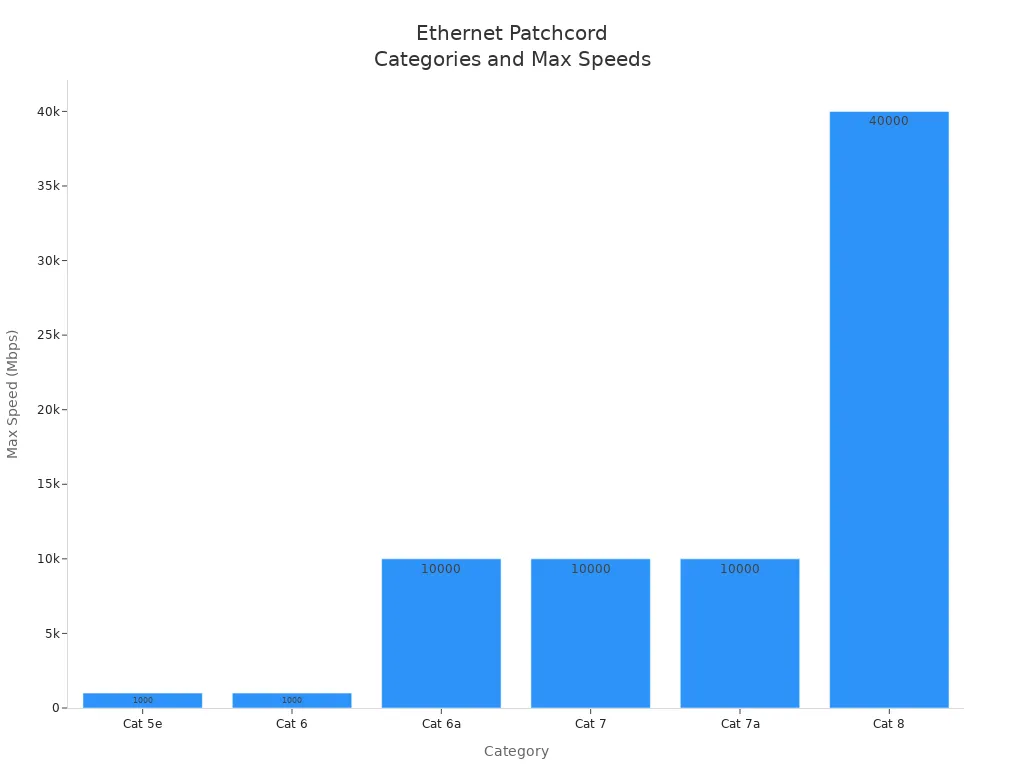
You should choose the cable category based on your network's speed requirements and future scalability. For example, Cat 6a and above support 10 Gbps speeds, which are essential for high-performance networks.
Note: Shielded Ethernet patchcords block EMI more effectively than unshielded ones. Use shielded cables in factories, healthcare, or broadcast environments for maximum reliability.
Fiber Optic Patchcords
Fiber optic patchcords transmit data using light, not electricity. You benefit from higher speeds, longer distances, and immunity to electromagnetic interference. These patchcords are essential in data centers, telecommunications, and high-security environments.
Connector Types
The most common fiber optic connectors are SC and LC. SC connectors use a push-pull latching mechanism, making installation quick and secure. LC connectors are smaller, which allows you to fit more connections in high-density panels. Both types offer low insertion loss, ensuring efficient signal transmission.
Connector polish types also matter. PC connectors have a spherical end, UPC connectors feature enhanced smoothness, and APC connectors use an 8° angled polish for minimal signal reflection. You must match the connector and polish type to your equipment for optimal performance.
Single-mode and Multi-mode
You choose between single-mode and multi-mode fiber optic patchcords based on distance and bandwidth needs. The table below highlights the key differences:
|
Feature |
Single-Mode Fiber |
Multi-Mode Fiber |
|---|---|---|
|
Light Source |
Solid lasers |
LEDs or VCSELs |
|
Transmission Distance |
Long distance (10-20 km) |
Short distance (up to 550 m) |
|
Bandwidth |
Wideband |
Lower bandwidth |
|
Core Diameter |
8-10 microns |
50 microns |
|
Dispersion |
Minimal |
Higher |
Single-mode fiber supports long-distance, high-speed communication.
Multi-mode fiber is best for short runs within buildings or data centers.
Callout: Single-mode patchcords excel in backbone links and metropolitan networks. Multi-mode patchcords suit local area networks and server rooms.
Specialty Patchcords
You may need specialty patchcords for unique applications, such as audio/video systems or harsh industrial environments. These patchcords offer features that standard cables cannot provide.
Audio/Video
Audio/video patchcords often include overmolded rubber flex handles to reduce strain and shielded designs to minimize crosstalk. You can select from various colors and lengths to organize complex setups. These cables use high-quality materials, such as nickel-plated copper and gold-plated contact pins, to ensure clear signal transmission. They are perfect for HD broadcast and professional audio installations.
- Overmolded handles reduce cable strain.
- Shielding prevents interference in high-density setups.
- Multiple color options help with cable management.
Industrial Use
Industrial patchcords must withstand extreme conditions. Manufacturers use materials like Polyurethane (PUR) and Thermoplastic Elastomer (TPE) to enhance durability and resistance to chemicals, oils, and temperature fluctuations. These patchcords endure mechanical stress and exposure to harsh substances, making them ideal for factories, outdoor installations, and mission-critical systems.
- PUR and TPE jackets resist water, oils, and chemicals better than PVC.
- Reinforced designs protect against rodent bites and physical damage.
- Waterproof and armored patchcords ensure reliable performance outdoors.
Note: Specialty patchcords, such as armored or waterproof types, provide extra protection and longevity in demanding environments.
Comparative Overview
The table below summarizes the main types of patchcords and their distinguishing features:
|
Type of Patch Cord |
Distinguishing Features |
|---|---|
|
Ribbon Cables |
Flat-shaped, high fiber density, saves space. |
|
Bundled Cables |
Round, loose tube, ideal for integrated cabling. |
|
Conventional Patch Cords |
Lightweight, cost-effective, for indoor use. |
|
Reinforced Patch Cords |
Resistant to rodents, water, and heat, suitable for outdoors. |
|
PVC Sheath Patch Cords |
Flexible, easy to install, for indoor applications. |
|
LSZH Sheath Patch Cords |
Flame-retardant, low smoke, for public spaces. |
|
Simplex Patch Cords |
Single-core, one-way signal. |
|
Duplex Patch Cords |
Dual-core, two-way signal. |
|
Single-Mode Patch Cords |
Long-distance, high bandwidth. |
|
Multimode Patch Cords |
Short-distance, cost-effective. |
|
PC/UPC/APC Connectors |
Different polish types for signal quality and reflection control. |
Performance Comparison
The table below compares Ethernet and fiber optic patchcords on key performance metrics:
|
Feature |
Fiber Optic Cable |
Ethernet Cable |
|---|---|---|
|
Transmission rate |
Much higher (up to 100 Gbps) |
Up to 10 Gbps (Cat 6a/7/8) |
|
Transmission distance |
10-20 km (single-mode) |
Up to 100 meters |
|
Security |
Immune to interference |
Susceptible to EMI |
|
Bandwidth |
Wider |
Narrower |
|
Installation costs |
Higher |
Lower |
|
Weight |
Lighter |
Heavier |
|
Damage |
More fragile |
Less fragile |
You should select the patchcord type that matches your performance, durability, and environmental requirements. The right choice ensures reliable connectivity, reduces downtime, and supports your network's growth.
Applications

Networking
You rely on patchcords every day to connect computers, switches, and routers in enterprise networks. These cables help you organize and manage network connections, which improves reliability and simplifies troubleshooting. In a typical office, you use patchcords to link workstations to wall outlets or patch panels. This setup allows you to reconfigure your network quickly as your business grows or changes.
The following table highlights common applications for patchcords in networking environments:
|
Application |
Description |
|---|---|
|
Data Centers |
High-density cabling with efficient space utilization; reduces cable clutter. |
|
Enterprise Networks |
Improved organization and management of network connections for reliability. |
When you select the right patchcord, you reduce signal loss and minimize downtime. Multimode patch cords, for example, offer a cost-effective solution for short runs in LANs and storage area networks (SANs). You benefit from easier cable management and improved network performance.
Data Centers
In data centers, you face unique challenges with high-density cabling and rapid technology upgrades. Patchcords play a critical role in connecting servers, switches, and storage devices. You need to optimize space and maintain flexibility for future expansion.
- MPO patch cords consolidate multiple fibers into a single connection, which saves valuable rack space.
- Choosing the correct number of fibers in MPO connectors helps you meet current and future bandwidth needs.
- MPO patch cords support higher speeds, such as 100G or 400G, so you can scale your data center without replacing existing cabling.
You improve efficiency and reduce cable clutter by using high-quality patchcords. This approach ensures your data center remains organized and ready for growth. Multimode patch cords are often preferred for short runs, while single-mode options support longer distances and higher speeds.
Telecommunications
Telecommunications networks depend on reliable connections for uninterrupted service. You use fiber optic patch cords to link network components, such as switches, multiplexers, and transmission equipment. These cables maintain signal integrity over long distances, which is essential for high-quality communication.
- Fiber optic patch cords ensure consistent data transmission and minimize downtime.
- Their robust construction reduces the risk of signal interference and supports continuous network operations.
- You achieve better connectivity and fewer disruptions by selecting patchcords with high-quality connectors and proper testing.
Patchcords help you build a telecommunications infrastructure that delivers reliable voice, video, and data services. When you choose the right patchcord, you enhance network performance and support your organization's communication needs.
Audio/Video Systems
You encounter patchcords in every professional audio/video setup. These cables connect mixing consoles, amplifiers, speakers, video switchers, and broadcast equipment. You rely on patchcords to deliver clear signals and maintain system integrity during live events, studio recordings, and conference presentations.
High-quality patchcords offer several advantages in audio/video environments:
- You scale your system easily by adding new devices without running long cables across the room.
- You improve cable management because shorter patchcords connect equipment to nearby patch panels, reducing clutter.
- You save on costs since shorter cables require less material and installation time.
- You perform maintenance quickly, swapping or repairing devices without disrupting the entire setup.
Professional studios and event venues often use shielded patchcords to prevent electromagnetic interference. You notice the difference in sound clarity and video quality when you choose cables with gold-plated connectors and robust insulation. For example, in a broadcast control room, you use color-coded patchcords to organize audio channels and video feeds, making troubleshooting and upgrades much faster.
Tip: Select patchcords with reinforced strain relief and flexible jackets for frequent reconfiguration. This choice extends cable life and reduces downtime during critical operations.
You also benefit from patchcords with overmolded handles, which make plugging and unplugging easier in high-density racks. In digital signage installations, you use patchcords to link media players to displays, ensuring reliable content delivery in retail or public spaces.
Industrial Environments
You face demanding conditions in industrial settings, such as factories, power plants, and outdoor installations. Patchcords must withstand mechanical stress, temperature extremes, and exposure to chemicals. You select cables designed for durability and compliance with strict industry standards.
The following table summarizes key requirements for patchcords in industrial environments:
|
Requirement |
Details |
|---|---|
|
Durability |
High durability with double armor for crush resistance and tensile strength |
|
Shielding |
Conforms to IEC, EIA-TIA, and Telcordia performance requirements |
|
Compliance |
RoHS, REACH & SvHC compliant |
|
Material Specs |
Available in PVC, LSZH material options |
|
Connector Types |
LC, SC, FC, and ST connector types |
|
Applications |
Suitable for telecommunication networks, CCTV, FTTx, FTTH, CATV networks |
You use patchcords with rugged jackets and double shielding to protect against electromagnetic interference and physical damage. In automated manufacturing, you rely on cables with 24AWG solid conductors for easy termination and stable data transmission. The following table highlights additional features for industrial Ethernet applications:
|
Requirement |
Details |
|---|---|
|
Shielding |
Double shielded with foil plus braid for EMI/RFI protection |
|
Conductors |
24AWG solid conductors for easy termination |
|
Jacket |
Rugged LSZH jacket for durability in harsh environments |
|
Compliance |
Exceeds EIA568 Category 5E requirements for high-speed networks |
|
Applications |
Industrial Ethernet, Factory Automation, Process Industry applications |
You deploy patchcords in control cabinets, outdoor surveillance systems, and process automation lines. These cables maintain signal integrity and reduce downtime, even in environments with vibration, moisture, or corrosive substances. You ensure long-term reliability by choosing patchcords that meet international standards and offer proven resistance to wear and tear.
Note: Always verify compliance certifications before installation. This step protects your investment and guarantees uninterrupted operation in mission-critical systems.
Patchcord Standards
International Standards
You need to follow international standards to guarantee that your network cabling performs reliably and remains compatible with global systems. These standards define the physical and performance characteristics of patchcords, ensuring you receive consistent quality no matter where you source your cables. International standards also help you avoid costly downtime and troubleshooting caused by subpar components.
Here is a summary of key international standards for patchcords:
|
Standard |
Description |
|---|---|
|
IEC 60793 series |
Sets optical fiber specifications, including core diameter and tensile strength. |
|
IEC 60794 series |
Focuses on performance test methods for optical cables, such as attenuation and durability. |
|
ITU-T G.650 series |
Standardizes macrobending loss test methods for patch cords. |
|
National YD/T 901 |
Clarifies attenuation limits for multimode fiber. |
By following these standards, you ensure your patchcords deliver the expected performance and durability in demanding environments.
Note: UL 3992 also outlines performance standards for patch cords with modular plug connectors. This standard addresses manufacturing challenges and verifies compliance with industrial requirements.
Industry Standards
Industry standards help you maintain compatibility and performance within specific markets or regions. These standards often address the unique needs of commercial buildings and enterprise networks. You benefit from clear guidelines on installation, testing, and expected lifespan.
The table below compares two major industry and international standards:
|
Aspect |
Industry Standards (TIA/EIA-568) |
International Standards (ISO/IEC-11801) |
|---|---|---|
|
Origin |
U.S. based |
Developed by ISO/IEC with 15 nations |
|
Publication Year |
1991 |
1995 |
|
Focus |
Commercial buildings |
Generic customer premises cabling |
|
Life Expectancy |
Not specified |
At least 10 years |
|
Scope |
Primarily work-area cabling |
Covers all aspects of cabling and connectors |
You should select patchcords that comply with both industry and international standards to future-proof your network and simplify upgrades.
Certification and Testing
Certification and testing protect your investment by verifying that each patchcord meets strict quality and performance benchmarks. You reduce the risk of network failures and ensure compliance with safety regulations.
Key certification and testing procedures include:
- PC, UPC, and APC Polish Standards: These standards ensure proper end-face geometry, which minimizes signal reflection and loss.
- Compliance with Zirconia Ferrules: High-precision connectors must meet IEC and GR-326 standards for durability and accuracy.
- Insertion Loss Testing (IL): This test, based on IEC 61300-3-4, measures how much signal is lost as it passes through the patchcord.
- Return Loss Testing (RL): Conducted according to IEC 61300-3-6, this test checks for signal reflection, which can degrade performance.
- Temperature Cycling and Humidity Tests: These tests guarantee performance from -40°C to +75°C, ensuring reliability in harsh environments.
- Connector Durability Tests: Your patchcords must support at least 500 mating cycles, as specified by GR-326.
- Visual End-Face Inspection: This inspection, following IEC 61300-3-35, checks for cleanliness and geometric accuracy.
Tip: Always request certified test reports from your supplier. This step helps you avoid hidden defects and ensures your network operates at peak efficiency.
Construction and Performance
Cable Material
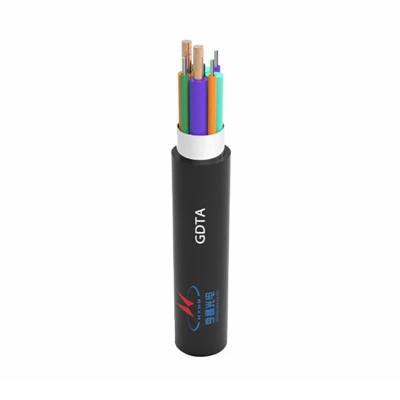
You must pay close attention to cable material when selecting a patchcord for your network. The quality of raw materials directly impacts both durability and signal transmission. High-purity glass in fiber optic cables minimizes light loss, which enhances signal clarity. Uniform cladding materials prevent light leakage and maintain consistent performance. Specialized coatings protect fibers from environmental stress, and strength members like aramid yarn provide resilience during installation and daily use. The outer sheath and jacket materials shield the cable from moisture, chemicals, and physical damage, which extends the cable's lifespan.
- The quality of core fibers and protective sheaths determines both performance and longevity.
- Humidity testing reveals that moisture exposure can make fibers brittle, increasing the risk of decay and stress.
- Micro-bending from poor jacketing materials leads to excessive signal loss.
- Dust contamination blocks optical signals and reduces overall efficiency.
Tip: Always choose patchcords with high-quality materials to avoid premature failure and costly downtime.
The table below summarizes how different material components affect cable performance:
|
Component |
Impact on Performance |
|---|---|
|
Core Fiber |
Signal clarity, light loss |
|
Cladding |
Light leakage prevention |
|
Coating |
Environmental protection |
|
Strength Member |
Durability, installation resilience |
|
Outer Sheath |
Longevity, hazard resistance |
Length Considerations
You need to consider cable length to maintain optimal network performance. The total length of Ethernet channels, including patchcords, should not exceed 100 meters. For Cat 6 cables, you achieve the best results at lengths up to 50 meters. Exceeding recommended limits can cause signal degradation and reduce data transmission speeds.
|
Cable Type |
Maximum Length |
Optimal Length |
|---|---|---|
|
Cat 5e |
100 meters |
N/A |
|
Cat 6 |
100 meters |
50 meters |
|
Cat 6a |
100 meters |
N/A |
Shorter patchcords reduce latency and improve reliability.
Longer cables increase the risk of attenuation and signal loss.
Note: Always measure your installation space and select the shortest cable that meets your needs.
Connector Quality
Connector quality plays a critical role in patchcord reliability and data transmission. Shielded connectors reduce electromagnetic interference (EMI) and crosstalk, which improves signal quality. Investing in robust fiber optic patch cables prevents data transmission loss and network performance issues. High-quality materials and sturdy construction resist wear and environmental factors, ensuring long-term durability.
- Shielding enhances signal integrity in environments with high EMI.
- Precision manufacturing ensures consistent contact and minimal insertion loss.
- Durable connectors withstand repeated plugging and unplugging without degrading performance.
- Callout: Reliable connectors protect your network from costly outages and support high-speed data transfer.
You should always inspect connector quality before installation. Poor connectors can undermine even the best cable materials and lead to frequent network failures.
Choosing Patchcords
Selecting the right patchcord for your network environment requires careful evaluation of several factors. You must consider your application needs, ensure compatibility with existing equipment, and balance cost against quality. Making informed choices helps you avoid common mistakes and supports long-term reliability.
Application Needs
You should start by identifying the specific requirements of your network application. Each environment presents unique challenges, so you need to match the patchcord's characteristics to your operational demands. For example, data centers require high-density cabling and rapid scalability, while industrial sites demand rugged cables that withstand harsh conditions.
The following table outlines the main factors you should assess when choosing a patchcord for your application:
|
Factor Type |
Description |
|---|---|
|
Performance Characteristics |
Optimize signal transmission based on application needs, considering noise levels and shielding. |
|
Physical Characteristics |
Ensure cable and connector can withstand environmental stresses like heat, moisture, and foot traffic. |
|
Testing |
Conduct thorough testing to ensure performance meets standards before and after installation. |
You need to select cables with appropriate shielding if your environment experiences high electromagnetic interference. In areas with heavy foot traffic or exposure to moisture, you should choose patchcords with reinforced jackets and water-resistant materials. Testing before and after installation confirms that your cables meet performance standards and reduces the risk of unexpected downtime.
Tip: Always match the patchcord's physical and performance features to your network's operational environment. This approach minimizes failures and maximizes uptime.
Compatibility
Ensuring compatibility between patchcords and network equipment prevents costly errors and system disruptions. You must verify that the cable type, connector style, and jacket color align with your existing infrastructure.
Consider these best practices to avoid compatibility issues:
- Match the fiber type in your patchcord to the cable plant (e.g., use 50/125 patchcords with 50/125 fibers).
- Use proper cable jacket color codes to prevent mismatching and confusion during installation.
- Select connectors that fit the patch panels and equipment ports in your network.
- Avoid mixing different connector types, such as PC and APC, to prevent physical damage and signal loss.
- Maintain cleanliness by using dust caps and cleaning connectors before use.
You often encounter problems when you choose the wrong Ethernet cable category, ignore bend radius, or manage patch cords improperly. These mistakes can lead to degraded performance and increased maintenance costs.
Note: You should always check connector specifications and fiber types before purchasing. This step ensures seamless integration and protects your network investment.
Cost vs. Quality
Balancing cost and quality is essential when selecting patchcords for enterprise networks. You may feel tempted to choose lower-priced options, but sacrificing quality often leads to higher long-term expenses due to frequent replacements and network outages.
You should evaluate the following aspects to make an informed decision:
- Assess the durability of cable jackets and connectors. High-quality materials resist wear and environmental stress.
- Review manufacturer testing and certification reports. Reliable patchcords undergo rigorous performance testing.
- Consider the total cost of ownership, including installation, maintenance, and potential downtime.
Expert recommendations vary based on network environment. For example, you should choose armored cables for harsh conditions, LSZH jackets for enclosed spaces, and high-density patchcords for space-constrained installations. Selecting the correct fiber mode, connector type, and polishing style ensures optimal performance and longevity.
|
Factor |
Description |
|---|---|
|
Fiber Mode |
Simplex for unidirectional transmission; Duplex for full-duplex communication. |
|
Cable Jacket Type |
OFNR for vertical riser shafts; LSZH for enclosed spaces; OFNP for air-handling spaces. |
|
Connector Type |
LC, SC, ST, etc., suited for different performance needs. |
|
Polishing Style |
UPC for general use; APC for minimal signal reflection. |
|
Specialty Cables |
Armored for harsh environments; Industrial for extreme conditions; High-density for space constraints. |
Callout: Investing in certified, high-quality patchcords reduces downtime and supports future network upgrades. You protect your business operations and ensure consistent connectivity.
You should always prioritize quality over short-term savings. Reliable patchcords deliver better performance, require less maintenance, and support your network's growth.
You improve network reliability and performance when you choose patchcords that match your environment and comply with standards. Regular cleaning and inspection of connectors prevent signal issues and downtime. Using proper tools during installation enhances signal flow.
- Clean fiber optic connectors to avoid dirt buildup.
- Inspect cables for damage or wear.
- Align connectors accurately for optimal performance.
Consulting certified professionals, such as CNCI® installers, ensures high-quality cabling and proper management.
|
Feature |
Description |
|---|---|
|
Program Name |
Certified Network Cable Installer (CNCI®) |
|
Purpose |
Sets high standards for network cabling practices |
|
Assurance |
Demonstrates contractor competence and compliance |
Applying these practices helps you maintain a reliable, efficient network.
FAQ
Why should you choose certified patchcords for your network?
Certified patchcords guarantee compliance with industry standards. You reduce the risk of network failures and ensure consistent performance. Certified cables also help you meet regulatory requirements and support long-term reliability in business-critical environments.
Why does patchcord length affect network performance?
Long patchcords increase signal loss and latency. You maintain optimal data speeds and reduce errors by selecting the shortest cable that fits your setup. Proper length selection helps you avoid costly downtime and supports high-speed network operations.
Why do connector types matter when selecting patchcords?
Connector types determine compatibility with your network equipment. You prevent signal loss and physical damage by matching connectors to your devices. Using the correct connector ensures stable connections and simplifies future upgrades.
Why is shielding important in patchcords for industrial environments?
Shielding protects your patchcords from electromagnetic interference (EMI). You maintain data integrity and prevent communication errors in environments with heavy machinery or electrical noise. Shielded cables deliver reliable performance in harsh conditions.
Why should you invest in high-quality fiber optic patchcords?
High-quality fiber optic patchcords minimize signal loss and support higher bandwidth. You achieve faster data transmission and reduce maintenance costs. Investing in premium cables ensures your network meets demanding business requirements.
Why do you need to match patchcords to application needs?
Different applications require specific patchcord features. You optimize performance and durability by selecting cables designed for your environment, such as data centers or outdoor installations. Proper matching reduces failures and extends the lifespan of your network infrastructure.
Why is regular inspection and cleaning of patchcord connectors necessary?
Dust and debris on connectors cause signal degradation and connection failures. You maintain peak network performance by inspecting and cleaning connectors regularly. This simple practice prevents costly outages and extends the life of your patchcords.