





Multimode Fiber Cable: Structure, Types, Performance, and Applications for High-Capacity Networks
Multimode Fiber Cable helps send lots of data fast. Many companies use it because the market was $5.2 billion in 2023. It could grow to $11.3 billion by 2032 with an 8.9% growth rate.
|
Year |
Bandwidth Demand Trend |
Key Insights |
|---|---|---|
|
2020-2024 |
Wavelength deals over 1 Tb more than doubled |
Bigger capacities help cloud and AI work better |
|
2021 |
Use of 400G Wavelength capacity |
Four times bigger than before, now most used for big needs |
|
2020-2024 |
Metro dark fiber buying grew over 600% |
People want solutions that can grow and last |
You should know about structure, types, and performance. This helps you make smart choices and save money. It also helps your network get bigger.

Key Takeaways
- Multimode Fiber Cable is cheaper for short distances. It works well in data centers and local networks.
- The bigger core size makes it easier to install. It also helps lower connection mistakes.
- There are different types, from OM1 to OM5. Each type meets different bandwidth needs. This lets you upgrade in the future.
- Picking the right type can boost network performance. It also helps the network grow and saves money over time.
- These cables are strong and can handle tough conditions. They make sure data moves safely. Upgrading from OM1 or OM2 to OM4 or OM5 makes things faster.
- It also increases how much data you can send. Good support from sellers is very important. It helps keep the network working well and fixes problems fast.
- Knowing the difference between multimode and singlemode fiber is helpful. It helps you pick the best one for your network.
Multimode Fiber Cable Overview

Key Features
You want a network that is fast and works well. Multimode Fiber Cable is good for sending lots of data quickly over short spaces. It has a bigger core, so it is easier to set up. This also means fewer mistakes when connecting. You can link devices fast and keep the signal strong in places like data centers and business networks.
Here are the top features:
- The cable lets many light paths move inside, so it can carry more data.
- The big core makes it simple to connect to light sources.
- The signal stays strong for short distances.
- You spend less money to set up and fix it.
There are different types (OM1, OM2, OM3, OM4, OM5) for different needs.
|
Feature |
Description |
|---|---|
|
Multiple Modes of Light |
Lets the cable send more data at once. |
|
Larger Core Diameter |
Makes setup cheaper and less tricky. |
|
High Integrity for Short Distances |
Keeps the signal clear for fast jobs. |
|
Cost-Effectiveness |
Saves money when you grow your network. |
|
Types of Multimode Fibers |
Works for many needs and distances. |
You often see Multimode Fiber Cable in local networks and data centers. These places need lots of data moved fast but not very far.
Comparison with Singlemode Fiber
You might ask how Multimode Fiber Cable is different from singlemode fiber. The main change is the size of the core and how light moves. Multimode has a bigger core, so light can go in many ways. Singlemode has a small core, so light only goes in one way.
|
Characteristic |
Multimode Fiber |
Single Mode Fiber |
|---|---|---|
|
Core Size |
Has a bigger core |
Has a smaller core |
|
Light Dispersion |
Light travels in many paths |
Light travels in one path |
|
Distance Suitability |
Good for short or medium spaces |
Good for long spaces |
|
Bandwidth |
High for short spaces |
Lower for long spaces |
|
Distortion |
Can happen if the cable is too long |
Not much distortion |
You pick multimode for short or medium spaces and to save money. Singlemode is better for long trips and lots of data.
Cost Advantages
You want to save money and avoid problems. Multimode Fiber Cable costs less to put in and keep working than singlemode fiber or copper wires. The parts for multimode are cheaper, so your whole system costs less. For short spaces, you get good results without spending too much.
|
Fiber Type |
Installation Cost |
Maintenance Cost |
Best Use Case |
|---|---|---|---|
|
Multimode Fiber |
Costs less |
Costs less |
Best for short spaces |
|
Singlemode Fiber |
Costs more |
Costs more |
Best for long, busy networks |
|
Copper Cabling |
Costs in between |
Costs in between |
Used for general jobs |
You can upgrade your network easily and add more later. Multimode Fiber Cable helps you get ready for the future and keeps your costs low.
Structure and Design

The way Multimode Fiber Cable is built is very important. It helps your network work well and last longer. Picking the right design gives you faster data speeds. You will have fewer problems and spend less money over time. It also makes your network easier to fix and upgrade.
Core and Cladding
The core and cladding are the main parts of every fiber cable. The core moves the light signals. The cladding keeps the light inside the core by bouncing it back. You should know about these parts to choose the best cable for your business.
Core Sizes (62.5μm vs 50μm)
There are two main core sizes in multimode fiber. One is 62.5 microns and the other is 50 microns. The bigger core, 62.5μm, lets more light paths go through. This makes connecting easier and works with older equipment. The 50μm core is used in newer cables. It supports faster speeds for modern networks.
Tip: If you want a faster network, pick the 50μm core. It works better with new systems. It also lets signals go farther with less loss.
|
Core Size |
Typical Use Case |
Bandwidth Support |
Compatibility |
|---|---|---|---|
|
62.5μm |
Legacy systems, LANs |
Lower |
Older equipment |
|
50μm |
Data centers, new builds |
Higher |
Modern equipment |
A bigger core lets more light rays travel together. This makes installation easier. But it can cause modal dispersion if the cable is too long. That can make data unclear.
Cladding and Buffer Layers
The cladding wraps around the core. It keeps the light signals inside. Good cladding lowers signal loss and keeps data moving fast. If the cladding is not even, you get more reflections and higher attenuation. This slows down your network.
The buffer layer gives extra protection. It keeps the fiber safe from water and damage. Most cables use a 900μm buffer. This lets you finish the fiber easily and makes installation simple.
|
Component |
Dimension/Material |
Description |
|---|---|---|
|
Core |
50 or 62.5 microns |
Carries light signals; larger size means easier connections |
|
Cladding |
Optical material |
Traps light in the core for fast, reliable transmission |
|
Buffer |
Protective coating |
Protects against moisture and damage |
Cable Construction
How the cable is made changes its strength and flexibility. It also affects how easy it is to install. You should check strand count, jacket material, and strength members. This helps you pick a cable that fits your needs.
Strand Count (e.g., 6, 12 fibers)
You can get cables with different numbers of fiber strands. Some have 6, others have 12. More strands let you connect more devices and grow later. For big places like data centers, more strands help you expand without spending more.
- Helically stranded cores bend easily and protect the fibers.
- Armored cables keep the cable safe when buried or hung up.
- More strands help you add devices and upgrade easily.
Jacket and Strength Members
The jacket covers the cable and keeps it safe from tough places. Strength members inside help the cable resist pulling and bending. You want a cable that can handle hard use and last a long time.
|
Specification |
Value |
|---|---|
|
Operating Temperature |
-40°C to +85°C |
|
Crush Resistance |
1,800 N/cm |
|
Flex Resistance |
2,000 Cycles |
|
Tensile Strength |
≥70kN |
|
Salt Spray Test |
≥500h |
|
Lifespan |
15+ years |
Note: Top brands like CommScope and AFL make cables that meet IEC, ITU, and IEEE standards. This keeps your network safe and working well, even in hard places.
Choosing the right Multimode Fiber Cable structure gives you better performance. Your cable lasts longer and costs less to fix. Your network will be ready for upgrades and new technology.
Types of Multimode Fiber Cable

OM1 and OM2
It is important to know the basics before picking a fiber cable. OM1 and OM2 are the first multimode fiber types. OM1 is found in older buildings and old systems. OM2 works better for new networks. It also fits many small businesses.
OM1 has a 62.5 µm core. OM2 has a 50 µm core. Both can support Gigabit Ethernet. OM2 can handle more bandwidth and go farther. These cables work well for LANs and small campus networks.
|
Type |
Core Size (µm) |
Bandwidth (MHz·km) |
1GBASE-SX Distance |
10GBASE Distance |
Typical Use Case |
|---|---|---|---|---|---|
|
OM1 |
62.5 |
200 |
275 m |
33 m |
Legacy LAN, office |
|
OM2 |
50 |
500 |
550 m |
82 m |
Small campus, upgrades |
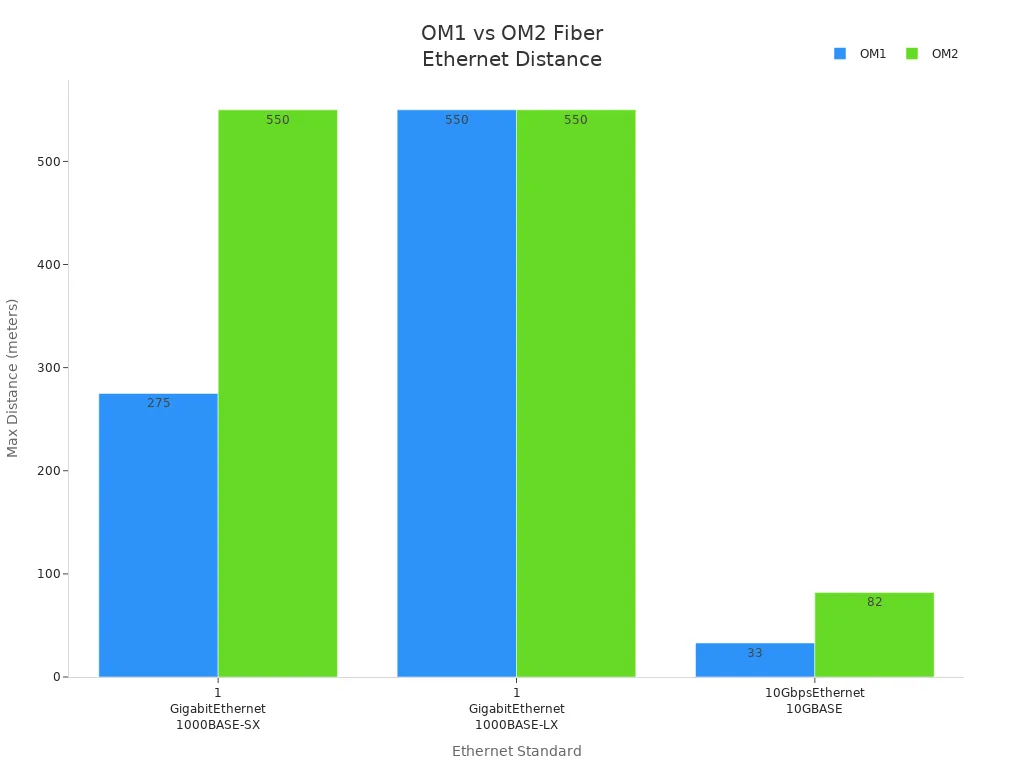
Tip: Upgrading from OM1 to OM2 gives you more speed. You also get longer reach for a little more money.
OM3 and OM4
You may want faster speeds and longer distances. OM3 and OM4 are made for these jobs. Both use a 50 µm core. OM4 gives more bandwidth and goes farther than OM3.
OM3 can send up to 10 Gb/s for 300 meters. OM4 can send up to 10 Gb/s for 550 meters. OM4 also supports 40/100 Gb/s for 150 meters. These cables help big networks grow and stay strong.
|
Fiber Type |
Core Size (µm) |
Bandwidth (MHz·km) |
10GBASE Distance |
40/100GBASE Distance |
Typical Use Case |
|---|---|---|---|---|---|
|
OM3 |
50 |
2000 |
300 m |
100 m |
Data center, ISP |
|
OM4 |
50 |
4700 |
550 m |
150 m |
High-speed backbone |
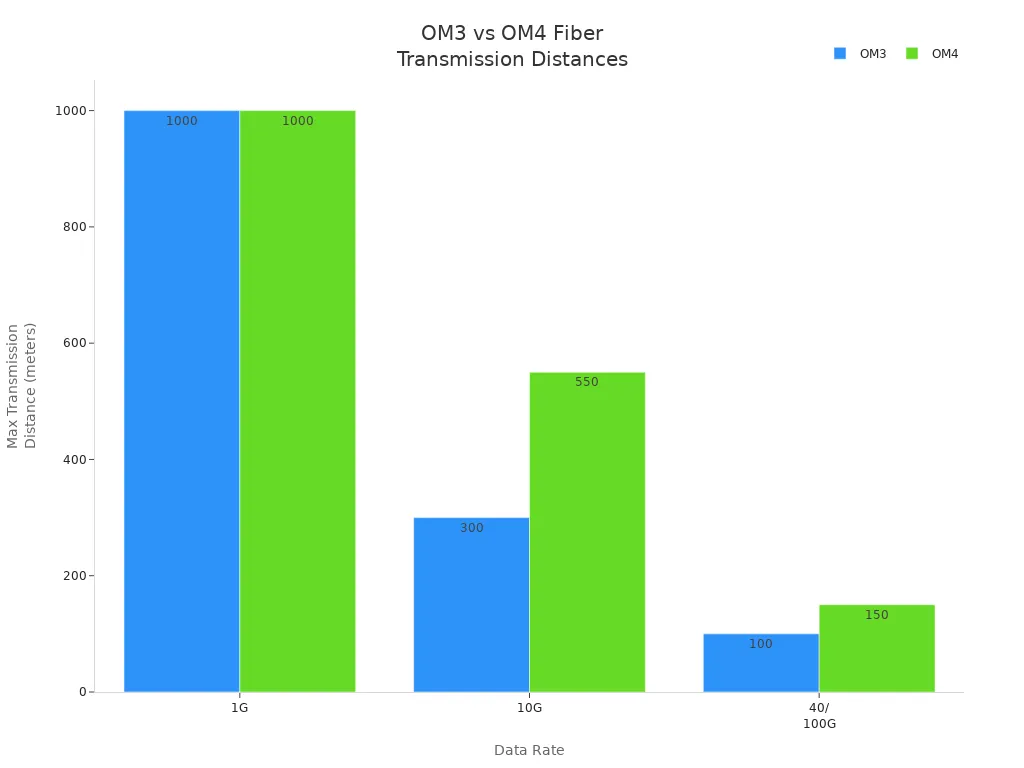
OM4 fiber loses less signal than OM3. You get better performance and longer links. OM3 is good for most 10 Gb/s needs. OM4 is best for 40 Gb/s and 100 Gb/s. It is great for future upgrades.
Note: OM3 and OM4 are used in Ethernet and ISP data centers. They move lots of data fast and without problems.
OM5
You may need a cable for new technology and future growth. OM5 is the newest multimode fiber type. It uses a 50 µm core and supports SWDM. This lets you send many signals at once.
OM5 gives at least 28 GHz of modal bandwidth. It can go up to 400 meters at 100 Gb/s. It can go 70 meters at 400 Gb/s. OM5 works with OM3 and OM4, so you do not need to change all your gear.
|
Advancement Type |
Description |
|---|---|
|
Improved Data Transmission |
SWDM lets you send more data at once. |
|
Higher Bandwidth |
Handles 28 GHz modal bandwidth, good for 100GbE and more. |
|
Longer Reach |
Sends data farther than older multimode fibers. |
|
Future-proofing |
Needs fewer upgrades later, saving time and money. |
|
Compatibility |
Works with OM3 and OM4, making upgrades easier. |
- Core Diameter: 50 µm
- Bandwidth: 20000 MHz·km (at 850 nm)
- Transmission Distance: 400 meters at 100 Gb/s, 70 meters at 400 Gb/s
Good for data centers and networks that need high speed and future-proofing
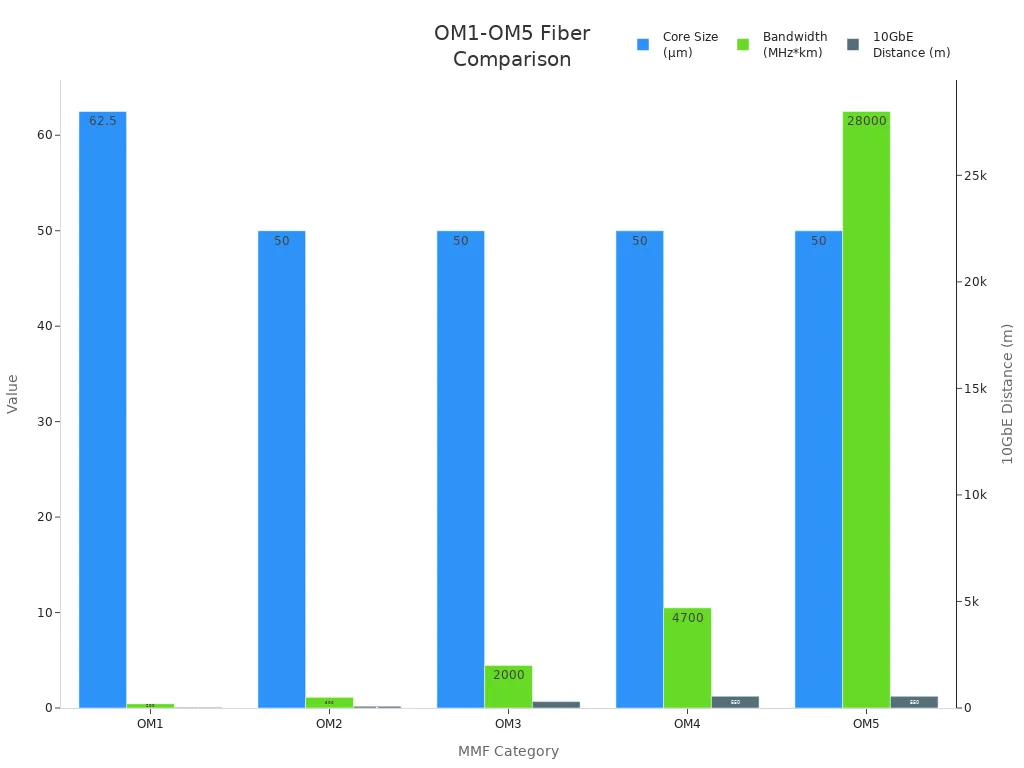
If you run a big data center or want to grow fast, OM5 gives you the best value and lowest risk for future upgrades.
OM Type Comparison
Picking the right multimode fiber cable type affects your network. It changes how fast your network works. It also helps your network stay strong and grow later. You want a cable that fits your needs and budget. Each OM type has special benefits for cost, speed, and future upgrades.
You save money and lower risk when you pick the right cable for your network.
Quick Comparison Table
|
Cable Type |
Cost |
Performance |
Future-proofing |
|---|---|---|---|
|
OM1 |
Lowest |
Basic |
Limited |
|
OM2 |
Low |
Moderate |
Limited |
|
OM3 |
Lower |
Moderate |
Limited |
|
OM4 |
Higher |
High |
Excellent |
|
OM5 |
Highest |
Ultra High |
Best |
Why Choose Each OM Type?
OM1 and OM2:
You use OM1 or OM2 for old systems or small offices. These types cost less and work for simple data jobs. OM1 is good for older equipment. OM2 gives more bandwidth for a little more money.
OM3:
You pick OM3 for short cable runs and saving money. OM3 supports 10 Gb/s speeds for most local networks. If you want to spend less now, OM3 is a good choice.
OM4:
You choose OM4 for fast data and future growth. OM4 handles 40 Gb/s and 100 Gb/s over longer distances. If you want to upgrade later, OM4 gives great speed and reliability.
OM5:
You buy OM5 for advanced data centers and new networks. OM5 supports many wavelengths and the highest bandwidth. If you want to be ready for the future, OM5 is the best long-term choice.
Key Points for Decision-Makers
- OM3 is cheaper for short cable runs.
- OM4 is better for future upgrades and faster speeds.
- If you have a small budget, OM3 works for now.
- OM5 supports new technology and makes upgrades easier.
Tip: You get more value and fewer problems when you pick a cable that matches your business plans.
Application Fit
- Telecom companies often use OM4 or OM5 for big data center links.
- EPCs and sellers suggest OM3 for cheaper jobs and OM4 for bigger networks.
- You avoid downtime and save on repairs by picking a cable that fits your upgrade plans.
You help your network and business grow by knowing these OM type differences. Picking a multimode fiber cable is not just about speed. It is also about getting your network ready for the future.
Performance in High-Capacity Networks

Bandwidth and Distance
Networks need to move data quickly. They also need to be ready for upgrades. Multimode Fiber Cable works well for short and medium distances. Each fiber type has its own limits for bandwidth and distance. The table below shows how OM1 to OM5 are different:
|
Multimode Fiber Type |
Bandwidth (MHz-km) |
Maximum Distance (meters) |
|---|---|---|
|
OM1 |
200 |
275 |
|
OM2 |
500 |
550 |
|
OM3 |
2000 |
300 |
|
OM4 |
4700 |
400 |
|
OM5 |
4700 |
400 |
OM2 can reach up to 550 meters. This is good for offices and schools. OM4 and OM5 have the highest bandwidth. They are best for data centers and big networks. Multimode fiber can go up to 550 meters at 10 Gb/s. At 400 Gb/s, it can go about 100 meters.
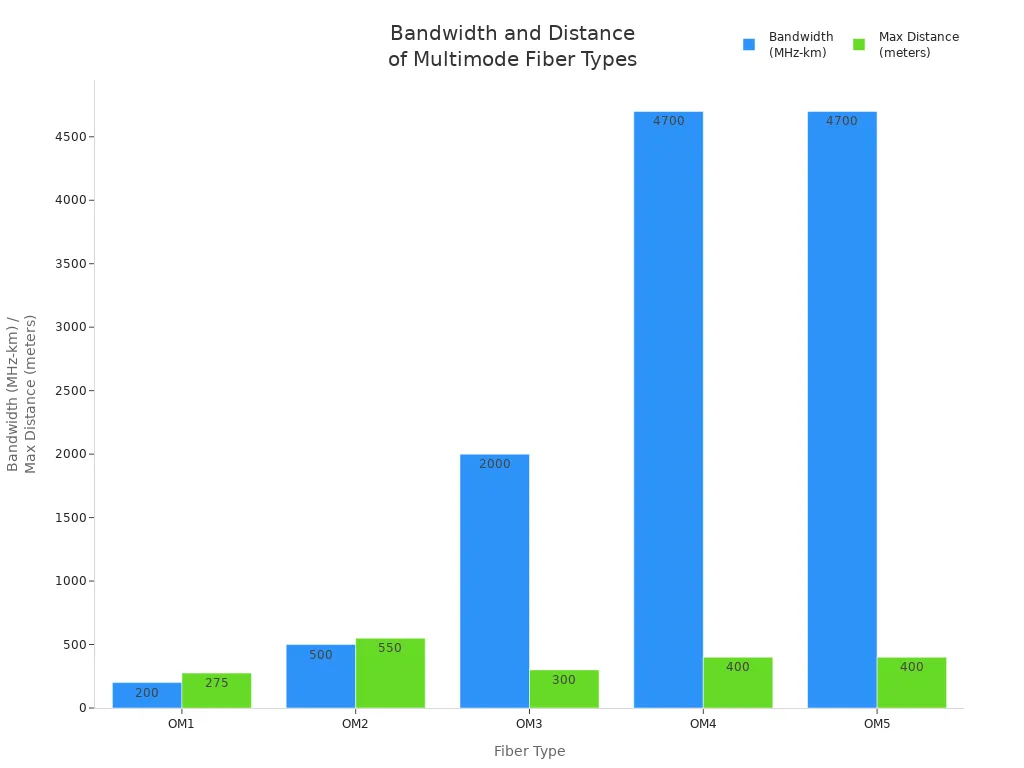
Tip: Pick OM4 or OM5 if you want fast speeds later. This helps you avoid changing cables too soon.
Attenuation
Attenuation is when the signal gets weaker as it moves. You want low attenuation for fast and steady data. The core and cladding help keep the signal strong. This is important for networks that cover longer spaces.
- Fiber optic cables use light to send data. This is faster and carries more than copper cables.
- Attenuation decides how far the signal can go before it needs help.
- Signal loss happens from scattering, absorption, and bending.
- Good cables and strong covers help lower attenuation.
Note: Less attenuation means your network works better and costs less to fix.
Standards and Certification
Networks should follow safety and performance rules. Certification makes sure your cables work right and helps you avoid problems.
- The encircled flux (EF) standard (IEC 61280-4-1) allows tighter loss budgets. This matters for fast networks.
- Tier-1 certification checks if cables meet standards like IEC, TIA, and ISO. This is needed for data centers and big businesses.
- Technicians must use the right connectors and follow good steps for setup and testing.
- Certification helps stop network failures and keeps data moving.
Tip: Always ask your supplier about certification. This helps you avoid trouble later.
Scalability
- You want your network to grow as your business gets bigger. Multimode fiber cable lets you add more without big problems or high costs. If you pick the right fiber type, your network is ready for faster speeds and new tech in the future.
- OM4 and OM5 are best for growing networks. These cables can handle more data and reach farther. They work well in data centers and big company networks. OM5 is called wideband multimode fiber. It uses SWDM, which lets you send many signals through one fiber by using different colors of light. This gives you more space for data and makes your network work better for new needs.
Tip: If you buy OM4 or OM5 fiber, your network will work with new rules and tech. You will not need to buy new cables or stop your network when you need more speed or space.
Here is a table that shows how OM4 and OM5 are different:
|
Fiber Type |
Extended Reach |
Bandwidth Capability |
Compatibility with Standards |
|---|---|---|---|
|
OM4 |
Yes |
High |
40GBASE-SR4, 100GBASE-SR10 |
|
OM5 |
Yes |
Very High |
SWDM compatible |
Scalability helps you in many ways:
- You can add new devices and users without changing all your cables.
- You can get faster speeds, like 40G or 100G Ethernet, with only small changes.
- You have fewer problems and your network does not stop when you grow.
- You save money and your network is ready for new things in the future.
Multimode fiber cable helps your business for a long time. It grows with you, saves money, and keeps your network strong. Telecom companies, EPCs, and sellers like scalability because it costs less over time and gives better value.
Note: If you plan for scalability, you make better choices for your network. Your network will be ready for more users, new services, and new tech.
If you choose scalable multimode fiber cable, you keep up with new trends. You can handle more data and keep your network strong. You build a network that helps your business grow and do well.
Applications

Data Centers
Data centers help your business work every day. Multimode Fiber Cable is important in these places. You use it for short and medium connections inside the building. The big core size makes setup quick and easy. This lowers work costs and stops delays. You can link servers, switches, and storage with fast cables.
Common uses in data centers:
- Connect main switches and routers
- Link servers for fast computing
- Join storage area networks (SAN)
- Connect to internet service providers
|
Feature |
Benefit for Data Centers |
|---|---|
|
Cost-Efficiency |
Saves money now and later |
|
High Bandwidth |
Handles 10G/40G/100G speeds |
|
Easy Installation |
Quick setup, less waiting |
|
Scalability |
Easy to upgrade for the future |
Tip: Use multimode fiber for short cables to save money. Use singlemode for long cables.
The cable can carry many light paths at once. This helps with crowded racks and new light sources. You get fast and steady data without spending too much.
Enterprise LANs
Your business needs a strong network every day. Multimode Fiber Cable gives high bandwidth and works well for your LAN. The big core size makes setup simple for most teams. You can link computers, meeting rooms, and devices easily.
Key advantages for enterprise LANs:
- Good price for short cables
- Works for video calls and cloud apps
- Fits many data types
- You can use the cable as the main part of your network. It links switches and routers for quick data. The cable is tough and easy to care for, so you spend less on repairs.
Note: Many companies pick multimode fiber for LANs. It gives good speed, saves money, and helps you grow later.
Campus Networks
You may need to connect many buildings or groups. Multimode Fiber Cable is great for campus networks like schools or hospitals. You can link buildings with fast cables over short or medium spaces.
Deployment considerations:
- Pick connectors (LC, SC, ST, MTP/MPO) that match
- Choose jackets for the place: PVC for inside, LSZH or PE for outside
- Think about water and temperature
|
Material |
Use Case |
Lifespan |
Cost Level |
|---|---|---|---|
|
PVC |
Indoor |
15+ years |
Low |
|
LSZH/PE |
Outdoor |
15+ years |
Medium |
|
Stainless Steel |
Aerial/Harsh |
20+ years |
Higher |
Tip: Pick the right cable for each place. This lowers risks and fixes.
You get steady links across your campus and can add more as you grow. This way, you keep costs low and your network strong for a long time.
Industrial and OEM/ODM Use
Factories and OEM/ODM places have hard problems. Machines work all the time. Data needs to move fast and not stop. Multimode fiber cable gives strong data connections, even when things get rough.
You can pick special cable designs for your job. These cables fit what you need in telecom, automation, planes, or hospitals. Custom cables help your network work better and stay safe.
Tip: If you choose multimode fiber cable, you get tough and flexible cables. This keeps your network safe from harm and helps your work go smoothly.
Many factories have hot and cold spots, big machines, and chemicals. Regular cables break in these places. Rugged multimode fiber cables like Corning's can handle hits, heat, and spills. You do not lose time or money fixing them.
Why multimode fiber cable is good for factories and OEM/ODM:
- Cables are made for tough places.
- Data stays strong, even with big machines close.
- You can change cable designs for your needs.
- You fix less and save money over time.
|
Sector |
Key Benefit |
Typical Application |
|---|---|---|
|
Telecommunications |
Very reliable |
Main network links |
|
Industrial Automation |
Super tough |
Factory robots, machines |
|
Aerospace |
Light and strong |
Plane controls, avionics |
|
Healthcare |
Safe, fast data |
Scans, medical tests |
You want your network to last a long time. Multimode fiber cable works for over 15 years, even in hard places. You spend less fixing or swapping cables. You can also upgrade as your company grows.
Note: Custom cables let you pick jackets, connectors, and strand numbers. You do not pay for things you do not need.
If you work with OEM/ODM partners, multimode fiber cable helps you make products that pass strict tests. You can give clients cables that meet IEC, ITU, and IEEE rules. This builds trust and helps you get more jobs.
You save money and time with multimode fiber cable in factories. You have less downtime, fewer fixes, and your network is ready for new tech. Your business stays strong and quick.
Main reasons to pick multimode fiber cable for factories and OEM/ODM:
- You get steady work in tough places.
- You can change designs for your job.
- You spend less on fixes and problems.
- You can grow and add new tech later.
Multimode fiber cable helps you fix real problems in factories and OEM/ODM jobs. You keep your money safe and your work fast.
Choosing the Right Multimode Fiber Cable

Key Selection Factors
You want your network to work well for a long time. Picking the right Multimode Fiber Cable starts with knowing what you need. Think about how far your data must go. Check how much bandwidth you need. Make sure you stay within your budget. Each thing helps you make a smart choice and avoid mistakes.
|
Factor |
Description |
|---|---|
|
Application Needs |
Know what each part of your network must do. |
|
Distance |
Measure how far your signals must go. |
|
Bandwidth Requirements |
Match your cable to your data speed needs. |
|
Budget Constraints |
Stay within your spending limits. |
|
Supplier Relationships |
Build trust for better service and reliability. |
|
Quality Standards |
Pick cables that meet top industry standards. |
Always check the quality standards before you buy. Good cables keep your network strong. If you manage your supply chain well, you get cables on time. Watching costs helps you get what you need without spending too much.
Tip: Start with what your network needs. Go down the list to make smart choices and avoid problems.
Performance vs. Cost
You want fast speeds but also want to save money. It is important to balance speed and cost. For networks under 500 meters, multimode fiber gives high bandwidth for less money. Multimode transceivers cost less than singlemode ones. This helps you save on equipment.
Here is a quick comparison:
|
Fiber Type |
Bandwidth |
Core Diameter |
Attenuation |
|---|---|---|---|
|
OM3 |
2000 MHz-km |
50 µm |
Low |
|
OM4 |
4700 MHz-km |
50 µm |
Lower |
When you plan your network, think about distance and bandwidth. If you need longer cables, singlemode works better but costs more. For short runs, multimode fiber gives good speed and saves money.
- Total system cost is very important.
- Multimode fiber is cheaper for short and medium spaces.
- You get fast speeds without buying expensive transceivers.
Note: Always match your cable type to your network's size and speed. This helps you get the best value for your money.
Supplier Considerations
You need a supplier who gives you good cables every time. Look for companies that follow rules like IEEE, TIA-568, and ISO/IEC 11801. A big product range means you can find the right cable for every job. Strong cables last longer and work in tough places.
Think about these things when picking a supplier:
- Check for warranties and good customer support.
- Ask if they have experts who can help you.
- See how they test cables for quality and safety.
- Make sure prices are fair and not too high.
- Look for eco-friendly choices and ways to customize.
- Read reviews to see if other customers are happy.
Tip: Always check product quality and certifications before you buy. This keeps your network safe and helps you succeed for years.
After-Sales Support
After-sales support is very important when you pick a multimode fiber cable for your business. You want your cable to last and work well every day. Good after-sales service helps you stop problems and keeps your network running. It also saves you money and helps your business do better. You need a supplier who will help you fix issues fast.
You should check for these things in after-sales support:
- Technical Assistance: You get help with setup, fixing problems, and upgrades. This help keeps your network working well.
- Warranty Coverage: You are protected if something breaks or does not work. A warranty saves you money on new parts.
- Rapid Response: You get answers fast when something goes wrong. Quick help means your business does not stop.
- Training Resources: You get guides, videos, and training at your place. These tools help your team use the cable the right way.
- Replacement and Repair Services: You can get spare parts and repairs easily. This keeps your network strong and working.
Tip: Always ask your supplier about after-sales support before you buy. Good support means less stress and lower costs later.
Here is a table that shows why after-sales support is good for business buyers:
|
After-Sales Feature |
Business Benefit |
Impact on ROI |
|---|---|---|
|
Technical Assistance |
Fixes problems faster |
Less time lost |
|
Warranty Coverage |
Lowers repair costs |
Saves more money over time |
|
Rapid Response |
Gets your network back quickly |
Helps your team work better |
|
Training Resources |
Fewer mistakes when setting up |
Less risk of problems |
|
Replacement Services |
Keeps your network working |
Makes cables last longer |
You may have hard jobs in telecom, EPC, or selling. Your multimode fiber cable must work in tough places and help your business grow. After-sales support helps you fix surprises and keeps your network strong.
When you look at suppliers, ask these questions:
- What warranty do you give for multimode fiber cable?
- How fast do you help with technical problems?
- Do you train people to set up and care for the cable?
- Can you send replacement parts quickly?
- What certifications do you have for after-sales service?
Note: Good after-sales support keeps your money safe and helps your business grow. You spend less fixing things and avoid long stops.
You make a smart choice when you pick a supplier with strong after-sales support. Your multimode fiber cable works better, lasts longer, and helps your business reach its goals. You feel safe and your network is ready for the future.
Multimode Fiber Cable vs Alternatives

Singlemode Fiber
You might wonder how singlemode fiber is different from Multimode Fiber Cable. Singlemode fiber has a very small core. It sends light in just one straight line. This stops modal dispersion, so signals stay clear over long distances. You often find singlemode fiber in big data centers and telecom networks. It can handle lots of data and works well for links across cities or large campuses.
|
Feature |
Multimode Fiber Cable |
Singlemode Fiber |
|---|---|---|
|
Installation Complexity |
Easier to install |
More complex to install |
|
Cost |
Lower cost, short distances |
Higher cost, long distances |
|
Performance |
Limited over long distances |
Superior for long distances |
|
Material |
Glass or plastic core |
Pure glass core |
|
Lifespan |
15+ years |
25+ years |
Multimode Fiber Cable is easy to set up and costs less for short runs. Singlemode fiber is best for long links and future upgrades.
Tip: Pick singlemode fiber if your network needs to go far or be very fast.
Copper Cabling
Copper cabling is still used in many places. You might use it for old systems or simple office networks. Copper wires send electrical signals, but this limits how far and how fast they can go. They can also get interference from other machines. Fiber optic cables, like Multimode Fiber Cable, use light instead of electricity. This means they do not get electromagnetic interference and are safer for important data.
|
Feature |
Copper Cabling |
Fiber Optic Cabling |
|---|---|---|
|
Transmission Distance |
Less than 300 feet |
Up to 550 meters (MMF) |
|
Bandwidth |
Limited |
High |
|
Interference |
Susceptible to EMI |
Immune |
|
Installation Cost |
Lower upfront |
Higher upfront |
|
Security |
Easily tapped |
More secure |
|
Durability |
Degrades with age |
Lasts up to 50 years |
|
Weight |
Heavy |
Light |
|
Maintenance |
Frequent repairs |
Minimal maintenance |
|
Compatibility |
Works with old systems |
Needs fiber-ready equipment |
|
Cost Efficiency |
Cheaper at first |
Saves money long-term |
Copper cabling is cheaper to put in but breaks more often. Fiber optic cables last longer, are safer, and are better for the future.
Note: If you want a network that lasts and grows, fiber optic cabling gives you better value.
Hybrid Solutions
Sometimes you need both fiber and copper in your network. Hybrid solutions let you use fiber for main connections and copper for short device links. This helps you save money and get good performance. You can upgrade important parts with fiber and keep copper for older systems.
Benefits of hybrid solutions:
- Lower upgrade costs for old buildings
- Flexible design for mixed setups
- Easy move to high-speed fiber networks
When to choose Multimode Fiber Cable:
- You need fast data for short or medium spaces.
- Your team wants easy setup and lower costs.
- You plan to make your network bigger later.
- You want less downtime and fewer repairs.
Tip: Multimode Fiber Cable is best for data centers, business LANs, and campus networks where you need speed, strong links, and room to grow.
You now know how the Multimode Fiber Cable structure, types, and performance help your network work well. Pick a cable that fits your business needs. This saves money and helps your network grow later. Think about how much data you need now and in the future. Check if you need your network to be reliable and easy to make bigger. Talk to fiber experts or ask for product samples. This lets you see how the cables work in real life.
Want to make your network better? Look at new fiber solutions for your setup.
References:
- IEC 61280-4-1 Standard
- TIA-568 and ISO/IEC 11801 Standards
- Market data: Global Market Insights, 2023
- CommScope, AFL, Corning product white papers
FAQ
Why should you choose multimode fiber cable for your business network?
Multimode fiber cable lets you send lots of data quickly. It works well for short and medium distances. You spend less money to set it up and upgrade later. This cable helps your network get bigger and keeps costs low.
Why does multimode fiber cable cost less than singlemode fiber?
Multimode fiber cable is cheaper because its connectors and transceivers cost less. The cable is simple to install. You do not need special tools or extra training. This means you pay less for labor.
Why do data centers prefer multimode fiber cable for internal links?
Data centers use multimode fiber cable for short links between servers and switches. The cable supports fast speeds and easy upgrades. You get strong connections and save money on equipment.
Why is core size important in multimode fiber cable?
Core size changes how much data you can send. It also makes connecting devices easier. A bigger core lets you use cheaper light sources. This makes installation simple and gives better network performance.
Why does multimode fiber cable work well in harsh environments?
Manufacturers make multimode fiber cable with tough jackets and buffer layers. These cables resist heat, water, and chemicals. You get less downtime and fewer repairs in hard places.
Why should you upgrade from OM1 or OM2 to OM4 or OM5?
OM4 and OM5 cables give you more bandwidth and longer reach. You get ready for faster speeds and new technology. Upgrading now helps you avoid expensive changes later.
Why is after-sales support important when buying multimode fiber cable?
Good after-sales support helps you fix problems quickly. You get technical help, training, and fast replacements. This keeps your network working and protects your money.
Why do telecom operators and EPCs trust multimode fiber cable for scalable networks?
Telecom operators and EPCs pick multimode fiber cable because it makes upgrades and expansion easy. You lower maintenance risks and get a better return on your investment.