





Fiber optic networks are becoming the mainstream choice for homes and businesses. When technicians come to install fiber, you'll see a small box installed on the wall or in the equipment room-this is the ONT (Optical Network Terminal). Understanding what this ONT device does will help you better use and manage your network.
What Is an Optical Network Terminal (ONT)?
An Optical Network Terminal (ONT) is the final point of a fiber optic network, installed in a user's home or office to convert the carrier's fiber signal into a network signal your devices can use. You can think of an ONT as the fiber version of a modem.
What does ONT mean? The ONT abbreviation stands for Optical Network Terminal. Traditional broadband modems handle electrical signals over copper wires, while a fiber ONT processes optical signals in fiber cables. When your carrier sends data through fiber optic cables to your location, the ONT box converts light pulses into Ethernet signals, allowing your router, computer, and TV to work properly.
An ONT is typically a palm-sized white or black box with several different colored LED indicator lights. These lights tell you whether the power is normal, whether the fiber connection is established, and whether data is being transmitted over the network. The optical network terminal box is usually installed indoors in equipment rooms, basements, or living rooms, though some are mounted on exterior walls with waterproof enclosures for protection.
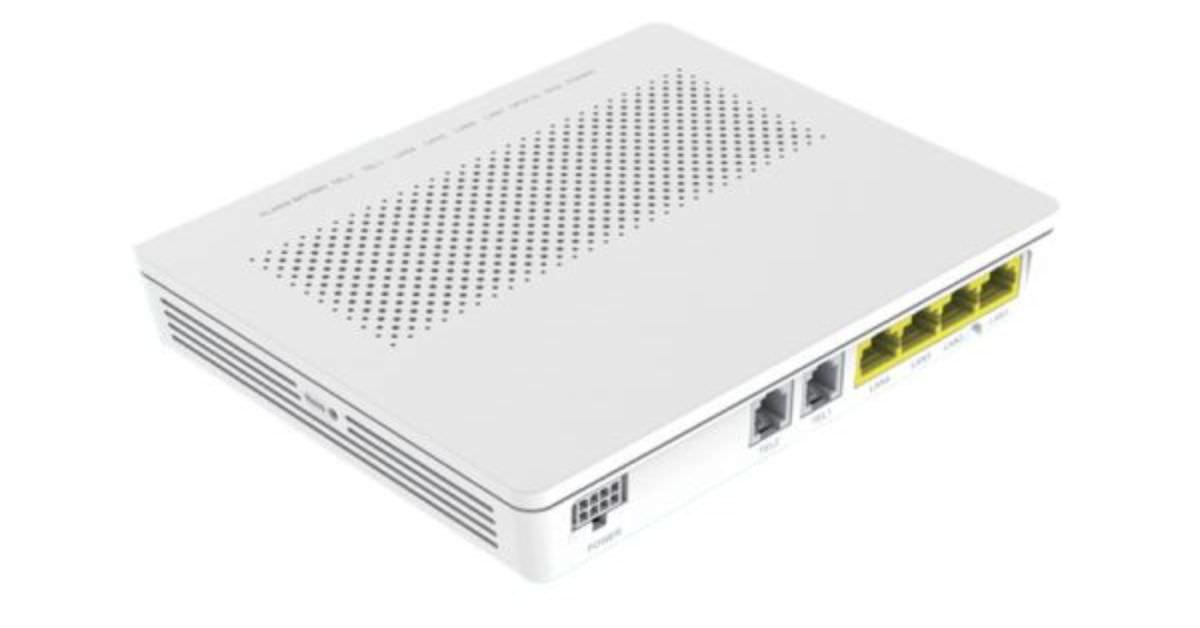
How Does an ONT (Optical Network Terminal) Work?
The working principle of an ONT optical network terminal is actually straightforward. Just as light enters the eye and the retina converts optical signals into nerve signals for the brain, an ONT does something similar-receiving light pulses in the fiber and converting them into electrical signals for your network devices.
The carrier's data center converts data into optical signals and transmits them through fiber optic cables. The fiber extends all the way to your home, connecting to the ONT's fiber port. The ONT's internal optical-to-electrical conversion module receives these optical signals and immediately converts them into standard Ethernet electrical signals. The converted signals output through the Ethernet port, connecting to your router. The router then distributes the network to various devices in your home via Wi-Fi or Ethernet cables.
This process is bidirectional. When you upload photos or make video calls, data travels the reverse path: your devices send data to the router, the router transmits it through an Ethernet cable to the ONT, the ONT converts the electrical signal into an optical signal, and sends it back to the carrier through the fiber.
In actual fiber optic networks, the ONT is the terminal link of the entire system. From the carrier's equipment room to your home, the network architecture includes an OLT (Optical Line Terminal) in the carrier's equipment room. The OLT connects through a single fiber to an optical splitter, which then distributes the signal to multiple users' ONTs. This architecture is called PON (Passive Optical Network), where "passive" means the optical splitter doesn't require power to operate, greatly reducing network operating costs.
Key Features of Optical Network Terminals (ONT)
ONT devices play a critical role in fiber broadband connections, with the following core functions:
Optical-to-Electrical Signal Conversion
Converts fiber optic light pulses into electrical data signals
Supports high-speed broadband, VoIP, and IPTV services
Bidirectional conversion, handling both upload and download data simultaneously
Multiple Port Configuration
Provides 1-4 Gigabit Ethernet ports to connect routers, computers, and smart TVs
Equipped with RJ-11 phone ports supporting VoIP and landline telephone services
Fiber input port (SC/APC or LC interface) connects to carrier fiber cables
Some models include coaxial ports for IPTV services
Passive Optical Network (PON) Compatibility
Supports GPON technology (2.5 Gbps downstream/1.25 Gbps upstream)
Compatible with XGS-PON technology (10 Gbps symmetric rate)
Ensures efficient bandwidth allocation and low-latency transmission
High-Speed Fiber Connection
Supports speeds from 1 Gbps to 10 Gbps and higher
Provides symmetric upload and download rates
Delivers ultra-low latency (1-5ms) for online gaming, 4K/8K streaming, and cloud applications
Quality of Service (QoS) and Traffic Management
Allocates bandwidth priority for VoIP, video conferencing, and cloud applications
Reduces latency and packet loss for real-time communications
Supports simultaneous high-speed connections for multiple devices
Secure Data Transmission and Encryption
Uses AES encryption (128-bit or 256-bit) to protect data security
Supports VLAN segmentation to prevent data leakage
Carriers can remotely configure and update firmware via TR-069 protocol
Some models feature built-in firewall capabilities
Power and Backup Options
Standard 12V/48V DC power adapter
Some models support PoE (Power over Ethernet)
Optional battery backup maintains telephone service for 2-8 hours during power outages
Ensures continuity of critical communication services
LED Status Indicators
Power light: displays device power status
PON/Fiber light: indicates fiber connection quality (green for normal, red for fault)
LAN light: shows Ethernet port data transmission status
Facilitates quick network problem diagnosis

Supported Technical Standards
GPON is currently the most common standard, with downstream speeds of 2.5 Gbps and upstream speeds of 1.25 Gbps, widely deployed globally. XGS-PON is an upgraded version, offering symmetric speeds of 10 Gbps, suitable for users with higher bandwidth requirements. EPON is primarily used in Asian markets and is based on Ethernet protocols. 10G-EPON is the 10G version of EPON.
Management and Security Features
Carriers can remotely manage ONT equipment, meaning most configuration and troubleshooting doesn't require technicians to visit in person. Through protocols like TR-069, carriers can remotely update firmware, modify settings, and diagnose problems.
In terms of security, ONTs typically support AES encryption and VLAN isolation to protect your data from eavesdropping or tampering. Some models also feature built-in firewall capabilities for additional security protection.
Some high-end ONTs integrate router functionality, directly allocating IP addresses, providing NAT translation, and even built-in Wi-Fi. This eliminates the need to purchase a separate router, but in most cases, carriers still recommend using an independent router for better performance and more features.
What's the Difference Between ONT and OLT?
ONT and OLT are two key devices in fiber optic networks. While their names are similar, their locations and functions are completely different.
The OLT (Optical Line Terminal) is installed in the carrier's equipment room, essentially the "brain" of the fiber network. It connects to the carrier's core network and manages and distributes data to multiple users. A single OLT can typically serve 32 to 128 users.
The ONT (Optical Network Terminal), on the other hand, is installed in users' homes or offices, with each user having their own ONT. It's the endpoint of the fiber network, responsible for converting optical signals into signals usable by user devices.
The OLT is on the carrier side, serving multiple users, acting as the network's central node responsible for data aggregation and distribution. The ONT is on the user side, one per user, serving as the network terminal responsible for signal conversion and device connection.

What Are the Advantages of Using an ONT? Where Should It Be Installed?
Speed Advantages
Fiber network speeds far exceed traditional broadband. Current mainstream GPON can provide 1 Gbps download speeds, while the latest XGS-PON can even reach 10 Gbps. More importantly, upload and download speeds are symmetric, which is crucial for applications like video conferencing, cloud backup, and live streaming.
In comparison, traditional ADSL speeds are typically 10-20 Mbps, with upload speeds of only 1-2 Mbps. Cable networks can reach 100-500 Mbps, but upload speeds remain far lower than download speeds. If you frequently need to upload large files or conduct video calls, the advantages of fiber become very apparent.
Latency Performance
When gaming or video calling, latency (ping value) is more important than speed. Fiber network latency is typically 1-5 milliseconds, compared to 20-50 milliseconds on traditional broadband. For FPS gamers, this difference can determine victory or defeat. For remote workers, low latency means smoother video conferences without noticeable audio delay.
Stability
Fiber is immune to electromagnetic interference, an advantage copper cables can never match. If you live near power facilities or have an office with numerous electronic devices, traditional network signals may be unstable. Fiber is completely unaffected by these factors. Additionally, fiber signal attenuation is minimal-even if your home is several kilometers from the carrier's equipment room, speeds won't decrease. Copper cable signals noticeably attenuate beyond 100 meters. Traditional DSL often experiences disconnections or slowdowns on rainy days because water seeps into phone lines. Fiber itself is waterproof, and when properly installed, isn't affected by weather.
Another benefit of choosing fiber is scalability. When you need faster speeds, carriers only need to replace your ONT and the OLT in the equipment room-the fiber cable itself doesn't need modification. Copper cable networks have already approached their physical limits and are unlikely to see significant improvements.
ONT Installation Location
Common Installation Locations:
Basements or equipment rooms are ideal choices-devices are centrally managed and don't occupy living space, but ensure cable distance doesn't exceed 100 meters.
Living rooms suit apartment users-the ONT is close to the router with simple wiring, but disadvantages include exposed equipment and LED lights potentially affecting rest.
Garages balance aesthetics and convenience, typically near the fiber entry point, but temperature variations require ensuring proper ventilation.
Outdoor installation requires waterproof protective boxes, suitable when no appropriate indoor location exists, but requires outdoor power and proper protection.
Installation Requirements:
ONTs need stable 220V power; using independent outlets is recommended. Leave space around devices for heat dissipation; don't place in enclosed environments.
Outdoor installations must include proper grounding protection to prevent lightning damage to equipment.
ONT to router distance should ideally be within 5 meters; beyond 30 meters, use Cat6a cables; greater distances require fiber extension or switches.
If power outage protection is needed (such as for landline phones), ONT models with battery backup can be selected, maintaining service for 2-8 hours.
FAQ
Q: FAQ
A: Is an ONT a router?
No. An ONT converts optical signals to electrical signals, while a router manages home network traffic and assigns IP addresses.
Q: Is an ONT the same as a modem?
A: Functions are similar but not identical. Modems are used for traditional copper cable networks (DSL, cable), while ONTs are specifically for fiber optic networks. Both handle signal conversion, but an ONT converts optical-to-electrical signals, whereas a modem converts analog-to-digital signals.
Q: Why is an Optical Network Terminal (ONT) so important for fiber internet?
A: The ONT converts light pulses transmitted by carriers through fiber into standard Ethernet signals your devices can use. Without an ONT, no matter how fast the fiber, it cannot connect to your devices. The ONT also handles reverse conversion for uploaded data, ensuring bidirectional communication.
Q: Can I replace my ONT myself?
A: Not recommended. ONTs need to be registered in the carrier's system, with each device having a unique serial number and configuration. Even if you purchase the same model ONT, it requires carrier authorization to activate.
Q: What's the difference between ONT and ONU?
A: Essentially the same device, just different terminology. ONT is the ITU (International Telecommunication Union) term, while ONU is the IEEE (Institute of Electrical and Electronics Engineers) term. In practical applications, ONT typically refers to terminal devices for individual users in FTTH networks, while ONU sometimes refers to devices serving multiple users (such as building equipment).