





Multimode Cable: Different Types and How to Choose the Right One for Your Network
You have many choices when picking network cables. OM1, OM2, OM3, OM4, and OM5 are different Multimode Cable standards. Each one is made for certain speeds and distances. Picking the right one changes your network's speed, distance, and cost. For short or medium distances, many companies like multimode. It gives good performance and does not cost too much.
Studies show multimode cables cost less at first. They are also easier to install than single-mode cables.
|
Aspect |
Multi-Mode Fiber (MMF) |
Single-Mode Fiber (SMF) |
|---|---|---|
|
Initial Cost |
Lower |
Higher |
|
Installation Complexity |
Easier because the core is bigger |
Harder because the core is smaller |
|
Suitable for |
Short-range uses |
Long-distance uses |

Key Takeaways
- Learn about the types of multimode cables: OM1, OM2, OM3, OM4, and OM5. Each type works best for certain speeds and distances.
- Pick OM1 if you have an old network. It is good for low speed and short distances. OM1 is cheap and works for simple data jobs.
- Use OM2 for medium distances and average speeds. It fits office networks well. OM2 gives a good mix of price and performance.
- Choose OM3 if your network needs high speed and longer distances. OM3 works well for cloud computing and virtualization.
- Go with OM4 for places that need top performance. OM4 has more bandwidth. It is great for data centers and tough jobs.
- Think about OM5 if you want your network ready for the future. OM5 can handle many wavelengths. It is made for advanced uses.
- Look at the core size and bandwidth. A 50-micron core lets you get faster speeds. It also works with new equipment.
- Always make sure your cables work with your current hardware. This helps stop your network from slowing down.
Multimode Cable Types

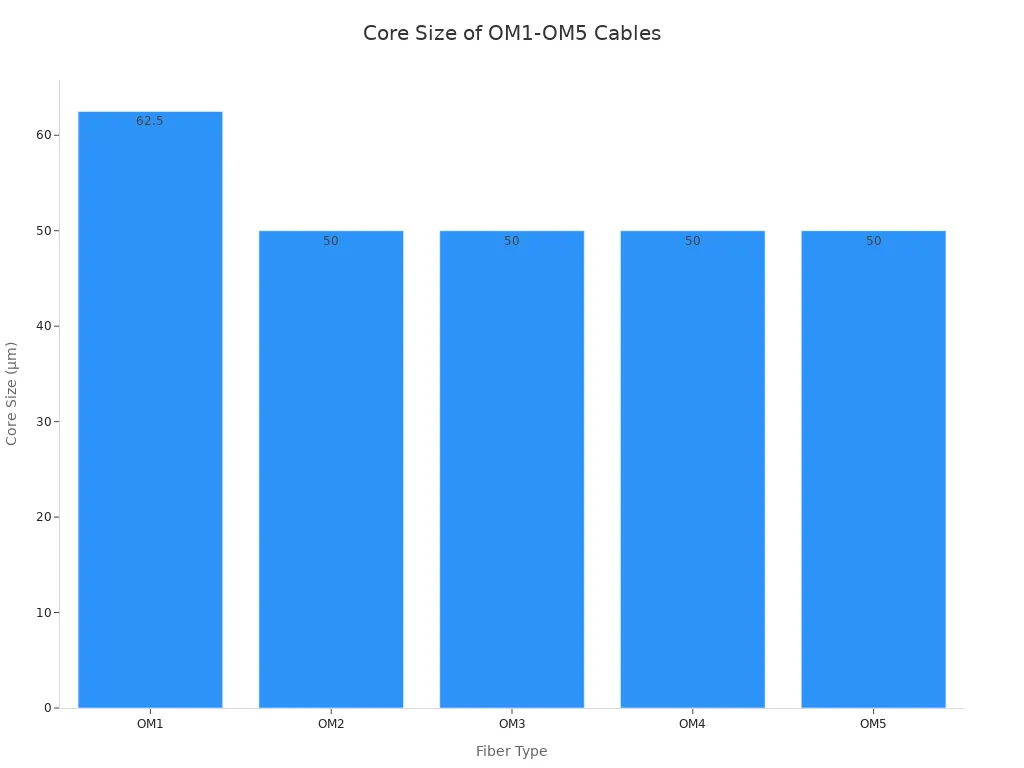
To pick the right Multimode Cable, you need to know how OM1, OM2, and OM3 are different. These types follow rules set by groups like IEC and ISO. Each one fits certain network jobs. You can look at their core sizes and jacket colors in this table:
|
Fiber Type |
Core Size (µm) |
Jacket Color |
|---|---|---|
|
OM1 |
62.5 |
Orange |
|
OM2 |
50 |
Orange |
|
OM3 |
50 |
Aqua |
OM1
OM1 Multimode Cable has a 62.5-micron core and an orange jacket. You can find OM1 in old networks or legacy systems. Many schools and small businesses use OM1 for simple data needs. This cable can go up to 1 Gbps for short distances, less than 300 meters. If your network does not need high speed or long distance, OM1 saves money. But OM1 cannot handle new, fast network uses.
Tip: OM1 works best if you want to keep or fix old networks and need to save money.
OM2
OM2 Multimode Cable has a 50-micron core and an orange jacket. You see OM2 in company networks and small data centers. It can move more data than OM1 and goes up to 10 Gbps for 150 meters. OM2 is good for medium distances and office network backbones. If you want more speed but still want to save money, OM2 is a good choice.
Core size: 50 µm
Jacket color: Orange
Typical use: Company LANs, medium-distance backbones
OM3
OM3 Multimode Cable also has a 50-micron core but uses an aqua jacket. You find OM3 in new data centers and big company networks. It works for fast jobs like cloud computing and virtualization. OM3 can do 10 Gbps up to 300 meters and even 40 or 100 Gbps for shorter runs. If you want to make your network ready for the future, OM3 gives you speed and options.
|
OM Type |
Typical Applications |
Network Environments |
|---|---|---|
|
OM1 |
Old systems |
Schools, small businesses |
|
OM2 |
Company networks |
Office backbones, medium distances |
|
OM3 |
Data centers, fast networks |
Cloud, virtualization, high data use |
Note: OM3 is a smart buy for business buyers who want to use fast networks now and later, but do not want to spend too much.
OM4
OM4 multimode cable gives you a strong upgrade for high-speed networks. You get a 50-micron core, just like OM2 and OM3, but OM4 offers much higher bandwidth. The jacket color is aqua, which helps you identify it quickly in your racks or trays. OM4 supports up to 10 Gbps for 550 meters and 40/100 Gbps for shorter distances. If you run a data center or need fast connections between switches, OM4 fits your needs.
OM4 is designed for high-performance environments. You can future-proof your network and support demanding applications.
You should choose OM4 when your business needs to move large amounts of data quickly. Many telecom operators and EPCs use OM4 for backbone links and storage area networks. OM4 meets IEC 60793-2-10 and TIA/EIA-492AAAD standards, so you get reliable performance and compliance.
Key Features of OM4 Multimode Cable:
- Core size: 50 µm
- Jacket color: Aqua
- Bandwidth: 4700 MHz·km
- Max distance at 10 Gbps: 550 meters
- Max distance at 40/100 Gbps: 150 meters
|
OM Type |
Core Size (µm) |
Bandwidth (MHz·km) |
Max Distance (10 Gbps) |
Jacket Color |
|---|---|---|---|---|
|
OM4 |
50 |
4700 |
550 m |
Aqua |
You reduce risk and downtime by using OM4 in mission-critical networks. OM4 helps you scale your infrastructure and maximize ROI. If you want to support cloud, virtualization, and high-speed storage, OM4 is the right choice.
Note: OM4 is backward compatible with OM3. You can upgrade without replacing all your equipment.
Key Differences

Core Size
When you pick a Multimode Cable, core size is important. The core is the middle part where light moves. There are two main core sizes: 62.5 microns and 50 microns. OM1 has a 62.5-micron core. OM2, OM3, OM4, and OM5 all use a 50-micron core. Core size changes how much data you can send. It also decides what equipment you can use.
|
Fiber Type |
Core Diameter (µm) |
Data Rate (Gbps) |
Compatibility |
|---|---|---|---|
|
OM1 |
62.5 |
Suitable for older Ethernet standards |
Limited |
|
OM2 |
50 |
Supports 1 Gbps over longer distances |
Moderate |
|
OM3 |
50 |
10 Gbps |
High |
|
OM4 |
50 |
40 Gbps |
Very High |
|
OM5 |
Enhanced |
Greater data rates and multiple wavelengths |
Highest |
A bigger core, like OM1, works with old equipment. It is also easier to put in. But it cannot go fast or far. The 50-micron core in OM2 and newer types lets you use new transceivers. You can get faster speeds. If you want to upgrade, pick a cable with a 50-micron core. This gives you better speed and works with new gear.
Tip: Check your hardware before you pick a core size. The wrong core can slow your network and cause problems.
Bandwidth
Bandwidth tells you how much data your cable can carry. More bandwidth means faster speeds and better connections. Each Multimode Cable type has its own bandwidth. Bandwidth is measured in MHz·km. OM1 has the lowest bandwidth. OM4 and OM5 have the highest.
|
Fiber Type |
Core diameter |
Bandwidth at 850 nm (MHz·km) |
Bandwidth at 1300 nm (MHz·km) |
|---|---|---|---|
|
OM1 |
62.5 µm |
200 |
500 |
|
OM2 |
50 µm |
500 |
500 |
|
OM3 |
50 µm |
1500 |
500 |
|
OM4 |
50 µm |
3500 |
500 |
|
OM5 |
50 µm |
3500 |
500 |
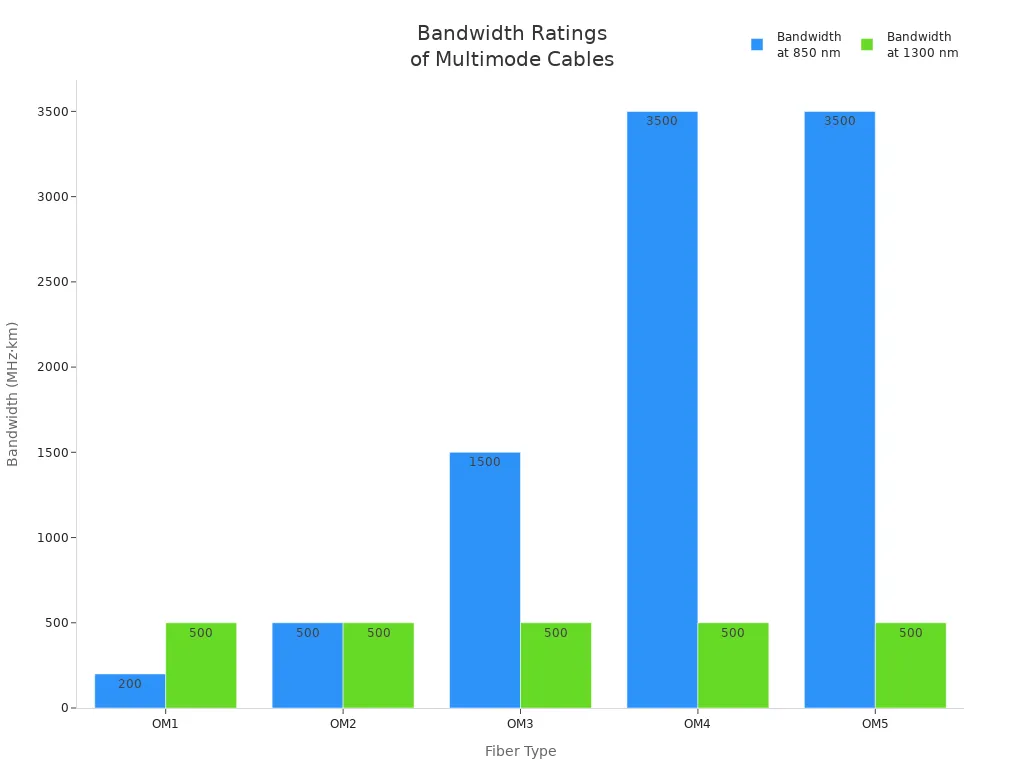
- OM1 and OM2 are good for simple office and school networks.
- OM3 and OM4 work well in fast data centers and backbones.
- OM5 is made for new networks that need more channels.
Bandwidth affects how fast your network can go. Multimode fibers send many signals at once. This means you get higher speeds with less loss. When you plan your network, match the cable's bandwidth to your needs.
Note: Cables with more bandwidth cost more. But they last longer and work better. Buying OM4 or OM5 can save money later.
Distance
Distance is important when you choose a Multimode Cable. Each type can go different lengths at different speeds. If you use a cable that is too long, you lose signal and speed. Modal dispersion happens when light spreads out in the fiber. This can cause problems if the cable is too long.
|
Fiber Channel Speed |
OM1 |
OM2 |
OM3 |
OM4 |
OM5 |
|---|---|---|---|---|---|
|
4Gbps |
70m |
150m |
380m |
400m |
400m+ |
|
8Gbps |
21m |
50m |
150m |
190m |
190m+ |
|
16Gbps |
Not Supported |
35m |
100m |
125m |
150m |
|
32Gbps |
Not Supported |
Not Supported |
70m |
100m |
150m |
|
64Gbps |
Not Supported |
Not Supported |
35m |
50m |
100m |
OM1 can do 10 Gigabit Ethernet up to 33 meters. OM2 can go up to 82 meters. OM3 is made for laser gear and goes up to 300 meters. OM4 can do 10Gbps up to 550 meters and 40/100Gbps up to 150 meters. OM5 is for very fast networks and can use more channels.
OM3 fiber can do 10 Gigabit Ethernet up to 300 meters.
OM4 fiber can do this up to 550 meters, which is great for big jobs.
OM5 is best for new networks that need more channels and distance.
If your network is big, like a campus or data center, use OM3, OM4, or OM5. These work for longer runs and faster speeds. For short office links, OM1 or OM2 may be enough.
Tip: Multimode fiber is best for short and medium distances. For longer runs, use single-mode fiber to keep your signal strong.
Color Coding
Color coding is very important for managing multimode cables. You use jacket colors to tell cable types apart fast. This helps you avoid mistakes in your network. Each multimode fiber type has its own color. These colors are set by industry rules. This makes it easier when you set up, upgrade, or fix big networks.
|
Multimode Fiber Type |
Jacket Color |
|---|---|
|
OM1 |
Orange |
|
OM2 |
Orange |
|
OM3 |
Aqua |
|
OM4 |
Aqua (often Violet) |
|
OM5 |
Lime Green |
OM1 and OM2 cables have orange jackets. OM3 and OM4 use aqua jackets. Sometimes OM4 uses violet to stand out in busy places. OM5 cables are lime green. This is the newest type for advanced uses.
Why is color coding important for your network?
You can spot cable types right away. This saves time and stops confusion when you install or upgrade.
You can fix problems faster. This means less downtime and fewer service breaks.
You keep things the same for all teams. This helps everyone follow the same rules and make fewer mistakes.
If you know jacket colors fast, you keep things neat in crowded racks and patch panels. You stop unplugging the wrong cable and keep cables in order.
|
Benefit |
Description |
|---|---|
|
Quick Recognition |
You see cable types and what they do right away. This makes network work easier. |
|
Order in High-Density Areas |
You keep cables neat. This lowers the chance of unplugging or mixing up cables. |
|
Consistency Across Teams |
You make sure everyone handles cables the same way, even with many teams. |
You make things more organized in busy places.
You make fewer mistakes when fixing cables.
You find and fix problems faster, so the network works better.
Color coding helps your network stay strong and grow. If you follow the rules, you lower risk and get more value from your network. Your team can work faster and smarter, which is very important for big business jobs.
References: IEC 60793-2-10, TIA/EIA-492AAAD, CommScope, AFL technical datasheets
Choosing Multimode Cable

Network Needs
First, you need to know what your network needs. Think about speed, distance, and future plans. If your business moves lots of data or wants to grow, pick cables with more bandwidth and longer reach. OM4 and OM5 work well for fast and big networks. These types can handle high data rates and go farther, so they are good for growing companies.
|
Criteria |
Description |
|---|---|
|
Bandwidth |
OM4 and OM5 have more bandwidth. They help networks move lots of data. |
|
Distance |
OM3, OM4, and OM5 work better over long distances than older cables. |
|
Scalability |
OM4 and OM5 let networks grow and handle more data. |
OM3, OM4, and OM5 are made for fast upgrades and bigger networks. OM5 uses SWDM, so you can send many signals on one fiber. This makes OM5 work faster and better. OM5 is great for data centers and big companies that want to grow. OM5 costs more at first, but it has smart features and works with old cables. This means you do not need to change everything often.
Tip: If you want your network to last, pick OM4 or OM5. These cables move more data and work with new tech.
Compatibility
You need to check if your new cable works with your old equipment. Connector types are important. Make sure your connectors, like LC or SC, match your fiber and job. Good connectors keep your signal strong. Things like temperature and humidity also matter. Pick connectors that can handle your network's environment.
- Connector Types: LC, SC, and ST connectors fit most multimode fibers.
- Insertion Loss and Return Loss: Use connectors that keep signal loss low.
- Environmental Factors: Choose connectors that work in your network's conditions.
- Ease of Installation and Maintenance: Pick connectors that are easy to use and fix.
OM1 works with many connectors, like SC, LC, and ST. This makes it easy to use in old networks. Most switches and transceivers today work with OM3, OM4, and OM5. OM3 can do 1 Gig up to 1000 meters and 10 Gig up to 300 meters. OM4 does 1 Gig over 1000 meters, 10 Gig up to 550 meters, and 40/100 Gig up to 150 meters. OM5 is like OM4 but works at a higher wavelength and uses SWDM.
Note: Always check your hardware before you buy new cables. If things do not match, your network can slow down and cost more.
Budget
Your budget matters when you pick a cable. Cheaper cables like OM1 and OM2 cost less at first but may cost more later. They do not go far or move much data. OM4 and OM5 cost more but work better for a long time. These cables help with upgrades and high data use, which is good for big companies.
|
Cable Type |
Price Range |
|---|---|
|
OM1, OM2, OM3, OM4 Trunk Fiber Optic |
$408.10 – $2,003.10 |
|
12.0 Core OM3 or OM4 Multimode Armored Micro Distribution |
$326.50 – $1,255.30 |
|
24.0 Core OM3 or OM4 Multimode Armored Micro Distribution |
$515.15 – $3,210.10 |
|
6.0 Core OM1 / OM2 / OM3 / OM4 Multimode Corning Fiber Plenum |
$71.50 – $295.00 |
|
12.0 Core OM1 / OM2 / OM3 / OM4 Multimode Corning Fiber Plenum |
$276.50 – $1,070.10 |
|
Multimode Optical Fiber Patch Cord OM1 OM2 OM3 OM4 OM5 |
$6.95 |
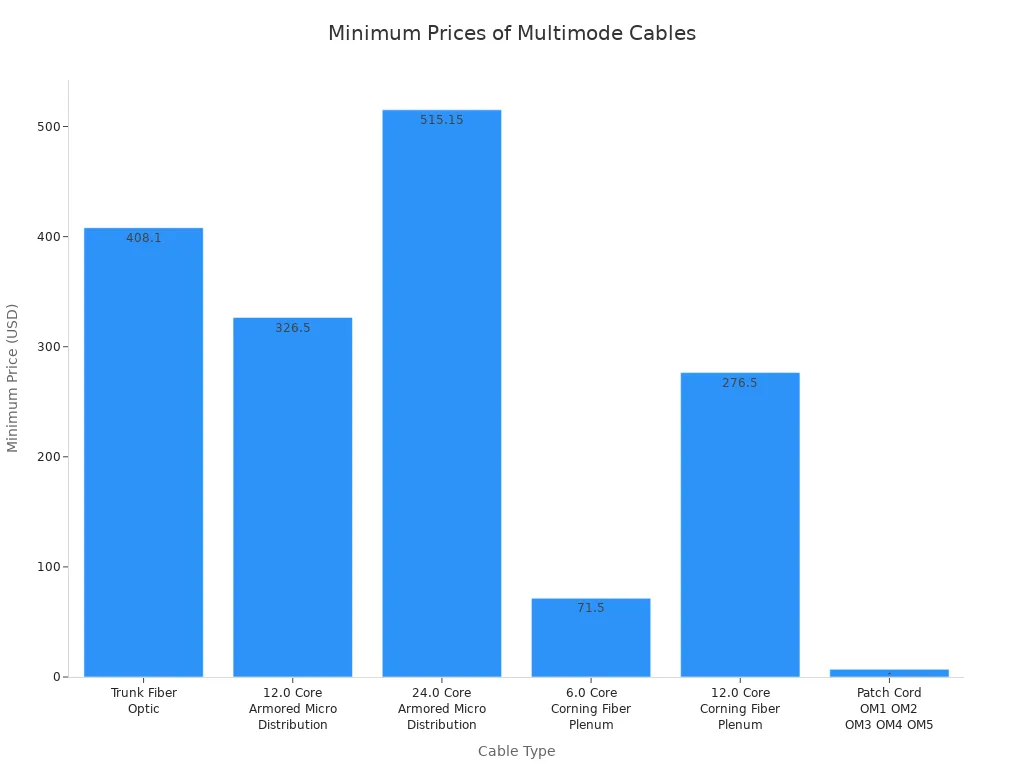
- Cheaper cables save money now but may slow your network later.
- Better cables cost more but help your network work well and last longer.
- Think about the total cost, not just the price you pay first.
If you work in telecom or distribution, you need to balance cost and performance. OM3 and OM4 give good value for most business jobs. OM5 is best for advanced networks that need to grow a lot.
Tip: Plan for upgrades. Buying better cables now can save you money and work later.
Use Cases
When you pick a multimode cable, you need to think about what your network needs. Each cable standard works best for certain business jobs. You want your network to work well, save money, and lower risks. The right cable helps your network run better and lets it grow in the future.
Common B2B Use Cases for Multimode Cable Types
|
Fiber Type |
Typical Use Cases |
|---|---|
|
OM1 |
Local Area Network (LAN), Fiber-to-the-Desk (FTTD) |
|
OM2 |
Enterprise Networks, Campus Networks |
|
OM3 |
Data centers, High-performance computing |
|
OM4 |
Large-scale data centers, Cloud computing, Virtualization |
|
OM5 |
Future large-scale data centers, High-performance computing applications |
You find OM1 in older LANs and small offices. If you need simple connections for computers or printers, OM1 is a good choice. You do not spend too much when your network does not need fast speeds.
- OM2 is used for campus networks and business backbones. You pick OM2 when you want strong links between buildings. This cable handles medium data rates and helps you save money for mid-sized networks.
- OM3 is best for data centers and fast computing jobs. You use OM3 when you need to move lots of data quickly. This cable gives fast speeds and can go longer distances, so it works well for server rooms and storage.
- OM4 is great for cloud computing, virtualization, and big data centers. You choose OM4 when your business needs important apps to run all the time. OM4 helps you get ready for the future and handle more data. You cut downtime and get better value by using OM4 for backbone links.
- OM5 is made for new data centers and advanced computing. You select OM5 when you need the most bandwidth and support for many signals. OM5 lets you grow your network and get ready for new tech. You get more choices and long-term value with OM5 in fast-growing places.
Tip: Always pick a cable that matches your business plans. If you want to grow or upgrade, choose a cable that can handle future needs. You save money and keep your network strong.
You make your network more reliable and faster by picking the right multimode cable for each job. You also spend less on repairs and make network work easier. When you match your cable to your needs, you build a strong base for your business.
Cost and ROI

Budgeting
You want your network to work well and save money. Multimode Cable is a smart choice for short and medium distances. You pay less to install it because it is easy to use. You also save power since multimode fiber uses less energy than single-mode fiber in most offices.
When you plan your budget, you should:
- Pick cables that meet good standards and come from trusted suppliers.
- Work with suppliers who have a good record.
- Follow ESG rules to lower risks and help your business grow.
- Do not ignore rules or pick cables just because they are cheap.
- Write down what your business needs now and in the future.
- Look at prices from different sellers.
- Check if sellers have the right certificates and good reviews.
- Make sure the cables are high quality and follow the rules.
- Think about all costs, like fixing and upgrading cables.
- These steps help you avoid surprise costs and keep your network working well.
Value
You should think about more than just the first price. The total cost includes installing, fixing, upgrading, and any downtime. Multimode Cable costs less for short runs and is easy to upgrade. You have less downtime because it is simple to fix. This means fewer problems and lower repair costs.
Here is a table that compares return on investment for multimode and single-mode fiber in normal business use:
|
Aspect |
Multimode Fiber |
Singlemode Fiber |
|---|---|---|
|
Cost |
Lower for short distances |
Higher for long distances |
|
Installation |
Easier to install and terminate |
Needs more skill and care |
|
Power Consumption |
Lower |
Higher |
|
Distance and Bandwidth |
Best for short/medium distances |
Best for long distances |
You get more value from multimode fiber for offices, campuses, or data centers. You spend less on fixing and upgrading, so your ROI gets better over time.
Tip: Pick cables that fit your business plans. You will save money and skip expensive upgrades later.
Performance vs. Price
You want good performance without spending too much. Multimode fiber costs more per foot than copper, but it moves data faster and needs less fixing. You also spend less on cleaning and repairs than with single-mode fiber.
|
Cable Type |
Cost per Foot |
Data Rate (Gbps) |
Maintenance Frequency |
|---|---|---|---|
|
Cat 5e |
$0.10-$0.20 |
Up to 1 |
Every 2-3 years |
|
Cat 6 |
$0.15-$0.30 |
Up to 10 |
Every 2-3 years |
|
Cat 6a |
$0.25-$0.50 |
Up to 10 |
Every 2-3 years |
|
Cat 8 |
$0.50-$1.00 |
Up to 25 |
Every 2-3 years |
|
Multi-mode Fiber |
$0.50-$2.00 |
10-40 |
Regular cleaning |
|
Single-mode Fiber |
$0.75-$3.00 |
10-100 |
Regular cleaning |
You can see that multimode fiber gives a good mix of price and speed for most business networks. You do not need to fix it often, so you save money and keep your network safe.
Note: Multimode fiber helps you keep costs low and get good ROI for short and medium network runs.
References:
IEC 60793-2-10, ITU-T G.651, IEEE 802.3, CommScope, AFL technical datasheets
Applications

Data Centers
Data centers need fast and steady connections. Multimode Cable links servers, switches, and storage at high speeds. OM3, OM4, and OM5 cables are best for this job. These cables can handle 10G, 40G, and 100G speeds. They work well for short and medium distances. OM3 works up to 300 meters at 10G. OM4 can go up to 550 meters. OM5 is used for advanced 400G jobs.
Data centers often get new equipment. You want cables that work with new speeds. This way, you do not have to change all your cables. OM4 and OM5 let you do this. They help you avoid downtime and make it easy to grow your network.
|
Cable Type |
Max Distance for 1G |
Max Distance for 10G |
Max Distance for 40G/100G |
Max Distance for 400G |
Jacket Color |
|---|---|---|---|---|---|
|
OM1 |
300 meters |
30 meters |
N/A |
N/A |
Orange |
|
OM3 |
1000 meters |
300 meters |
100 meters |
70 meters |
Aqua |
|
OM4 |
>1000 meters |
550 meters |
150 meters |
100 meters |
Aqua/Pink |
|
OM5 |
N/A |
N/A |
N/A |
150 meters |
N/A |
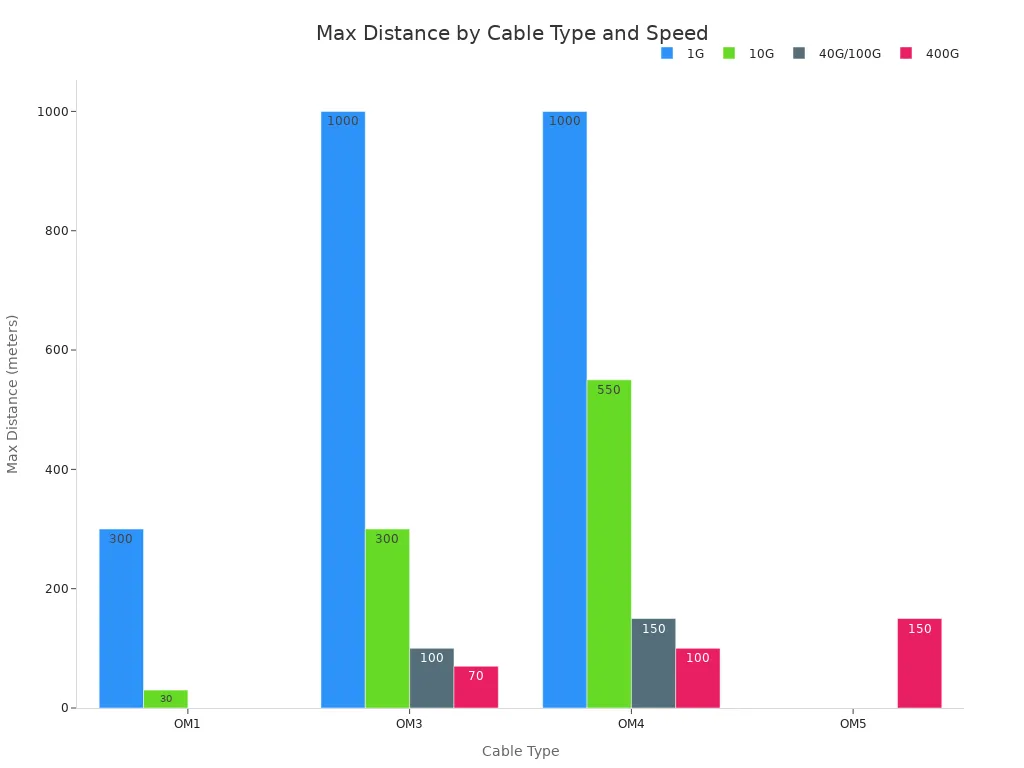
Tip: Pick OM4 or OM5 if you want your data center to be ready for the future. These cables work with new tech and help you save money on upgrades.
Industrial Networks
Industrial networks need strong and steady cables. These places can be dusty, shaky, or hot and cold. Multimode Cable, like OM2 and OM3, works well here. These cables are good for short and medium distances. They also block noise from machines.
OM2 is good for simple machines and control systems. OM3 is better for big factories with lots of data. Both types last a long time and are easy to fix. You spend less on repairs because these cables are simple to use.
|
Fiber Type |
Core Size |
Data Rate |
Distance |
Application |
|---|---|---|---|---|
|
OM1 |
62.5um |
1Gb @ 850nm |
Up to 300m |
Short-haul networks, LANs |
|
OM2 |
50um |
1Gb @ 850nm |
Up to 600m |
Short-haul networks, LANs |
|
OM3 |
50um |
10Gb @ 850nm |
Up to 300m |
Larger Private Networks |
|
OM4 |
50um |
10Gb @ 850nm |
Up to 550m |
High-Speed Networks, Data Centers |
|
OM5 |
N/A |
40Gb/100Gb |
N/A |
High-speed Networks, Data Centers |
Note: OM2 and OM3 cables are a good mix of price, strength, and speed for factories.
Campus Backbone
Campus networks link many buildings and offices together. You need cables that go far and help many people connect. OM3 and OM4 are good for campus backbones. They give fast speeds over long distances. This makes them great for joining buildings and network rooms.
- OM3 can reach 300 meters at 10G speeds. OM4 can go up to 550 meters. These cables help stop signal loss and keep your network working well. They also last longer and do not break easily, so you save on repairs.
- OM3: Good for medium campuses that need more data.
- OM4: Best for big campuses or colleges with lots of traffic.
If you want to make your campus bigger or add new things, OM4 gives you more space to grow.
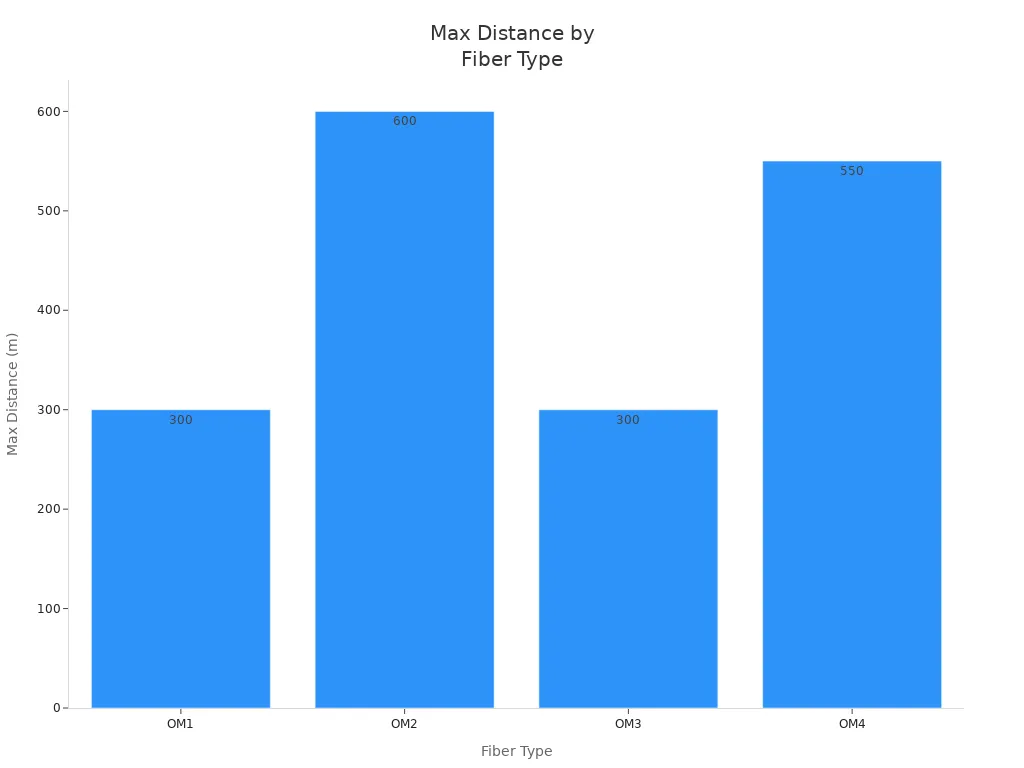
Picking the right cable type helps you fix common problems. You get better speed, lower costs, and a network that helps your business do well.
Large Deployments
When you work on large deployments, you face special problems. You must connect lots of users and devices over big areas. Multimode cable like OM3, OM4, and OM5 helps with these big jobs. These cables give you the speed and flexibility you need. You want a network that is fast, does not stop often, and does not cost too much.
Why use multimode cable for large deployments?
- You get lots of bandwidth for busy networks.
- You can upgrade without changing every cable.
- You spend less on putting in and fixing cables.
- You lower risk by using cables that meet world rules.
Many business buyers, like telecom companies and EPCs, pick OM4 or OM5 for big projects. These cables work for fast links in office towers, hospitals, airports, and smart cities. You can use 10G, 40G, or even 100G speeds for long distances. This lets you connect data centers, control rooms, and far-away buildings easily.
|
Multimode Cable Type |
Max Data Rate |
Max Distance (10G) |
Typical Use in Large Deployments |
|---|---|---|---|
|
OM3 |
40G/100G |
300m |
Office parks, hospitals |
|
OM4 |
100G |
550m |
Airports, smart campuses |
|
OM5 |
400G |
150m (SWDM) |
Smart cities, mega data centers |
Tip: OM4 and OM5 cables help your network get ready for the future. You can add new things or make your network bigger without lots of work.
You do not want your network to slow down or stop working. Multimode cables with high bandwidth and low signal loss help your network stay strong. You also follow the rules by picking cables that meet IEC, TIA, and IEEE standards.
Key benefits for large deployments:
- Scalability: You can add more users and devices as your business grows.
- Cost Efficiency: You save money on setup and upgrades with cables that work at many speeds.
- Reliability: You have less downtime because these cables block noise and keep signals strong.
- Easy Management: Color-coded jackets help you find and manage cables in busy places.
Note: Always buy from certified suppliers. This makes sure your cables are safe and high quality.
When you plan a big network, think about the long-term value of multimode cable. You protect your money, get ready for new tech, and keep your network working well.
References:
IEC 60793-2-10
IEEE 802.3
AFL, CommScope technical datasheets
Comparison Table
It can be hard to pick the right multimode cable. You want to see the main differences fast. The table below shows OM1, OM2, OM3, OM4, and OM5 types. You can check their specs, use cases, material, cost, and how long they last. This helps you choose what is best for your business.
|
Cable Type |
Core Size (µm) |
Transmission Rate |
Max Distance |
Material |
Typical Cost (per meter) |
Expected Lifetime |
Recommended Use Case |
|---|---|---|---|---|---|---|---|
|
OM1 |
62.5 |
1Gbps |
300m |
Standard Grade Glass |
$0.50 – $1.00 |
15+ years |
Low speed network renovation, legacy LAN |
|
OM2 |
50 |
1Gbps |
550m |
Improved Glass |
$0.80 – $1.50 |
15+ years |
Upgrade from OM1, campus backbone |
|
OM3 |
50 |
10Gbps |
300m |
Laser-optimized Glass |
$1.20 – $2.00 |
20+ years |
Data centers, high-speed connections |
|
OM4 |
50 |
100Gbps |
100m |
High-performance Glass |
$1.50 – $2.50 |
20+ years |
Mainstream choice for data centers, virtualization |
|
OM5 |
50 |
400Gbps+ |
N/A |
Wideband Glass |
$2.00 – $3.50 |
20+ years |
5G fronthaul, high-density applications |
OM1 and OM2 are good for old networks and simple upgrades. OM3 and OM4 give more speed and work well for big jobs. OM5 is used for new tech like 5G and busy places.

Key Points to Consider
- Material Quality: OM3, OM4, and OM5 use better glass. This means they last longer and work faster.
- Cost vs. Value: Higher cable types cost more. You get more speed and do not need to upgrade as often.
- Lifetime: Most multimode cables last 15 to 20 years. If you pick cables that meet IEC and IEEE rules, you lower risk and downtime.
- Use Case Fit: Pick the cable that matches your network needs. This helps your business run without slowdowns.
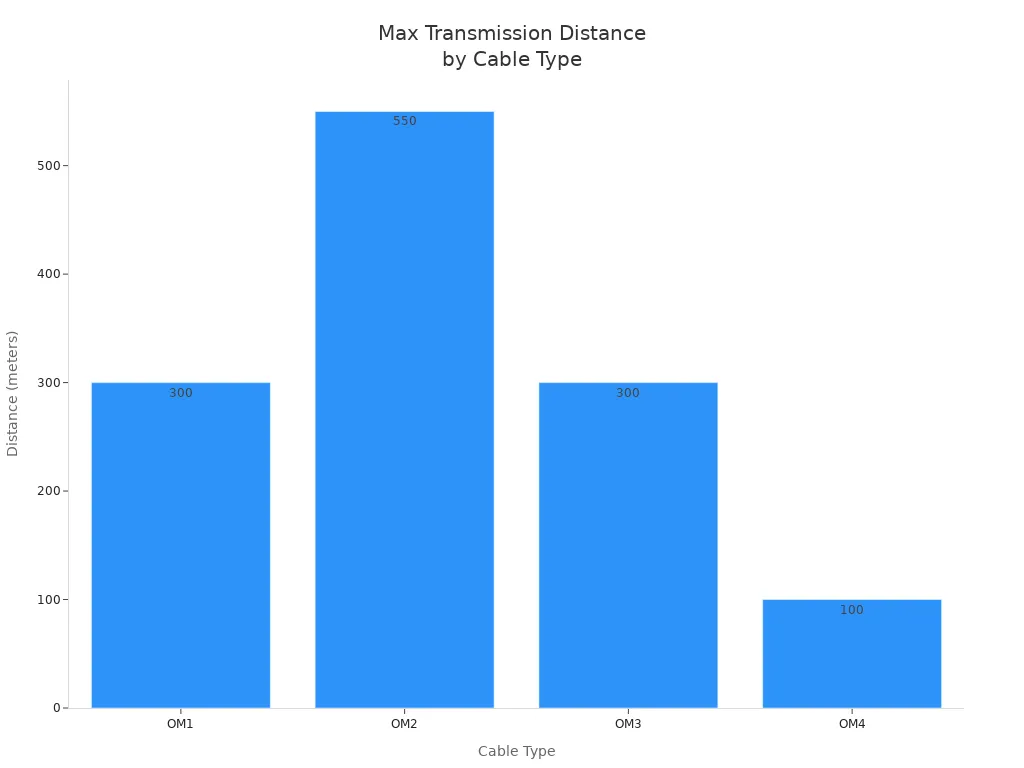
Tip: If you want to save money and avoid problems, use OM3, OM4, or OM5 for new networks or big upgrades. These cables work with faster speeds and new tech.
You can use this table to plan your network project. It helps you save time, spend less, and build a strong network for your business.
References:
IEC 60793-2-10, ITU-T G.651, IEEE 802.3, PLP, AFL, CommScope technical datasheets
Procurement Tips
Picking the best Multimode Cable is not just about specs. You also need to think about where you get your cables and who sells them. After you buy, support is important too. These steps help you avoid mistakes that cost a lot. They also help your network work well.

Certified Suppliers
You should buy from certified suppliers. Certified suppliers follow strict rules and use good methods. They work with top makers and check quality carefully. This means you get cables that last and do what you need.
Here are some important certifications to look for:
|
Certification |
Description |
|---|---|
|
ISO 9001 |
Makes sure products and services are always good quality. |
|
CE |
Shows the product is safe and meets health rules in Europe. |
|
RoHS |
Stops bad materials from being used in electronics. |
|
FCC |
Makes sure devices do not cause too much signal noise. |
Tip: Always ask your seller to show these certifications before you buy.
Quality
Quality is important for every network job. Good cables work well and are easy to put in. They help your project finish on time. When you pick a supplier, check if they use new tech and test their cables. This lowers the chance of cable problems and keeps your network strong.
- Pick suppliers who care about good performance.
- Choose cables that are simple to install and fix.
- Get products that help your project finish fast.
A good supplier will also help you find the right cable for your job. This means you get a cable that fits your needs, not just any cable.
Delivery
Fast and safe delivery is important for business jobs. You want your cables to come on time and not be damaged. Good suppliers give clear delivery times and strong boxes. They also help you after you buy, so you can fix problems fast.
- Work with suppliers who answer quickly if something breaks.
- Pick companies that help you when you have questions.
- Make sure your supplier can send big orders and handle special needs.
Note: A good supplier and after-sales help are important for your network. They help you stop downtime and keep your business working.
If you follow these tips, you lower risk and get more value from your Multimode Cable. You also build a network that helps your business grow.
Picking the right Multimode Cable helps your network work well. It makes your network fast, strong, and ready to grow. You need to think about bandwidth, how far signals go, core size, wavelength, and connector types.
- Bandwidth and distance decide how fast your network is.
- Core size and wavelength change how good your data is.
- Connector types make cables easy to put in.
Here are steps you should follow:
- Figure out how much bandwidth you need.
- Find out how far your cable must reach.
- Check the core size you need.
- Pick the best wavelength for your job.
- Make sure your connectors fit your equipment.
Buy from certified suppliers so your network stays strong for years. You can talk to our team for help and get solutions made just for you.
FAQ
Why should you choose multimode cable for short and medium network distances?
Multimode cable costs less to install. It is easy to fix and keep working. You get good performance for short and medium distances. OM3 and OM4 give fast speeds without big upgrades. You save money and get strong value.
Reference: IEC 60793-2-10, CommScope
Why do OM3 and OM4 cables work better for data centers?
OM3 and OM4 move more data and go farther. They help your data center get ready for new tech. These cables make fast connections. You have less downtime and can grow your network easily.
Reference: IEEE 802.3, AFL
Why does color coding matter when managing multimode cables?
Color coding helps you spot cable types fast. You make fewer mistakes when you install or fix cables. Orange, aqua, and lime green jackets keep things neat. You spend less time fixing problems.
Reference: TIA/EIA-492AAAD
Why is OM5 recommended for advanced networks and large deployments?
OM5 uses more wavelengths and moves data faster. You can reach 400G speeds and get ready for new tech. OM5 lowers risk and gives you better value for a long time.
Reference: ITU-T G.651, PLP
Why should you buy multimode cable from certified suppliers?
Certified suppliers give you safe and high-quality cables. You lower risk and avoid costly problems. ISO, CE, and RoHS mean your cables meet world rules and last longer.
Reference: ISO 9001, CE, RoHS
Why does compatibility with existing equipment affect your cable choice?
Matching cable and connectors stops signal loss. You avoid network problems and save money. OM3, OM4, and OM5 work with most new transceivers.
Reference: CommScope, AFL
Why does investing in higher-grade multimode cable improve ROI?
Better cables like OM4 and OM5 last longer. They support faster speeds and need fewer upgrades. Your network stays strong, and you get more value over time.
Reference: IEC 60793-2-10, IEEE 802.3
Why do B2B buyers prefer multimode cable for scalable network projects?
Multimode cable lets you grow your network easily. You save money and upgrade without changing everything. OM3, OM4, and OM5 fit the needs of telecom and EPCs.
Reference: AFL, CommScope
Sources: IEC 60793-2-10, ITU-T G.651, IEEE 802.3, TIA/EIA-492AAAD, ISO 9001, CE, RoHS, PLP, AFL, CommScope