



Types of Fiber Optic Cables: Structures, Applications, and Key Differences
You will see three main Types of Fiber Optic Cables. These are single-mode, multimode, and special designs. Each type has its own structure and use. For example, single-mode cables have a core that is 8 to 10 microns wide. They work best for long distances. Multimode cables have a core that is 50 or 62.5 microns wide. They are better for shorter links. The table below shows how core size, light source, and use can change your cost and network speed.
|
Feature |
Single Mode Fiber |
Multimode Fiber |
|---|---|---|
|
Core Diameter |
8 to 10 microns |
50 or 62.5 microns |
|
Distance |
Up to 40 km or more |
Usually up to 2 km |
|
Bandwidth |
Almost unlimited |
Lower bandwidth |
|
Cost |
Higher |
Cheaper |
|
Typical Use Cases |
Long-distance links |
Short or medium distances |
You should look at these differences. The right cable changes your cost, speed, and how you install it. The five main parts are core, cladding, coating, strengthening fibers, and cable jacket. These parts affect how strong, bendy, and clear the cable is.
Key Takeaways
- There are three main types of fiber optic cables. These are single-mode, multimode, and specialized cables. Each type is used for different jobs.
- Single-mode cables have a small core. They work best for long distances. Multimode cables have a bigger core. They are good for shorter distances.
- Picking the right fiber optic cable can save you money. It can also make your network faster and more reliable.
- Fiber optic cables have five main parts. These are the core, cladding, coating, strengthening fibers, and cable jacket. Each part is important for how the cable works.
- Specialized cables, like armored and ribbon cables, are made for special places and uses. They give extra protection and work better in certain situations.
- Always look for industry standards and certifications when you pick fiber optic cables. This helps make sure they are safe and high quality.
- Think about what your network might need in the future when you choose cables. Planning now can help you avoid spending more money later.
- Working with good suppliers can give you helpful support. It can also help make your fiber optic project a success.
Types of Fiber Optic Cables: Main Categories
Single Mode Fiber Optic Cable
Structure
Single mode fiber optic cables have a core that is 8 to 10 microns wide. This small core lets only one light mode move through at a time. The cladding is usually 125 microns thick and keeps the light inside the core. These cables use laser light sources for sending signals. Laser light helps the signal stay strong and clear. The five main parts-core, cladding, coating, strengthening fibers, and cable jacket-make the cable strong and long-lasting. These cables can handle pulling forces up to 600N. If installed right, they can last more than 25 years.
Tip: Pick single mode cables if you need high reliability and little maintenance for long distances.
Applications
You will see single mode fiber optic cables in:
Telecommunications networks for sending data, voice, and video far away.
Data centers that need fast, long-distance links.
CATV systems to bring cable TV to many places.
Industrial automation for safe, clear communication.
Military and defense networks where safety and signal quality matter.
OS1 cables work best inside buildings and support up to 10G speeds over 10 km. OS2 cables are better for outside and can handle up to 100G over 200 km. These cables work at 1310 nm and 1550 nm wavelengths. They lose very little signal, even over long distances.
Key Differences
Core Diameter: 8–10 microns (the smallest of all Types of Fiber Optic Cables).
Light Source: Laser.
Bandwidth: Almost unlimited, great for fast, long links.
Distance: Up to 40 km or more without needing repeaters.
Cost: Higher at first because of special parts and setup.
Standards: Follows ITU-T G.652 and IEC 60793-2-50 rules.
Best For: Telecom operators and EPCs who want strong, low-maintenance networks.
Single mode cables help lower maintenance and give the best value for big projects.
Multimode Fiber Optic Cable
Structure
Multimode fiber optic cables have a bigger core, usually 50 or 62.5 microns wide. This lets many light modes travel at once. They use LED or VCSEL light sources. The cladding is still 125 microns thick to guide the light. The five main parts-core, cladding, coating, strengthening fibers, and cable jacket-make the cable flexible and strong enough for most uses. These cables are easier to set up and cost less for short or medium distances.
Note: The bigger core can cause modal dispersion, which lowers bandwidth and distance.
Applications
You will find multimode fiber optic cables in:
Corporate LANs for fast data sharing in offices.
Data centers for quick server and cloud links.
Schools to connect classrooms and offices.
Factories for machine-to-control system communication.
|
Use Case |
Description |
|---|---|
|
Corporate LANs |
Fast, steady networking in local areas. |
|
Data Centers |
Quick links for servers and cloud services. |
|
Educational Institutions |
Easy connections across school campuses. |
|
Manufacturing |
Helps machines and systems work better together. |
Key Differences
Core Diameter: 50 or 62.5 microns (bigger than single mode).
Light Source: LED or VCSEL.
Bandwidth: Lower than single mode, good for short distances.
Distance: Up to 2 km, best for buildings or campuses.
Cost: Cheaper to install and buy equipment.
Standards: Meets IEC 60793-2-10 and IEEE 802.3 rules.
Best For: Distributors and EPCs who want easy, low-cost networks for local use.
Multimode cables give a good mix of speed and price for businesses.
Specialized Fiber Optic Cables
Specialized Types of Fiber Optic Cables solve special problems and work in tough places. You can pick from different designs for your project.
Armored
Structure: Has a metal layer between the jacket and core to protect from animals, crushing, and rough places.
Applications: Used underground, in factories, and where there is a lot of risk.
Key Benefit: Makes the cable stronger and safer.
Ribbon
Structure: Has many fibers in flat ribbons, so you can join lots of fibers at once.
Applications: Used in data centers, telecom backbones, and places where saving space and weight is important.
Key Benefit: Quick to install and easy to manage many fibers.
Loose Tube
Structure: Fibers are put in tubes that can be filled with gel or dry stuff to keep out water. The fibers can move inside, so they do not break easily.
Applications: Used outside, in bad weather, and for long runs.
Key Benefit: Protects well from weather and temperature changes.
|
Cable Type |
Unique Features |
|---|---|
|
Loose Tube |
Fibers can move, gel-filled for water safety, good for outside and tough places. |
|
Ribbon |
Many fibers stacked, easy to join, saves space and weight. |
Tight Buffer
Structure: Each fiber has a thick plastic layer, making it strong and easy to use. There is a ripcord for fast access.
Applications: Used inside buildings, for short runs, and underwater.
Key Benefit: Easy to install, stays strong under stress, and keeps water out.
|
Cable Type |
Unique Features |
|---|---|
|
Tight Buffer |
Thick plastic cover, waterproof, simple to install, strong under pressure. |
Polarization-Maintaining (PM) Fiber
Structure: Made to keep the light's polarization using special rods or oval cores.
Applications: Used for sensing, medical imaging, and science research.
Key Benefit: Gives steady, clear signals for sensitive jobs.
Specialized Types of Fiber Optic Cables use green materials and block electromagnetic interference, so they are good for safe and lasting networks.
Comparison Table: Structural Characteristics
|
Fiber Type |
Core Diameter (microns) |
Light Transmission Modes |
Applications |
|---|---|---|---|
|
Single-mode |
8 to 10 |
Single mode |
Long-distance, high-bandwidth |
|
Multimode |
50 to 62.5 |
Multiple modes |
Shorter distances, lower bandwidth |
|
Armored |
Varies |
Single/Multiple |
Tough, risky places |
|
Ribbon |
Varies |
Single/Multiple |
High-density, saves space |
|
Loose Tube |
Varies |
Single/Multiple |
Outside, wet areas |
|
Tight Buffer |
Varies |
Single/Multiple |
Inside, underwater, flexible routes |
|
PM Fiber |
8 to 10 |
Single mode |
Science, medical, precise work |
Picking the right cable type helps you save on repairs, makes your network stronger, and keeps it working well for a long time.
Structure and Components

Fiber optic cables have five main parts. These parts help the cable work well in tough places. You should know how each part works. The materials used can change how strong the cable is. They also affect how clear the signal is and how easy it is to install.
Core and Cladding
The core is in the middle of the cable. It carries the light that sends your data. Most cores are made from very pure glass. Some use plastic for special jobs or to save money. The size of the core changes how the cable moves light. Single-mode cores are 8–10 microns wide. They are good for sending lots of data far away. Multimode cores are 50 or 62.5 microns wide. They let many light paths travel for short distances.
The cladding wraps around the core. It has a different refractive index. This keeps the light inside the core. The design helps the signal stay strong and not get lost. If you pick a cable with a bigger core, you get more modal dispersion. This means the signal does not go as far or as fast. Smaller cores have less dispersion. They are best for telecom and backbone networks.
Tip: For long networks, use cables with a small glass core and good cladding. This helps keep the signal strong and clear.
Component Table
|
Component |
Contribution to Performance |
|---|---|
|
Core |
Carries the light signal; determines bandwidth and distance |
|
Cladding |
Maintains signal integrity; enables total internal reflection |
Coating and Strengthening Fibers
The coating protects the fiber from scratches and water. Most cables have two layers of acrylate coating. The inside layer cushions the fiber. The outside layer stops scratches. The coating is about 75% of the fiber's size. Rules like IEC 60793-1 say coatings must handle heat and wetness.
Strengthening fibers are often made from aramid yarn. These fibers make the cable strong. They help the cable handle pulling during setup and use. Strength members let cables take up to 600N of force. This is good for outdoor and factory use.
Coating: Protects the fiber from damage and stress.
Strength Member: Makes the cable strong, stops breaking, and helps with long runs.
Note: Two-layer coatings and aramid yarns are needed for cables used in rough places or handled a lot.
Cable Jacket
The cable jacket is the outside layer. It keeps the inside safe from bumps, chemicals, and water. Makers use PVC, LSZH, or polyethylene for jackets. Outdoor cables need jackets that block water and sun. Indoor cables need jackets that bend easily for setup.
PVC jackets are bendy and cheap for indoor use.
Polyethylene jackets block water well for outdoor cables.
LSZH jackets are safe in fires for public places and data centers.
The jacket protects the cable and makes it easier to install. Picking the right jacket helps your cable last longer and work better.
Using the right core, cladding, coating, strength member, and jacket helps your network work well, cost less to fix, and meet rules.
Applications by Cable Type

Telecommunications
Telecommunications need fast and steady connections. Fiber optic cables are the top choice because they use light to send data. This way is much faster than copper cables. You also get more bandwidth with fiber optic cables. They do not let other signals mess up your data. This keeps your signal clear, even in busy places.
|
Cable Type |
Bandwidth |
Speed |
Use Case |
|---|---|---|---|
|
Cat5e |
100 MHz |
100 Mbps |
Basic home networks |
|
Cat6 |
N/A |
Higher speeds |
General use |
|
Cat6a |
N/A |
10 Gbps/100m |
High-performance networks |
|
Cat7 |
N/A |
Higher speeds |
Data centers |
|
Cat8 |
N/A |
Highest speeds |
Data centers |
|
Fiber-optic |
N/A |
Very high |
Backbone networks, data centers |
You should pick fiber optic cables for backbone networks and data centers. They give you low delay and fast internet. These cables can grow with your network. You can count on them for long-distance links.
Tip: Fiber optic cables help your network last longer. They work with new tech and faster data as you need it.
Industrial Networking
Factories and plants need strong and steady cables. You may have to pay a lot to set up these cables. Getting land for cables can be hard. It is tough to put cables in rough places. The cost to put in fiber broadband can be $27,000 per mile. You might need to talk to land owners for space. Bad weather or rocky ground can slow down your work.
High costs for setup and materials
Problems getting land from owners
Hard to install because of land and tools
You also have to follow rules and get permits. These steps can slow your project and cost more money.
Rules can slow you down and need extra steps.
Environmental rules make the job harder.
Getting permits can take a long time.
For factories, use armored or loose tube fiber optic cables. These Types of Fiber Optic Cables stop crushing and water from hurting the cable. They keep your network working in tough places.
Note: Picking the right cable type means less downtime and lower repair costs in factories.
Medical and Sensing
Doctors and scientists need good and steady data. Fiber optic cables are used in many medical tools and monitors. They help track breathing, joint movement, and how people walk. These cables also help with medical pictures, laser surgery, and fast data in hospitals.
Breathing monitors check how you breathe.
Joint monitors help with therapy.
Walking insoles help people move better.
Medical pictures use fiber optics for clear views.
Laser surgery uses fiber optics for safe care.
Fast data helps doctors talk and share info quickly.
Long-period fiber gratings in cables can find changes in stretch, heat, and light bending. This helps doctors check and watch patients. You need cables that are very sensitive and safe for people. They must also work in many medical places.
Sensitivity helps get the right results.
Biocompatibility keeps patients safe.
Cables must work in all kinds of medical spots.
Optical coherence tomography and fluorescence spectroscopy use fiber optics for sharp pictures and quick checks. These tools help doctors find problems fast and safely.
Fiber optic cables give you the speed and trust you need for new medical and sensing jobs.
Data Centers
Data centers need the best network performance. You want fiber optic cables that give speed and reliability. These cables also help your data center grow in the future. Picking the right cable type keeps your data center working well. It helps you avoid problems and stops expensive downtime.
Why Fiber Optic Cables Dominate in Data Centers
You must move lots of data very quickly. Fiber optic cables do this better than copper cables. Here are reasons to use fiber optics in your data center:
Higher Bandwidth: Fiber optic cables can go from 10 Gbps to many terabits per second. They handle big data and help with cloud computing and virtualization.
Lower Latency: Fiber optics lose very little signal. You get faster responses, which is important for real-time jobs and fast trading.
Greater Immunity to Interference: Fiber cables do not get affected by electromagnetic interference. Your data stays safe and steady, even near strong electrical machines.
Tip: If you upgrade to fiber optic cables, your data center will run faster and be ready for new technology.
Preferred Cable Types for Data Centers
Pick your cable type based on how your data center is set up. Think about how far the cables go and how much data you need to move.
|
Cable Type |
Best Use Case |
Key Benefits |
|---|---|---|
|
Single-mode Fiber |
Long runs (over 300 meters), backbone |
Highest bandwidth, future-proof |
|
Multimode Fiber |
Short runs (up to 300 meters), server rooms |
Lower cost, easy installation |
|
Ribbon Fiber |
High-density connections, fast splicing |
Saves space, speeds up deployment |
Single-mode fiber is good for linking data halls or buildings far apart. It gives you the longest reach and fastest speeds.
Multimode fiber works for short links between racks or inside server rooms. It costs less and is easier to set up.
Ribbon fiber helps you connect many cables in small spaces. You can finish jobs faster and pay less for labor.
Industry Pain Points and Solutions
You might have trouble with small spaces, high energy bills, and needing to grow quickly. Fiber optic cables help with these issues:
They take up less room in trays and racks.
They use less power because they work with fast switches.
They make it easy to change or add cables with modular designs.
If you pick the right fiber optic cable type, your data center will be safer, need less fixing, and be ready for more data in the future.
Key Differences and Comparison
Core Diameter and Light Source
You need to know the core diameter and light source before choosing fiber optic cables. These two factors decide how much data you can send and how far your signal will travel. Single-mode fiber optic cables have a small core, about 9 microns. They use laser light sources at 1310 nm or 1550 nm. This setup gives you high speed and long reach. Multimode fiber optic cables come in several types. OM1 has a 62.5-micron core and uses LED light. OM2, OM3, and OM4 have a 50-micron core. OM2 uses LED, while OM3 and OM4 use lasers for better performance.
|
Fiber Type |
Core Diameter (microns) |
Light Source Type |
|---|---|---|
|
Single-mode |
9 |
Laser (1310/1550 nm) |
|
OM1 |
62.5 |
LED |
|
OM2 |
50 |
LED |
|
OM3 |
50 |
Laser |
|
OM4 |
50 |
Laser |
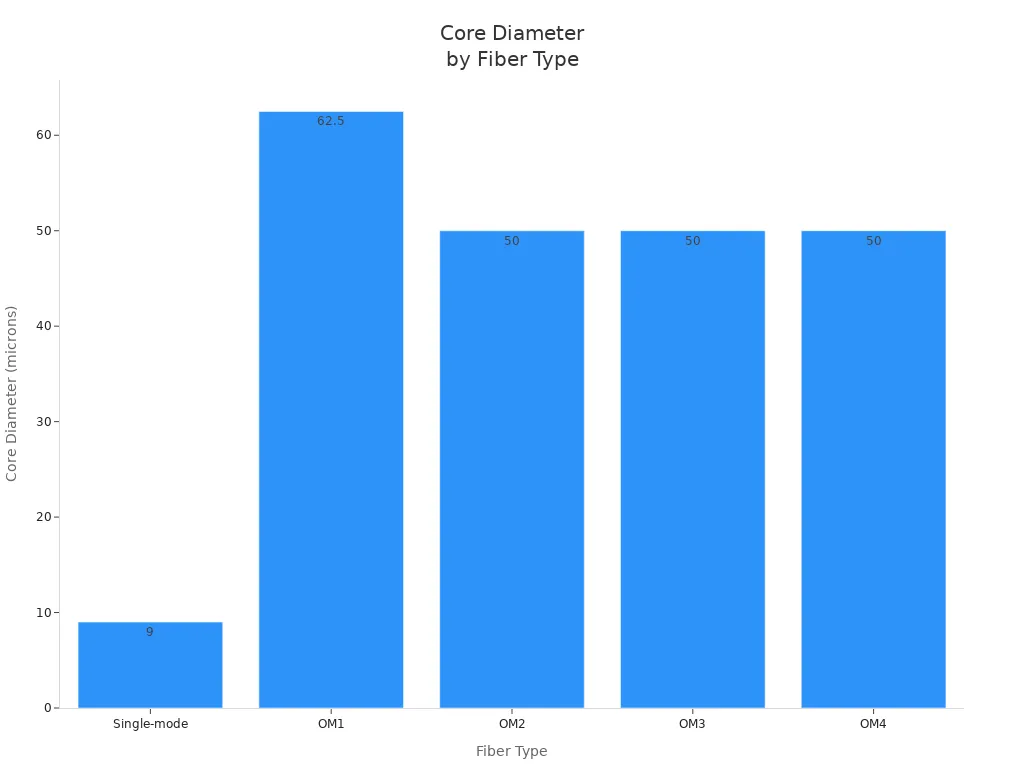
Tip: If you need long-distance, high-speed links, pick single-mode fiber optic cables. For short runs and lower costs, multimode cables work well.
Bandwidth and Distance
Bandwidth and distance are key when you plan your network. Single-mode fiber optic cables give you almost unlimited bandwidth and can send data up to 180 km. Multimode cables have limits. OM1 supports 200 MHz-km, while OM4 and OM5 reach up to 3500 MHz-km. As you move to higher OM grades, you get more bandwidth and longer distances, but still less than single-mode.
|
Cable Type |
Max Distance (10Gbps) |
Max Bandwidth |
|---|---|---|
|
OM1 |
33 m |
200 MHz-km |
|
OM2 |
82 m |
500 MHz-km |
|
OM3 |
300 m |
1500 MHz-km |
|
OM4 |
400 m |
3500 MHz-km |
|
OM5 |
400 m |
3500 MHz-km |
|
Single-mode |
100 km |
Nearly unlimited |
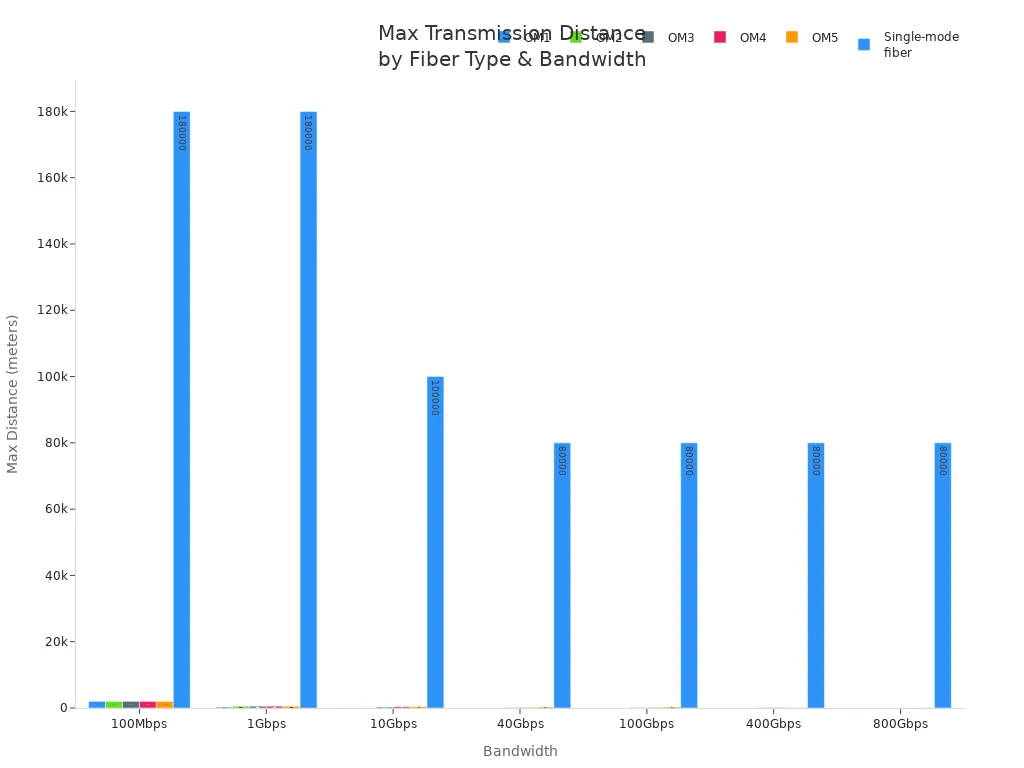
Single-mode fiber optic cables are best for backbone networks and long-haul links. Multimode cables fit short runs in buildings or data centers.
Cost and Installation
Cost and installation matter for every project. Single-mode fiber optic cables cost more to buy and install. You pay more for the cable and for laser transceivers. These cables need careful handling and special tools. However, you get long-term value with less maintenance and future-proof speed. Multimode fiber optic cables cost less up front. The cables and LED or VCSEL transceivers are cheaper. You can install them faster in local networks. For short distances, multimode gives you the best price-to-performance ratio.
Single-mode: Higher initial cost, higher transceiver price, longer lifespan, lower maintenance.
Multimode: Lower initial cost, cheaper transceivers, easy to install, best for short links.
Specialized cables (like armored or ribbon): Cost varies by design and protection level. You pay more for extra strength or high-density layouts, but you reduce risk and downtime.
When you choose fiber optic cables, balance your budget with your network's needs. Investing in the right cable type now saves you money and trouble later.
Standards and Certification
When you pick fiber optic cables for your business, you need to check standards and certification. These rules help protect your money and make sure your network follows the right rules. Certified fiber optic cables help stop big problems, lower downtime, and help your network grow in the future. You can feel safe knowing your cables will work well anywhere.
Why do standards and certification matter?
You must follow strict rules in telecom, data centers, and factories. If you use cables without certification, you could have delays, get fined, or even have your network shut down. Certified cables make sure your setup will pass checks and meet what customers want. They also show your supplier uses good steps for safety and quality.
Tip: Always ask to see proof of certification before you buy fiber optic cables. This helps keep your business safe from hidden problems.
Key Certification Bodies and Programs
Many groups make the rules for fiber optic cables. Each group checks different things like quality, safety, and how well the cables work. The table below shows the main groups and what they do:
|
Certification Body |
Description |
|---|---|
|
Telecommunications Industry Association (TIA) |
Gives out certifications like CFOT and CFOS to show skill in fiber optic technology. |
|
Fiber Optic Association (FOA) |
Has a full program for different skill levels in fiber optics. |
|
ISO Certification |
Not just for fiber optics, but ISO 9001 shows good quality control in making and installing cables. |
You should pick cables and suppliers that have TIA and FOA certifications. These show the products passed hard tests for safety and performance. ISO 9001 gives even more trust, showing the maker uses strong quality checks.
What does this mean for your business?
You lower the chance of network problems.
You follow the law and industry rules.
You look better to clients and partners.
You make upgrades and repairs easier later.
If you work in places with lots of rules, you must have certified cables. Certified fiber optic cables help you avoid big mistakes and keep your network working well. You also show you care about safety and quality, which helps people trust your business.
Picking certified fiber optic cables is not just about following rules. It is a smart way to make your network strong and your company look good.
Choosing the Right Fiber Optic Cable
Factors for B2B Buyers
When you pick fiber optic cables for your business, you have lots of choices. The cable you choose can change how well your network works, how much it costs, and how it grows later. You should think about some important things before you decide:
Industry Standards and Compliance: Always make sure your cables follow TIA/EIA, ISO, and UL rules. This keeps your network safe and working for a long time.
Environmental Considerations: Think about where you will put the cables. Hot places, wet spots, or chemicals can hurt some cable types.
Cable Length and Installation Requirements: Measure your cable runs carefully. Some cables are better for long distances, and others work for short ones.
Compatibility with Existing Infrastructure: Check that your new cables fit with your old connectors and switches.
Budget Constraints and Cost-Effectiveness: Try to balance your money with the need for good quality. Look at the price now and the cost over the cable's life.
Bandwidth and Data Transmission Requirements: Pick cables that can handle your data needs now and in the future.
Maintenance and Service Considerations: Plan for regular checks and fixes. Good help from the maker can save you time and money.
Support and Warranty Options: Choose suppliers who offer strong warranty and support.
Tip: If you look at these things carefully, you can avoid big mistakes and make sure your network works well.
Matching Cable to Application
You want your fiber optic cable to fit your business needs. The right cable helps you get more value and keeps your network working well. Here is how you can pick the best one:
Forward Planning: Think ahead about upgrades. This helps your network grow with your business.
Flexible Fiber Architecture: Use a design that lets you change to new tech and get more bandwidth.
If you pick a cable that fits your job, you will have less downtime and save money on changes. For example, single-mode cables are best for long links in telecom networks. Multimode cables work for short runs in data centers or offices. Special cables, like armored or ribbon, help in tough or crowded places.
Picking the right cable for your job protects your money and helps your business reach its goals.
Supplier Reliability and Support
Your supplier is important for your project's success. Good suppliers help you avoid delays, lower risks, and keep your network running. Look for these signs:
|
Indicator |
Description |
|---|---|
|
R&D Capabilities |
Suppliers with their own labs can make fast fixes and new designs. |
|
Technical Expertise |
Good quality control and following rules help your network work well. |
|
After-Sales Support |
Good help includes installation tips and fixing problems when needed. |
Talking to fiber optic cable experts or trusted suppliers gives you many benefits:
You can switch to new tech easily.
You have less downtime when installing.
You get better network performance for your business.
You get help for maintenance and fixing problems.
When you work with skilled suppliers, you feel safe and set your project up for success in the future.
You can spot big differences between single-mode and multimode fiber optic cables. Single-mode fiber has a small core. It lets only one light mode travel. This makes it good for sending lots of data far. Multimode fiber has a bigger core. It lets many light modes move at once. This works best for short distances. Picking the right cable for your job saves money and keeps your network strong. If you pick the wrong cable, you might pay more and have more problems.
In one FTTA project, a company used plenum-rated cables outside. This mistake cost extra money and they had to replace all the cables.
To pick the best fiber optic cable, you should:
Pick a cable that fits your space and how far it must go.
Choose a cable built for where and how you will install it.
Move and place cables with care so they do not break.
Talking to fiber optic experts can help you avoid mistakes. This also helps your network work well for a long time.
FAQ
What is the main difference between single-mode and multimode fiber optic cables?
Single-mode cables have a small core. They use lasers for sending data far and fast. Multimode cables have a bigger core. They use LEDs or VCSELs for short distances. Pick your cable based on how far and how fast you need to send data.
Why should you use armored fiber optic cables in industrial settings?
Armored fiber optic cables keep the cable safe from crushing and animals. They work well in rough places like factories or outside. Using them means less fixing and less downtime. Your network stays strong even in hard conditions.
How do you select the right fiber optic cable for your project?
Think about how far the cable must go and how much data you need. Check the place where you will put the cable. Make sure the cable follows the rules for your industry. Match the cable type to your job. Ask suppliers for help and check safety needs.
What are the five main components of a fiber optic cable?
Fiber optic cables have five main parts. These are core, cladding, coating, strengthening fibers, and cable jacket. Each part helps the cable send data, stay strong, and last longer in different places.
Can you mix single-mode and multimode cables in one network?
Do not mix single-mode and multimode cables. They have different core sizes and light sources. Mixing them can make your signal weak and cause problems. Always use the same cable type for best results.
Why do data centers prefer ribbon fiber optic cables?
Ribbon fiber optic cables let you connect many fibers at once. This saves space and makes setup faster. They help data centers handle lots of connections and grow easily.
What certifications should you look for when buying fiber optic cables?
Look for TIA, FOA, and ISO certifications. Certified cables meet strict safety and quality rules. This helps your network follow laws and work well.
How does the cable jacket material affect fiber optic cable performance?
The jacket keeps the cable safe from water, chemicals, and damage. Use polyethylene for outside cables. Use PVC or LSZH for inside cables. The right jacket helps the cable last longer and keeps people safe.