





Fiber Optik Single Mode: Tips Splicing, OTDR Testing, dan Manajemen Patch Panel
You will have some problems when you set up fiber optik single mode networks.
High prices, rules, and hard setups can make things slow.
Getting permission and more people wanting broadband make it harder.
Using good methods, like trained workers and fixing things early, helps your network work better and cost less. These ways help you save money for a long time and need fewer changes, so your network lasts longer and works well.

Key Takeaways
- Splicing is very important for fiber optic networks. Use the correct tools and follow rules for strong connections. This helps keep signal loss low.
- Always clean and get fiber ends ready before splicing. Cleaning well stops dirt from making bad connections.
- Pick fusion splicers for permanent connections. Fusion splicers give less signal loss than mechanical splicers.
- Do OTDR testing often to find problems early. This helps stop long downtime and lowers repair costs.
- Organize patch panels and label them clearly. Good organization helps avoid mistakes and makes fixing problems faster.
- Check patch panels often to keep them working well. Regular checks help your network run smoothly and stop surprise problems.
- Write down every splice and test result. Keeping good records helps you watch your network and plan upgrades.
- Choose certified suppliers for better quality. Trusted suppliers make sure your network parts follow industry rules.
Splicing in Fiber Optik Single Mode
Splicing is very important for every fiber optik single mode setup. You need to know the right tools and steps. This helps you make good connections that last a long time. If you follow rules like IEC 61300-3-35 and ITU-T G.652, your network will work well and last longer.

Tools and Preparation
You need to get all the tools before you start splicing. Each tool helps you work faster and fix things easier. This is very important for B2B users who need their network to work all the time.
Key Splicing Tools:
- Fiber Optic Cleaver: Makes clean cuts for better fusion.
- Fusion Splicer: Joins fiber ends with little signal loss.
- Optical Time-Domain Reflectometer (OTDR): Checks splices and finds problems.
- Cable Puller: Helps move cables without breaking them.
- Fiber Splicing Kits: Has all the things you need for splicing.
- Cable Testers: Checks if the signal is good after splicing.
- Protective Conduits: Keeps fibers safe from things like water or dirt.
- Labeling Accessories: Helps you keep cables neat and easy to find later.
Cleaning and Cleaving
You must clean and cut the fiber ends very carefully. If you do not clean or cut well, you will have bad connections.
Preparation Steps:
- Take off the outer jacket and buffer with fiber strippers. Be careful not to hurt the fiber core.
- Clean the fiber with a lint-free wipe and isopropyl alcohol. Make sure there is no dust left.
- Cut the fiber with a good cleaver. The end should be flat and smooth.
Tip: Always keep your fiber strippers and cleavers clean. Change the blades often so you get good cuts.
Equipment Selection
Picking the right equipment helps you work faster and keeps your network healthy. Fusion splicers make strong, low-loss joints. Mechanical splicers are fast but not as strong.
Equipment Type | Use Case | Signal Loss (dB) | Lifespan | Maintenance Needs |
|---|---|---|---|---|
Fusion Splicer | Permanent, high-speed networks | <0.05 | 20+ years | Low |
Mechanical Splicer | Temporary, quick repairs | 0.2–0.3 | 5–10 years | Moderate |
OTDR | Fault location, splice verification | N/A | 10+ years | Low |
You should use fusion splicers for important links in fiber optik single mode networks. These tools meet IEEE and ITU rules for low signal loss and back reflection. This helps your business get better results and save money.
Splicing Steps
You need to follow each step to get the best results. Each step helps you avoid mistakes and get good quality.
Step | Description |
|---|---|
1 | Take off the coating with a fiber stripper. Clean the tool first. |
2 | Clean the fiber with isopropyl alcohol wipes. Use a new part of the wipe each time. Cut the fiber to make a smooth end. |
3 | Join the fibers with a fusion splicer. Line up the ends and heat them to join. Keep everything clean and lined up. |
4 | Cover the joined fiber with heat shrink tubing or a splice protector. This stops damage from bending or pulling. |
Note: Fusion splicing usually gives you very low signal loss, about 0.1 dB. This is much better than mechanical splicing. Good fusion splices may not even show up on an OTDR, which means they are very reliable.
Common Mistakes
Mistakes during splicing can make your network work badly and cost more to fix. You need to avoid these mistakes to keep your network safe.
Not cleaning the fiber well can cause dirt and bad splices.
- Bad cutting makes rough ends and higher signal loss.
- Using old or broken fiber makes bad splices.
- Wrong splicing settings can make the ends not match up.
- Not holding the fiber right can make it move during fusion.
- Not thinking about things like dust or humidity can hurt splice quality.
- Not testing after splicing can leave bad connections you do not see.
Alert: In one campus network, many errors happened because of bad splicing and too many connections. You should always test and write down each splice to make sure it works well.
Best Practices to Avoid Mistakes:
- Clean connector ends often. Dust and oil can cause most signal loss problems.
- Train your workers well. Training helps them cut and splice better.
- Always follow the right steps and rules for each job.
- Use fiber devices and connectors that work together to stop problems.
If you use these tips, you will have less downtime and fewer problems. Your fiber optik single mode network will work better and save you money.
Quality Checks
Quality checks help keep your fiber network strong. You need to test every splice after you finish. This step makes sure your fiber optik single mode connections follow the rules and last a long time.
You should use different ways to check each splice. The table below shows the main checks and the rules that support them:
Quality Assurance Checks | Supporting Standards |
|---|---|
Measuring signal loss | TIA/EIA |
Verifying the strength and quality of fiber | IEC |
Ensuring compliance with industry standards | ISO |
You need to measure signal loss at every splice point. Low loss means your network sends data faster and with fewer mistakes. You should also check the fiber's strength so it does not break. Always follow the rules from TIA/EIA, IEC, and ISO to keep your network safe and working well.
Tip: Use an OTDR to test each splice. This tool helps you find weak spots and fix them before they cause trouble.
You must keep good records for every splice. These records help you watch your network's health and plan upgrades. Industry rules say that good records give you many benefits:
- Durability: A good splice can last for many years with little care, which is important for places that are hard to reach.
- Cost-effectiveness: Splicing lets you use longer cables, so you need fewer repeaters and spend less money.
- High signal integrity: Good splicing gives a clear path for light signals, which is needed for sending data well.
Check splice enclosures often to find damage from weather or stress. You should test splice points for signal quality using OTDR. These steps help you find problems early and stop network downtime. Good care keeps your network safe and helps you save money in the long run.
OTDR Testing for Fiber Optik Single Mode
Optical Time-Domain Reflectometer (OTDR) testing is very important for your fiber network. You use OTDRs to check for signal loss and find faults. OTDRs also help you make sure your network meets the rules. Good OTDR testing stops long network problems and keeps your network working well. This is important for telecom operators, EPCs, and distributors.

OTDR Setup
You must set up your OTDR the right way to get good results. First, look at the site to learn about the network and the area. Gather all tools you need, like calibration standards and cleaning kits. Check and clean your OTDR often to keep it working well.
Here are some best ways to set up your OTDR:
- Teach your team how to use OTDRs and test the right way.
- Use launch and tail fibers to check the first and last connectors.
- Calibrate your OTDR devices often.
- Make a plan for testing that does not stop the network for long.
- Use the same testing steps each time for good results.
- Watch for things like temperature or humidity that can change your test.
You should do OTDR testing at different times. The table below shows when to test and why it helps:
Timing | Advantages |
|---|---|
During Installation | 1. Fault Localization: Finds where problems are so you can fix them fast. |
Ongoing Maintenance | 1. Preventive Maintenance: Finds small problems before they get worse and stop the network. |
Tip: Always use a fiber optic cleaning kit before you connect your OTDR. Clean connectors help you get the right results and stop wrong readings.
Trace Interpretation
When you do an OTDR test, you see a line on the screen. This line tells you if your fiber link is healthy. You need to know how to read this line to find problems and check quality.
Here are some things to look for in an OTDR trace:
- Reflective Events: These show changes at connectors, splices, or breaks.
- Non-Reflective Events: These show signal loss without reflection, often from fusion splices or bends.
- Gain Events: These look like a sudden jump in signal, often from mismatched fibers.
- Ghost Events: These are fake signals from too many reflections and can make you confused.
- Fiber Attenuation Events: These show normal signal loss over distance or extra loss from bends.
- Fiber End Event: This shows the end of the fiber with a sharp drop in the line.
You can use this table to match OTDR events with what they mean:
Event | Description |
|---|---|
A | OTDR's connector, big reflection makes it hard to check the first connector. |
B | First connector of the link, checked because of a launch fiber about 300 ft. |
C | Two connectors too close to check one by one. |
D | Loss event with no reflection, likely from a bad splice or APC connector. |
E | Normal UPC connector with both reflection and loss. |
F | Connector with reflection, where the signal after is stronger than before, called a 'gainer.' |
G | End of the fiber, big reflection makes it hard to know if a connector is there. |
Note: Rules like IEC 61300-3-35 and ITU-T G.652 say fusion splices in fiber optik single mode networks should not lose more than 0.1 dB. Always check your OTDR results with these limits.
Troubleshooting
If your OTDR trace shows strange loss or reflection, you need to fix it fast. First, clean everything. Use a fiber optic cleaning kit to take away dust from connectors. Next, do an insertion loss test with a power meter and light source to find the problem.
You can also use a Visual Fault Locator (VFL) to find breaks or bends in the fiber. Check and clean fiber ends often to stop loss and back reflection. Use your OTDR to look for and measure loss and reflection.
Here are some common reasons OTDR tests fail:
- Excessive Splice Loss: Often from bad fusion splicing, not lined up, or dirty fiber. You should splice again and line up the fiber right.
- Bend Loss and Microbends: Happen when the fiber is bent too much. Check and move the fiber to stop bends.
- Ghost Reflections: Come from connectors with high reflection. Make the OTDR pulse smaller and check the ends.
- Alert: Good OTDR testing and quick fixes help your network stay strong and lower repair costs. This helps your business by stopping downtime and keeping customers happy.
References/Notes
IEC 61300-3-35: Basic Test and Measurement Procedures for Fiber Optic Interconnecting Devices
ITU-T G.652: Characteristics of a Single-Mode Optical Fiber and Cable
TIA/EIA-568: Commercial Building Telecommunications Cabling Standard
Patch Panel Management
Good patch panel management in fiber optik single mode networks keeps your connections neat and easy to fix. This helps you stop problems, fix things faster, and make your equipment last longer. If you use smart ways to manage patch panels, you save money and lower the chance of mistakes. This is very important for telecom operators, EPCs, and distributors.

Organization and Labeling
You should organize and label every patch panel. This makes fixing and checking things much faster. Clear labels and good notes help you not get mixed up and stop expensive errors.
- Put a label on each fiber optic cable with where it starts, where it goes, and other details.
- Write down the patch panel layout and cable connections in a record.
- Use cable ties, racks, trays, or sleeves to keep cables from getting tangled or broken.
- Make sure patch panels follow network standards so everything works together.
Tip: Companies that manage patch cables well have fewer network problems and can fix things faster.
If you organize things well, you can find and fix problems quickly. This means less downtime and better work. Neat layouts also help air move and stop mess, so your equipment stays good longer.
Benefit of Organization | Impact on Network |
|---|---|
Centralized connections | Troubleshooting is faster |
Clear labeling | Fewer mistakes |
Good documentation | Upgrades are easier |
Neat cable arrangement | Air moves better |
Cable Routing
You need to route cables the right way to keep your fiber optik single mode network safe from damage. Try these steps to keep your network working well:
- Feed cables from both sides of the box so things are balanced.
- Use top and bottom feeds to keep cable paths apart and stop crowding.
- Let each cable bundle leave close to where it needs to go, and follow the bend radius rule.
- In big boxes, let cables leave near the port they need to reach.
Good cable routing gives strain relief and keeps fibers safe from stress, shaking, and things like dirt or oil. The table shows how routing helps your network:
Factor | Description |
|---|---|
Vibration and repeated shock loading | Cables can handle stress and stop signal loss |
Flexing and bending | Routing lowers stress and keeps things working |
Exposure to dirt, oil, solvents | Strain relief keeps fibers safe from harm |
Note: Do not let your patch panel get crowded. Bad cable management can make fixing things take much longer. Good routing helps your equipment last over 30% longer.
Maintenance
Regular care keeps your patch panel working well. You should check and clean connectors, look for loose cables, and update your notes after every change.
- Check everything every three to six months.
- Clean connectors with the right fiber optic cleaning kits.
- Change broken cables and update labels right away.
- Look at your notes to make sure they are right after changes.
Doing regular care lowers the chance of things breaking and keeps your network strong. You can stop surprise problems and keep your fiber optik single mode network working well.
🛠️ Alert: Doing regular care helps you avoid big repair costs and keeps your network safe.
References/Notes
TIA/EIA-568: Commercial Building Telecommunications Cabling Standard
IEC 61300-3-35: Fiber Optic Interconnecting Devices Test Procedures
ITU-T G.652: Characteristics of Single-Mode Optical Fiber and Cable
Impact on Network ROI

Cost and Downtime
You want your fiber optic single mode network to work well and not stop often. How you splice fibers, test with OTDR, and manage patch panels affects costs and how often your network has problems. If you splice the right way, you keep splice loss under 0.05 dB. Low loss helps your network run smoothly and stops expensive downtime. If you do not follow these steps, you may get higher signal loss, more repairs, and longer outages.
Good OTDR testing helps you find problems early. You can fix issues before they hurt your business. Cleaning and organizing patch panels often lowers the chance of cables getting unplugged or mixed up. These actions save money by cutting emergency repair costs and keeping your network working.
Tip: Clean patch panels and good splicing can lower network problems by up to 30%, says industry reports.
Practice | Impact on Cost | Impact on Downtime |
|---|---|---|
Proper Splicing | Lower repair expenses | Fewer outages |
OTDR Testing | Early fault detection | Shorter repair times |
Patch Panel Management | Reduced labor costs | Faster troubleshooting |
You save money because you do not need many emergency fixes. You also avoid losing money when your network goes down. Your team spends less time fixing problems and more time helping your business grow.
Scalability
Your network should grow as your business gets bigger. Fiber optic single mode networks help you plan for future growth from the start. If you design your network with extra space and neat patch panels, upgrades are easy and cheap.
Good planning lets you add new connections without big changes.
Fiber optics in factories work better, have less delay, and let you share data fast. These things help you grow your business.
Fiber optic networks let you add new tech, like IoT devices, as your business changes.
If you use best practices now, you will save money later. You do not need to spend a lot on big changes. Your network will be ready for new needs. You can also add new tools and apps easily, so your business stays strong.
🏆 Note: A scalable fiber optic single mode network gives you choices. You can change fast when the market or customers need something new.
References/Notes
IEC 61300-3-35: Basic Test and Measurement Procedures for Fiber Optic Interconnecting Devices
ITU-T G.652: Characteristics of a Single-Mode Optical Fiber and Cable
TIA/EIA-568: Commercial Building Telecommunications Cabling Standard
Industry reports on fiber optic network ROI and operational efficiency
Fiber Optik Single Mode vs Alternatives
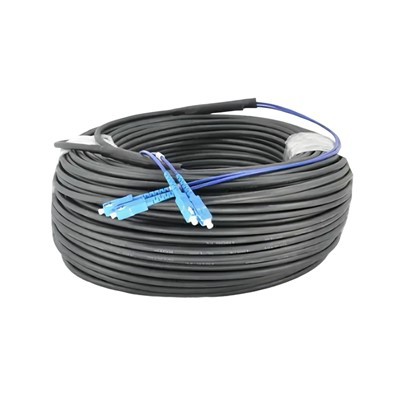
Single Mode vs Multimode
You have to pick the right fiber for your network. Fiber optik single mode has a small core and sends data with one light path. This type works well for long distances and fast speeds. Multimode fiber has a bigger core and uses many light paths. It costs less for short runs, but signal loss gets worse if the distance is long.
Feature | Single Mode Fiber | Multimode Fiber |
|---|---|---|
Core Diameter | 8–10 µm | 50–62.5 µm |
Transmission Distance | Up to 40 km | Up to 2 km |
Bandwidth | Very high | Moderate |
Typical Use | Telecom, backbone, B2B | Data centers, LAN |
Cost (Transceiver) | High | Lower |
Lifespan | 20+ years | 10–15 years |
Note: You get more value with fiber optik single mode for big business networks. It lasts longer and needs less fixing, which helps your company grow.
Material, Cost, and Lifespan Comparison
Component Type | Single Mode (Standard Parts) | Multimode (Low-Cost Parts) |
|---|---|---|
Cable Material | Stainless Steel/Alloy | Alloy/Plastic |
Initial Cost | Higher | Lower |
Maintenance Cost | Lower | Higher |
Lifespan | 20+ years | 10–15 years |
Single mode fiber uses tough materials and stays good for many years. Multimode fiber is cheaper at first, but you spend more later on repairs and new cables.
Splicing and Testing Differences
You need to know how splicing and testing are not the same for each fiber. These things change what tools you buy and how strong your network is.
Single mode fiber needs a laser light source. You pay more for transceivers, sometimes much more than multimode.
Multimode fiber uses Encircled Flux (EF) testing. This test makes sure the light goes in the right way for good results.
You must use launch cords that match your fiber. Mixing single mode and multimode fibers causes problems and signal loss.
Splicing single mode fiber needs careful work. You need special fusion splicers and must clean everything very well.
Multimode splicing is easier. You can use mechanical splicers for quick fixes, but signal loss goes up.
OTDR testing for single mode fiber finds small problems far away. Multimode OTDRs work best for short cables.
🛠️ Tip: Always pick tools that fit your fiber type. This lowers fixing costs and helps your network last longer.
Real-World Scenario
A telecom company switched from multimode to fiber optik single mode for their campus network. The team bought stainless steel patch panels and top fusion splicers. In five years, downtime dropped by 40%. They spent less on repairs, and the network could handle new IoT devices without big changes.
References/Notes
IEC 61300-3-35: Fiber Optic Interconnecting Devices Test Procedures
ITU-T G.652: Characteristics of Single-Mode Optical Fiber and Cable
TIA/EIA-568: Commercial Building Telecommunications Cabling Standard
Industry case studies on fiber optic network upgrades and ROI
Real-World Scenarios

Enterprise Case Study
You can learn a lot from real fiber optic single mode networks. Many telecom operators and EPCs made their networks better by using good splicing, OTDR testing, and patch panel management.
FTTH Deployment:
A big city set up fiber to the home with single mode fiber. The team used fusion splicers and OTDR testing for every step. They labeled and wrote down each patch panel. The network had less than 0.05 dB splice loss. People got faster internet and had fewer problems. The company spent 25% less on repairs in the first year.
Data Center Upgrade:
A global data center changed old multimode fiber to single mode fiber. You get more bandwidth and longer cables. The team used strong patch panels and careful cable routing. OTDR tests found and fixed bends before they caused trouble. The upgrade helped the center add new cloud services and IoT devices. ROI went up as the network handled more traffic with less risk.
Aerial Line Expansion:
A telecom provider grew its network with aerial single mode fiber lines. Workers had to deal with bad weather and shaking. They kept splices safe with weatherproof covers and strong locks. Regular OTDR testing found signal loss from bending and stress. The network stayed strong, even in tough weather. The provider had fewer emergency repairs and happier customers.
Tip: Always write down every step and test result. Good records help you plan upgrades and show you follow the rules.
Scenario | Technical Outcome | Business Outcome | Lessons Learned |
|---|---|---|---|
FTTH Deployment | Low splice loss, stable | Lower maintenance cost | Label and test every splice |
Data Center | High bandwidth, scalable | Higher ROI, future-proof | Use rugged panels, strict routing |
Aerial Line | Reliable in harsh weather | Fewer repairs, happy clients | Protect splices, regular OTDR |
Common Pitfalls
You may run into problems in fiber optic single mode projects. Many groups have learned how to fix these by using best practices.
- Signal Loss: Attenuation makes your signal weak from absorption, bending, and scattering. You can lower this by planning cable routes and testing often.
- Installation Challenges: Bad cuts and gaps between fibers cause signal loss. You should use good cutting tools and line up fibers well.
- Maintenance Issues: Weather and other things can hurt connections. You need strong covers and locks to keep your network safe.
🛠️ Alert: If you ignore these problems, you will pay more and have more downtime. You should train your team and buy good equipment.
You can stop most problems by following industry rules and keeping your network neat. Regular OTDR testing and careful splicing help you keep high performance and save money for a long time.
References/Notes
IEC 61300-3-35: Fiber Optic Interconnecting Devices Test Procedures
ITU-T G.652: Characteristics of Single-Mode Optical Fiber and Cable
TIA/EIA-568: Commercial Building Telecommunications Cabling Standard
Industry case studies and operational reports on fiber optic deployments
Sourcing and Quality Assurance
Picking the right way to buy parts and using strong quality checks gives your fiber optic single mode network a good start. You want every part to match industry rules. This keeps your network safe and lowers repair risks later. Good buying and quality checks help you stop costly network problems and help your business grow.

Standards and Certifications
You need to check each fiber optic single mode part with trusted standards and certifications. These rules make sure your network works well and can be upgraded later. If you follow these rules, you lower the chance of bad parts and keep your network strong for a long time.
Here is a table with the main standards and certifications for fiber optic single mode parts:
Standard/Certification | Description | Impact on Quality Assurance |
|---|---|---|
Telcordia GR-326 | Basic rules for single-mode optical connectors and jumper assemblies | Makes sure parts are made well, tested right, and suppliers are checked. |
TIA TL 9000 | Quality rules for telecom companies | Sets up quality checks for the whole supply chain and cuts down on extra rules for suppliers. |
TIA-455 series | Fiber Optic Test Procedures | Gives ways to test and measure how well parts work. |
IEC 61755 series | Rules for optical connectors | Makes sure parts from different suppliers work together and are always good quality. |
Tip: Always ask your suppliers for proof of these certifications. This helps you make sure they follow the rules and stops problems later.
You should pick parts that meet Telcordia GR-326 and IEC 61755 rules. These show your connectors and cables will work well every time. TIA TL 9000 and TIA-455 series help you keep quality high in your supply chain.
Supplier Evaluation
Choosing the right supplier is very important for your fiber optic single mode network. You want partners who know your needs and deliver on time. A good supplier lowers risks and helps your network grow.
Think about these things when picking suppliers:
- Compliance: Make sure the supplier follows all needed rules and has the right certifications.
- Delivery Reliability: Check if they ship on time and get orders right.
- After-Sales Support: Ask about their warranty, tech help, and how they replace broken parts.
- Documentation: Get test reports, certifications, and guides for every product.
- References: Talk to other business customers to see if the supplier is good.
🛡️ Alert: Suppliers with good support and clear paperwork help you fix problems fast and keep your network working.
You should work with suppliers who care about quality and always try to get better. This helps you spend less on repairs and makes your network give more value. Good buying and quality checks protect your business from surprise problems and help you grow in the future.
References/Notes
Telcordia GR-326: Basic rules for Single-Mode Optical Connectors and Jumper Assemblies
- TIA TL 9000: Telecom Quality Management System
- TIA-455 series: Fiber Optic Test Procedures
- IEC 61755 series: Optical Connector Rules
Industry tips for picking suppliers and keeping networks strong
You want your fiber optik single mode network to give good value and need little fixing. Begin with clean splicing, careful OTDR testing, and neat patch panel management. These steps help you stop expensive network problems and help your business grow. Pick certified suppliers and follow the rules for your industry. If you want to learn more, look at trusted guides and tips from experts.
📚 References/Notes: Check the standards and case studies above to learn more about fiber optik single mode best practices.

FAQ
Why should you choose fiber optik single mode for business networks?
Fiber optik single mode gives you fast speeds and works over long distances. You get less signal loss and do not need many upgrades. This choice helps your business grow and lowers maintenance costs as time goes on.
Why does proper splicing matter in fiber optik single mode installations?
Good splicing keeps signal loss low and makes strong connections. You avoid downtime and save money on repairs. Proper splicing helps your network last longer and keeps your data safe.
Why is OTDR testing important for your fiber optic network?
OTDR testing finds faults and checks signal loss. You can fix problems early and keep your network working well. Testing often protects your investment and helps your ROI over time.
Why do you need to manage patch panels carefully?
Managing patch panels keeps your network neat and organized. You can fix problems faster and make fewer mistakes. Good management lowers outages and makes upgrades easier.
Why do industry standards and certifications matter for fiber optik single mode?
Industry standards and certifications make sure your equipment is safe and high quality. You get better performance and can grow your network more easily. Certified products lower the risk of failures and protect your business.
Why should you document every splice and test result?
Writing down splices and test results helps you watch your network's health and plan upgrades. You can find and fix problems quickly. Good records help with audits and following rules.
Why does supplier selection impact your fiber optic network's success?
Picking the right supplier means you get good parts and support. Reliable suppliers help you avoid delays and expensive repairs. This choice keeps your network safe and helps your business reputation.
📚 References/Notes:
Check IEC 61300-3-35, ITU-T G.652, TIA/EIA-568, and Telcordia GR-326 for more about fiber optik single mode best practices and standards.