





Patch Cords for Data Centers: Length, Jacket, and Bend Radius Guide
Choosing the right patch cords is very important. It helps your data center work well and stay safe. If you ignore things like length, jacket type, or bend radius, problems can happen. You might have downtime, safety issues, or higher costs. The table below explains how these things affect your setup:
|
Factor |
Impact on Performance and Reliability |
|---|---|
|
Patch Cord Length |
Stops signal loss and keeps connections strong |
|
Jacket Type |
Fits the environment and makes things safer |
|
Bend Radius |
Keeps cables working and stops damage or signal loss |

Key Takeaways
- Picking the right patch cord length stops signal loss. It also keeps connections strong.
- Choose the right jacket type for better safety. This also helps follow fire rules.
- Follow the minimum bend radius to protect cables. This keeps them working well.
- Plan cable management to cut down on mess. This also helps air move better in data centers.
- Use certified patch cords to meet safety rules. This lowers the chance of fines or problems.
- Check patch cords often and replace old ones. This keeps the network working well.
- Think about the environment when picking patch cords. This helps stop damage from heat or water.
- Buying good patch cords can save money over time. It cuts repair costs and downtime.
Key Factors for Patch Cords
Picking patch cords is more than just connecting things. You have to think about length, jacket type, and bend radius. These things affect how safe your network is. They also help your network work well and stay online.

Performance Impact
You want your network to be fast and reliable. Long patch cords can slow down your network. They can make data move slower. Short cords help your network stay quick and steady. Good connectors are important too. Shielded connectors stop interference and crosstalk. This keeps your signal strong.
Tip: Use cables that match your environment. Cat6a or Cat7 S/FTP cables with LSZH jackets are best for high-performance data centers.
Here is a table that shows how cable type and length matter:
|
Cable Type |
Maximum Length |
Optimal Length |
|---|---|---|
|
Cat 5e |
100 meters |
N/A |
|
Cat 6 |
100 meters |
50 meters |
|
Cat 6a |
100 meters |
N/A |
It is important to install cables the right way. Bad installation can slow your network. Always plan your cable runs. Do not leave extra slack.
Compliance Considerations
Data centers must follow strict rules. These rules keep people and equipment safe. Patch cords must meet fire safety and hazardous material rules. RoHS stops dangerous substances like lead and mercury. UL ratings show cables are safe in fires. NFPA 75 protects IT equipment from fire, smoke, and heat.
|
Compliance Standard |
Description |
|---|---|
|
RoHS |
Stops harmful substances like lead, cadmium, and mercury. |
|
UL Ratings |
Makes sure cables are safe in fires with OFNR and OFNP materials. |
CMP-rated cables are good for easy installation. They also help air flow in racks with lots of cables.
Risk Management
Choosing the wrong patch cords can be risky. If specs do not match, you get noise and errors. Things like moisture or heat can hurt cables. This can break your network. Bad cords can cause data loss and security problems. They also cost more to fix.
|
Risk Type |
Description |
|---|---|
|
Specification Mismatches |
Wrong specs cause noise and errors. |
|
Environmental Hazards |
Water, heat, and stress can break your network. |
|
Poor Quality |
Bad cords lower performance, lose data, and cause security issues. |
Picking the right cables protects your data center. It helps you avoid downtime and keeps your network safe.
Patch Cord Length
Picking the right patch cord length is very important. It helps your data center work well, stay safe, and grow in the future. You must measure carefully, manage cables well, and keep signals strong. This stops downtime and keeps your network working for a long time.

Measuring Length
You can find the right patch cord length by following steps. This helps you avoid too much slack or pulling the cable too tight. Both can cause problems or break the cable.
Use a tape or laser tool to measure the cable path. Make sure to count all turns and height changes.
Think about adding a service loop for future changes.
Add some extra slack for each part. Experts say to add 10-20% more for moving and fixing.
Add up the path, loop, and slack to get the total length.
Tip: Always round up to the next standard patch cord length. This makes buying and installing easier.
Cable Management
Good cable management starts with the right length. In busy data centers, this cuts down on mess, helps air move, and makes fixing things easier.
Right lengths mean less slack and fewer loops.
Cables that are too long make a mess and block air. This can make things too hot.
Good cable paths stop cables from blocking other gear.
Managing cable length makes it easier to fix and upgrade later.
Here are some tips for handling slack:
Run cords so they do not get tangled or block each other.
Measure both side-to-side and up-and-down distances for the shortest length.
Do not use too much slack. This keeps racks tidy and stops problems.
Use old cords again by moving them instead of letting them pile up.
Always look over all cords at the end to catch mistakes.
Signal Integrity
Patch cord length affects how well signals travel. If cords are too long or too short, you can have problems. You might lose signal or put stress on the cable.
|
Consequence Type |
Description |
|---|---|
|
Performance Issues |
Short cords can cause problems with electricity and signals. |
|
Mechanical Strain |
Short cords pull on connectors and can break them over time. |
|
Clutter and Damage Risk |
Long cords make a mess and can get damaged more easily. |
|
Testing and Certification Challenges |
Short cords can mess up test results and make fixing harder. |
|
Network Stability |
Picking the right length keeps your network working well. |
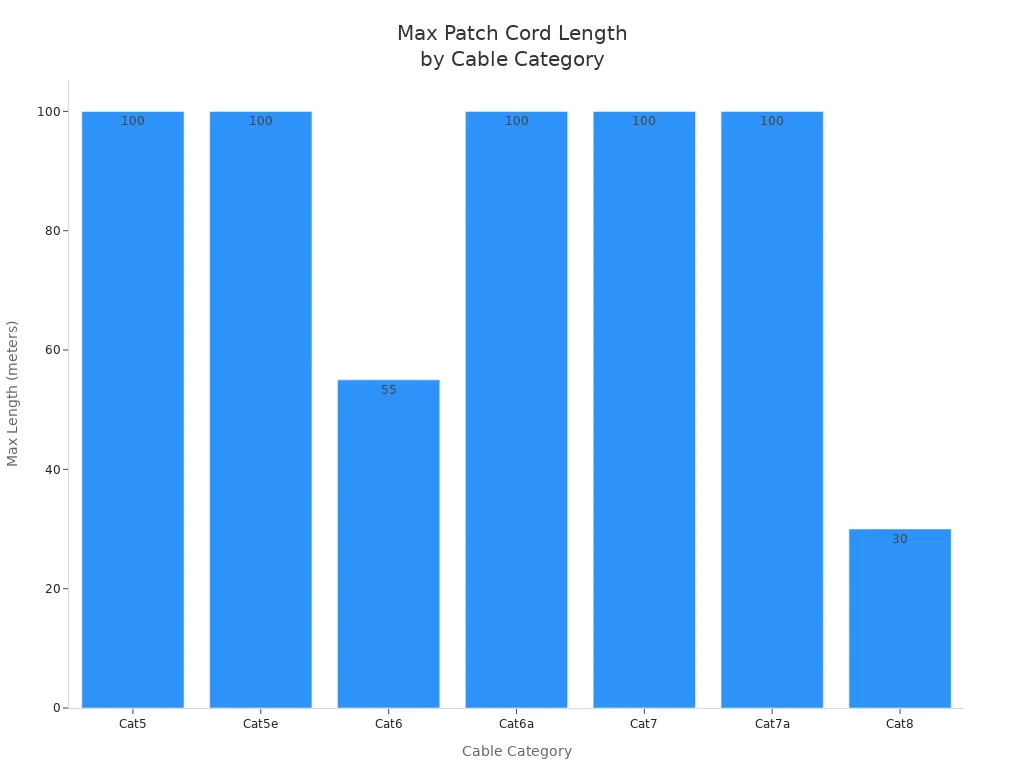
Most patch cords should not be longer than 100 meters for Cat5, Cat5e, Cat6, Cat6a, Cat7, and Cat7a. Cat8 cords should not be longer than 30 meters. If you go over these, your signal can get weak, slow down, or lag.
|
Category |
Distance (Max) |
|---|---|
|
Cat5 |
100 meters (328 feet) |
|
Cat5e |
100 meters (328 feet) |
|
Cat6 |
55 meters (180 feet) |
|
Cat6a |
100 meters (328 feet) |
|
Cat7 |
100 meters (328 feet) |
|
Cat7a |
100 meters (328 feet) |
|
Cat8 |
30 meters (98 feet) |
|
Mechanism |
Impact on Signal Integrity |
|---|---|
|
Signal Attenuation |
Long cords or bad materials can make signals weak and slow. |
|
Crosstalk Interference |
Wires close together can mess up signals. Shielded patch cords help stop this. |
|
Connection Stability |
Bad connectors can make the signal weak or slow. |
|
Electromagnetic Interference |
Other electric things nearby can mess up signals. Shielded patch cords help with this. |
Note: Always follow rules from IEC, ITU, and IEEE for cable length and setup. These rules help your network stay safe and work well.
Measuring length right helps your network work its best. It also makes it easier to handle slack and plan for the future. Picking the right patch cords saves money, lowers repair risks, and helps your data center grow.
Jacket Types
Picking the right jacket type keeps your data center safe. It also helps you follow the rules. There are three main jacket types: PVC, LSZH, and plenum. Each one has its own good and bad points. You need to know how they are different to pick the best one.

PVC vs LSZH vs Plenum
You will see three jacket types in most data centers:
PVC (Polyvinyl Chloride): This is cheap and easy to find. Many offices use PVC cables.
LSZH (Low Smoke Zero Halogen): This jacket is made for safety. LSZH does not make thick smoke or bad fumes if there is a fire.
Plenum: This jacket is the safest for fires. Plenum cables are used in places where air moves around.
Here is a table that shows how each jacket type acts in a fire:
|
Jacket Type |
Fire Safety Characteristics |
Emissions Characteristics |
|---|---|---|
|
PVC |
Makes thick black smoke and bad gases when burned |
Lets out hydrochloric acid and other bad gases |
|
LSZH |
Stops flames and does not make bad fumes |
Makes very little smoke and no bad halogen gases |
|
Plenum |
Best at stopping fire, puts itself out |
Makes almost no smoke or bad gas |
Tip: Use LSZH or plenum jackets where people or important gear are. These jackets help you follow safety rules and keep people safe.
Safety and Compliance
You have to follow safety rules in data centers. Many rules say you must use LSZH or plenum jackets. These jackets help stop bad smoke and fire damage. LSZH works well in closed rooms, like server rooms, where people may need to leave fast. Plenum cables are needed in air ducts or places where air moves.
LSZH: Follows IEC and RoHS rules for low smoke and fire safety.
Plenum: Follows NFPA and UL rules for use in air spaces.
If you pick the wrong jacket, you could fail checks or get fined. You also put your gear and people in danger.
Cost Factors
How much you pay matters too. PVC cables cost less but are not as safe in fires. LSZH cables cost more but keep things safer. Plenum cables cost the most but give the best safety.
|
Cable Type |
Cost |
Fire Safety Performance |
|---|---|---|
|
PVC Cable |
Low |
Okay |
|
LSZH Cable |
High |
Good |
|
Plenum Cable |
Highest |
Best |
Think about the price now and what you save later. Buying LSZH or plenum patch cords can save money on repairs, lower insurance, and stop big problems in your data center.
Picking the right jacket type makes your data center safer, helps you follow the rules, and keeps things running well for a long time.
Bend Radius for Patch Cords

Definition
Bend radius is the smallest curve a cable can make without breaking or losing signal. You need to know the minimum bend radius for each patch cord. This helps your network work well. For fiber-optic cables, do not bend them tighter than 10 times their width for normal use. For short or heavy bends, use 15 to 20 times the width. Copper patch cords like Cat5 need at least a 1-inch bend radius. A 2-inch bend radius is even better for both fiber and copper when running cables sideways. These rules help stop problems and keep your data center safe.
Here is a table with the minimum bend radius for common fiber types:
|
Fiber Type |
Minimum Bend Radius |
|---|---|
|
G657A1 |
10mm |
|
G657A2 |
7.5mm |
|
G657B3 |
5mm |
Tip: Always look at the cable specs before you install. Using the right bend radius keeps your network strong and protects your cables.
Performance Effects
If you bend patch cords too much, you can break them or hurt your network. Bending past the recommended bend radius can cause:
More signal loss
Damage to the cable
Cables breaking early
Not meeting important standards
Losing your warranty
Higher repair costs
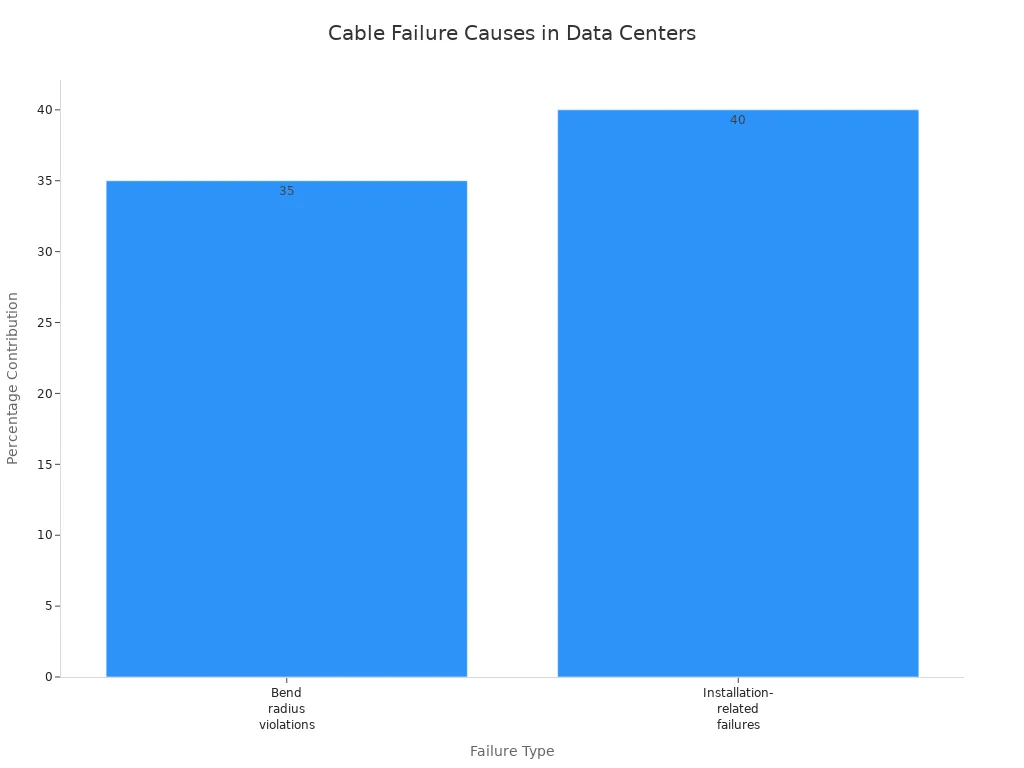
You might also get crosstalk or interference in your data. Tight bends can make cables wear out faster and make your network less steady. In data centers, 35% of failures are from bending cables too much. Another 40% come from other mistakes during setup.
|
Failure Type |
Percentage Contribution |
|---|---|
|
Bend radius violations |
35% |
|
Installation-related failures |
40% |
Common problems are:
Microbending attenuation from sharp bends
Macrobending loss from tight bends over time
Fiber breaking from too much pulling during setup
Bend-insensitive patch cords help fix these problems. You can run them around corners and walls without losing signal. Their special design bounces lost light back inside, so you get steady performance even in small spaces. These cables are good for fast networks and make it easier to install cables in crowded racks.
Best Practices
You can keep your network safe and working well by following these bend radius tips:
Check the minimum bend radius before using any patch cord.
Do not pull or force cables when setting them up.
Do not tie cords too tightly; let each one move a little to stop pinching.
Move cords to get rid of knots and twists.
Look at all connections before you finish the job.
Use mini boots or uniboot connectors to save space and help with bends in tight racks.
Pick bend-insensitive patch cords for small spaces or tricky cable runs.
Keeping cables neat makes repairs easier and helps you find problems fast. Good bend radius care also helps with upgrades and lowers repair bills.
If you follow these steps, your patch cords last longer and your data center works better. You also meet industry rules and protect your cables for years.
Sourcing and Compliance
When you buy patch cords for your data center, you have an important choice to make. You need to think about cost, quality, and following the rules. Picking the right patch cords keeps your network safe and helps it grow. If you pick the wrong ones, you might have problems, lose money, or break safety rules.

Procurement Tips
You want patch cords that work well and meet all standards. Do not just look at the price when picking a supplier. Find suppliers who can make lots of cords, show good quality, and answer you fast. Good suppliers help you avoid waiting and keep your data center running.
Here is a table to help you compare patch cord suppliers:
|
Criteria |
Description |
|---|---|
|
Production Scalability |
Check factory size and workforce. Large facilities handle big orders without delays. |
|
Quality Verification |
Ask for prototypes. Test for insertion loss, durability, and connector polish. |
|
Factory Audits |
Confirm automated testing equipment like OTDRs and IL/RL testers are in use. |
|
Performance Metrics |
Request on-time delivery rates (98% or higher) and low defect ratios. |
|
Supplier Responsiveness |
Fast communication (within 2 hours) helps resolve issues quickly. |
|
Reorder Rates |
High reorder rates (e.g., 44%) show customer satisfaction and reliability. |
Tip: Pick suppliers who have done a good job before. If they get lots of repeat orders and answer fast, they are likely to be helpful and give you good cords.
Certifications
Certifications are important when picking patch cords for your data center. They show the cords are safe and work well. Always check if the cords follow ISO/IEC, ANSI/TIA, and UL rules. Certified patch cords lower risks and help you pass checks.
ISO/IEC 11801: Sets worldwide rules for cabling in data centers.
ANSI/TIA-568: Lists what copper and fiber cabling must have.
UL Listings: Shows the cords are safe in fires and made well.
Certified patch cords protect your money and help you avoid fines. They also make sure your network follows the law.
Supplier Questions
Before you order, ask suppliers some questions. This helps you make sure the cords are safe and follow the rules.
Do your patch cords follow ISO/IEC 11801-2002 Ed.2.0 Amendment 1 and ANSI/TIA-568-B.2-10?
How do you test for alien crosstalk, and how do you stop it?
Can you give patch cords in category 6a or higher?
What is your on-time delivery rate and defect ratio?
Do you use machines like OTDRs and IL/RL testers for testing?
How fast do you answer questions or fix problems?
Asking these questions helps you get patch cords that are safe, work well, and follow all the rules.
If you follow these steps, your data center will be safer and your network will work well for a long time.
Application Scenarios

Case Studies
Patch cord choices matter in real data centers. One big telecom company changed from PVC patch cords to LSZH plenum-rated cords. This made fire safety better and helped pass tough checks. The new cords also cut downtime by 20%. They could bend more without losing signal.
Another example is an EPC contractor working on a huge FTTH rollout. The team picked bend-insensitive fiber patch cords for overhead lines and tight spaces. This made installation quicker and stopped cables from breaking. The contractor had fewer service calls and spent less on repairs.
|
Scenario |
Patch Cord Choice |
Outcome |
|---|---|---|
|
Data Center |
LSZH Plenum, Cat6a S/FTP |
Improved safety, less downtime |
|
FTTH Deployment |
Bend-insensitive Fiber |
Faster install, fewer repairs |
|
Overhead Lines |
UV-resistant Jacket |
Longer lifespan, less damage |
Lessons Learned
You can learn from these stories and avoid mistakes. Many data centers use cords that are too long or short. This makes cables messy, blocks air, and raises failure risk. Some teams forget bend radius rules. This causes signal loss and cables break early.
Success comes from planning cable length, picking the right jacket, and following bend radius rules. Always check safety standards before buying. Teams that do this have fewer outages and spend less fixing things.
Tip: Check your patch cord stock often. Replace cords that do not meet safety or performance rules.
ROI Impact
Good patch cords help you save money over time. You get fewer bit errors and stop signal loss. This keeps your network strong and fast. Reliable patch cords mean less trouble and less downtime. You spend less on repairs and replacements.
|
Factor |
Impact on ROI |
|---|---|
|
Fewer Bit Errors |
Less troubleshooting needed |
|
Lower Signal Loss |
Higher network efficiency |
|
Better Compliance |
Avoid fines and penalties |
|
Longer Cable Lifespan |
Fewer replacements required |
Buying the right patch cords is worth it. Your data center works better, your team fixes less, and you protect your investment.
Selection Checklist

Step-by-Step Guide
Picking the right patch cords keeps your network safe. It also helps you follow the rules and lets your data center grow. Use these steps to make good choices:
Map Your Data Center
Draw a top-down map of your data center. Show where all the cables will go. This helps you see where patch cords need to run. You can also plan for air to move and for people to reach things.
Label Hardware and Ports
Give each piece of hardware a clear name. Count how many ports you have. This stops mix-ups and helps you pick the right patch cord length and type.
Adopt Structured Cabling
If you do not use structured cabling, make a plan for it. Structured cabling keeps things neat and makes upgrades easier.
Plan for Growth
Find spots that might need more gear later. Add these places to your map. Planning now saves time and money in the future.
Mark Hardware Locations
Show where each piece of hardware will go on your map. This helps you avoid mistakes when you set things up.
Check Cabling Needs
Make sure you have enough patch cords and trunking. Check that you have open ports at the main area and racks. This lets you connect all your devices from the start.
Specify Cable Types and Quantities
If you need new trunking, pick the fiber type and connector type. Write down how many patch cords you need for each spot.
Tip: Always check your plan again before you order. This helps you avoid mistakes and keeps your data center working well.
Final Tips
You can make your data center work better and safer by following these tips:
Use standards like ANSI/TIA and ISO/IEC for patch cord setups.
Follow all rules from the government to keep your team and gear safe.
Plan cable paths before you put them in. This helps air move and makes fixing things easier.
Keep cable length and bend radius right. This stops damage and keeps signals strong.
Use Velcro ties to hold cables. Do not use plastic zip ties because they can hurt cables.
Make sure all gear is grounded and bonded to stop electrical problems.
Pick patch cords with the right jacket type for your space. Use LSZH or plenum jackets in high-safety areas.
Check patch cords often and replace any that are worn out or do not meet rules.
Use surge-protected PDUs to keep your network safe from power spikes.
If you follow these steps, you lower downtime and make your network stronger. You also protect your data center investment. Good patch cord choices save money and give you peace of mind.
Picking the right patch cord length, jacket type, and bend radius helps your data center stay safe. It also makes everything work better and saves money. You can stop problems and keep things running smoothly if you make smart choices.
Check the patch cords you have now. Talk to good suppliers to make sure your data center follows the rules and can grow in the future.
FAQ
What makes patch cord length critical for data center reliability?
Patch cord length changes signal quality and network uptime. Cords that are too long can make signals weak. Short cords might pull and break easily. Picking the right length keeps your data center working well.
Why should you care about jacket type in patch cords?
Jacket type keeps cables safe and follows safety rules. LSZH and plenum jackets help stop fires and bad smoke. Using the right jacket helps you pass checks and keeps people safe.
How does bend radius impact patch cord performance?
Bend radius tells you how much you can curve a cable. Bending cables too much can break them or make signals weak. Following bend radius rules keeps connections strong.
Why do data centers need certified patch cords?
Certified patch cords follow safety and performance standards. Using certified cords lowers risk and helps you avoid fines. These cords last longer and work well with fast networks.
What problems can poor cable management cause?
Bad cable management makes things hot and blocks air. It is hard to find problems when cables are messy. Organizing cables and using the right length helps lower downtime and repair costs.
Why should you choose bend-insensitive fiber patch cords?
Bend-insensitive fiber patch cords keep signals strong in tight spots. They work well in crowded racks and tricky setups. These cords help you avoid repairs and keep your network running.
How do you know which patch cord is best for your data center?
You should draw your layout, check safety rules, and plan for growth. Pick patch cords by length, jacket type, and bend radius. This keeps your network safe and working well.
Why does patch cord selection affect ROI?
Good patch cord choices lower repair costs and stop outages. You save money and protect your data center. Reliable patch cords help your business grow and keep things running.