



Why Fiber Optic Patch Cable Choices Matter for You
Choosing the right fiber optic patch cable affects your network. It changes speed, reliability, and costs over time. Different cables give different results. Look at this table to see how cable type changes performance in real networks:
|
Cable Type |
Speed Impact |
Reliability |
Cost Impact |
|---|---|---|---|
|
Helically Stranded Tight-Buffered |
High |
High |
Low |
|
Ribbon Cable |
Moderate |
Low |
Moderate |
|
Standard Copper Cables |
Low |
Moderate |
High |
Connector type, polish type, and loss budget all matter. These things help your system work well. If you know about these factors, you can avoid mistakes. You can make choices that keep your network strong.

Key Takeaways
- Picking the right fiber optic patch cable affects how fast your network is. It also affects how well it works and how much it costs. Make smart choices to help your network work better.
- Learn about connector types like LC, SC, and MPO. Each type has its own use. Using the right connector for your equipment stops signal loss. It also helps avoid network problems.
- Choose the correct polish type, like UPC or APC, for your network. APC polish lowers back reflection. This helps your signal stay strong.
- Watch your loss budget to keep your network working well. If you go over this budget, your network may slow down or stop working.
- Do not mix up fiber types or connectors. Plan carefully and check your cables. This can help you avoid expensive network troubles.
Fiber Optic Patch Cable Connector Types

LC, SC, MPO
When you choose a Fiber Optic Patch Cable, you need to know about connector types. The three most common connectors are LC, SC, and MPO. Each one has a different design, size, and use.
|
Connector Type |
Size (Ferrule) |
Port Density |
Insertion Loss |
Durability (Cycles) |
|---|---|---|---|---|
|
SC |
2.5mm |
24 ports/U |
0.25–0.5 dB |
500–1,000 |
|
LC |
1.25mm |
48 ports/U |
0.1–0.3 dB |
500–1,000 |
|
MPO |
Multi-fiber |
Up to 144 |
0.2–0.5 dB |
500 |
SC connectors use a 2.5mm ferrule. You often see them in telecom and broadband networks. They are easy to use and last a long time.
LC connectors are smaller, with a 1.25mm ferrule. You find them in high-density setups, like data centers. Their small size lets you fit more connections in less space.
MPO connectors can connect many fibers at once. You see them in large data centers where you need to move a lot of data quickly.
Tip: LC connectors help you save space in crowded racks. MPO connectors make it easy to install many fibers at once.
Connector Choice
Your choice of connector changes how you install and maintain your Fiber Optic Patch Cable.
SC connectors are simple to install. You can use them in places with lots of people moving around, like telecom rooms.
LC connectors need careful handling because they are small. They work best when you need many connections in a small area.
MPO connectors let you connect many fibers at once. This saves time in big data centers and reduces maintenance work.
If you mix connector types by mistake, you can face problems. The wrong connectors can cause signal loss, slow speeds, or even network failure.
|
Compatibility Issue |
Description |
|---|---|
|
Signal Loss |
Mismatched connectors weaken your signal. |
|
Inefficiency |
Wrong connectors slow down your data transfer. |
|
System Failure |
Incompatible connectors can stop your network. |
You should always match connector types to avoid these issues. Standards like IEC and IEEE help guide these choices. When you pick the right connector for your Fiber Optic Patch Cable, you get better performance and fewer problems.
UPC vs APC Polish

Polish Differences
There are two main polish types for Fiber Optic Patch Cable connectors. These are UPC and APC. UPC connectors have a flat endface. APC connectors have an endface with an eight-degree angle. This angle changes how light moves inside the fiber.
The eight-degree angle on APC connectors sends light into the cladding. It does not send light straight back to the source.
UPC connectors send light straight back. This can cause more signal problems.
|
Fiber Connector Type |
Insertion Loss (IL dB) |
Return Loss (RL dB) |
|---|---|---|
|
UPC |
≤0.2 |
≥50 |
|
APC |
≤0.3 |
≥60 |
Note: APC connectors have the lowest back reflection. This is important for single-mode fiber use.
Signal Quality
You want your network to have strong signal quality. The polish type affects this. APC connectors give better return loss. The angled endface sends light away from the source. This helps keep signal quality high.
APC connectors have return loss of -60 dB or more.
UPC connectors have return loss of at least -50 dB.
Using APC polish lowers back reflection. This keeps your network stable. It is helpful for high-speed or long-distance links.
Application Fit
Pick the polish type that fits your needs. APC connectors work best where low back reflection matters most.
Optical radio frequency systems like CATV
Passive optical networks (PON)
High-speed telecom links
UPC connectors work well in regular data networks. They are good for short-distance connections. If your business uses sensitive equipment or long fiber runs, APC polish helps you avoid signal loss and downtime.
Tip: Always use the same polish type at both ends of your Fiber Optic Patch Cable. Mixing UPC and APC can cause high loss and poor performance.
Industry standards like IEC and IEEE help you choose the right polish. Leading brands suggest APC polish for advanced uses. Your choice affects your network's value and ROI over time.
Loss Budgets

What Is Loss Budget
You need to understand the loss budget before building or upgrading your fiber network. The loss budget is the total amount of signal loss your fiber link can handle while still working without errors. This number matters because it keeps your signal strong enough for the receiver to read data. If you go over the loss budget, your network can slow down or stop working.
A loss budget helps you in many ways:
You check if your design will work.
You find problems by comparing actual loss to your plan.
You see if you can add new parts without hurting performance.
You predict how your network will work over time.
Cable Impact
Your choice of connectors and polish style changes the total loss in your network. Different connectors and polish types have their own loss numbers. For example, APC connectors have higher return loss, which means less signal comes back and causes problems. UPC connectors have lower return loss but work well for short links.
|
Connector Type |
Polishing Style |
Return Loss (dB) |
Best For |
|---|---|---|---|
|
PC |
Slight convex end-face |
~ -40 dB |
Cost-sensitive, legacy uses |
|
UPC |
Enhanced convex polish |
~ -50 dB |
Telecom, data centers |
|
APC |
8° Angled polish reduces reflection |
~ -60 dB |
High power, PON, RF over fiber |
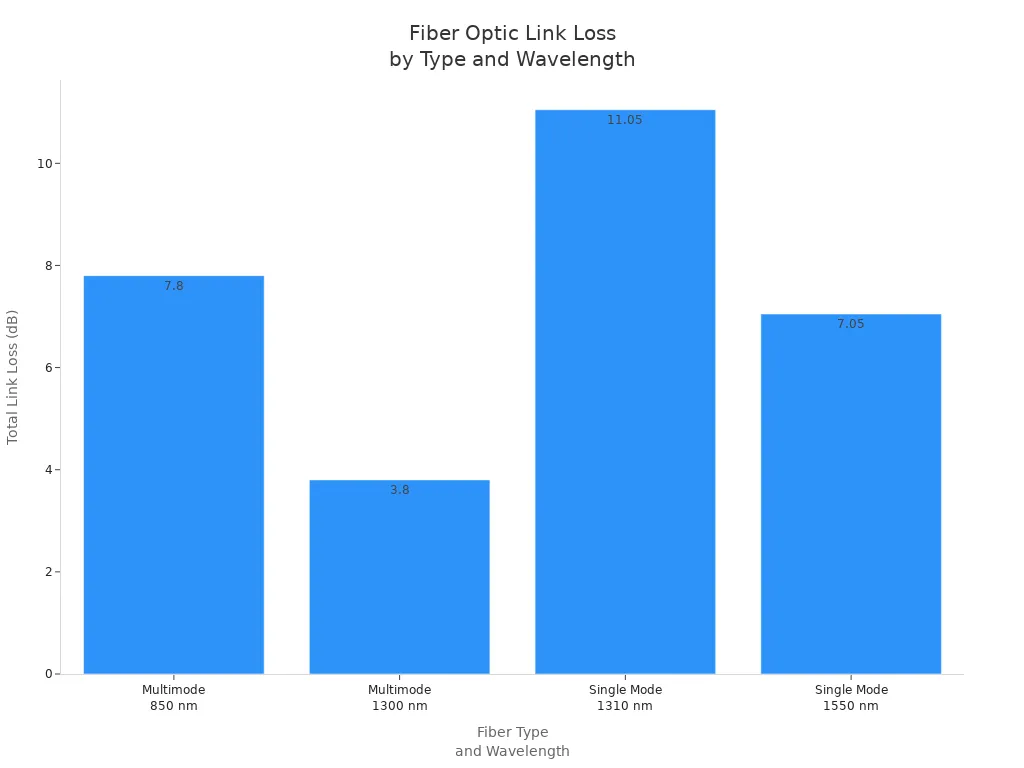
The type of fiber also affects your loss budget. Look at the table below to see how single-mode and multimode fibers compare:
|
Fiber Type |
Wavelength (nm) |
Fiber Attenuation (dB/km) |
Total Fiber Loss (dB) |
Total Connector Loss (dB) |
Total Splice Loss (dB) |
Total Link Loss (dB) |
|---|---|---|---|---|---|---|
|
Multimode |
850 |
3 |
6.0 |
1.5 |
0.3 |
7.8 |
|
Multimode |
1300 |
1 |
2.0 |
1.5 |
0.3 |
3.8 |
|
Single Mode |
1310 |
0.4 |
7.0 |
3.75 |
0.3 |
11.05 |
|
Single Mode |
1550 |
0.3 |
3.0 |
3.75 |
0.3 |
7.05 |
Minimizing Loss
You can take steps to keep your network within the loss budget. Here are some ways to lower loss:
Use high-quality cables with matching properties.
Pick connectors with low insertion loss.
Reduce the number of joints by using longer cables.
Follow proper splicing methods and keep the environment clean.
Make sure connectors fit tightly to stop light from leaking.
Clean connectors often to avoid dirt and dust.
Plan your cable routes to avoid sharp bends and twists.
Hire skilled workers for installation.
Protect cables from lightning, corrosion, and damage.
Tip: Always check your loss budget before adding new Fiber Optic Patch Cable links. This helps you avoid costly mistakes and keeps your network running smoothly.
Industry standards like IEC and IEEE set limits for loss budgets. Following these standards helps you build reliable networks for business, telecom, or data center use.
Choosing the Right Patch Cable

Assess Needs
You should know what your network needs before picking a Fiber Optic Patch Cable. Think about these questions: What kind of data will you send? How far does your signal need to go? Where will the cable be used-inside, outside, or in tough places? How many devices will connect, and will you add more later?
Look at these things when choosing:
Transmission mode: single-mode is for long distances, multimode is for short ones.
Fiber strand setup: simplex sends data one way, duplex sends it both ways, multi-fiber is for lots of data.
Jacket material: riser-rated is for going up floors, plenum-rated is for air spaces, armored is for outside or risky spots.
Connector interface: LC, SC, MPO, or others, depending on your gear.
Ferrule polish type: UPC is for normal use, APC is for high performance.
Tip: Outdoor cables need strong jackets. These jackets protect from sun, water, and damage. They work in very hot or cold weather. They can bend, twist, and pull without breaking. If you put cables underground or in pipes, pick armored ones for extra safety.
Think about the future too. Fiber optic technology lets you grow your network easily. You do not have to change everything. This helps your business get bigger and use new tools.
Performance vs Cost
You need to balance speed and cost for your network. You want fast and steady connections, but you also need to save money.
|
Cable Type |
Lifespan (years) |
Installation Time (hours) |
Cost (per meter) |
ROI Factors |
|---|---|---|---|---|
|
OM1 Multimode |
10 |
1 |
Low |
Basic office, low cost |
|
OM4 Multimode |
15 |
1.5 |
Moderate |
High speed, future-proofing |
|
Single-mode |
20 |
2 |
High |
Long distance, low downtime |
|
Armored Outdoor |
20+ |
2.5 |
Highest |
Extreme environments, safety |
OM1 cables are cheap but only give basic speed. OM4 and single-mode cables cost more but are faster and go farther. Armored cables stop damage and lower repair costs.
The number of connectors changes your budget. Small networks do not need many connectors. Big data centers need lots, so costs go up. Pick cable length based on how far apart your devices are. This stops waste and keeps loss low.
Note: Rules like ISO/IEC 14763-3 and TIA-568.3-E say what color cables should be, what connectors to use, and how to test them. Following these rules keeps your network safe and good quality.
If you pick better cables, you get less downtime and fewer repairs. This saves money over time. Good cables mean your network works well and you lose less work time.
Common Mistakes
People often make mistakes when picking patch cables. You can avoid problems by learning what not to do:
Using single strand optical fiber devices wrong. If you use the wrong transceivers, your network can fail.
Mixing single-mode and multimode fiber. This causes lost data and errors.
Not knowing connector types. SC, LC, and MPO connectors have special uses and may not work together.
Forgetting about connector loss. More connectors mean more signal loss and worse performance.
Mixing APC and UPC connectors. These do not work together and hurt your signal.
Connecting SFP to SFP+ transceivers. Different speeds cause problems.
⚠️ Alert: If you go over your loss budget, you get more insertion loss. This hurts your signal and makes your network less reliable. It can also cost you money if your network goes down.
Always check cables and connectors before you use them. Use fiber microscopes and end-face probes to look for dirt or damage. Tools like OTDR help you find signal loss and check quality.
|
Mistake |
Consequence |
Prevention Tip |
|---|---|---|
|
Mixing fiber types |
Packet loss, errors |
Match fiber type to equipment |
|
Ignoring connector loss |
Reduced performance |
Limit number of connectors |
|
Using wrong polish type |
Signal degradation |
Use same polish at both ends |
|
Skipping inspections |
Hidden faults, downtime |
Test and inspect before install |
Plan for growth. Fiber optic cables can handle more data as your needs grow. This means you do not have to buy new cables often.
Tip: Buy cables from trusted companies and follow quality checks. Good cables lower repair costs and keep your network working longer.
Picking the right Fiber Optic Patch Cable makes your network strong. If you choose the right connector, polish, and loss budget, you stop signal loss. This also helps you avoid network downtime. You can make your network last longer by following a good plan:
You get the speed you need and keep things working.
You stop early problems by thinking about where cables will be used.
You make sure everything works with what you already have.
Learning about new cable types gives you faster speeds. It also lets your network get bigger. To do your best, check your cables, plan ahead, and use trusted help like CommScope's training and videos.
FAQ
Why does connector type matter for my fiber optic patch cable?
Connector type affects how well your network works. You get better speed and reliability when you match connectors to your equipment. Using the wrong type can cause signal loss and downtime.
Why should I care about polish type (UPC vs APC)?
Polish type changes how much light reflects inside your cable. APC polish lowers back reflection, which helps your signal stay strong. UPC polish works for short links. Picking the right polish keeps your network stable.
Why is loss budget important when choosing patch cables?
Loss budget tells you how much signal your network can lose before problems start. If you go over the budget, your network slows down or stops. You need to plan your cables and connectors to stay within limits.
Why do standards like IEC and IEEE matter for fiber optic patch cables?
Standards make sure your cables work with other equipment. They help you avoid mistakes and keep your network safe. Following standards gives you better performance and long-term value.
Why should I avoid mixing single-mode and multimode fiber cables?
Mixing single-mode and multimode cables causes errors and lost data. You need to match fiber types to your devices. This keeps your network fast and reliable.