





Lc fiber optic patch cord- OS2/OM3/OM4 Specs and Uses
You use lc fiber optic patch cord technology for fast data in your telecom systems. The differences between OS2, OM3, and OM4 are important for your fiber setup.
OS2 works with single-mode fiber and is best for long distances.
OM3 and OM4 use multimode fiber with a 50-micron core, but OM4 gives more data bandwidth.
Picking the right fiber type helps your network work well, saves money, and can grow bigger later.
Making a good choice means less downtime and better long-term value.
Key Takeaways
- Pick the right fiber type for your network. OS2 works best for long distances. OM3 and OM4 are good for fast, short connections.
- LC connectors help save space. They let you fit more connections in small places. These are great for data centers and crowded spots.
- Learn about OS2, OM3, and OM4 specs. OS2 is for long links. OM3 works for 10G up to 300 meters. OM4 supports 10G up to 550 meters.
- Make sure your fiber optic cables are high quality. Check for certifications that show they meet industry rules. This helps them work better and last longer.
- Check and take care of your fiber optic patch cords often. This stops problems and keeps your network running. Good care can lower signal loss a lot.
- Think about future needs when picking fiber optic cables. Choosing higher bandwidth like OM4 now can save money later.
- Use color codes to tell fiber types apart. Yellow means OS2. Aqua is for OM3. Magenta shows OM4. This makes setup and fixing easier.
- Always talk to vendors about your fiber optic cables. Make sure they have what you need and can help you quickly.
LC Fiber Optic Patch Cord Overview

LC Connector Features
LC connectors are small and work well. They use a clip-lock to stay in place. This lock helps you connect fast and keeps cables from coming loose. Because LC connectors are tiny, you can fit many in a small space. This is important for data centers today.
Here's a table that compares LC connectors and SC connectors:
|
Characteristic |
LC Connectors |
SC Connectors |
|---|---|---|
|
Size |
Smaller in size |
Larger in size |
|
Latching Mechanism |
Clip-locking mechanism |
Push-pull latching mechanism |
|
Compatibility |
Mainly for data centers |
Compatible with a wide range |
|
Cable Diameter |
0.9mm or 1.6mm |
2.5mm or 3.0mm |
LC connectors are good for places with lots of cables. They save space and make setup easier. The latch is longer, so you can unplug them even if the panel is crowded.
Patch Cord Construction
When you pick an lc fiber optic patch cord, you want it strong and steady. Makers follow careful steps to build each cable. This makes sure every cable is made right.
|
Step |
Description |
|---|---|
|
1 |
Fan-out: The duplex cable is separated at 16cm from the top and a 2cm heat-shrinkable tube is applied. |
|
2 |
Threading: Specific procedures for threading the number ring and boot according to SOP requirements. |
|
3 |
Components: Use of aluminum parts, rivets, and stop rings after stripping the cable. |
|
4 |
Quality Check: Self-inspection and quality IPQC must be confirmed before proceeding. |
|
5 |
Boot Application: Follow schematic diagrams for applying the boot and heat-shrinkable tubes. |
These steps help your cables last longer and work better. Checks at each step stop problems before they happen. This means you fix less and save money.
High-Density Applications
You want your network to hold more connections. LC connectors let you fit twice as many ports as older types.
LC connectors are smaller, so you can add more in one spot.
A 1U rack panel holds 24 LC ports, but only 12 SC ports.
In a 42U rack, you get 1,008 LC ports and only 504 SC ports. This lets you grow your network without using more space.
Using LC connectors gives you better value and helps your network run smoother. You can make your system bigger, fix less, and move data faster.
Tip: When you set up new fiber optic cables, think about LC connectors. They save space and work well in places with lots of cables.
OS2, OM3, OM4 Specs
Choosing the right lc fiber optic patch cord depends on understanding the technical specs of each fiber type. OS2, OM3, and OM4 fiber optic cables each serve different needs in data transmission, network design, and business growth. You need to know how each fiber performs, what standards it meets, and how it supports your data goals.

OS2 Specs
Wavelength and Distance
OS2 fiber optic cables use single-mode fiber. You get reliable data transmission over long distances. OS2 supports wavelengths from 1260 nm to 1625 nm. You can transmit data up to 10 kilometers at 1310 nm and up to 40 kilometers at 1550 nm. For large-scale networks, OS2 can reach up to 200 kilometers with the right equipment.
|
Specification |
Value |
|---|---|
|
Cable Length |
30m (98.4ft) |
|
Fiber Type |
OS2 Single Mode |
|
Core Size |
9/125µm |
|
Wavelength Support |
1260-1625nm |
|
Insertion Loss |
Below 0.3dB |
|
Maximum Attenuation |
0.4 dB/km |
|
Supported Distances |
10G from 5-10km at 1310nm, 30-40km at 1550nm |
|
Standards Compliance |
ITU-T G652.D/G657.A1, IEC60703-2-50 type B1.3/B6.a1 |
OS2 single-mode fiber meets strict IEC and ITU standards. This ensures stable performance and long-term reliability for your network.
Attenuation and Standards
You want low signal loss for your fiber optic cable. OS2 offers maximum attenuation of 0.4 dB/km. This means your data stays strong over long distances. OS2 cables also pass tensile strength tests (≥70kN) and salt spray tests (≥500h), giving you a lifespan of 15+ years in harsh environments.
Key compliance features:
OS2 fiber optic cables support data speeds from 1G to 100G.
LSZH jackets reduce toxic smoke in case of fire, improving safety.
TIA, IEC, and ITU standards ensure your network meets global requirements.
OM3 Specs
Bandwidth and Distance
OM3 fiber optic cables use multimode fiber with a 50/125µm core. You get high bandwidth for fast data in short to medium distances. OM3 supports 10G data rates up to 300 meters and 1G up to 1000 meters at 850 nm. This makes OM3 ideal for data centers and enterprise LANs.
|
Bandwidth (MHz-km) |
Distance (meters) at 850 nm |
Distance (meters) at 1310 nm |
|---|---|---|
|
1500 @ 850 nm |
1000 |
600 |
|
2000 @ 1300 nm |
300 |
300 |
You can transmit data efficiently in high-density environments. OM3 fiber meets IEEE 802.3ae and TIA-492AAAC standards for 10G Ethernet.
Jacket Color and Identification
You identify OM3 fiber optic cables by their aqua jacket color. This color coding follows the EIA/TIA-598 standard, making it easy to manage cables in large installations.
|
Fiber Type |
Jacket Color |
|---|---|
|
OM1/OM2 |
Beige/Black |
|
OM3 |
Aqua |
|
OM4 |
Magenta |
Printed legends on the cable show fiber count and type, such as "12 Fiber, 8 x 50/125, 4 x SM."
This helps you avoid mistakes during installation and maintenance.
OM4 Specs
Enhanced Bandwidth
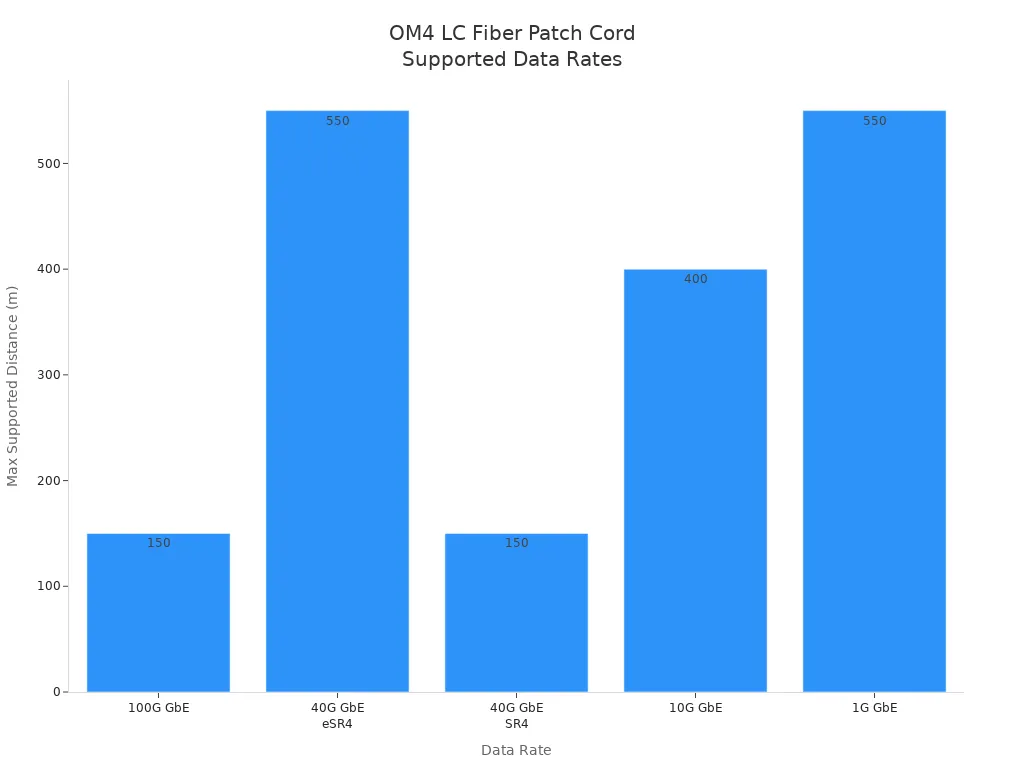
OM4 fiber optic cables take multimode fiber performance further. You get an effective modal bandwidth of 4700 MHz·km at 850 nm. This is more than double OM3's 2000 MHz·km. OM4 supports 10G data rates up to 550 meters and 40/100G up to 150 meters. You can transmit data faster and farther in high-speed networks.
OM4 fiber supports 10G up to 550 meters, 40G/100G up to 150 meters.
Lower attenuation rates mean less signal loss and better performance.
High-Speed Support
You need fiber optic cables that keep up with modern data demands. OM4 supports high-speed data transmission for 10G, 40G, and 100G Ethernet. This makes OM4 the best choice for future-proofing your network.
|
Data Rate |
Distance |
|---|---|
|
100G GbE |
150m |
|
40G GbE |
550m (eSR4) |
|
40G GbE |
150m (SR4) |
|
10G GbE |
400m |
|
1G GbE |
550m |
OM4 fiber optic cables meet IEC 60793-2-10 and TIA-492AAAD standards. You get high reliability, long lifespan, and strong ROI for your business.
Quick Comparison: OS2 vs OM3 vs OM4
|
Feature |
OS2 (Single-mode) |
OM3 (Multimode) |
OM4 (Multimode) |
|---|---|---|---|
|
Core Size |
9/125µm |
50/125µm |
50/125µm |
|
Bandwidth @ 850 nm |
N/A |
2000 MHz·km |
4700 MHz·km |
|
Max Distance (10G) |
40km+ |
300m |
550m |
|
Jacket Color |
Yellow |
Aqua |
Magenta |
|
Standards |
ITU, IEC, TIA |
IEEE, TIA |
IEEE, TIA, IEC |
|
Lifespan |
15+ years |
15+ years |
15+ years |
|
Tensile Strength |
≥70kN |
≥70kN |
≥70kN |
|
Salt Spray Test |
≥500h |
≥500h |
≥500h |
You can see that each fiber type fits a different use case. OS2 is best for long-haul, high-capacity links. OM3 and OM4 are ideal for high-speed, short-range data transmission in data centers. OM4 gives you the most bandwidth and future-proofing for new technologies.
Tip: For B2B buyers, choosing the right fiber means less downtime, lower repair costs, and better network growth. Always check compliance with IEC, ITU, and TIA standards for peace of mind.
Key Differences

Specs Comparison Table
It helps to look at lc fiber optic patch cord types side by side. The table below shows OS2, OM3, and OM4 in important areas. You can see how they are different in fiber type, core size, bandwidth, and how far data can go.
|
Feature |
OS2 (Single-mode) |
OM3 (Multimode) |
OM4 (Multimode) |
|---|---|---|---|
|
Fiber Type |
Single-mode |
Multimode fiber |
Multimode fiber |
|
Core Size |
9/125µm |
50/125µm |
50/125µm |
|
Bandwidth @ 850 nm |
N/A |
2000 MHz·km |
4700 MHz·km |
|
Max Distance (10G) |
40km+ |
300m |
550m |
|
Jacket Color |
Yellow |
Aqua |
Magenta |
|
Typical Use |
Long-haul |
Data center |
High-speed DC |
|
Compliance |
ITU, IEC, TIA |
IEEE, TIA |
IEEE, TIA, IEC |
You can use this table to quickly compare om1, om2, om3, om4, and om5 when you plan your network.
Performance in Use
You want your business to send data fast and without problems. OS2 fiber lets you send data the farthest. You can send data over 40 kilometers and still keep the signal strong. OS2 is best for sending data between buildings or cities.
OM3 and OM4 use multimode fiber. They give you fast speeds and lots of bandwidth for shorter distances. OM3 works for 10G up to 300 meters. OM4 gives even more bandwidth and lets you send 10G data up to 550 meters. OM4 also works for 40G and 100G networks in big data centers.
OS2: Best for long trips and low signal loss.
OM3: Good for regular data center connections.
OM4: Great for fast and high-bandwidth jobs.
Pick the fiber type that fits your network. This helps your system work well and saves you from spending more money later.
Cost and Supply
Think about price, materials, and how easy it is to get cables. OS2 cables use single-mode fiber and usually cost more than multimode ones. They cost more because the core is made carefully and needs strict rules. OS2 lasts longer and needs less fixing.
OM3 and OM4 use multimode fiber. OM3 is the cheapest for short and crowded links. OM4 costs more than OM3 because it has better bandwidth and stronger parts. OM4 often has stainless steel connectors to last longer. OM3 may use regular alloy parts.
|
Fiber Type |
Typical Material |
Lifespan (years) |
Cost Level |
ROI Potential |
|---|---|---|---|---|
|
OS2 |
Stainless steel core |
15+ |
High |
High (long-term) |
|
OM3 |
Alloy/standard parts |
15+ |
Low |
Good (short-term) |
|
OM4 |
Stainless steel core |
15+ |
Medium-High |
Highest (future-proof) |
If you buy for a business, balance the price with long-term value. OS2 is best for long-distance links. OM4 gives the most bandwidth and gets your data center ready for the future. Always check if you can get cables easily and ask sellers about wait times and certifications.
Applications

OS2 Use Cases
You pick OS2 lc fiber optic patch cord for sending data far. OS2 uses single-mode fiber. It can carry lots of data with little signal loss. This makes OS2 great for telecom operators and EPCs. They use it to build networks between buildings or cities.
Common places for OS2 fiber optic cables:
School networks that link many buildings
Hospitals with big campuses
Government offices needing secure, long links
Companies with more than one building
Outdoor projects using overhead lines
OS2 is often used in FTTH (Fiber to the Home) networks. The single-mode design gives steady bandwidth and strong data delivery. It works well even in tough conditions. OS2 fiber meets strict rules, so it lasts long and needs less fixing. Telecom operators and sellers like OS2 because it works with global systems.
Note: OS2 fiber optic cables help you avoid downtime and save on repairs in big, busy networks.
OM3 Use Cases
You choose OM3 lc fiber optic patch cord for fast data in data centers and LANs. OM3 uses multimode fiber. It gives high bandwidth for short or medium distances and costs less. You can connect servers, switches, and routers easily. OM3 is good for racks with lots of connections.
OM3 fiber optic cables are used in:
Data centers needing cheap upgrades
Server rooms with many connections
Enterprise LANs for quick data between devices
OM3 multimode fiber supports 10G Ethernet up to 300 meters. You get easy setup and it works with what you already have. You can upgrade your network step by step. Sellers and EPCs like OM3 for its many options and quick delivery.
Tip: OM3 fiber helps you get enough bandwidth without spending too much. It is smart for growing data centers.
OM4 Use Cases
You use OM4 lc fiber optic patch cord when you need the fastest speeds and most bandwidth. OM4 uses advanced multimode fiber made for 850nm VCSELs. It can send data at 10, 40, or 100 Gb/s. OM4 is needed for modern data centers and fast LANs.
Main uses for OM4 fiber optic cables:
Fast networking in big data centers
10 Gigabit Ethernet and higher
Places needing top performance and reliability
Projects needing protection from electromagnetic interference
OM4 is found in important systems where speed cannot drop. Telecom operators and EPCs pick OM4 to get ready for new tech and avoid downtime. OM4's bigger bandwidth and longer reach make it best for future data needs.
Callout: OM4 fiber gives you the best value. It supports fast data growth and means fewer upgrades.
Table: Ideal Environments for Each Fiber Type
|
Fiber Type |
Best Use Case |
Typical User |
|---|---|---|
|
OS2 |
Long-haul, high-capacity links |
Telecom, Government |
|
OM3 |
Data center, enterprise LAN |
EPCs, Distributors |
|
OM4 |
High-speed, future-proof networks |
Data Centers, Operators |
You can look at om1 om2 om3 om4 om5 tables to see which fiber fits your project. Always pick fiber optic cables that match your network's data and bandwidth needs for the best results.
Choosing the Right LC Fiber Optic Patch Cord

Assessing Network Needs
You need your lc fiber optic patch cord to fit your network. First, check how far your data must go. Think about how much data you want to send. You have to pick between single mode and multimode fiber. Single mode is best for sending data far. Multimode is good for short links in data centers.
Single Mode vs. Multimode: Use single mode for long trips. Use multimode for short, crowded setups.
Core Diameter: Pick the right core size for your network. Single mode uses a 9-micron core. Multimode uses 50 or 62.5 microns.
Types of Fiber: Learn the types. OS1 and OS2 are single mode. OM1, OM2, OM3, OM4, and OM5 are multimode. Use a chart to compare om1 om2 om3 om4 om5.
Check your current cables and plan for upgrades. If your business will grow, pick a patch cord that can handle more data and longer runs. This helps you avoid buying new cables and stops network problems.
Tip: Always look at your network's setup and future plans before you buy. This helps your network grow and use new tech.
Balancing Cost and Performance
You need to think about price and how well your network works. Better fiber costs more, but it saves money later. OM3 and OM4 multimode cables give different speeds and reach. OM3 is cheaper and works for most jobs. OM4 costs more but gives you more speed and lasts longer.
Think about what you need. If you only need short links, OM3 is fine. For faster or longer runs, OM4 is better.
Compare prices. OM1 is the cheapest. OM4 costs the most. Pick the cable that fits your job.
Match the specs to your needs. Sometimes OM1 is enough for short runs, even if OM4 is faster.
|
Fiber Type |
Cost Level |
Bandwidth |
Best Use Case |
|---|---|---|---|
|
OM1 |
Low |
Basic |
Short links |
|
OM3 |
Medium |
High |
Data centers |
|
OM4 |
High |
Highest |
Future-proof |
|
OS2 |
High |
Long-haul |
Campus, WAN |
Think about what you will need later. Spending more now on OM4 or OS2 can save you money on fixes and upgrades. This keeps your network working and stops downtime.
Note: Buying the right fiber optic cables now means less fixing and better value later.
Vendor and Quality
You want fiber optic cables you can trust. Always check if the cables have the right certificates. Look for OS2 fiber if you need to send data far, up to 200 kilometers. Make sure your cables work with speeds from 1G to 100G.
Check for OFNR rating. This means the cable is safe for tall buildings.
Confirm TIA compliance. TIA rules make sure your cable works well.
Ask about warranty and help after you buy. Good sellers help if you have problems or need new cables.
|
Certification |
What It Means |
Why It Matters |
|---|---|---|
|
OFNR |
Fire safety for vertical use |
Protects your assets |
|
TIA |
Industry performance |
Ensures compatibility |
|
OS2/OM3/OM4 |
Fiber type and speed |
Matches your network |
Ask about how fast they ship and what products they have. Fast shipping and many choices help you finish your work on time. Good sellers help you avoid delays and problems.
Tip: Pick sellers who have certified cables and good support. This keeps your network safe and your business running.
Industry Pain Points and Solutions

Downtime Reduction
Network downtime can stop your business and cost money. Many LC fiber optic patch cord problems happen from small mistakes. These mistakes often occur during setup or fixing cables. You need to avoid these issues to keep your network working well:
Keep the right bend radius for each patch cord. For 1.6mm and 3.0mm cords, bend them at least 3.5cm.
Do not pull or stretch the fiber when you install it. This helps keep the cable working right.
Put each patch cord in the correct path. This stops tangles and keeps cables neat.
Do not bundle cords too tightly. Pinched cords can break or lose their signal.
Label every cable so you know what it does. Good labels make fixing cables faster and easier.
Check cords often for damage. Finding problems early helps you fix them before they get worse.
If you do these things, you lower the chance of signal loss and make your fiber network last longer. Good cable care keeps your data moving and your business running.
Standards Compliance
Your fiber optic patch cords must work with all your gear and follow safety rules. Industry standards help make networks safe and easy to use. When you pick LC fiber optic patch cords, look for these important standards:
International standards make sure patch cords work well and are safe.
Connector standards help you get low signal loss and good return loss.
High-quality connectors should use ceramic ferrules that meet IEC and GR-326 rules.
Interoperability standards like IEC 61754 let LC, SC, and ST connectors work with different brands.
Patch cords that do not meet standards can lose signal and fail quality checks.
Always check for standards before you buy. Standards protect your network and help you avoid big problems.
ROI and Efficiency
You want your network to help your business grow and save money. LC fiber optic patch cords give you fast and steady connections. They keep your data moving quickly. As more companies use digital tools, cloud, and 5G, you need fiber that can grow with you.
The optical fiber market is getting bigger, with about 9% growth each year for five years. This means more businesses trust fiber for strong and easy-to-grow networks. When you buy good LC fiber optic patch cords, your network works better and you save money. You spend less on fixes and upgrades, and your network is ready for new tech.
Picking the right fiber patch cords now means fewer problems later. You get speed, dependability, and save money for a long time.
Comparison with Other Fiber Solutions

LC vs. Other Connectors
You have to pick the best connector for your fiber network. LC connectors are small and let you fit more in tight spaces. This is important for new data centers and telecom networks.
LC connectors are great when space is tight.
SC connectors are strong and used a lot, but they need more room.
ST connectors last long and work with old systems, so they fit older setups.
MTP/MPO connectors hold many fibers in one piece. They are best for very fast and crowded networks.
If you use LC connectors, you save rack space and make cables easier to manage. You also get ready for bigger networks later. SC and ST connectors are good for old or tough jobs, but LC and MTP/MPO connectors help businesses grow and work better.
Tip: LC connectors help you set up lots of connections fast and keep things running smoothly.
Single-Mode vs. Multimode
You need to pick single-mode or multimode fiber for your network. Each type works best for different jobs. The table below shows how they are not the same:
|
Feature |
Single-Mode Fiber |
Multimode Fiber |
|---|---|---|
|
Core Size |
8–9 μm |
50/62.5 μm |
|
Light Source |
Laser |
LEDs/VCSELs |
|
Distance |
Long-distance transmission |
Short-distance applications |
|
Bandwidth |
Greater bandwidth |
Lower bandwidth |
|
Attenuation |
Lower attenuation |
Higher attenuation |
|
Cost |
More expensive |
Less expensive |
|
Typical Use Cases |
Telecom, long-haul links |
LANs, data centers |
Single-mode fiber is best for sending data far. It gives you more bandwidth and less signal loss. This helps big networks and telecom companies. Multimode fiber is good for short links, like inside data centers. It costs less and is quicker to install.
Single-mode fiber helps you connect far places without losing signal.
Multimode fiber is cheaper and works well for short, fast links.
Note: Picking the right fiber stops you from wasting money and keeps your network ready for the future.
Case Studies
You can see how LC fiber optic patch cords help real businesses. These stories show how companies fix problems and grow stronger.
A seaport made its network better to handle more ships and trade. Using fiber optic cables helped send data fast and got the port ready for more work.
iColo, a big data center in Africa, used better fiber cables to make its network stronger. This made the center work faster, grow bigger, and stay reliable for new tech.
These stories show why good LC fiber optic patch cords matter. You get less downtime, can grow your network, and keep things working well. Businesses get cables that last long, are easy to set up, and follow standards.
Callout: Picking the best fiber solution keeps your business safe and helps it grow.
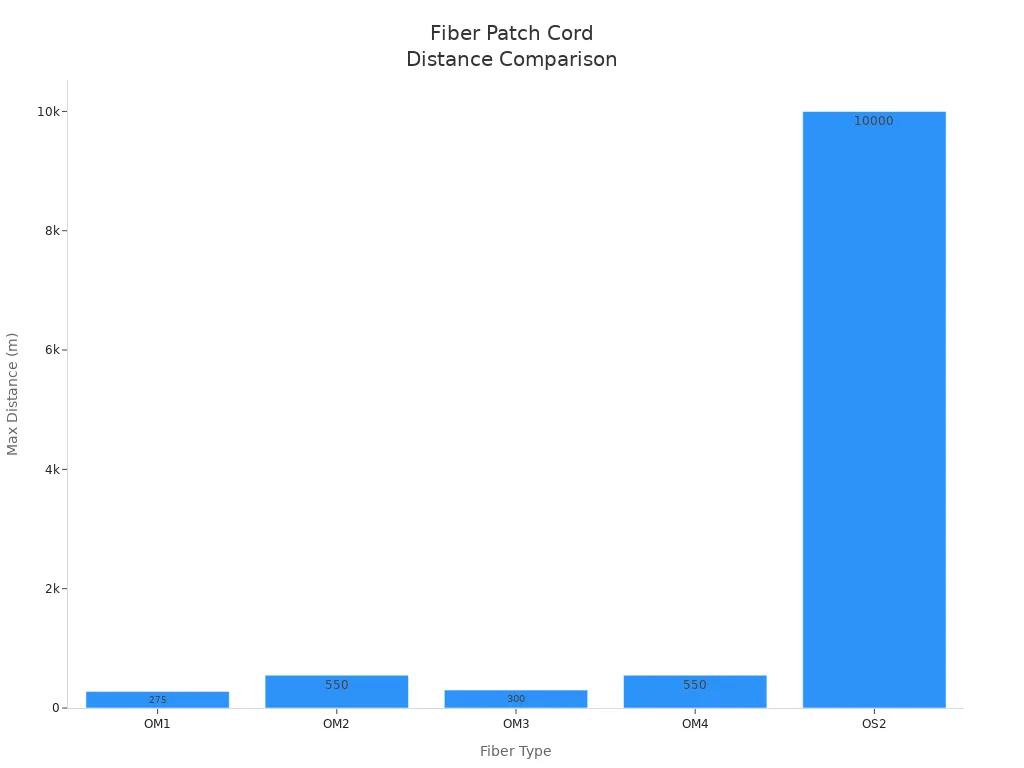
You have to pick the right lc fiber optic patch cord for your network. OS2 sends data far, up to 10km. OM3 and OM4 work best for fast fiber jobs between 300m and 550m. The table below shows what each type can do:
|
Type |
Distance Capability |
Application |
|---|---|---|
|
OM3 |
Up to 300m |
10G Ethernet |
|
OM4 |
Up to 550m |
10G Ethernet |
|
OS2 |
Up to 10km |
Long-distance applications |
If you choose the right patch cord, your network works better. You get fewer problems, save time, and make your money go further. Always check the specs, price, and seller help before you buy.
Helps your network grow and work faster.
Makes sure cables work together easily.
Saves money when you buy more at once.
FAQ
What makes LC fiber optic patch cords ideal for high-density networks?
LC connectors let you fit more connections in less space. Their small size means you can double the number of ports in racks. This helps you grow your data center or telecom network easily. You also spend less money on setup.
Why should you choose OS2 over OM3 or OM4 for long-distance links?
Pick OS2 LC fiber optic patch cords for sending data far. OS2 single-mode fiber can send data up to 200 kilometers. It keeps the signal strong with little loss. OS2 is best for campus, metro, or backbone networks.
How do OM3 and OM4 patch cords improve data center performance?
OM3 and OM4 LC fiber optic patch cords make your network faster. OM3 works for 10G up to 300 meters. OM4 goes up to 550 meters and supports 40G/100G. These choices help your data center last longer and cost less to upgrade.
What standards should you check before buying LC fiber optic patch cords?
Check if your LC fiber optic patch cords meet TIA, IEC, and ITU standards. Certified patch cords work well, are safe, and last a long time. Always ask sellers for proof and test results before you buy.
Why does jacket color matter when selecting fiber patch cords?
Jacket color helps you know the fiber type fast. Yellow means OS2, aqua means OM3, and magenta means OM4. This makes setup easier and helps you fix cables quickly in big networks.
How can you reduce downtime with the right patch cord choice?
Pick LC fiber optic patch cords that match your network's speed and distance. The right choice stops signal loss and cuts down on repairs. Your business keeps running without problems.
What is the ROI benefit of investing in OM4 LC fiber optic patch cords?
OM4 LC fiber optic patch cords give you better value. They work faster and reach farther, so you upgrade less often. This saves you money on future fixes and growth.
Can you mix OS2, OM3, and OM4 patch cords in one network?
Do not mix single-mode (OS2) and multimode (OM3/OM4) LC fiber optic patch cords. Mixing them can cause signal loss and problems. Always use the same fiber type for the best network results.