



Duplex fiber optic patch cord- SM/MM Selection and Standards
Picking the right duplex fiber optic patch cord is very important. It can help your network work well or cause problems. You should think about standards like OM/OS and plenum rating. You also need to look at connector types like LC. This helps make sure your network is safe and follows rules.
If you choose the right fiber optic patch cords, your network will have less downtime. You will spend less money fixing things. Your business will get more value over time. Make smart choices to help your network grow and stay safe.
Key Takeaways
Picking the right duplex fiber optic patch cord is very important for your network to work well and stay reliable. Duplex patch cords let data go both ways at the same time, so there is less downtime and things work better. Single-mode fiber works best for long distances and when you need a lot of data to move fast. Multimode fiber is good for short distances and saves money. LC connectors take up less space and fit well in places with lots of cables, so they are a good choice for new setups. Knowing fiber standards like OM and OS helps you follow rules and get the best results for your network. Always think about the environment and if the cables will work with what you already have before you choose fiber optic cables. Using color codes for fiber optic cables makes it easier to keep track of them and helps stop mistakes when you put them in. If you use a checklist when picking cables, you can make better choices, spend less money, and get a network that works better.
Duplex fiber optic patch cord basics

What is a duplex fiber optic patch cord?
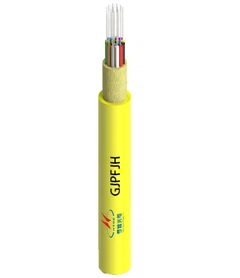
A duplex fiber optic patch cord has two fiber strands in one cable. This lets you send data and get data at the same time. Businesses use this kind of patch cord for fast and steady data. The patch cord has two fibers, two connectors on each end, and a cable that holds them together. You can see the main parts in the table below:
|
Component |
Description |
|---|---|
|
Fibers |
There are two fibers, so you can send and get data both ways. |
|
Connectors |
Each end has two connectors, one for each fiber. |
|
Cable Structure |
The fibers are together in one cable, so data goes both ways at once. |
|
Application |
Used in business networks to share data. |
You pick a duplex fiber optic patch cord when you want to talk both ways and keep your network working with less downtime.
How does duplex design support data transmission?
Duplex design uses two fiber strands. One strand sends data. The other strand gets data. It works like a road with two lanes. Data moves both ways at the same time. This means faster talking and fewer slowdowns. Here's why duplex is important:
Duplex uses two fiber strands: one sends, one gets data.
This lets data move both ways at once, like a two-lane road.
Simplex only lets data go one way.
Duplex is needed for things like phones and computer networks.
It lets signals move at the same time, so talking is faster.
Most networks need duplex because it makes data move faster and helps your business work better.
Common connector types (LC, SC)
Connector type matters when you use fiber patch cords. LC connectors are good for places with lots of cables. You see LC connectors in data centers and telecom rooms. They are small and easy to use. LC connectors let data go both ways and save space. SC connectors are bigger and work in older systems or where space is not a problem. Pick LC connectors for new setups if you want to save space and make cables easier to handle.
Tip: Use LC connectors for places with lots of cables. They help your network last longer and make upgrades simple.
Single-mode vs. multimode fiber optic patch cords

Core size and transmission distance
It is important to know about core size and how far data can go. Single-mode fiber has a much smaller core than multimode fiber. The small core lets light move straight, so data can travel farther and signal loss is less. Multimode fiber has a bigger core. This lets more light paths move through, but data cannot go as far.
|
Fiber Type |
Core Size (microns) |
|---|---|
|
Single-mode |
9 |
|
Multimode |
50 - 62.5 |
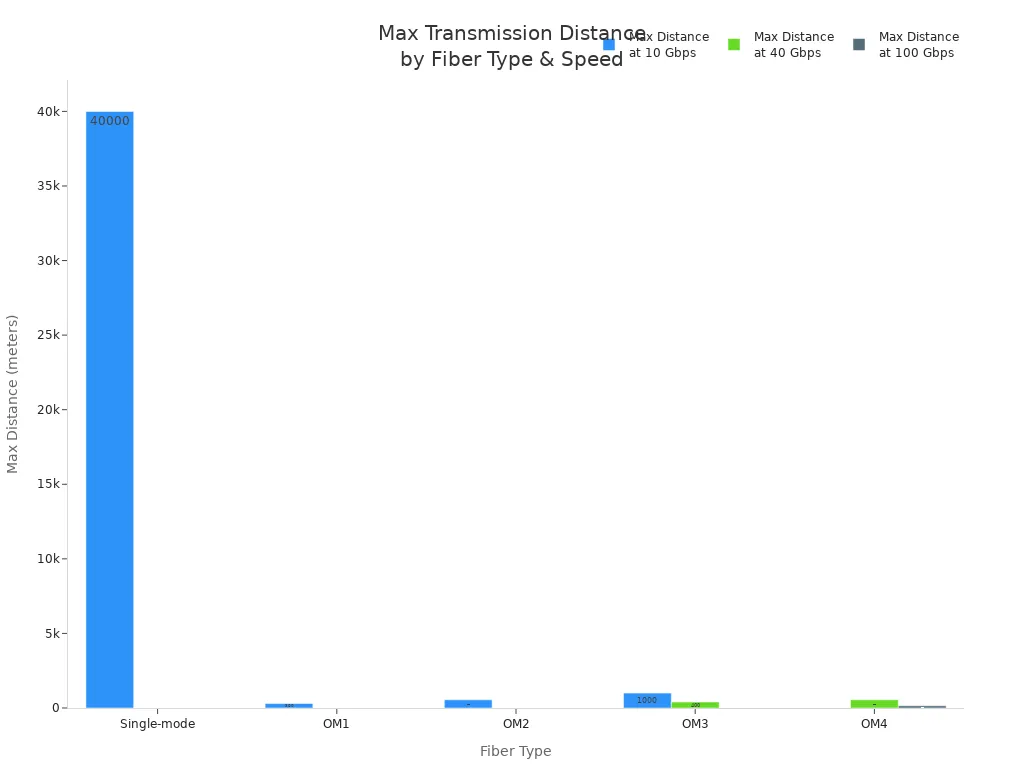
Single-mode fiber can send data up to 25 miles at 10Gbps. Multimode fiber works best for short distances. OM1 multimode fiber can reach 300 meters at 10Gbps. OM3 can go up to 1000 meters at the same speed. OM4 multimode fiber supports 550 meters at 40Gbps and 150 meters at 100Gbps.
|
Fiber Type |
Maximum Distance (meters) |
Speed (Gbps) |
|---|---|---|
|
Single-mode |
40,000 (25 miles) |
10 |
|
OM1 |
300 |
10 |
|
OM2 |
550 |
10 |
|
OM3 |
1000 |
10 |
|
OM3 |
400 |
40 |
|
OM4 |
550 |
40 |
|
OM4 |
150 |
100 |
Tip: Pick single-mode fiber if you need to cover long distances. For short connections inside buildings, multimode fiber saves money.
Bandwidth and performance
You should think about bandwidth and performance when picking between single-mode and multimode fiber optic patch cords. Single-mode fiber supports higher bandwidth because it uses only one light path. This design stops signal spreading and lets data rates go above 100Gbps. Multimode fiber uses many light paths. This can cause signals to spread out and lower bandwidth.
|
Fiber Type |
Bandwidth Capability |
|---|---|
|
Single-mode |
Up to 100 Gbps and beyond |
|
Multimode |
Ranges from 10 Gbps to 400 Gbps |
Single-mode fiber gives almost unlimited bandwidth and can support very fast speeds over long distances. Multimode fiber works well for fast data over short distances, especially with OM3 and OM4 standards. You should check the standards for your network. IEC, ITU, and IEEE set the rules for fiber optic cable performance.
Single-mode fiber supports higher bandwidth because it uses one light path.
It can handle data rates over 100Gbps.
Multimode fiber has lower bandwidth, usually between 10Gbps and 400Gbps.
Note: For networks that need to last and work fast, single-mode fiber is the best choice.
Typical use cases
You should pick the fiber type that fits your network needs. Single-mode fiber is best for long distances and high bandwidth. You see it in telecom networks, campus backbones, and data centers where speed and reliability matter most. Multimode fiber is good for short connections, like inside buildings or between racks in a data center.
Common single-mode fiber use cases:
Data centers: Connect servers, switches, and routers for fast data.
Telecommunications: Send voice, video, and data signals between equipment.
Campus networks: Link buildings and departments over long distances.
Industrial automation: Send data between sensors and machines.
Healthcare: Move high-quality images in medical equipment.
Common multimode fiber use cases: Multimode fiber optic patch cords work best in business places for high bandwidth data transfers. You find them in data centers and local area networks (LANs). The bigger core lets you send many signals at once over medium distances. This makes multimode fiber great for jobs where you need lots of data but not long distance.
Tip: Use single-mode fiber for long-distance, high-bandwidth needs. Pick multimode fiber for short, fast connections in offices or data centers.
Cost comparison
When you pick between single-mode and multimode fiber optic patch cords, price is important. You want to know why one costs more and how that can change your business. The price difference comes from the materials, the technology, and the standards each cable must meet.
Single-mode fiber optic patch cable costs more at first. The core is smaller and needs lasers to send data. Lasers cost more than the LEDs used in multimode systems. You also need special transceivers for single-mode, which adds to the price. But single-mode cables send data farther with less signal loss. You need fewer repeaters and less equipment for long links. This saves money in big networks.
Multimode fiber optic patch cords have a bigger core and use cheaper LEDs. The cables and connectors cost less. Multimode works for short distances, like inside buildings or between racks in a data center. If your network does not need to go far, multimode costs less at the start. You also spend less on transceivers and installation.
|
Feature |
Single-mode |
Multimode (Multi-mode) |
|---|---|---|
|
Initial Cable Cost |
Higher |
Lower |
|
Transceiver Cost |
Higher (laser-based) |
Lower (LED-based) |
|
Installation Cost |
Higher for long runs |
Lower for short runs |
|
Maintenance |
Lower over long distances |
Higher if used for long runs |
|
Upgrade Flexibility |
High (future-proof) |
Limited by distance/bandwidth |
|
Typical Use Case |
Long-haul, backbone |
Short-range, LAN/data center |
Tip: If your project covers a big campus or city, single-mode gives better value over time. For short links, multimode keeps costs low.
Think about the total cost of ownership too. Single-mode cables last longer and support faster speeds as standards change. You will not need to upgrade as often. Multimode cables may need to be replaced if you need more bandwidth or grow your network.
Why does this matter for your business?
Lower starting costs help you stay on budget.
Saving money over time comes from fewer upgrades and less downtime.
Meeting standards keeps your network safe and reliable.
When you pick a fiber optic patch cable, match the mode to your distance and bandwidth needs. This helps you control costs and avoid mistakes.
How to select the right duplex fiber optic patch cord

Application requirements
Begin by thinking about what you need. Match the duplex fiber optic patch cord to your network's job. Telecom needs strong connections and long-distance data. Data centers want lots of connections and fast speeds. EPC contractors look for easy setup and rule-following. Distributors need products that work for many clients.
|
Factor |
Description |
|---|---|
|
Type of Fiber |
Pick single-mode for far distances and big bandwidth. Use multimode for short, quick links. |
|
Type of Connectors |
Choose LC for crowded setups. Use SC or MPO for older or special places. |
|
Cable Jacket Materials |
Pick OFNR or LSZH jackets for safety in offices or public buildings. |
Tip: Always check your project's rules and local codes before buying. This makes sure your fiber patch cord is safe and works well.
Think about where you will put the cable. For FTTH, single-mode fiber is best. In data centers, multimode fiber saves money and space. For cables outside, pick jackets that block weather and sunlight.
Distance and bandwidth needs
Distance and bandwidth help you decide. If you need to send data far, single-mode fiber optic patch cable gives you speed and reach. For short runs inside a building, multimode fiber optic patch cords cost less.
Single-mode fiber sends data far and fast.
Multimode fiber works for short distances and medium speeds.
Multimode fiber is cheaper for runs under 500 meters.
Single-mode fiber costs more but is better for long links and upgrades.
Think about how your network might grow. If you need more speed later, single-mode fiber can handle it. If your setup will stay the same, multimode fiber keeps costs down.
Note: Always plan for the future. Upgrading to single-mode later costs more than picking it now.
Connector type and cable length
Connector type changes how you install and fix cables. LC connectors are good for crowded places like data centers. They are small and save space. SC connectors work in older systems but need more room. MPO connectors hold many fibers in one plug, so big jobs are easier.
|
Connector Type |
Description |
Suitability for High-Density Installations |
|---|---|---|
|
LC |
Small, clip design |
Great for crowded racks and panels |
|
SC |
Bigger, push-pull |
Not as good for tight spaces |
|
MPO |
Many fibers, simple |
Good for big jobs, not as small as LC |
Pick the right cable length for your setup. Measure the space between devices and add a little extra for slack. Do not use cables that are too long. Long cables can lose signal and make a mess.
Tip: Use LC connectors for new setups in data centers or telecom rooms. They make upgrades and fixes easier.
When you pick a duplex fiber optic patch cord, check if it works with your gear. Match connector type, fiber mode, and jacket to your space. Think about temperature, wetness, and chemicals if you put cables outside or in tough places.
Checklist for B2B users:
Decide what you need (telecom, data center, FTTH, industrial).
Figure out distance and speed needed.
Pick fiber type (single-mode or multimode).
Choose connector type (LC, SC, MPO).
Pick cable jacket for safety.
Make sure it fits your hardware.
Plan for upgrades and fixes.
Picking the right fiber patch cord means less downtime, lower costs, and a better network ROI.
Compatibility and environment
You need to make sure your duplex fiber patch cord fits your network hardware and where you will install it. This keeps your network working well and protects your money. If you pick the wrong fiber optic patch cable, your network might stop working. Fixing it can cost a lot. You could also break important rules.
Why does compatibility matter?
Your fiber patch cord must work with your switches, transceivers, and patch panels. If the connectors or fiber type do not match, data will not move. You should check these things:
Connector compatibility:
LC, SC, and MPO connectors fit different devices. Always check the connector type on both ends before you buy.
Fiber mode matching:
Single-mode and multimode fibers do not work together. Make sure the fiber type matches your equipment and network plan.
Standard compliance:
Your fiber optic patch cable should meet IEC and TIA/EIA standards. This helps your network work well now and in the future.
Why does environment matter?
Where you put the cable changes what kind you need. Think about temperature, wetness, chemicals, and fire safety. Plenum-rated cables are needed in air spaces. LSZH jackets make less smoke if there is a fire. Cables outside need jackets that block sun and water.
|
Environment Type |
Recommended Jacket |
Key Features |
Compliance Needs |
|---|---|---|---|
|
Indoor (office) |
OFNR, LSZH |
Flame-retardant, low smoke |
Building codes, safety |
|
Plenum spaces |
CMP, LSZH |
High fire resistance |
NFPA, local codes |
|
Outdoor |
PE, Armored |
UV, moisture protection |
Weather, durability |
|
Industrial |
Armored, LSZH |
Chemical, crush resistance |
OSHA, IEC |
Tip: Always check local building codes and standards before you install fiber patch cords. This helps you avoid trouble and keeps your network safe.
Checklist for compatibility and environment:
Match connector types to your devices.
Make sure the fiber mode is right.
Check cable standards (IEC, TIA/EIA).
Pick the best jacket for your site.
Check plenum rating for air spaces.
Plan for upgrades and changes.
When you pick the right duplex fiber optic patch cable for your space, you keep your network and business safe. You lower repair risks and get more value. You also follow safety and rule standards, which is very important for B2B jobs.
Standards for fiber optic patch cords

OM1 to OM5 multimode standards
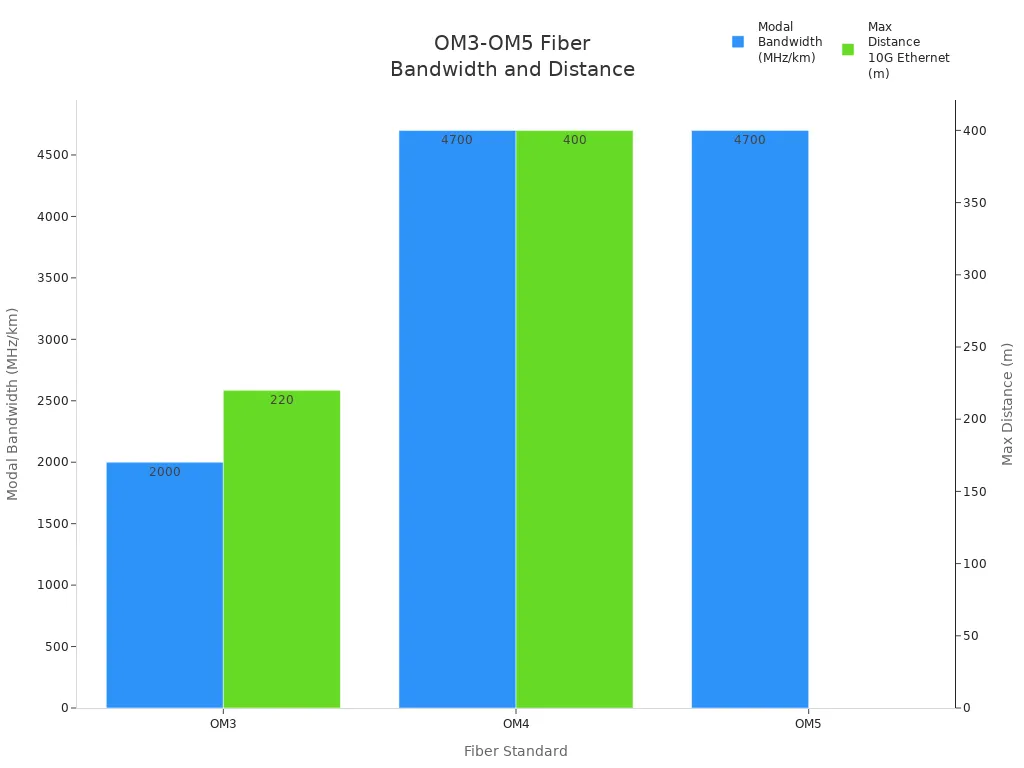
It is important to know about OM1 to OM5 multimode standards before you pick a fiber optic patch cable. These standards tell you how well the cable works, its core size, and how much data it can carry. Each standard is made for different network jobs, from simple LANs to fast data centers.
|
Standard |
Core Diameter (microns) |
Modal Bandwidth (MHz/km) |
Max Distance for 10G Ethernet (meters) |
Applications |
|---|---|---|---|---|
|
OM1 |
62.5 |
N/A |
N/A |
LAN, FTTD |
|
OM2 |
50 |
N/A |
N/A |
Enterprise, Campus Networks |
|
OM3 |
50 |
2000 |
220 |
10G Ethernet |
|
OM4 |
50 |
4700 |
400 |
10G, 25G, 40G, 100G Ethernet |
|
OM5 |
N/A |
4700 (850 nm) |
N/A |
SWDM Transceivers |
OM1 and OM2 are used in older networks. OM3 and OM4 work for faster speeds and longer links. OM5 is new and made for advanced data centers using SWDM.
Tip: Pick OM3 or OM4 for most new multi-mode jobs. They give you good speed, distance, and help your network last longer.
OS2 single-mode standards
OS2 single-mode standards show what you need for long-distance, fast fiber optic patch cables. These cables have a small core and lose very little data-only 0.4db per kilometer. OS2 cables use a loose-tube design. This keeps your signal strong for up to 10 kilometers without extra help. They follow ITU-T G.652C/D rules, so you know they work well in outdoor and backbone networks. You get easy setup, great bandwidth, and they fit many systems. OS2 single-mode cables are good for telecom, campus backbones, and any job needing fast, steady data over long distances.
Note: If you want the lowest loss and best reliability, choose OS2 single-mode fiber optic cable for backbone and outdoor links.
Plenum rating and building codes
You must follow plenum ratings and building codes when you put fiber optic patch cords in business buildings. These rules keep people and property safe if there is a fire. Plenum-rated cables stop bad fumes from spreading, so your building stays safe and legal.
Plenum-rated cables are needed in plenum spaces to stop toxic fumes during a fire. This keeps people safe and follows building rules.
Using riser-rated cables in plenum spaces can cause legal trouble. They might make harmful smoke and fumes if there is a fire.
The National Fire Protection Agency (NFPA) and the National Electric Code (NEC) set rules for which cables you can use in each area.
Always check your local rules before you buy or put in any fiber optic patch cable. Picking the right cable lowers risk, avoids fines, and keeps your network safe.
Always pick cables with the right plenum or riser rating for your space. This keeps you legal and protects your network and money.
Color codes and identification
Color codes make it easy to tell what each fiber optic patch cable does. Knowing these codes helps you avoid mistakes and fix problems faster. It also helps you follow the rules set by the industry. Using the right color codes keeps your network safe and simple to manage. This is very important for telecom operators, EPC contractors, and distributors. They work with big and tricky setups.
Color codes are used for both the outside jacket and the connector boots. Each color gives you a clue about the cable's build and job. Orange jackets mean OM1 or OM2 multimode fiber. Aqua jackets show OM3 or OM4. Yellow jackets mean single-mode fiber. These colors help you stop expensive mistakes when you install or fix cables.
Here is a table to help you remember the color codes:
|
Cable Jacket Color |
Fiber Type |
Typical Use/Standard |
|---|---|---|
|
Yellow |
Single-mode (OS2) |
Long-distance, backbone |
|
Orange |
OM1/OM2 Multimode |
Legacy, short-range |
|
Aqua |
OM3/OM4 Multimode |
High-speed, data center |
|
Lime Green |
OM5 Multimode |
SWDM, advanced networks |
|
Black/Gray |
Indoor/Outdoor |
General or custom use |
Tip: Always look at both the jacket and connector color. Some makers use colored connector boots to match the fiber type. This makes it even easier to spot the right cable.
You should also check the connector color. Blue connectors mean single-mode. Beige or aqua connectors mean multimode. This double color system helps you make sure you have the right fiber optic patch cable for your gear and standards.
Why does this matter for your business?
You find the right cable fast and lower downtime.
You do not mix up single-mode and multimode fibers. Mixing them can break your network.
You follow the rules and safety codes. This is important for audits and staying legal.
If you run a big network or sell fiber optic cable, using the right color codes shows you care about quality. It also makes upgrades easier and lowers risks when you grow your network.
Note: Using color code standards is not just for looks. It is a key part of keeping your network safe, reliable, and working well.
Multimode fiber optic patch cable applications

Data centers
Multimode fiber optic patch cables are used in data centers. These cables connect servers, switches, and routers. They help move data quickly with little delay. Multimode cables work best for short and medium distances. This makes them great for crowded server racks and flexible setups.
You use these cables to link core switches and top-of-rack switches.
They help cloud services and virtual machines run fast and steady.
You can upgrade your network easily since multimode cables support up to 100Gbps for short runs.
Most data centers use multimode fiber cables for links under 500 meters. This keeps costs low and makes setup easy. You do not need expensive single-mode transceivers but still get enough bandwidth. If your data center grows, you can add more cables or upgrade to OM4 or OM5 for faster speeds.
Tip: Pick multimode fiber optic patch cable for your data center if you want fast, reliable links and do not need long-distance technology.
Enterprise networks
Multimode cables are helpful in enterprise networks. They give you good speed, low cost, and flexibility. You can connect computers, wireless points, and network closets in your office or campus.
Multimode cables are the cheapest choice for distances up to 500–600 meters.
You can install these cables quickly, even in old buildings, because they are easy to use.
You get fast data with little signal loss, so your business works well.
For example, a big office building might use multimode fiber to link floors or departments. You save money on cables and transceivers compared to single-mode. These cables are easy to fix and replace, so you have less downtime.
|
Feature |
Multimode Fiber |
Single-mode Fiber |
|---|---|---|
|
Max Distance (m) |
500–600 |
10,000+ |
|
Initial Cost |
Lower |
Higher |
|
Upgrade Flexibility |
Good (short runs) |
Best (long runs) |
|
Installation Ease |
Simple |
More complex |
Note: For most enterprise jobs, multimode fiber gives you the best mix of speed and value.
Industrial environments
You can use multimode fiber optic patch cables in factories and plants. But you need to plan for tough conditions. These places can be hard on cables and may cause problems.
Common problems include:
- Cables can get bent, crushed, or cut by accident.
- Dust, dirt, or oil at connectors can lower signal quality.
- Bending cables too much can cause tiny cracks or signal loss.
- Bad splicing can make signals weak.
- Extreme temperatures, wetness, or animals can hurt cables.
- Old cables can break down over time.
- To fix these problems, pick armored or tough multimode fiber cables. Train your team to handle and clean cables the right way. Check cables often to find problems early and stop downtime.
Tip: In industrial places, always use cables with strong jackets and follow good steps for setup and care.
Single-mode fiber optic patch cable applications

Long-distance telecom
Telecom networks often cover big areas, like cities or even countries. You need strong connections that do not lose signal over long distances. Single-mode fiber optic patch cables send data far with little signal loss. These cables help keep data moving fast and clear for many miles. Telecom companies use them to build the main internet lines and link data centers. You also find these cables in business networks that need steady, high-speed links.
Key applications include:
Sending data between cities or regions
Fast data transfer for telecom networks
Main internet backbone lines
Connecting data centers
Business network links
Tip: Pick single-mode fiber optic patch cable for telecom jobs that need speed and dependability. You will spend less on repairs and not need to upgrade often.
Campus networks
Campus networks need quick and safe links between buildings. Single-mode fiber cables are good for busy networks in smart cities. You use these cables to connect servers and storage in campus data centers. They also link equipment in main offices and data points. This helps send data far and fast for important jobs.
Common campus network scenarios:
Linking school buildings on big campuses
Connecting labs to main data centers
Helping smart city networks with busy middle-mile links
Making sure important data moves quickly and safely
|
Feature |
Single-mode Fiber |
Multimode Fiber |
|---|---|---|
|
Max Distance (km) |
10+ |
<1 |
|
Bandwidth |
High |
Medium |
|
Initial Cost |
Higher |
Lower |
|
Maintenance |
Lower |
Higher |
|
Upgrade Flexibility |
Excellent |
Limited |
Note: Using single-mode fiber for campus networks saves money over time. These cables are ready for upgrades and help stop network problems.
High-bandwidth backbones
Backbone networks need to move lots of data over long distances. Single-mode fiber optic patch cables have a small core that keeps light signals strong. This design stops signal loss and spreading. It is great for fast, long-range data moves. You use single-mode fiber in telecom, internet backbones, and big business data centers.
Advantages for backbone installations:
Less signal spreading for clear data
Handles more data over longer distances
Works well in telecom, internet, and business networks
Single Mode 9/125 OS2 Fiber Optic Cables are made for backbone jobs where you need lots of data and little signal loss. You get fewer repairs and steady performance. These cables help you follow industry rules and keep your network strong.
Tip: Use single-mode fiber optic patch cable for backbone networks to get the best value and meet IEC and TIA/EIA rules.
Selection checklist for fiber optic patch cords
Picking the right fiber optic patch cords keeps your network safe. It helps your business run smoothly and protects your money. If you follow a good checklist, you can stop problems and save time. Here is a simple checklist to help you choose the best patch cords for your company.

Step-by-step guide
You need to follow steps when you pick patch cords for your business. This helps you make fewer mistakes and keep your records correct:
- Planning: Begin with a change request. Write down any changes you want to make to your cables.
- Preparation: Make sure each cord is the right type and quality. Look at the cord to check for damage before you use it.
- Patching: Finish all work on the patch panel quickly. Be gentle with cords so they do not break or slow down your network.
- Validation: Look at the cords one last time. Update your records to show what you changed.
Tip: Always write down every change you make. This helps you know what is in your network and makes upgrades easier later.
Quality and certification
Quality certifications show your fiber optic patch cable meets the rules. Certified cables work better and last longer. You should always look for these certifications before you buy.
|
Specification |
Purpose |
Testing Focus |
|---|---|---|
|
EIA/TIA-568-B.3 |
Used for offices and business buildings |
Tests for single-mode and multi-mode networks in tough places |
|
Telcordia GR-326-CORE |
Makes sure service providers get reliable cables |
Tests for how long cables last and how strong they are |
Cables with these certifications pass hard tests. They work well in tough places and give steady performance. This means your network will not break often and you will not spend much on repairs.
Note: Certified cables help you follow the rules and keep your business looking good.
Supplier reliability
Good suppliers help you get your cables on time and avoid bad products. You should check suppliers using clear rules:
|
Criteria |
What to Check |
|---|---|
|
Certifications |
ISO 9001, CE, RoHS, UL, REACH |
|
Manufacturing Capacity |
Do they make cables themselves and test them with machines? |
|
Product Range |
Do they offer LC, SC, FC, ST, MPO/MTP; OM1–OM5, OS2; simplex, duplex, armored? |
|
Technical Support |
Do they help before and after you buy? Do they answer fast? |
|
Customization Services |
Can you get special labels or cable lengths? |
|
Testing and Quality Control |
Do they give test reports and use good testing tools? |
|
Global Shipping Ability |
Can they ship worldwide and pack cables well? |
|
Reference Projects & Clients |
Do they have case studies and happy customers? |
Tip: Pick suppliers who have lots of experience and good support. This helps you get the right cables and good service.
Picking the right duplex fiber optic patch cord makes your network safer and faster. It helps your data move better and keeps your business safe from problems. You lower fire risks and stop costly downtime. The table below shows how good choices help your network:
|
Benefit |
Description |
|---|---|
|
Optimal Data Transmission |
You get strong signals and fewer mistakes. |
|
Safety Improvements |
Plenum-rated cables lower fire risks and keep air clean. |
|
Bandwidth and Distance Coverage |
You match cable type to your speed and reach needs. |
|
Mechanical Protection |
Armored cables stop damage and keep your network safe. |
|
Longevity and Maintenance |
Good setup and care make your network last longer. |
You should clean and line up connectors every time. Use the right testing tools for your cables. Always follow good steps when you install cables. Ask certified suppliers for help and follow the rules. This keeps your network ready for the future and helps your business grow.
FAQ
Why should you choose duplex fiber optic patch cords for business networks?
Duplex fiber optic patch cords let data move both ways. This means faster talking and fewer slow network times. These cords help your business follow rules and work better.
Why do standards like OM/OS and plenum rating matter?
Standards make sure cables are safe and work well. You stay out of legal trouble and lower fire danger. Plenum-rated cables keep people and buildings safer.
Why pick single-mode over multimode fiber optic patch cords?
Single-mode patch cords send data farther and faster. They help your network last longer and cost less to fix. Pick single-mode for big jobs and long links.
Why do connector types like LC impact your network setup?
LC connectors save space and make cables easy to handle. You can fit more cables in small places. LC connectors help with upgrades and quick fixes.
Why does color coding help with fiber optic cable management?
Color coding helps you spot cable types fast. This stops mistakes and keeps your network running. Using standard colors makes fixing problems easier.
Why is supplier reliability important for fiber optic patch cords?
Good suppliers send certified cables on time. This lowers the chance of network trouble and saves money. Trusted suppliers help with tech support when you need it.
Why should you consider environmental factors when selecting patch cords?
Where you put cables changes how they work and stay safe. You need the right jacket for fire, water, and chemicals. Picking the right one keeps your network safe and follows rules.
Why does following a selection checklist improve ROI?
A checklist helps you pick cables that fit your needs. This stops problems and keeps your network working longer. Careful choices help your business save money and grow.
Need more help? Ask certified suppliers for advice about duplex fiber optic patch cords.
References
IEC 60793-2-10: International fiber optic standards
TIA/EIA-568: Commercial building cabling standards
ITU-T G.652: Single-mode fiber specifications
NFPA 70: National Electrical Code for plenum rating
Telcordia GR-326-CORE: Patch cord reliability standards