

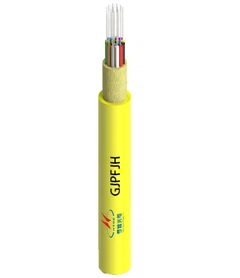


Indoor fiber optic cables aren't "one-size-fits-all." In real projects, people get stuck on questions like
In this guide, you'll get a clear, practical map of indoor fiber optic cable types in three dimensions:
- Fire rating / installation space (where the cable is allowed to run),
- Cable construction (how it's built and how it installs/terminates), and
- Fiber mode (how it performs for distance and bandwidth).
By the end, you'll be able to match the right cable type to your building area, routing method, and network needs, using a simple checklist-plus a FAQ section that answers the most common "can I replace X with Y?" questions buyers and installers face.
What Is an Indoor Fiber Optic Cable?

Indoor fiber optic cable is designed specifically for inside-building cabling, where the priorities are fire safety (flame-retardant / low-smoke jackets) and easy installation and termination-smaller bending radius, cleaner routing, and simpler handling for technicians.
Compared with outdoor fiber cable, indoor cable typically focuses less on weatherproofing, water blocking, UV resistance, and wide temperature range, and more on compliance for indoor spaces plus day-to-day construction efficiency.
In this article, "indoor fiber optic cable types" are explained through three practical dimensions-fire rating/installation space, cable construction, and fiber mode (OS/OM)-so you can choose the right cable without mixing concepts.
Indoor Fiber Optic Cable Types in 3 Dimensions
When people talk about "indoor fiber optic cable types," they often mean different things. To avoid confusion, it helps to look at indoor cables through three practical dimensions. Think of it as a quick map: where it's allowed to be installed, how the cable is built, and what optical performance you need.
Type 1 - By Installation Space & Fire Rating
This is the "where can I run this cable?" classification. In many projects, this is the first gate you must pass.
Plenum / Riser / General Purpose: the building space (air-handling areas, vertical shafts, general pathways) determines which rating is required.
Common markings you'll see: OFNP / OFNR / OFN (how deep you explain these depends on your target market and standards).
Important note: LSZH describes a jacket material approach (low smoke, zero halogen). It is not the same thing as plenum/riser rating, and should not be treated as a direct replacement for them.
Type 2 - By Cable Construction (Indoor Structures)
This is the "how it installs and terminates" classification-impacting routing, density, durability, and labor.
Interconnect (for short runs, equipment room, easy handling)
Distribution (high fiber count, smaller diameter, higher density)
Breakout (more rugged, easier direct termination, larger diameter)
Simplex / Duplex / Zipcord (common forms for patching and device interconnects)
Optional options you may see: indoor armored (extra protection) and ribbon / high-density designs (for very high fiber counts)
Type 3 - By Fiber Mode (Optical Types)
This is the "distance, bandwidth, and transceiver ecosystem" classification.
Single-mode (OS2): typically chosen for longer indoor backbone runs and future scalability
Multimode: OM1/OM2 (legacy, often mentioned briefly) and OM3/OM4/OM5 (the main focus for modern LAN/data center links)
With this 3D framework, you can quickly narrow the right cable down: start with fire rating (where it must go), choose the construction (how it must be installed), then pick the fiber mode (how it must perform).
Type 1 – Plenum vs Riser vs General Purpose: Where Can You Install Each Cable?

What Is Plenum Cable (Air-Handling Spaces)?
Plenum-rated cable is intended for spaces used to transport environmental air, such as certain return-air ceiling or raised-floor air-handling zones and duct-related areas. Because these spaces can spread smoke and flame quickly, plenum requirements are typically the strictest-and often the highest cost option.
What Is Riser Cable (Vertical Shafts)?
Riser-rated cable is designed for vertical pathways between floors (for example, riser shafts). It focuses on controlling flame spread between floors, but it's generally not intended for plenum (air-handling) spaces. In most specs, you can't substitute a lower rating where a higher rating is required-always follow local code and the project requirement.
What About General Purpose, LSZH, and CPR Euroclass?
General Purpose: used in areas where neither plenum nor riser rating is required, as permitted by the applicable code/spec.
Is LSZH a "type" like plenum/riser? LSZH describes a jacket material approach (low smoke, zero halogen) often preferred in people-dense or smoke/corrosion-sensitive environments. It is not automatically equivalent to plenum/riser ratings unless the cable is specifically certified for those ratings too.
What Is CPR Euroclass (Europe)? Many EU tenders specify a CPR Euroclass (e.g., Cca-s1,d1,a1) as the procurement "classification language" for cable fire performance.

Type 3 – Fiber Types for Indoor Networks (OS2 vs OM3/OM4/OM5)
Choosing fiber type is really about three things: link distance, transceiver strategy, and how you want the network to evolve (upgrade path). For indoor projects, most decisions come down to OS2 single-mode vs OM3/OM4/OM5 multimode.

Why Choose OS2 Single-Mode?
OS2 is the "go-to" option when you want maximum flexibility over distance and the cleanest long-term upgrade story.
Best fit scenarios: building backbone runs, cross-floor links, campus-style interconnect (between buildings/IDFs), and designs where future expansion is likely.
Strengths: strong distance capability, consistent performance across a wide range of indoor backbone needs, and a straightforward path when you later move to higher speeds.
Trade-offs / selection principle: OS2 usually makes sense when you'd rather standardize and reduce "what-if" risk-even if some short links could have been done with multimode.
When Does OM3 / OM4 / OM5 Multimode Make Sense?
Multimode is popular for short, high-bandwidth links-especially in equipment rooms and data centers-because it can be very cost-effective and easy to manage when your distances are controlled.
Best fit scenarios: switch-to-server, switch-to-switch within a data hall, high-density patching, and short in-building links where distance is clearly bounded.
OM3 vs OM4 vs OM5 (scenario + upgrade path):
OM3: solid choice for established short-link environments and budget-driven builds.
OM4: the common "upgrade-safe" step when you want more headroom for higher speeds and a longer lifecycle.
OM5: typically chosen when you're planning around specific high-speed, short-reach upgrade approaches and want an "optics-forward" roadmap-often in modern data center designs.
(Instead of memorizing specs, the practical way is: confirm your link lengths and target upgrade plan, then pick the OM grade that supports that plan without overbuying.)
How to Choose Indoor Fiber Optic Cable Types?
The fastest way to avoid wrong selections is to follow a simple order: code first, then construction, then fiber type, then delivery/installation.

Step 1: Where Will the Cable Run (Plenum / Riser / General Purpose)?
Start with the building pathway. Your installation space determines which fire rating is acceptable-this is the non-negotiable part. If the route includes air-handling spaces or vertical shafts, confirm the required rating in the project specification and local code before you do anything else.
Step 2: How Should It Be Built (Distribution vs Breakout vs Interconnect)?
Next, pick the construction based on how the cable must be handled on site:
Need high fiber count and small diameter for pathways or trays? → Distribution
Need more rugged, direct termination and simpler field handling? → Breakout
Mostly short links inside racks/equipment rooms? → Interconnect / simplex / duplex / zipcord
Step 3: What Fiber Type Fits the Network (OS2 vs OM3/OM4/OM5)?
Now decide the optical platform:
Backbone or longer in-building/campus links, "future-proof" approach → OS2
Short, high-bandwidth equipment-room/data-center links → OM3/OM4/OM5
Choose the OM grade based on your upgrade roadmap and transceiver strategy-not just today's speed.
Step 4: How Will You Deliver and Install It (Bulk vs Pre-Terminated)?
Finally, choose how the cable is delivered and installed:
Bulk cable + field termination/splicing: flexible, good for complex routes, but depends on workmanship and time.
Pre-terminated trunks/assemblies: faster and more consistent, but you must plan pathway diameter, bend points, pulling limits, and connector protection.
Typical Indoor Applications & Recommended Types
Below are common indoor scenarios and the cable "type mix" that usually fits best. Use this as a starting point-final selection should always follow the project spec and local code requirements.
| Application | Typical route & priority | Recommended fire rating / compliance | Recommended construction | Recommended fiber type |
|---|---|---|---|---|
| Data Center | High density, clean cable management, fast deployment | Per room requirements (often strict); EU projects may specify CPR | Distribution / high-density trunk (ribbon or micro-distribution), often pre-terminated | OM4/OM5 for short high-bandwidth links; OS2 commonly used for backbone/structured cabling strategy |
| Office building backbone | Cross-floor / telecom rooms, predictable pathways | Riser-rated is common for shafts; plenum if air-handling spaces are involved | Distribution for backbone runs; breakout if rugged/direct termination is preferred | OS2 is a common default for backbone distance + future expansion |
| Campus (inside-building links) | Longer runs and standardization across buildings | Match the required rating for each building space | Distribution (or trunk) for backbone; interconnect for short equipment-room links | OS2 for consistency and distance margin |
| Security / DAS / smart building | Many short drops, device connections, flexible routing | Match the local requirement; often general-purpose in allowed areas | Interconnect / duplex / zipcord for device links; distribution for aggregated pathways | OS2 or OMx depending on link length and available optics |
| Public venues (transport, hospitals, schools, stadiums) | People-dense, evacuation-focused, smoke/corrosion sensitivity | Often emphasize LSZH and/or CPR Euroclass (region-specific) | Depends on density: interconnect for drops, distribution for trunks | OS2 for backbone; OM4/OM5 for short equipment-room/data-hall style links |
Installation & Testing:What Causes Loss, What to Test

Installation Best Practices
Bend radius
Always follow the cable/assembly datasheet for minimum bend radius-note that dynamic (during pulling) and static (after installation) limits are often different.
Use smooth, wide sweeps at entries/exits, trays, and enclosures; avoid sharp edges, tight tie-wraps, and pinch points.
Pulling tension
Apply pulling force to the strength member / pulling eye (not the jacket or fiber itself).
For long pulls, use rollers, proper payout, and cable lubricant where appropriate; consider staged pulls or intermediate access points to reduce stress.
Turns, conduit size & pathway
Plan routes to minimize tight turns and excessive bends; use long-radius elbows and guides at corners.
Check conduit fill and clearance-especially for pre-terminated assemblies (connector heads increase OD). Verify minimum conduit size and turning radius before deployment.
Fiber handling: breakout, stripping, splicing/termination
Keep fibers and connector end faces clean throughout stripping, splicing, and termination (lint-free wipes and approved cleaning tools).
Ensure proper strain relief and fixation inside closures/boxes; fibers should follow smooth paths without being suspended under tension.
Manage slack storage and labeling to prevent future micro-bending from rework and maintenance.
Acceptance Testing
Baseline tests (recommended for every link)
End-to-end Insertion Loss (IL): measure and record per link/per fiber against the project loss budget.
Return Loss (RL): test when specified by the project/operator requirements-especially for links sensitive to reflections.
When OTDR is recommended
Backbone/feeder and long-distance links where event-level visibility is needed.
Commissioning baseline to create a trace "fingerprint" for future troubleshooting.
Troubleshooting when IL is high but the fault location is unclear (identify splices, connectors, bends, and reflective events).
Large rollouts / phased acceptance for audit sampling and quality consistency, used alongside IL/RL for a complete view.
