



How to Select Patch Cords for Enterprise and Industrial Networks

Selecting the right Patch Cords for your enterprise or industrial network directly influences performance, reliability, and safety. You need to match cable specifications to your network's bandwidth and environmental demands. For example, Cat6 cables can boost network performance by up to 40% in high-density environments. Cat6 supports data transfer rates from 1 GB to 10 GB, but cable length affects signal strength-limiting gigabit networks to a recommended 100 meters. Consistent documentation and systematic selection help you maintain an efficient and trouble-free infrastructure.
Key Takeaways
- Understand your network's needs before selecting patch cords. Evaluate bandwidth, application type, and environmental conditions to ensure reliability.
- Assess current and future bandwidth requirements to avoid bottlenecks. Plan for growth to keep your network scalable and efficient.
- Choose the right type of patch cord-copper for short distances and budget-friendly options, fiber for high-speed and long-distance needs.
- Consider environmental factors like temperature and humidity when selecting cables. Use robust jackets and shielding for industrial settings to prevent damage.
- Select patch cords with appropriate category ratings to match your network's speed. Using lower-rated cables can lead to performance issues.
- Ensure proper labeling and documentation of patch cords. This practice aids in quick identification and efficient network management.
- Verify that patch cords meet industry certifications for safety and performance. This step helps avoid network failures and ensures compliance.
- Choose reputable vendors who provide quality products and support. Reliable vendors help maintain network integrity and reduce maintenance costs.
Network Needs

Selecting the right Patch Cords begins with a clear understanding of your network's needs. You must evaluate bandwidth, application type, and environmental conditions before making any decisions. This approach ensures your infrastructure remains scalable and reliable as your business grows.
Bandwidth
Bandwidth requirements vary widely between organizations. You should assess both current and future needs to avoid bottlenecks as your team expands or as new applications demand more data. The following table outlines typical bandwidth needs based on employee count and activities:
|
Bandwidth (Mbps) |
Number of Employees |
Activities Supported |
|---|---|---|
|
50-75 |
5 to 10 |
Basic browsing, email, downloading/uploading large files, streaming |
|
100 |
10-15 |
Basic browsing, emails, IP/VoIP, light cloud activity, few video calls |
|
500 |
20-30 |
Regular access to cloud applications, simultaneous video calls |
|
1000 |
30+ |
Bandwidth-heavy activities, many devices, regular cloud computing |
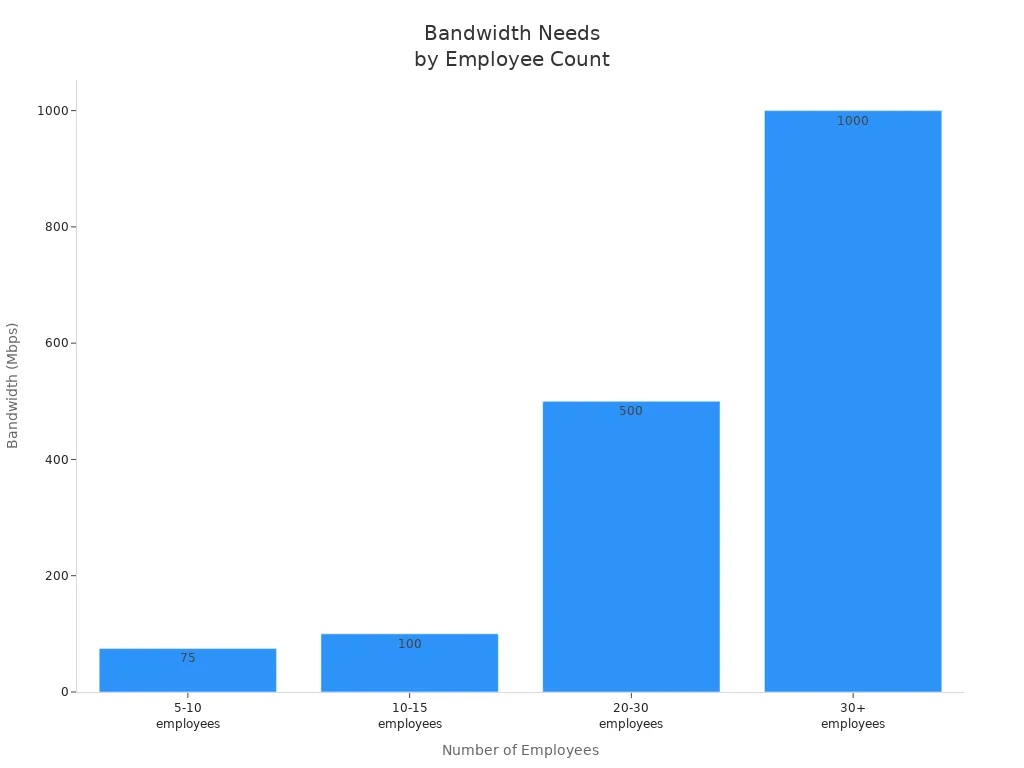
Tip: For small teams, 100-200 Mbps usually covers daily tasks. Larger teams (50 or more) should plan for at least 500 Mbps, especially if you rely on cloud-based tools or frequent video conferencing.
Enterprise networks often support thousands of devices. Many common applications require only about 1 Mbps per device, but new technologies like WiFi 6 can increase overall demand. Always plan for growth to ensure your Patch Cords do not become a limiting factor.
Application Type
Different environments place unique demands on your network cabling. Consider the following scenarios:
|
Application Type |
Key Considerations |
Example Requirements |
|---|---|---|
|
Data Centers |
High-density, high-speed connectivity |
Quality fiber optic cables, low noise design |
|
Manufacturing |
Ruggedness and durability |
Sturdy materials, resistance to environmental stress |
|
Office Environments |
Cost-effectiveness and ease of installation |
Affordable options, simple setup |
In a data center, you need Patch Cords that support high-speed connections and minimize noise. Manufacturing environments require cables that withstand vibration, dust, and temperature swings. Office spaces often prioritize cost and ease of installation. Matching your selection to your application ensures optimal performance and longevity.
Environment
Environmental factors can significantly impact cable performance, especially in industrial settings. You must consider temperature, humidity, dust, UV exposure, chemicals, and vibration. The table below summarizes key risks:
|
Environmental Factor |
Impact on Performance |
|---|---|
|
Temperature |
Fiber expansion or contraction can cause signal loss or breakage |
|
Humidity |
Moisture can lead to signal loss or corrosion |
|
Dust and Dirt |
Accumulation causes signal loss or attenuation |
|
UV Radiation |
Degrades fiber over time, leading to signal loss or breakage |
|
Chemical Exposure |
Causes fiber degradation or breakage |
|
Vibration and Shock |
Can break fiber or loosen connectors |
Note: Industrial environments demand cables with robust jackets and shielding. Always select Patch Cords rated for your specific conditions to prevent costly downtime.
Patch Cords: Types and Specs

Copper vs. Fiber
You face a critical decision when choosing between copper and fiber Patch Cords. Each type offers unique advantages and fits specific network scenarios. Copper Patch Cords use electrical impulses to transmit data. Fiber Patch Cords use light pulses, which enables higher speeds and longer distances.
|
Feature |
Copper Patch Cords |
Fiber Patch Cords |
|---|---|---|
|
Data Transmission Method |
Electrical impulses |
Light pulses |
|
Speed |
25-300 Mbps |
Up to 10 Gbps |
|
Distance Limit |
Short distances (less than 100 meters) |
Long distances (over 100 meters) |
|
Interference Susceptibility |
High (vulnerable to EMI) |
Low (immune to EMI) |
|
Use Cases |
Short-distance connections, Legacy systems |
High-bandwidth applications, Data centers |
You should select copper Patch Cords for short-distance connections, legacy system compatibility, and Power over Ethernet (PoE) applications. Copper also fits budget-constrained projects and networks with lower bandwidth requirements. Fiber Patch Cords excel in long-distance connections, high-bandwidth applications, and environments with high electromagnetic interference (EMI). Data centers and organizations planning for future scalability often choose fiber for its energy efficiency and performance.
Tip: Fiber Patch Cords provide immunity to EMI, making them ideal for industrial environments with heavy machinery or radio equipment.
Category Ratings
Category ratings define the performance and reliability of copper Patch Cords. You must match the cable category to your network's speed and error tolerance requirements. The table below compares the most common categories:
|
Cable Category |
Maximum Speed |
Frequency |
Distance |
Key Features |
|---|---|---|---|---|
|
Cat5e |
1 Gbps |
100 MHz |
100 m |
Basic performance, suitable for residential use. |
|
Cat6 |
10 Gbps |
250 MHz |
55 m |
Tighter twists, reduced crosstalk, suitable for office use. |
|
Cat6a |
10 Gbps |
500 MHz |
100 m |
Better shielding, suitable for data centers. |
|
Cat7 |
10 Gbps |
600 MHz |
100 m |
Extensive shielding, used in high-performance environments. |
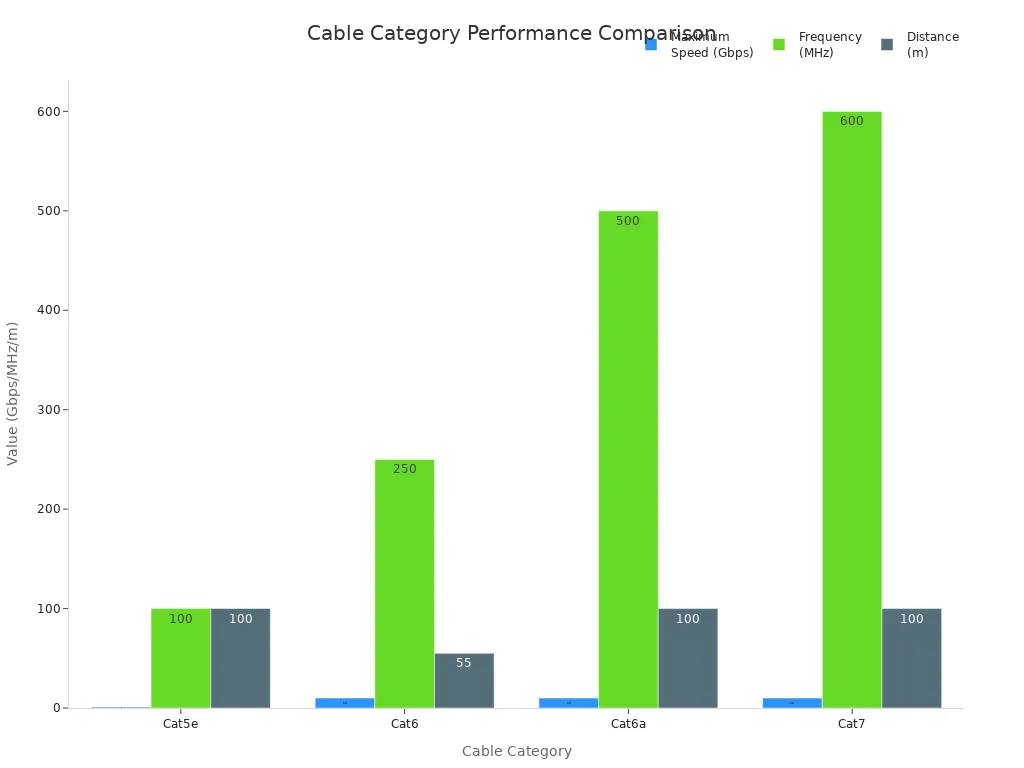
Cat5e Patch Cords work well for basic office setups and small businesses. Cat6 Patch Cords support higher speeds but have a shorter maximum distance at 10 Gbps. Cat6a and Cat7 Patch Cords offer better shielding and longer distances, making them suitable for data centers and high-performance environments. Always consider your current and future bandwidth needs before selecting a category.
Note: Using a lower category Patch Cord in a high-speed network can increase error rates and limit performance.
Fiber Mode & Count
Fiber Patch Cords come in different modes and strand counts. The mode determines the type of light transmission and the supported bandwidth. The count refers to the number of fiber strands within the cable, which affects capacity and redundancy.
|
Fiber Type |
Core Size (μm) |
Bandwidth (MHz*km) |
Recommended Use |
|---|---|---|---|
|
OM1 |
62.5/125 |
200/500 |
Older technology |
|
OM2 |
50/125 |
400/500 |
LED-based transmission |
|
OM3 |
50 |
2000 |
10 Gb/s, 40 Gb/s, 100 Gb/s |
|
OM4 |
50 |
4700 |
10 Gb/s, 40 Gb/s, 100 Gb/s |
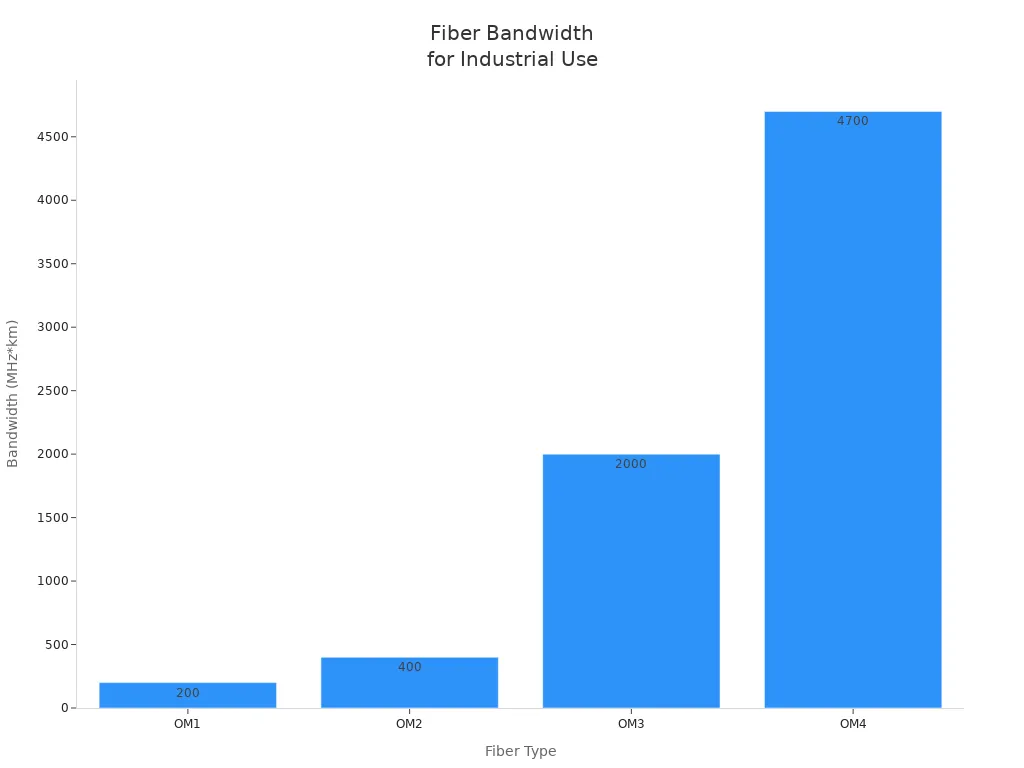
You should use OM3 or OM4 Patch Cords for high-bandwidth industrial applications. These types support speeds up to 100 Gb/s and provide the best performance for modern networks. The number of fiber strands depends on your installation requirements. More strands allow you to run multiple signals in parallel, which reduces the need for complex multiplexing and increases reliability. For example, a 4-fiber Patch Cord can carry four separate signals without bandwidth issues.
Note: Always match the fiber mode and count to your network's speed and redundancy needs. This ensures you avoid bottlenecks and maintain future scalability.
Connector Types
Choosing the right connector type ensures compatibility and performance in your network. You will encounter several connector options, each designed for specific cable types and applications. Selecting the wrong connector can lead to signal loss, increased downtime, or even equipment damage.
Common Connector Types for Copper Patch Cords
- RJ45: The most widely used connector for Ethernet networks. You will find RJ45 connectors in almost every office and data center. They support Cat5e, Cat6, Cat6a, and Cat7 cables.
- GG45: An advanced version of RJ45, designed for Cat7 and Cat7a cables. GG45 connectors provide better shielding and higher frequencies.
- TERA: Used in high-performance environments, TERA connectors support Cat7 and Cat8 cables. They offer superior shielding and bandwidth.
Common Connector Types for Fiber Patch Cords
|
Connector |
Description |
Typical Use Case |
Key Benefit |
|---|---|---|---|
|
LC |
Small form factor, push-pull design |
High-density panels, data centers |
Saves space, easy to use |
|
SC |
Snap-in connector, square shape |
Enterprise backbones, telecom |
Reliable, simple installation |
|
ST |
Bayonet-style, round design |
Legacy networks, industrial |
Secure connection, durable |
|
MTP/MPO |
Multi-fiber, rectangular |
High-density, parallel optics |
Supports multiple fibers, fast deployment |
Tip: Use LC connectors for high-density environments. They allow you to fit more connections in less space, which is critical in modern data centers.
You should always match the connector type to your existing hardware and patch panels. Incompatibility can cause costly delays and require additional adapters. For industrial networks, choose connectors with ruggedized designs to withstand harsh conditions.
Cable Length
Cable length directly affects network performance and reliability. You must select the correct length to avoid signal degradation, latency, and unnecessary clutter.
-
Why Cable Length Matters
- Signal Loss: Longer cables experience greater attenuation. For copper Patch Cords, the maximum recommended length is 100 meters for Cat5e and Cat6 at gigabit speeds. Exceeding this limit can cause data errors and slowdowns.
- Latency: Longer cables introduce more delay. In high-speed networks, even small increases in latency can impact application performance.
- Cable Management: Using cables that are too long creates tangled racks and airflow problems. Shorter, properly sized cables improve organization and cooling.
|
Cable Type |
Max Recommended Length |
Impact of Exceeding Limit |
|---|---|---|
|
Cat5e/Cat6 |
100 meters |
Increased errors, lower speeds |
|
Cat6a/Cat7 |
100 meters |
Maintains 10 Gbps up to 100 m |
|
Fiber (OM3/OM4) |
300-400 meters (10G) |
Signal loss, requires repeaters |
Note: For fiber Patch Cords, you can achieve much longer runs than copper, but you must still consider the type of fiber and the network speed. Always check manufacturer specifications.
You should measure the distance between devices before ordering cables. This step prevents waste and ensures optimal performance. In industrial settings, avoid running cables near sources of electrical noise, as longer runs increase susceptibility to interference.
Construction & Performance

Shielding: UTP vs. STP
- Shielding plays a critical role in maintaining signal integrity, especially in environments with high electrical noise. You need to choose between Unshielded Twisted Pair (UTP) and Shielded Twisted Pair (STP) cables based on your network's exposure to electromagnetic interference (EMI).
- STP cables wrap each pair of wires in metallic shielding, which significantly reduces electrical leakage and crosstalk.
- The extra layer of shielding in STP cables blocks EMI, preventing signal leakage and reducing crosstalk.
- STP cables offer enhanced protection against EMI, making them suitable for industrial environments with high electrical noise.
- The shielding in STP cables minimizes the impact of EMI from external sources, which is crucial in industrial settings.
- UTP cables provide less protection against external interference and are more suitable for office or residential environments with minimal EMI.
- In industrial networks, always consider STP Patch Cords when heavy machinery or radio equipment operates nearby. This choice helps you maintain reliable data transmission and reduces the risk of costly downtime.
Jacket Ratings
The outer jacket of a cable determines its safety, durability, and suitability for specific environments. You must select the right jacket rating to comply with building codes and protect your network infrastructure.
|
Cable Jacket Rating |
Description |
Safety Features |
|---|---|---|
|
CMP (Plenum) |
For use in air ducts and plenums |
Fire-resistant, low smoke production |
|
CMR (Riser) |
For vertical runs between floors |
Fire-resistant, prevents vertical flame spread |
|
CM/CMG (General) |
For general communications |
Resistant to fire spread |
|
LSZH |
Low Smoke Zero Halogen |
Minimal smoke, no halogen gases in a fire |
Low Smoke Zero Halogen (LSZH) cables are especially valuable in environments where safety is a top priority, such as hospitals and airports. In the event of a fire, LSZH cables produce minimal smoke and release no halogen gases, protecting both occupants and first responders. Plenum-rated cables use fire-resistant materials to reduce the risk of fire spreading through air ducts. Riser-rated cables prevent flames from traveling between building floors. Always match the jacket type to your installation environment to ensure compliance and safety.
- Plenum-rated cables reduce fire spread risk in air handling spaces.
- Riser-rated cables resist vertical flame spread in building shafts.
- LSZH cables minimize smoke and toxic gas emissions, enhancing safety in crowded or sensitive environments.
Tip: For industrial settings with exposure to chemicals, abrasion, or UV light, select industrial-grade jackets designed for harsh conditions.
Testing Standards
- Compliance with recognized testing standards ensures that your Patch Cords deliver reliable performance and support network uptime. You should always verify that cables meet standards such as TIA/EIA and ISO/IEC.
- Reliability and uptime: Standards ensure consistent, high-quality connections, reducing signal loss and downtime.
- Performance and bandwidth: Certified Patch Cords support high-speed data transmission and meet growing traffic demands.
- Scalability and future-proofing: Standards-compliant cables accommodate upgrades and evolving requirements without costly re-cabling.
- Testing of nearly 500 Category 6 copper Patch Cords revealed that 322 out of 379 offshore cords failed to meet TIA 568-C.2 standards, posing a significant risk of network issues. In contrast, all Patch Cords from recognized North American manufacturers passed with a 0% failure rate. Generic fiber jumpers also performed poorly, with only one out of 36 samples passing all specifications. These results highlight the importance of sourcing quality Patch Cords and verifying compliance with industry standards.
Note: Always request test reports or certifications from your vendor. This step helps you avoid unreliable products and ensures your network meets performance expectations.
Labeling & Documentation

Patch Cords: Labeling
You need clear and consistent labeling to keep your network organized and efficient. Proper labeling helps you identify connections quickly, which reduces downtime during troubleshooting or upgrades. When you label both ends of each patch cord, you save valuable time and avoid confusion. Durable labels resist wear and tear, so your network remains easy to manage even after years of use.
|
Source |
Key Practice |
|---|---|
|
A Guide to Patch Panel Cable Management |
Label both ends of the cables using labels that resist wear and tear to quickly identify each connection, saving time during troubleshooting or network expansion. |
|
Best Practices for Network Installation |
Use consistent, clear labels for all cables, ports, and panels to save time during troubleshooting and upgrades. |
|
Data Center Cable Labeling Standards |
Maintain documentation of all cables, including identifiers, source and destination, cable type, and length. |
Tip: Use a standardized labeling system across your entire network. You can include information such as cable type, port number, and destination. This approach makes it easier for your team to trace connections and resolve issues.
A well-labeled network supports faster repairs and upgrades. You avoid accidental disconnections and reduce the risk of costly mistakes. In high-density environments, clear labels help you manage hundreds or thousands of patch cords without confusion.
Documentation Practices
Systematic documentation transforms network management from a guessing game into a precise science. You should record every patch cord installation, including port numbers, cable paths, device connections, and cable specifications. This practice allows you to track changes, schedule maintenance, and plan upgrades with confidence.
Maintaining detailed records of patch panel configurations gives you a clear overview of your infrastructure. You can follow up on changes efficiently and prevent errors during expansions or repairs. When you document cable identifiers, source and destination, and cable length, you create a reliable reference for your team.
- Create a digital or physical log for every patch cord.
- Update documentation after every change or upgrade.
- Store records in a secure, accessible location for your IT staff.
Note: Accurate documentation supports compliance with industry standards and helps you meet audit requirements. You also improve long-term network management efficiency, which protects your investment and reduces operational risks.
You gain control over your network when you combine proper labeling with systematic documentation. This strategy ensures your enterprise or industrial network remains scalable, reliable, and easy to maintain.
High-Density & Fiber Considerations

High-density cabling environments, such as data centers and large enterprise networks, demand careful planning and specialized patch cords. You must address fiber counts, polarity, and connector performance to ensure your network supports high-speed data transmission and future scalability.
Fiber Counts
You face increasing demands for bandwidth and connectivity in modern enterprise and industrial networks. High-density fiber-optic cables now offer extreme fiber counts to meet these needs.
- 1728-fiber cables are common in telecom applications, supporting large-scale backbone connections.
- 3456- and 6912-fiber cables are typical in data center environments, where you need to connect thousands of devices efficiently.
- The evolution of fiber counts started with cables containing 432 fibers, then expanded to 864 fibers. As data centers and metro backbones grew, the need for even higher fiber counts led to the introduction of 1728, 3456, and 6912-fiber cables. These high-count cables help you maximize rack space, reduce cable congestion, and simplify management in high-density installations.
Tip: Choose the fiber count that matches your current and projected network growth. Higher fiber counts support rapid expansion and reduce the need for frequent upgrades.
Polarity
- Polarity management ensures that transmit (Tx) and receive (Rx) signals align correctly. In high-density environments, such as data centers, maintaining proper polarity is critical for reliable, high-speed data transmission.
- Proper alignment of Tx and Rx signals guarantees accurate data flow.
- Mismatched polarities can cause signal loss and data corruption, which directly impacts network performance.
- Standardizing polarity configurations simplifies deployment and maintenance, especially when you manage hundreds or thousands of connections.
You should always verify polarity during installation and use standardized methods, such as Method A, B, or C, to streamline troubleshooting and upgrades. Consistent polarity management protects your investment and keeps your network running smoothly.
Note: In high-speed, high-density environments, even a single polarity error can disrupt critical operations. Always double-check your connections.
UPC/APC Connectors
Connector performance plays a vital role in fiber optic networks, especially in high-density and high-speed applications. You will encounter two main types: UPC (Ultra Physical Contact) and APC (Angled Physical Contact) connectors. Each offers distinct advantages for different scenarios.
|
Metric |
UPC (Ultra Physical Contact) |
APC (Angled Physical Contact) |
|---|---|---|
|
Return Loss |
-50dB or lower (0.001% reflection) |
-60dB or lower (0.0001% reflection) |
|
Insertion Loss |
0.2–0.3dB (high efficiency) |
0.3–0.5dB (minimal extra loss) |
UPC connectors provide high efficiency and low insertion loss, making them suitable for most enterprise environments.
APC connectors offer superior return loss performance, which reduces signal reflection and is ideal for high-bandwidth or long-distance links.
You should select UPC connectors for standard enterprise applications where efficiency and cost matter most. For industrial or data center environments with sensitive equipment or long fiber runs, APC connectors deliver better signal integrity and minimize reflection-related issues.
Tip: Match connector types across your network to avoid compatibility problems and ensure optimal performance.
Compliance & Quality

Certifications
You must verify that every patch cord meets strict certification standards before installation in enterprise or industrial networks. Certifications guarantee safety, reliability, and compliance with international regulations. The most recognized certifications include UL, ETL, RoHS, and CE. Each certification addresses a different aspect of product quality and safety.
|
Certification |
Description |
|---|---|
|
UL |
Underwriters Laboratories. Ensures safety standards for electrical products. |
|
ETL |
Verifies compliance with ANSI TIA/EIA568-2 and ISO/IEC 11801 standards. |
|
RoHS |
Restricts hazardous substances in manufacturing. Protects the environment and user health. |
|
CE |
Confirms conformity with safety, health, and environmental protection standards in the EEA. |
You should always look for patch cords with CE marking. This indicates that the product meets safety, health, and environmental protection standards required in the European Economic Area. RoHS compliance ensures that hazardous substances are not present, which is vital for environmental safety. UL and ETL certifications confirm that the patch cords have passed rigorous safety and performance tests.
Fire Ratings
Fire ratings play a critical role in safety compliance, especially in industrial environments. Fire-rated patch cords maintain electrical integrity during emergencies. These cables support vital systems for up to two hours during a fire, which allows safe evacuation and effective firefighting.
Fire-rated cables with a 2-hour rating help maintain network operation during emergencies.
UL 2196 testing ensures cables withstand extreme heat and continue to function.
You protect your infrastructure and personnel by choosing cables with proper fire ratings.
Always select patch cords with verified fire ratings for industrial installations. This choice reduces risk and supports compliance with local safety codes.
Vendor Selection
Choosing a reputable vendor is essential for quality assurance and long-term support. You must evaluate vendors based on their testing procedures, product reliability, and customer service. Reliable vendors conduct extensive tests to ensure patch cords perform in harsh environments.
|
Test Name |
Purpose |
|---|---|
|
Salt Fog |
Tests for corrosion resistance in coastal environments. |
|
Airborne Contaminants |
Assesses stability in polluted outdoor conditions. |
|
Immersion/Corrosion |
Verifies material integrity after prolonged water exposure. |
|
Groundwater Immersion |
Checks durability in underground applications. |
|
Biological Contaminants |
Evaluates resistance to harmful organisms outdoors. |
|
Epoxy Quality |
Ensures proper curing to prevent mechanical failures. |
|
Tool Maintenance |
Maintains assembly tool quality for consistent product standards. |
You should request documentation of these tests from your vendor. Reliable vendors offer warranties and technical support, which protect your investment and minimize downtime. Always choose vendors with a proven track record in enterprise and industrial networking.
By prioritizing certifications, fire ratings, and vendor reliability, you ensure that your patch cords meet the highest standards for safety and performance. This approach supports compliance, protects your infrastructure, and delivers peace of mind for B2B customers.
Common Mistakes
Selecting patch cords for enterprise and industrial networks requires careful attention to specifications, environment, and quality. Overlooking these factors can lead to costly downtime, security risks, and dissatisfied customers. You can avoid these pitfalls by understanding the most frequent mistakes and their consequences.

Mismatched Specs
You may encounter specification mismatches when patch cords do not align with your network's requirements. Impedance mismatches are a common issue, especially in Category 5 channels, where mismatches can reach up to 15Ω. In Category 5e and Category 6, tighter impedance control reduces mismatches to less than 5Ω and 3Ω, respectively. These mismatches introduce noise and bit errors, which disrupt Fast Ethernet and Gigabit Ethernet networks. When you use patch cords with incorrect specs, you risk degraded network performance and increased error rates. Always verify that your patch cords match the category and impedance requirements of your network hardware.
|
Cable Category |
Typical Impedance Mismatch (Ω) |
Risk Level |
|---|---|---|
|
Cat 5 |
Up to 15 |
High |
|
Cat 5e |
< 5 |
Moderate |
|
Cat 6 |
< 3 |
Low |
Tip: Matching patch cord specs to your network's standards helps you maintain reliable data transmission and minimize downtime.
Ignoring Environment
Neglecting environmental factors during patch cord selection can cause network failures and long-term damage. You must consider the physical conditions where your cables operate. Environmental hazards include:
- Moisture can penetrate cable jackets, causing corrosion and signal loss.
- Extreme temperatures may lead to cable expansion, contraction, or breakage.
- Physical stress from vibration or impact can damage connectors and fibers.
- If you ignore these risks, your network may suffer from intermittent outages and costly repairs. Industrial networks demand patch cords with robust jackets and shielding to withstand harsh conditions.
Note: Always select patch cords rated for your specific environment to protect your infrastructure and ensure consistent performance.
Poor Quality
Using poor quality patch cords in industrial networks can have severe consequences. You expose your network to multiple risks:
- Reduced network performance due to return loss and crosstalk, resulting in data errors and slow speeds.
- Data loss that impacts business operations and reliability.
- Increased risk of security breaches as poor performance makes networks vulnerable.
- Customer dissatisfaction from frequent outages and slow service.
- Higher maintenance costs because low-quality cables fail more often.
In a 2010 test, 85% of cheap patch cords failed on near-end crosstalk and return loss. Well-known manufacturers achieved a 0% failure rate. Low-quality patch cords may pass limited tests but often fail in real-world, high-speed applications. Return loss indicates the power ratio of outgoing to reflected signals; low RL forces reliance on echo cancellation, which can degrade performance.
Choosing high-quality patch cords from reputable vendors protects your network, reduces maintenance costs, and ensures customer satisfaction.
Selecting patch cords for enterprise and industrial networks requires a systematic approach. You start by matching patch cord types, jacket colors, and connectors to your network's needs and environment. Proper documentation and compliance monitoring, as shown below, help you maintain reliability:
|
Aspect of Compliance Monitoring |
Contribution to Network Reliability |
|---|---|
|
Continuous Monitoring |
Ensures adherence to regulations |
|
Transparency |
Enables proactive issue resolution |
|
Culture of Compliance |
Builds resilient infrastructure |
Review your current patch cord setup and consult trusted vendors to ensure optimal performance and long-term network success.
FAQ
Why should you choose certified patch cords for your network?
Certified patch cords guarantee compliance with industry standards. You reduce the risk of network failures and ensure consistent performance. Certification also helps you meet regulatory requirements and pass audits with confidence.
Why does patch cord length matter in enterprise networks?
Long patch cords can cause signal loss and latency. You maintain optimal network speed and reliability by selecting the correct length. Shorter cables also improve rack organization and airflow.
Why is shielding important for industrial patch cords?
Shielding protects your network from electromagnetic interference (EMI). In industrial environments, you face high EMI from machinery. Shielded patch cords help you maintain data integrity and prevent costly downtime.
Why do you need to match patch cord category to network speed?
Each cable category supports specific speeds and frequencies. Using a lower category patch cord limits your network's performance. You avoid bottlenecks and errors by matching the patch cord to your network's requirements.
Why should you document and label every patch cord?
Clear documentation and labeling save time during troubleshooting and upgrades. You quickly identify connections, reduce errors, and maintain an organized infrastructure. This practice supports efficient network management.
Why do fiber connector types matter in high-density environments?
Different connector types affect compatibility and density. Choosing the right connector, such as LC for high-density panels, lets you maximize space and maintain reliable connections.
Why is vendor selection critical for patch cord reliability?
Reputable vendors test patch cords for quality and durability. You receive products that meet strict standards and come with support and warranties. This reduces maintenance costs and protects your investment.