



Fiber Patch Cables: LC/SC/ST Connectors, UPC vs APC, and Loss Budgets
Choosing the right connector and polish is important when using fiber patch cables. It can change how well your network works. LC connectors with APC polish have less loss, making them more stable in busy enterprise setups. SC or ST with UPC polish can save money and are suitable for simple links. The connector and polish you pick affects average loss, which you can see in the table below:
|
Connector Type |
Average Loss (dB) |
|---|---|
|
Adhesive/Polish or Fusion Splice-on |
0.3 |
|
Prepolished/Mechanical Splice or MPOs |
0.75 |
A lower loss budget helps your network work better. Always check technical specs before you choose fiber patch cables. Look at certification, delivery speed, and after-sales support too.
Key Takeaways
- Pick the right connector type for your network. LC connectors work well for crowded setups. SC and ST connectors fit simple links.
- Know the difference between UPC and APC polish types. APC polish helps stop signal reflection. This is good for high-performance uses.
- Always look at the average loss values for connectors. Lower loss values mean your network works better.
- Plan your loss budget with care. Add up losses from connectors, splices, and fiber length. This helps your network run smoothly.
- Clean fiber ends before you connect them. Dust and dirt can cause signal loss and problems in your network.
- Choose certified fiber patch cables for quality. Certified cables follow industry rules. This lowers the chance of network trouble.
- Think about the cost of connectors. SC and LC connectors save money. ST connectors may cost more because they are older.
- Buy from suppliers with good support. Trusted suppliers give warranties and help with problems. This keeps your network working well.
Fiber Patch Cables Connector Types

LC, SC, ST Overview
Design Differences
There are three main connector types for fiber patch cables. These are LC, SC, and ST. Each connector looks different and works in its own way. This affects how you install them and how well they work.
|
Connector Type |
Size |
Locking Mechanism |
Insertion Loss |
Applications |
|---|---|---|---|---|
|
LC |
Smaller than SC |
Clip-locking |
< 0.5 dB |
Data centers, enterprise networks |
|
SC |
2.5mm or 3.0mm |
Push-pull |
< 0.5 dB |
Telecommunications networks |
|
ST |
2.5mm |
Bayonet mount |
N/A |
Legacy networks, industrial settings |
LC connectors use a clip-locking design. You can fit many LC connectors in a small space. This is good for places with lots of cables. SC connectors use a push-pull system. They are easy to use and work well in medium-sized setups. ST connectors use a bayonet mount. You can plug and unplug ST connectors fast. This helps in older or industrial networks.
Compatibility
You need to check if your fiber patch cables match your equipment. LC connectors work best in new data centers and big networks. SC connectors fit most telecom and CATV gear. ST connectors are still used in old LANs and factories.
Tip: Always look at both ends of your fiber patch cables. Make sure the connector types match. LC and SC connectors have different colors to help you tell them apart. LC connectors are usually blue or green. SC connectors can be blue, green, or beige. ST connectors are often metal or black.
Pros and Cons
Cost Factors
Cost matters when you buy lots of connectors. You should think about how much you want to spend and what you need.
|
Connector Type |
Cost ($ = lower, $$$ = higher) |
|---|---|
|
SC |
$$ |
|
LC |
$$ |
|
ST |
$$$ |
SC and LC connectors do not cost much for most businesses. ST connectors cost more because they are older and not used as much now.
Performance
How well a connector works depends on its design and where you use it. You should think about how easy it is to install, fix, and keep working.
|
Connector Type |
Advantages |
Disadvantages |
|---|---|---|
|
LC |
High density; compact size (1.25mm) |
Difficult to access in crowded racks |
|
SC |
Cost-effective; easy to use; stable insertion loss |
Can fall out if not secured |
|
ST |
Quick plug/unplug; strong mechanical strength |
Prone to breaking |
LC connectors save space and move data fast. SC connectors are simple and work well. ST connectors are strong and easy to unplug, but they can break.
Use Cases
Data Centers
LC connectors are used a lot in data centers. Their small size lets you put many connections in one place. LC connectors help with cloud computing and storing lots of data.
Telecom
SC connectors are common in telecom networks. You can use them for FTTH, CATV, and long links. SC connectors give steady connections for internet and military use.
Industrial
ST connectors are found in factories and old networks. You see them in schools, plants, and old LANs. Their bayonet design is good for plugging and unplugging often.
|
Connector Type |
Common Use Cases |
|---|---|
|
LC |
Data centers, enterprise networks, fiber-to-desk, medical/industrial equipment |
|
SC |
Telecom networks, ISPs, CATV, military, industrial equipment |
|
ST |
Legacy networks, industrial equipment, military, cable TV, LANs |
LC Connector Use Cases:
Data centers
Enterprise networks
Fiber-to-desk applications
Medical and industrial equipment
High-speed internet and telecommunications
SC Connector Use Cases:
Telecommunication networks
Internet service providers
Cable television
Military communications
Industrial equipment
ST Connector Use Cases:
Legacy networks
Industrial equipment
Military communications
Cable television
Local area networks (LANs)
Note: If you buy for a business, match connector types to your needs. LC connectors are best for busy, fast networks. SC connectors are good for telecom and CATV. ST connectors are still used in old and factory systems.
Pick the right connector type for your job. Think about matching, cost, and how easy it is to keep working. This helps your network stay strong and reliable.
UPC vs APC Polishes

Polish Types
PC, UPC, APC
There are three main polish types for fiber patch cables. These are PC, UPC, and APC. Each polish shapes the connector end differently. This changes how well it works and what it fits with.
- PC (Physical Contact): This polish makes a rounded tip. It removes air gaps between connectors. PC connectors are found in older systems.
- UPC (Ultra Physical Contact): UPC polish makes the surface smoother than PC. This gives better return loss. UPC connectors are used in many homes and businesses.
- APC (Angled Physical Contact): APC connectors have an 8° angle at the tip. This angle sends reflections into the cladding. It lowers back reflection a lot. APC connectors are needed for high-performance and sensitive systems.
Colors help you know the polish type fast:
|
Color |
Polish Type |
|---|---|
|
Blue |
UPC (Ultra Physical Contact) |
|
Green |
APC (Angled Physical Contact) |
Tip: Blue means UPC polish. Green means APC polish. Always check the color before you connect cables.
Performance Comparison
Insertion Loss
Insertion loss tells you how much signal is lost when two fibers connect. UPC and APC connectors both have low insertion loss. It is usually between 0.3 and 0.5 dB, and can go up to 0.75 dB. Both polish types have about the same insertion loss.
|
Connector Type |
Insertion Loss (dB) |
Return Loss (dB) |
|---|---|---|
|
UPC |
0.3 - 0.5 (max 0.75) |
≥50 |
|
APC |
0.3 - 0.5 (max 0.75) |
≥60 |
Return Loss
Return loss shows how much signal bounces back to the source. Higher return loss is better. It means less reflection. UPC connectors usually have -50 dB return loss. APC connectors are even better, often -60 dB or more. The 8° angle on APC polish sends reflections away from the core. This makes APC connectors best for jobs where signal quality is very important.
|
Connector Type |
Description |
Return Loss |
|---|---|---|
|
PC |
Rounded tip, removes air gap. |
-40dB |
|
UPC |
Smoother than PC, better return loss. |
-50dB |
|
APC |
8° angle, cuts back reflection. |
Lower than -50dB |
Note: APC connectors give the best return loss. Pick APC polish for fast or analog jobs.
Compatibility
Do not mix APC with UPC or PC connectors. The different shapes do not fit well. This can cause more loss or even break the connectors. Always use the same polish type on both ends of your fiber patch cables.
|
Connector Type |
Compatibility |
|---|---|
|
UPC to UPC |
Good |
|
UPC to APC |
Not Recommended |
|
APC to UPC |
Not Recommended |
|
APC to APC |
Good |
Application Scenarios
When to Use UPC
UPC polish is good for most digital jobs. Use UPC connectors for:
Office networks, like switches, routers, and Wi-Fi.
Home networks, such as fiber modems and smart TVs.
Old systems, when updating older networks.
Data centers, for connecting servers to switches.
UPC connectors work well and save money for most homes and businesses.
When to Use APC
APC polish is needed for high-performance and sensitive systems. Use APC connectors for:
Distributed Antenna Systems (DAS)
Fiber to the Home (FTTH)
CCTV and analog video
Passive optical jobs
100G+ backbone links or shared networks
APC connectors lower signal reflection. This is key for RF, analog, and fast digital jobs.
|
Connector Type |
Recommended Application Scenarios |
|---|---|
|
UPC |
- Office networks: Switches, routers, Wi-Fi. |
|
APC |
- DAS, FTTH, CCTV, passive optical jobs. |
Alert: Always match polish types. Mixing APC and UPC can break connectors and hurt network performance.
Choosing the Right Polish Type
Follow these steps to pick the right polish type:
Application & Signal Type: Decide if you need digital, fast, or analog video. Fast and RF jobs need APC polish.
Network Standard: Check your gear and network rules. Many new systems need APC polish.
Required Performance: Look at your loss budgets. APC polish is best for high-performance, like 100G or more.
Compatibility: Use the same polish type at both ends. Mixing APC with PC or UPC causes trouble.
Cost: UPC polish costs less for most digital jobs. APC polish costs more but is needed for special cases.
Pick the right polish type for your job. This helps your fiber patch cables work well and last a long time.
Loss Budgets in Fiber Patch Cables
A loss budget is the most signal loss your system can have. It is also called a power budget or optical budget. You need to know this number to keep your network working well. The loss budget adds up all the losses as the signal moves through fibers, connectors, and splices. It is measured in decibels (dB). Decibels show the difference between the power going in and the power coming out. Planning your loss budget helps your system work, even if things change.

What Is Loss Budget
Components
Many things make up your total loss budget:
Transmitter Power: This is how strong the signal is at the start.
Fiber Attenuation: This is how much signal is lost per kilometer. It depends on fiber type and wavelength.
Receiver Sensitivity: This is the weakest signal your receiver can use.
Connector and Splice Losses: Every connector or splice adds some loss.
System Margin: This is extra room for changes or problems later.
You also need to think about losses that happen inside the fiber. These are fiber attenuation, material absorption, and Rayleigh scattering. Losses from outside include connector loss, splice loss, bend losses, and launch conditions.
Standards
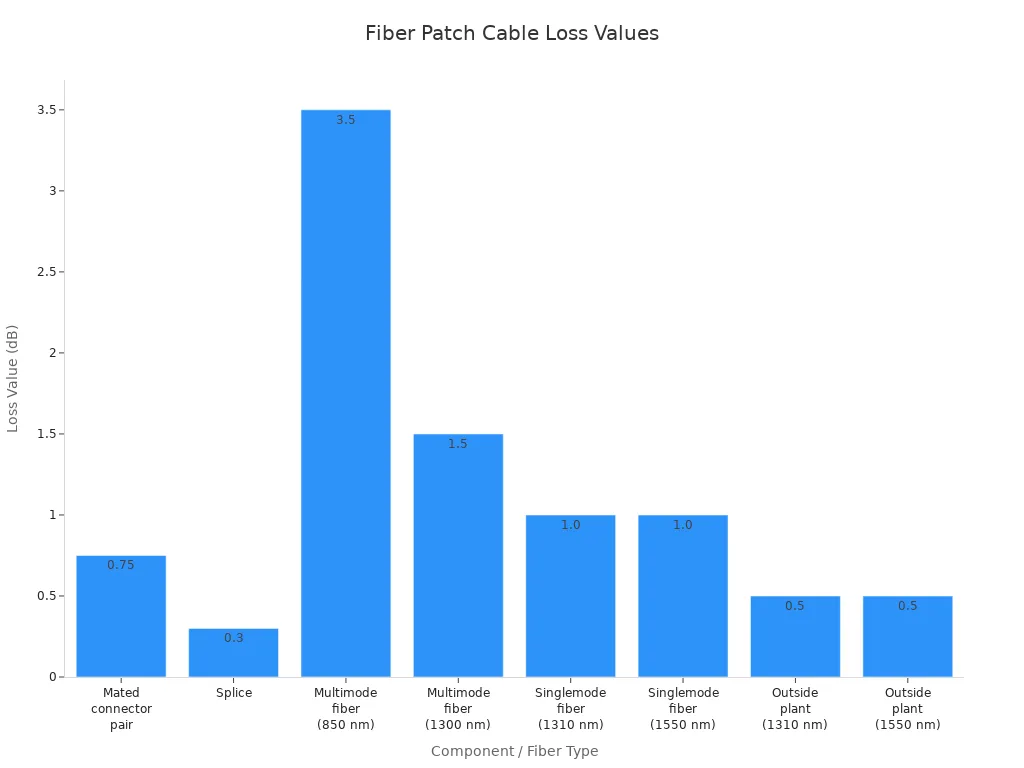
Industry rules help you pick good loss values. For example, a pair of connectors usually adds 0.75 dB. A splice adds 0.3 dB. Fiber attenuation changes with wavelength and fiber type.
|
Component |
Typical Loss Value |
|---|---|
|
Mated connector pair |
0.75 dB |
|
Splice |
0.3 dB |
|
Multimode fiber (850 nm) |
3.5 dB/km |
|
Singlemode fiber (1310 nm/1550 nm) |
1.0 dB/km |
Calculation Steps
Here is how you figure out your loss budget:
Count all connectors and splices in your link.
Measure the total length of fiber.
Use the standard loss values for each part.
Add a safety margin, usually 3 dB.
Example
Let's say you have a 2 km singlemode link. It has four connectors and two splices.
|
Component |
Quantity |
Loss per Unit |
Total Loss |
|---|---|---|---|
|
Connectors |
4 |
0.75 dB |
3.0 dB |
|
Splices |
2 |
0.3 dB |
0.6 dB |
|
Fiber (2 km) |
2 |
1.0 dB/km |
2.0 dB |
|
Subtotal |
5.6 dB |
||
|
Safety Margin |
3.0 dB |
||
|
Total Budget |
8.6 dB |
This means your system must work with up to 8.6 dB of loss.
Tools
You can use online calculators or spreadsheets to help with these steps. Charts make it easy to compare loss values for different parts.
Minimizing Loss
Best Practices
You can lower loss and keep your fiber patch cables working well by doing these things:
Clean fiber ends before you connect them.
Do not use basket trays for fiber patch cords.
Keep fiber cables away from copper cables.
Use flexible innerducts to protect cables.
Place cables gently instead of pulling hard.
Real-World Tips
Always follow the minimum bend radius. Most cords need at least 3.5 cm.
Do not pull or stretch cables.
Route cables so they do not get tangled or kinked.
Label cables so you can find them easily.
Check and clean connectors often.
Put caps on connectors you are not using.
Cleaning and careful setup help you avoid surprise losses and keep your network working well.
Cost and Quality Considerations

Price Comparison
LC vs SC vs ST
When you look at connector prices, you notice some differences. LC connectors usually cost more than ST connectors. If you need to connect LC to ST, the price is almost the same as ST. Here is a simple price chart:
|
Connector Type |
Price |
|---|---|
|
LC |
$41.15 |
|
ST |
$35.94 |
|
LC to ST |
$35.87 |
LC connectors are best for places with lots of cables, even though they cost more. ST connectors are good for older systems and cost less. SC connectors are a good choice if you want something in the middle for price and performance.
UPC vs APC
UPC connectors are usually cheaper than APC connectors. APC connectors have an angled end that helps with signal quality and return loss. You pay more for APC, but it works better for sensitive jobs. For most digital networks, UPC connectors work well and cost less. For jobs that need very good signal, APC is worth the extra money.
Tip: Always pick connector and polish types that fit your network. Spending more at first for the right connector can save you money later.
Certification
Standards
You need to make sure your fiber patch cables follow industry rules. These rules keep your network safe and working well:
TIA-568.3-D: Sets rules for fiber cables in buildings.
NEC (National Electrical Code, NFPA 70): Makes sure wiring and equipment are safe.
Following these rules helps you avoid problems and keeps your network running.
Supplier Selection
Picking a good supplier is just as important as picking the right cable. Look for suppliers who:
|
Certification Aspect |
Description |
|---|---|
|
Customer Focus |
Give you good products and care about your needs. |
|
Process Approach |
Use clear steps for making their products. |
|
Risk-Based Thinking |
Find and fix problems before they happen. |
|
Continuous Improvement |
Always try to make things better. |
|
Quality Audits |
Check their work often to make sure it is right. |
|
Inspection Processes |
Look at products during and after making them. |
|
Traceability |
Keep track of materials and how things are made. |
Testing shows the cables meet the rules.
Ask for real test reports, like LinkWare files, to check their claims.
Fiber certification makes sure your network works as it should. It helps you find weak spots before they cause trouble, which is very important for jobs that need data all the time.
ROI Factors
Maintenance
You want to get the most from your money. Fiber patch cables do not need much care and can last over 25 years. Fewer problems mean you spend less fixing or replacing them. Lower care costs help you save money over time.
Network Uptime
Good fiber cables can give speeds up to 100 Gbps. Strong cables help your business work better and keep customers happy. You avoid slowdowns and keep things running well. Good fiber also lets you use new things like 5G, IoT, and AI, so your network is ready for the future.
|
Aspect |
Evidence |
|---|---|
|
Fiber Optics Speed |
Up to 100 Gbps, fast and can grow with your needs. |
|
Impact on Productivity |
Faster data, happier customers, fewer slowdowns. |
|
Reliability & Lifespan |
Lasts over 25 years, needs little care. |
|
Maintenance Costs |
Costs less to fix, better uptime, lasts longer. |
|
Total Cost of Ownership |
Fewer repairs, not many upgrades needed. |
|
High-ROI Network Deployment |
Strong fiber means less downtime and lower costs, so you save more. |
|
Support for Emerging Technologies |
Lets you use 5G, IoT, AI, and work better. |
Buying certified, high-quality fiber patch cables means fewer problems, lower costs, and a network that is ready for new technology.
Procurement and Deployment

Delivery and Supply
Lead Times
You should plan for delivery times when you order fiber patch cables. If cables arrive late, your project can get delayed. This can make your project cost more. Here are some reasons why lead times are important: 1. Lead-time volatility: Sometimes, orders take weeks to arrive. If shipments are late, workers may have to wait. Waiting means you pay more for labor. 2. Quality inconsistency: If you get a bad batch of cables, they might not work. This means you need to fix or replace them. You may have to send workers out again. 3. Multiple vendors and complex logistics: Buying from many suppliers means more paperwork. It can also cause problems with shipping and customs. Shipping costs can go up. 4. Cost creep: Small orders cost more per cable. You also lose the chance to get better prices. 5. Inventory mismatch: Buying too many cables uses up your money. Buying too few means you might run out, especially for popular cables.
Tip: Pick suppliers who deliver on time and give good quality. This helps you avoid delays and keeps your project moving.
Inventory
You need to manage your fiber patch cable stock carefully. You want enough cables to meet needs, but not too many. If you buy too many slow-selling connectors, you waste money. If you buy too few, you might run out and miss deadlines. Use tools to track how many cables you use and what you need. This helps you keep the right amount in stock.
After-Sales Support
SLAs
Good after-sales support helps you feel safe about your purchase. Service Level Agreements (SLAs) tell you what help you get from your supplier. SLAs often include warranty, repair steps, and customer service.
|
Support Option |
Details |
|---|---|
|
Warranty |
One-year warranty covers problems from making or shipping. |
|
Repair Process |
Suppliers check cables, find problems, and help fix them. |
|
Customer Service |
Experts answer questions about cable choices and types. |
Note: Always read the SLA before you buy. A clear SLA protects your money and makes sure you get help if needed.
Troubleshooting
If you have problems, you need quick help to fix them. Good suppliers give technical support to help you solve issues. They guide you to find and fix the problem. Fast help keeps your network working and stops long delays.
Customization
OEM/ODM
Sometimes you need special fiber patch cables for your project. Many suppliers let you order custom cables. You can choose the length, connector, polish, and packaging. Custom cables help you meet your project needs and stand out.
Branding
Branding your fiber patch cables helps people trust your products. Suppliers can put your logo or labels on the cables or boxes. This makes your cables easy to spot and helps people remember your brand.
Custom cables and branding help you compete. They show you care about quality and help you get more customers.
Ensuring Reliable Fiber Patch Cables

Installation
Cleaning
You want your fiber patch cables to work well. Cleaning is very important. Dust, oil, or fingerprints can hurt the signal or the connector. Always check and clean both ends before you use the cable. Use lint-free wipes and isopropyl alcohol for the best cleaning. If you do not clean, you might get more signal loss or network problems.
Tip: Clean every connector before you use it. Even new cables can have dust on them.
Testing
Testing makes sure your fiber patch cables work right. After you set up the cables, use OLTS or visual fault locators to check for signal loss. Testing helps you find problems early, so you can fix them fast. Certification testing shows your cables meet the rules. This is important for warranty and following the standards.
|
Step |
Description |
|---|---|
|
Planning |
Plan your setup so patch cords match the other cables. |
|
Preparation |
Check cables for dirt or damage before using them. |
|
Post-installation Testing |
Test and certify cables to make sure they work and follow the rules. |
Deployment Challenges
Environment
You can face many problems from the environment when setting up cables. Dust, water, and big temperature changes can hurt fiber patch cables. In tough places, you need cables made with strong materials. Do not bend cables too much or let them get crushed or pulled. Good cable paths and protection stop surprise signal loss.
- Pick bend-insensitive fiber for small spaces.
- Use covers or pipes to protect cables outside or in factories.
- Keep cables away from things that cause electromagnetic interference.
Training
Training helps your team put in and take care of fiber patch cables the right way. If workers are not trained, they might bend cables wrong or break connectors. Give hands-on lessons on cleaning, handling, and testing. Trained teams make fewer mistakes and help your network work better.
Note: Keep training your team so they learn new ways and rules.
Future Trends
New Connectors
New connector designs are coming to help with more connections and better speed. Push-pull mini-MPO and MDC connectors let you fit more cables in a small space. Connector-on-board optics use less power and make equipment smaller. These new ideas help you build faster and better networks.
More connectors in one spot help with more data.
Better materials make cables last longer in hard places.
Eco-friendly ways to make cables help the planet.
Loss Management
Ways to control signal loss are getting better. New nano-polish methods can make insertion loss less than 0.1 dB. Bend-insensitive fiber and better connectors keep signals strong, even in hard setups. Special patch cables with small sizes help with crowded places and make networks easier to change.
Using the newest fiber patch cable technology helps you fix network problems and give good service to your customers.
Picking the right fiber patch cables is important for your network. You can use LC, SC, or ST connectors with UPC or APC polish. These choices help your network work well and stay strong. Always watch your loss budget and check for quality certifications. Choose suppliers who give good support and deliver quickly.
Next Steps:
- Think about what your network needs
- Choose cables that are certified
- Make a plan to install and test them the right way
Note: For more information, look at TIA-568.3-D and NEC standards. The data comes from industry reports and manufacturer datasheets.
FAQ
Why should you choose LC connectors for data centers?
LC connectors help save space in racks. You can fit more cables in one spot. This makes it easier to handle big networks. It also helps stop network problems and keeps things running.
Why does the polish type (UPC or APC) matter in fiber patch cables?
The polish type changes how much signal bounces back. APC connectors lower signal bounce, so they work better for fast or analog networks. UPC connectors are good for most digital jobs and cost less.
Why is it important to calculate the loss budget before installation?
Figuring out the loss budget helps your network work right. You can stop surprise signal loss and keep things running. This step saves money and keeps your network strong.
Why do telecom operators often prefer SC connectors?
SC connectors are easy to use and fit most gear. Telecom companies like them because they follow the rules. They give steady results in big networks.
Why should you avoid mixing UPC and APC connectors?
Mixing UPC and APC connectors makes them not line up right. This can cause big signal loss and break the connectors. Always use the same polish on both ends.
Why do certified fiber patch cables matter for B2B projects?
Certified cables follow important rules like TIA-568.3-D. This means fewer problems and better trust from customers. Certification helps you pass checks and keeps your network safe.
Why does after-sales support matter when buying fiber patch cables?
After-sales support helps you fix problems fast. You get help with repairs, questions, and warranties. Good support saves time and keeps your network working.
Why should you consider environmental factors during fiber patch cable deployment?
Things like dust, water, and heat can hurt cables. Picking the right cable and protection keeps signals strong. This helps your cables last longer and work better.