



Fiber Optik Single Mode Types: OS1, OS2, and Their Applications in Modern Networks
You will find two main types of Fiber Optik Single Mode cables. These are OS1 and OS2. OS1 is good for indoor use. It works best for short distances. OS2 is made for outdoor use. It is better for long distances. Knowing these differences helps you design your network better. It also helps you save money. You can also plan for future needs. The table below shows how OS1 and OS2 are different. It compares distance, attenuation, cost, and scalability:
|
Feature |
OS1 |
OS2 |
|---|---|---|
|
Maximum Distance |
Up to 2 km |
Greater than 10 km |
|
Attenuation Rate |
1.0 dB/km |
0.4 dB/km |
|
Cost |
Lower initial cost |
Higher initial cost |
|
Application |
Indoor, short-range |
Outdoor, long-distance |
|
Scalability |
Limited |
High scalability for future growth |

Key Takeaways
- OS1 works best inside buildings and for short distances. OS2 is made for outside use and long distances.
- Knowing about attenuation helps you pick the right fiber.
- OS1 cables save money for small networks. OS2 is better for big projects that may grow.
- OS2 has less signal loss, so you can run cables farther. You do not need extra gear for longer runs.
- Pick OS2 if you want your network to grow later. It can handle faster speeds and longer distances without new cables.
- Think about where you will put the cables. OS1 bends easily for indoor places. OS2 is tough for outdoor areas.
- Use standards like ITU-T G.652 to make sure your network works well.
- Talk to experts when buying fiber optic cables. This helps you make good choices and avoid mistakes.
Fiber Optik Single Mode Overview

What Is Single Mode Fiber?
Before you pick a cable, you should know what single mode fiber is. Single mode fiber has a very thin glass core. The core is about 8 to 10 microns wide. This design lets light travel in only one path. Because of this, there is less signal loss. You also get better data quality over long distances. Single mode and multimode fiber are different. They send light in different ways. They also carry data for different distances. Here is a table that shows these differences:
|
Feature |
Single Mode Fiber |
Multimode Fiber |
|---|---|---|
|
Core Diameter |
8 to 10 microns |
50 or 62.5 microns |
|
Number of Light Modes |
Allows only one mode of light |
Allows multiple modes of light |
|
Signal Dispersion |
Minimal due to single light path |
Higher due to multiple light paths |
|
Transmission Distance |
Long-distance, high-bandwidth |
Short-range, high-speed data transfer |
Single mode fiber is special because it sends data fast over long distances. You can find it in backbone networks. It is also used in data centers and telecom systems.
Core Features
When you look at Fiber Optik Single Mode cables, you see some important features.
- The core is about 8 to 10 microns wide.
- The numerical aperture is usually 0.14. This controls how light goes into the fiber.
- The cable sends only one light mode. This helps stop modal dispersion.
- There is very little signal loss or interference. Your data stays safe over long distances.
- Tip: If you want strong, fast connections for your business, Fiber Optik Single Mode is the best choice for big networks.
Here is a quick guide for technical details:
|
Core Diameter (microns) |
Numerical Aperture |
|---|---|
|
8.2 |
0.14 |
Role in Networks
- Fiber Optik Single Mode is very important in today's networks. You use it when you need to send lots of data far and safely.
- The small core lets only one light mode move. This cuts down on signal loss and stops interference.
- You get high bandwidth and almost no signal problems. This is true even in busy places like 5G, cloud computing, and big data centers.
- You spend less on repairs and power. The cable does not need much boosting and works well all the time.
- If you want your network to last, Fiber Optik Single Mode is a good choice. You can add new tech and faster speeds without changing your cables. This makes it a smart buy for companies that want to save money and avoid problems.
OS1 and OS2 Explained

OS1 Basics
Construction
OS1 cables have a tight-buffered design. The core is 9 microns wide. A tight buffer layer covers the core. This layer keeps the fiber safe. It also makes the cable easy to put inside buildings. The tight buffer helps the cable bend without breaking. It protects the cable from damage during setup.
Core diameter: 9 microns
Tight-buffered construction
Good for indoor use
Standard jacket materials help with fire safety
Standards
OS1 cables must follow strict rules. These rules make sure the cables work well in your network.
|
Standard |
Description |
|---|---|
|
ITU-T G.652A/B |
Sets core size, attenuation, and dispersion |
|
IEC 60793-2-50 |
Lists optical fiber features |
|
IEEE 802.3 |
Makes sure it works with Ethernet |
Note: OS1 cables meet ITU-T G.652A and G.652B rules. These rules make sure the cable works well for short and medium distances.
Performance
OS1 cables work well for networks inside buildings. Here are some important facts:
|
Specification |
OS1 Value |
|---|---|
|
Maximum Distance |
Up to 10 km |
|
Attenuation |
1.0 dB/km at 1310 nm |
|
Bandwidth |
500 MHz·km at 1310 nm |
|
Chromatic Dispersion |
Higher than OS2 |
|
Typical Use |
Short to medium-range |
OS1 cables are best for short data trips.
They work well for LAN, campus, and building backbones.
OS1 has more signal loss and dispersion, so it is not good for long or very fast networks.
OS2 Basics
Construction
OS2 cables use a loose-tube design. The 9-micron core sits inside a tube. The tube has gel or air to keep out water. This design keeps the fiber safe from weather and temperature. You can use OS2 cables outside, in pipes, or underground. The loose-tube makes the cable strong and long-lasting.
Core diameter: 9 microns
Loose-tube construction
UV-resistant and blocks water
Made for outdoor and long-distance use
Standards
OS2 cables follow advanced rules. These rules help your network send data far and fast.
|
Standard |
Description |
|---|---|
|
ITU-T G.652C/D |
Better attenuation and dispersion specs |
|
IEC 60793-2-50 |
Optical fiber features |
|
IEEE 802.3 |
Works with Ethernet |
Tip: OS2 cables meet ITU-T G.652C and G.652D rules. These rules help the cable go faster and farther.
Performance
OS2 cables give you better results for new networks. You get less signal loss and more ways to grow.
|
Specification |
OS2 Value |
|---|---|
|
Maximum Distance |
Up to 200 km |
|
Attenuation |
0.4 dB/km at 1310 nm |
|
Bandwidth |
Supports 40G/100G/400G |
|
Chromatic Dispersion |
Lower than OS1 |
|
Typical Use |
Long-haul, outdoor, metro |
OS2 cables can use the full optical spectrum. This makes them great for CWDM and DWDM systems.
You can upgrade to 40G, 100G, or 400G without new fiber.
Lower signal loss means you need fewer repeaters, so you save money.
Why do most new networks pick OS2?
You get better bend strength, less signal loss, and room to grow. OS2 cables work well outside and with new tech. You can build a network that lasts longer and costs less to fix.
|
Feature |
OS1 |
OS2 |
|---|---|---|
|
Construction |
Tight-buffered (indoor) |
Loose-tube (outdoor) |
|
Maximum Distance |
10 km |
200 km |
|
Attenuation |
1.0 dB/km |
0.4 dB/km |
|
Bandwidth |
500 MHz·km |
Supports 40G/100G/400G |
|
Standards |
ITU-T G.652A/B |
ITU-T G.652C/D |
|
Typical Use |
Indoor, short-range |
Outdoor, long-haul, metro |
|
Bend Tolerance |
Standard |
Enhanced |
|
Lifespan |
15-20 years |
25+ years |
If you want a network that grows with your business, pick OS2. You will get more value, fewer problems, and lower upgrade costs.
OS1 vs OS2 Comparison

Attenuation
Attenuation shows how much signal gets weaker as it moves. If attenuation is low, your data stays strong for longer. OS1 and OS2 have different attenuation at certain wavelengths. You can check the numbers in this table:
|
Fiber Type |
Wavelength (nm) |
Attenuation (dB/km) |
|---|---|---|
|
OS1 |
1310 |
0.5 |
|
OS1 |
1550 |
0.4 |
|
OS2 |
1310 |
0.4 |
|
OS2 |
1550 |
0.3 |
OS2 fiber loses less signal, especially at 1550 nm. This means you can build longer networks without extra gear. If you want less work and a network that works well, OS2 is a smart pick.
Note: OS2's lower attenuation means you need fewer repeaters. You also get less downtime, so you save money over time.
Distance
How far your fiber can go depends on its attenuation and build. OS1 and OS2 are made for different distances. Here is a quick look:
|
Attribute |
OS1 |
OS2 |
|---|---|---|
|
Max Distance |
10 km (100G) |
40 km (100G) |
OS1 connects things up to 10 km apart at 100G. OS2 can reach 40 km at the same speed. If you need to link buildings or cities, OS2 is better. You get more options and can grow your network later without new fiber.
Installation
You should pick the fiber type that fits where you will use it. OS1 and OS2 are built differently for certain places:
- OS1 has a tight-buffered design. You use it inside, like in offices or data centers.
- OS2 has a loose-tube design. You use it outside, in pipes, or underground. This keeps the fiber safe from water and heat.
- OS1 bends more easily and can break if not careful.
- OS2 handles bending better. It is more reliable in hard places.
Choosing the right fiber helps you avoid repairs and keeps your network working. OS2 is tough and flexible, so it is great for outdoor and long runs. OS1 is best for short, safe runs inside.
|
Feature |
OS1 (Tight-Buffered) |
OS2 (Loose-Tube) |
|---|---|---|
|
Environment |
Indoor |
Outdoor/Underground |
|
Bend Sensitivity |
Higher |
Lower |
|
Lifespan |
15-20 years |
25+ years |
|
Installation |
Simple, flexible |
Rugged, weatherproof |
|
Cost |
Lower initial |
Higher initial, lower long-term |
Tip: If you pick the right fiber, you get fewer problems, spend less, and your network can grow with your business.
Cost
When you plan a network, cost plays a big role in your decision. OS1 and OS2 single mode fibers have different price points and installation expenses. You need to know how these differences affect your budget and long-term goals.
|
Comparison |
OS1 |
OS2 |
|---|---|---|
|
Price |
Low |
High |
|
Application |
Indoor |
Outdoor |
|
Max. Distance |
10 km |
200 km |
OS1 fiber costs less up front. You pay a lower price for the cable and installation. This makes OS1 a good choice for small networks inside buildings. You save money on materials and labor. If you only need to connect rooms or floors, OS1 gives you reliable performance without a big investment.
OS2 fiber costs more at the start. You pay a higher price for the cable and installation. OS2 is built for outdoor use and long distances. The extra cost comes from stronger materials and advanced construction. You get better protection against water, heat, and bending. If you need to connect buildings, campuses, or cities, OS2 helps you build a network that lasts longer and grows with your business.
Tip: If you look at the big picture, OS2 can save you money over time. You spend more at first, but you get lower maintenance costs and fewer upgrades. OS2 supports faster speeds and longer distances, so you avoid expensive changes when your network grows.
You should think about your network's future. OS1 works well for short runs and simple setups. OS2 gives you more value for large-scale projects. You get better reliability, higher speeds, and room to expand. If you want a network that supports your business for years, OS2 is often the smarter investment.
Applications in Modern Networks

OS1 Use Cases
People pick OS1 fiber for networks inside buildings. It works well in offices, schools, and data centers. OS1 cables help connect users and devices quickly and safely. You can use OS1 for digital services that need strong security. Many groups use OS1 for talking inside their company.
Here are some ways to use OS1:
- Fast connections for business networks
- Linking users and devices in offices
- Helping IoT devices on a campus
- Making strong campus data networks
- Connecting telecommunication rooms
- Sending TV signals in big buildings
Note: OS1 is best for short runs, up to 10 km. It is a good choice for indoor use and saves money.
OS2 Use Cases
OS2 fiber is used for outdoor and long-distance networks. You can use OS2 to link buildings in a city or connect faraway data centers. OS2 cables can handle bad weather and tough conditions. This makes them great for city and long-distance networks. Telecom companies and EPCs like OS2 for its low signal loss and strong performance.
Here are some key OS2 features:
|
Specification |
Value |
|---|---|
|
Core Diameter |
9 microns |
|
Max Attenuation (1550 nm) |
0.3 dB/km |
|
Max Attenuation (1320 nm) |
0.3 dB/km |
|
Maximum Distance |
Up to 40 km |
|
Maximum Speed |
Up to 10 Gbps |
|
Bandwidth |
500 MHz·km (1310 nm) |
You can use OS2 for:
- Outdoor campus networks
- City-wide networks (MANs)
- Long-distance telecom links
- Underground or above-ground installs
- Fast links between data centers
Tip: OS2 lets you upgrade your network later. You can grow your network without changing the fiber.
Real-World Examples
A phone company in a big city uses OS2 fiber. It connects main offices and faraway sites. This setup gives fast internet and phone service over long distances. The company saves money because OS2 fiber stands up to water and heat.
An EPC company puts OS1 fiber in a new hospital. The fiber connects medical tools, security, and computers on many floors. The network works well and meets safety rules.
A supplier gives both OS1 and OS2 cables to a college. The IT team uses OS1 for labs and classrooms inside. They pick OS2 for outdoor links between buildings. This plan gives the college a network that can grow and saves money.
When you pick the right Fiber Optik Single Mode cable, your network works better and costs less over time. You also get ready for future growth.
Choosing the Right Fiber Optik Single Mode Type

Key Factors
When you pick a fiber type, you need to think about a few things. You want a cable that fits your project and can grow with your business. The table below shows how OS1 and OS2 are different. You can use it to help you decide.
|
Factor |
OS1 |
OS2 |
|---|---|---|
|
Attenuation |
1.0 dB/km |
0.4 dB/km |
|
Maximum Distance |
10 km |
200 km |
|
Cost |
Lower |
Higher |
|
Application Suitability |
Short-distance indoor |
Long-distance outdoor |
|
Performance |
Lower performance requirements |
Higher performance requirements |
Think about how far your data will go. Check where you will put the cable. Look at your budget. OS1 is good for short indoor runs. OS2 works for long outdoor runs and faster speeds. If your business will grow, OS2 gives you more ways to expand.
Tip: Pick the fiber type that matches your network's distance and speed needs. This helps you avoid spending extra money later.
Common Mistakes
- People sometimes make mistakes when picking OS1 or OS2. You can avoid these problems if you know what to watch out for.
- You might not plan for future bandwidth. This can mean you need costly upgrades.
- Some teams use OS1 outside. OS1 does not work well in bad weather or for long distances.
- You may only look at the first price. OS2 costs more at first, but saves money later with fewer fixes.
- Not checking standards can cause trouble with your equipment.
- Forgetting about where you install the cable can lead to damage or weak signals.
Note: If you plan for growth and think about where you put the cable, your network will last longer and work better.
Decision Checklist
A checklist can help you pick the right fiber. It helps you make smart choices and skip common mistakes.
- Think about how far the cable needs to go.
- Check how much data the fiber can carry.
- Look at what your network needs for growth and speed.
- Decide how far your network will reach.
- Compare how much data your network needs.
- Think about future upgrades and costs.
✅ If you use this checklist, you will pick the best Fiber Optik Single Mode cable for your business. Your network will work well, need less fixing, and be ready to grow.
Business Impact

Cost Savings
Picking the right Fiber Optik Single Mode type helps your business save money over time. OS1 fiber costs less at first. This makes it good for small jobs or short indoor runs. But you should not only think about the first price. OS1 can cost more later. It has higher attenuation. You might need more repeaters or repairs as your network gets bigger.
OS2 fiber is more expensive at the start. But it is better for big or outdoor networks. OS2 has lower attenuation. Your signal stays strong over long distances. You do not need as much extra equipment. This means you spend less on fixing things. If you want to grow your network, OS2 helps you avoid big upgrade costs.
Here is a table to show the differences:
|
Feature |
OS1 Fiber |
OS2 Fiber |
|---|---|---|
|
Cost |
Lower cost |
Higher cost |
|
Application Suitability |
Indoor, short-distance applications |
Outdoor, long-distance applications |
|
Attenuation |
Higher attenuation |
Lower attenuation |
|
Design |
Tight-buffered construction |
Loose-tube design |
Tip: To save the most money, think about what your network will need later. OS2 can help you spend less in the future, especially if your business is growing.
Reliability
You want a network that works every day with little downtime. Fiber Optik Single Mode cables are very reliable. The type you pick matters. OS1 works well inside buildings. It is good for short distances and simple setups. But OS1 is more sensitive to bending and damage.
- OS2 is best for outside and long distances. Its loose-tube design keeps the fiber safe from water and heat. It also protects from damage. You get fewer signal losses and less chance of problems. Your business can count on strong connections, even in tough places.
- OS1 cables are best for indoor networks and short runs.
- OS2 cables are better for outdoor use and longer links.
Note: Reliable networks mean fewer emergency repairs. Your business keeps running well. OS2 gives you strong links and is ready for upgrades.
Standards
You want your network to follow world standards. This makes sure it is safe and easy to upgrade. Both OS1 and OS2 fibers follow strict rules. The International Telecommunication Union (ITU) sets these rules. ITU-T G.652 lists the main features for single-mode fibers. This includes core size, attenuation, and dispersion.
|
Standard |
Description |
|---|---|
|
ITU-T G.652 |
Covers single-mode non-dispersion-shifted fiber, with subcategories G.652A, G.652B, G.652C, and G.652D. |
|
OS1 |
Generally conforms to G.652A/B/C/D standards, designed for long-distance telecommunications. |
|
OS2 |
Associated with G.652C and G.652D specifications, used for high-speed data transfer and long-distance signal transmission. |
If you pick Fiber Optik Single Mode cables that meet these standards, your network will work with new tech and gear. This keeps your investment safe and makes upgrades easier.
Picking fiber that meets standards helps you avoid problems. It also helps your business keep up as technology changes.
Supplier Support
When you pick fiber optic single mode cables, supplier help is very important. Good suppliers help you avoid mistakes and keep your network working well. You need experts to help you choose between OS1 and OS2. Suppliers with lots of knowledge can answer your questions. They can help you pick what is best for your business.
Top fiber optic suppliers do more than sell cables. They give you advice and help you match the cable to your project. You get tips about how far the cable can go, how fast it works, and how well it blocks signal problems. Suppliers also help you pick the right cable center size and jacket. These choices help your network work better and last longer.
Here is a table that shows how suppliers help you pick and use fiber optic cables:
|
Criteria |
Description |
|---|---|
|
Distance Capability |
OS1 fiber can go far without losing signal. It is good for linking offices that are far apart. |
|
Speed |
OS1 fiber sends data fast for important business jobs. |
|
Signal Interference Resistance |
OS1 fiber blocks signal problems, so your data stays correct. |
|
Cable Center Size |
Sizes like 8.3 or 9 microns help with long trips and work with more devices. |
|
Jacket Material |
Suppliers help you pick jackets for your space, like fire-safe ones for inside. |
|
Connectors and Ends |
The right connectors make your cable work better and last longer. |
You get help from suppliers when you set up your cables. They tell you which connectors and ends are best for your network. They help you avoid problems with your old equipment. You save time and make fewer mistakes if you listen to their advice.
Suppliers also help after you finish setting up. They help you fix problems, keep things working, and upgrade your network. This help means your network works well and does not stop often. You do not have surprise costs and can plan for the future.
Tip: Good supplier help means you get the right cable for your needs. Your network lasts longer and costs less to fix.
B2B buyers sometimes have trouble with too many choices and different product codes. Suppliers make this easier by giving clear info and options. You can trust their advice because they follow rules like ITU-T G.652. This keeps your network working with new tech and follows the rules.
You should always think about supplier help when you plan your fiber optic network. The right supplier helps you get more for your money, fix less, and get better results for a long time. You feel better knowing your network is built with expert help and good products.
Future Trends

Technology Compatibility
Network technology changes fast every year. Fiber Optik Single Mode cables can keep up with these changes. OS2 fiber works with new standards like 40G, 100G, and 400G speeds. You can upgrade your network without changing the fiber. This helps you avoid spending money on new wiring. OS2 also works with advanced systems like DWDM and CWDM. These systems help you send more data at once. You get a solution that is ready for the future. It keeps up with cloud computing, IoT, and 5G.
If you want your network to keep up, pick fiber that works with the newest speeds and protocols.
Sustainability
You should care about the environment when building networks. OS2 fiber lasts longer and needs fewer fixes. This means less waste and a smaller carbon footprint. OS2 uses less energy because it has lower attenuation. You need fewer repeaters, so you save power. Many suppliers now make cables with eco-friendly jackets and materials you can recycle.
- Longer life means you do not replace cables often.
- Fewer repairs save resources and cut downtime.
- Energy-saving design helps green projects.
- You help your business reach its green goals and show you care about the planet.
- Green networks attract partners who care about the environment.
Scalability
You want your network to grow as your business gets bigger. OS2 fiber lets you scale up more than OS1. Lower attenuation and longer distance make OS2 great for big campuses and cities. You can add new places and more bandwidth without changing the main cable.
Here is a table that shows why OS2 is better for scaling:
|
Metric |
OS1 |
OS2 |
|---|---|---|
|
Attenuation |
1.0dB/km |
0.4dB/km |
|
Max. Distance |
10 km |
200 km |
|
Application |
Indoor |
Outdoor |
OS2 single mode fiber can send data up to 200 km. OS1 only goes up to 10 km. You get strong performance for outdoor and big networks. This helps you get ready for the future and spend less on upgrades.
- The market for single mode optical fibers will grow from $8.21 billion in 2025 to $12.92 billion by 2034.
- Growth will be about 5.16% each year.
- Cloud computing, IoT, and 5G make people want better networks.
- Newer countries will build more fiber networks and use more fiber.
- Fiber networks are growing fast all over the world. OS2 fiber helps your business get ready for new chances and more data needs.
- When you choose scalable fiber, your network is ready for the future and can grow with your business.
Picking between OS1 and OS2 Fiber Optik Single Mode cables is important for your network's future. OS1 works well inside buildings for short distances. OS2 is better for outside use and long distances. OS2 also helps your network grow fast. Here are the main differences:
|
Feature |
OS1 (Indoor) |
OS2 (Outdoor) |
|---|---|---|
|
Attenuation |
0.5 dB/km |
0.3 dB/km |
|
Max Distance |
10 km |
200 km |
|
Structure |
Tight-buffered |
Loose-tube |
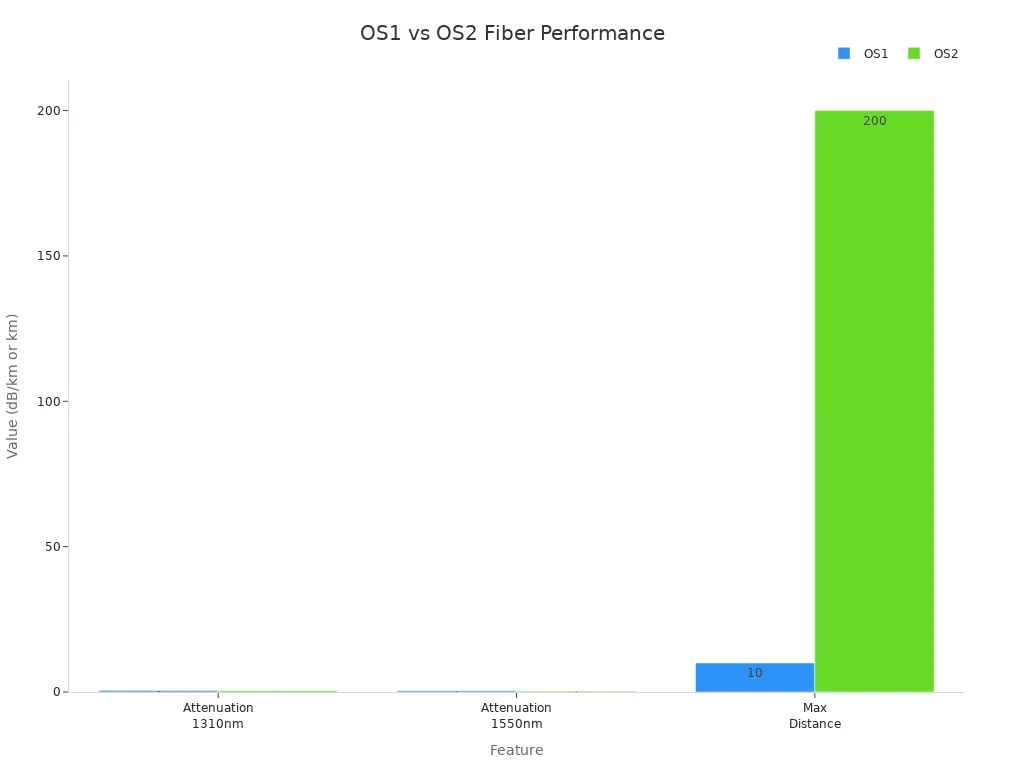
Picking the right fiber helps your network work better. You save money and avoid problems.
Next steps for B2B buyers:
- Think about how far your data will go.
- Pick the cable that fits your space.
- Ask suppliers about rules and help.
- Fiber Optik Single Mode choices you make now help your business grow later.
FAQ
Why should you choose OS2 fiber for outdoor installations?
OS2 fiber keeps water and heat from hurting the cable. It has lower attenuation and lasts longer. This makes OS2 great for outdoor and long-distance networks.
Why does attenuation matter in fiber optic networks?
Attenuation shows how far a signal can go before it gets weak. If attenuation is low, you need fewer repeaters. This saves money and makes your network work better.
Why do standards like ITU-T G.652 matter for your business?
Standards help your fiber work with new and old equipment. You will not have problems with upgrades. Following standards keeps your network safe and easy to update.
Why is OS1 fiber not recommended for long-distance links?
OS1 fiber loses more signal and is not as strong outside. You might get weak signals and need more repairs. OS2 fiber works better for long distances.
Why should you consider future scalability when selecting fiber?
Scalable fiber lets you make your network bigger later. OS2 can handle faster speeds and longer runs. You do not need to buy new cables when you grow.
Why does installation environment affect fiber choice?
Indoor places need flexible cables like OS1. Outdoor areas need tough cables like OS2. Picking the right cable stops damage and keeps your network running.
Why do B2B buyers prefer suppliers with strong technical support?
Good suppliers help you pick the best fiber and follow rules. They give advice, help with setup, and support you later. This means fewer mistakes and a better network.
Why is long-term ROI important in fiber optic network planning?
Buying good fiber like OS2 means less fixing and easier upgrades. You get more value and fewer problems as your network gets older.