



Fiber optic patch cord types
You need to know the main fiber optic patch cord types. This helps you make smart business choices. These types are different in fiber, connector styles, cable shapes, and special features. In telecom, single-mode patch cords make the most money. You can see this in the table below:
|
Type |
Market Share Contribution |
|---|---|
|
Single-mode |
Highest revenue contributor |
|
Multimode |
Not specified |
Knowing these differences helps you save money. It also helps you work faster and buy better. The next table shows how this knowledge helps your costs and work:
|
Cost-Saving Mechanism |
Impact on Costs and Efficiency |
|---|---|
|
Reduced failure rate |
You replace fewer cords. You pay less for shipping. This lowers your operating costs. |
|
Proven compatibility |
You spend less time testing. You get products ready faster. |
|
Better warranty processes |
You know your costs. You can plan your budget better. |
|
Bulk pricing |
You pay less for each cord. You wait less for orders. |
|
Technical support |
You have fewer delays. You pay less for workers. |
|
Customization options |
You buy only what you need. You waste less money. |
|
Consolidated procurement |
You manage fewer vendors. You pay less for paperwork. |
|
Certification compliance |
You have less risk. You follow rules in strict markets. |
When you pick the right fiber optic patch cord types, you get better matches. You control your costs. You make sure your setup works well.
Key Takeaways
Learn about the main types of fiber optic patch cords. There are single-mode and multimode patch cords. Pick one based on how far and fast your network needs to go.
- Choose the right connector type for your equipment. This helps your network work better. It also makes installation easier.
- Think about the cable structure. Simplex is for one-way data. Duplex is for two-way data. Ribbon is for high-density connections.
- Use armored or ruggedized patch cords in tough places. These cords give extra protection. They help lower downtime.
- Always check if cords meet industry standards like IEC and ITU-T. This helps you avoid expensive mistakes. It also makes your network more reliable.
- Look at the total cost of owning the patch cord. Do not just look at the first price. Think about installation, maintenance, and replacement costs.
- Ask suppliers about warranties and technical support. Good support can save you time. It can also save you money later.
- Custom patch cords can fit special needs. They help your network work better. They also help reduce waste.
Fiber optic patch cord types overview
Classification methods
It is important to know how the industry sorts fiber optic patch cord types. This helps you make better choices for your company. The main ways to sort these cords follow industry rules. They also meet different technical and work needs. Here is a quick look at the most common ways to group these cables:
|
Classification Method |
Description |
|---|---|
|
Structure |
Ribbon cables and bundled cables. Each one fits special jobs. |
|
Application Environment |
Conventional and reinforced patch cords. They are made for different work settings. |
|
Sheath Type |
PVC and LSZH sheaths. You pick them based on where you install and safety needs. |
|
Fiber Core Count |
Simplex (single-core) and duplex (dual-core) types. These change how signals move. |
|
Optical Transmission Mode |
Single-mode and multimode types. They affect how far and how well data travels. |
|
Connector Polishing Type |
PC, UPC, and APC connectors. They use different polishing ways and have different results. |
You will see these groups in technical sheets and order forms. For example, you might pick a simplex patch cord for one-way data. You might pick a duplex patch cord for two-way data. You choose single-mode or multimode based on how far and how fast your network needs to go. The sheath type, like PVC or LSZH, is important for safety and rules in different places.
Tip: Always check the sorting details before you buy. This makes sure you get the right cord for your job and for following rules.
Importance for B2B buyers
When you buy fiber optic patch cord types for your business, these details matter. They change your costs, how well your network works, and your long-term savings. Here are some reasons why you should care about these differences:
- Single-mode fiber patch cords carry one light signal. You use them for long trips and fast data. They are best for telecom and data center backbones.
- Multimode fiber patch cords carry many light signals. You use them for short trips, like inside buildings or on a campus. They come in grades like OM1, OM2, OM3, OM4, and OM5.
- Simplex patch cords have one fiber cable. You use them for one-way data, often in point-to-point links.
- Duplex patch cords have two strands. You use them for two-way data, which is common in fast network links.
- You must match the patch cord type to your use. This lowers the chance of network problems and helps you save money. Picking the right type also makes setup faster and helps you follow industry rules. This gives you better savings and fewer problems at work.
Note: Picking the right fiber optic patch cord types can help you avoid big mistakes and network downtime.
Fiber types
When you pick fiber optic patch cord types, you need to know the difference between single-mode and multimode fibers. These two types are used for different networks. They also change how much you spend and how well your network works.
Single-mode
Single-mode fiber patch cords have a very tiny core. The core is about 8 to 10.5 microns wide. Only one light mode can move through the fiber. This stops signal loss and keeps the signal clear. You get more bandwidth and can send data much farther.
Applications
You should use single-mode fiber patch cords for:
- Data centers that need fast links between servers, switches, and routers.
- Telecom networks that send voice, video, and data far away.
- LANs in big offices or campuses where you need lots of bandwidth.
- Factories that need steady data between sensors and machines.
- Places like TV, military, planes, hospitals, and labs where strong, safe links are needed.
Tip: Single-mode fiber is best for up to 10,000 meters. It is great for backbone networks and important systems.
Cost factors
Single-mode fiber optic patch cord types usually cost more to set up. You need workers with special skills and good tools. The transceivers also cost more. But you save money later if you have a big or long network. You do not need to upgrade often and you get better speed.
- You pay more for skilled workers to install it.
- Transceivers and connectors cost more money.
- New tech is making single-mode and multimode prices closer.
- For long, fast networks, single-mode saves money over time.
Multimode
Multimode fiber patch cords have a bigger core. The core is about 50 to 62.5 microns wide. Many light modes can move through the fiber. You get less bandwidth and can't send data as far. But you spend less on tools and setup.
Applications
You should use multimode fiber patch cords for:
Data centers that link servers, switches, and routers in one building.
LANs that connect devices over short spaces.
Offices and campuses where saving money and easy setup are important.
Multimode fiber is good when you do not need to send data far.
Cost factors
Multimode fiber optic patch cord types are cheaper for short networks.
It costs less to set up and take care of.
Transceivers and connectors are not as pricey.
The price changes by grade (OM1, OM3, OM4, OM5). Higher grades work better but cost more.
|
Fiber Grade |
Price Range (per foot) |
Performance Features |
|---|---|---|
|
OM1 |
$2.50 - $4.00 |
Good for short distances |
|
OM3 |
$3.28 - $4.50 |
Better speed, longer reach |
|
OM4 |
$4.50 - $5.50 |
Best speed, up to $13.50 for special uses |
Note: Multimode fiber is simple to set up and fix, so many companies like it.
Single-mode vs multimode
You need to look at both single-mode and multimode fiber optic patch cord types to pick the right one. The table below shows the main ways they are different:
|
Feature |
Single-Mode Fiber |
Multimode Fiber |
|---|---|---|
|
Core Diameter |
8–10 microns |
50–62.5 microns |
|
Modes of Propagation |
Single mode |
Multiple modes |
|
Maximum Distance |
40 km or more |
Shorter distances |
|
Bandwidth |
Higher bandwidth |
Lower bandwidth |
|
Cost |
Systems are costlier |
More cost-effective for short distances |
When you choose between single-mode and multimode, think about these things:
- Distance: Single-mode is best for sending data far. Multimode is good for short trips.
- Bandwidth: Single-mode gives more bandwidth. Multimode has limits because of modal dispersion.
- Cost: Single-mode costs more to set up but is better for big networks. Multimode is cheaper for short runs.
- Future upgrades: You cannot swap single-mode and multimode. Plan ahead before you buy.
Picking the right fiber type helps you save money, keeps your network working, and gives you the best value.
Connector types
Picking the right connector type is very important. It helps your network work well and last longer. You need to match the connector to your system's needs. You also need to think about rules and where you will use it. Here are the most common connector types for fiber optic patch cord types. Each connector has special benefits for business buyers in telecom, EPC, and distribution.

SC
SC connectors are simple and work well. You see them in many Ethernet and telecom networks. The push-pull design makes them easy to use. You can install them fast and they stay in place. SC connectors follow IEC 61754-4 and TIA/EIA-604-3 rules. This means they work with systems all over the world.
|
Feature/Application |
SC UPC |
SC APC |
|---|---|---|
|
Connector End Face Geometry |
Flat, polished surface |
8-degree angled surface |
|
Return Loss |
~-55dB |
>-65dB |
|
Typical Applications |
Ethernet, LAN |
FTTx, WDM, FTTH, PON, telecom, video, satellite |
Technical Comparison Table
|
Attribute |
SC UPC |
SC APC |
|---|---|---|
|
Material |
Zirconia ceramic ferrule |
Zirconia ceramic ferrule |
|
Cost |
Lower |
Slightly higher |
|
Lifetime |
1000+ mating cycles |
1000+ mating cycles |
|
Compatibility |
IEEE 802.3, ITU-T G.652 |
ITU-T G.657, G.652 |
You should pick SC connectors for steady and low-cost links in offices or telecom backbones. The APC type is better for long trips and fast speeds.
It cuts down on signal bounce and helps your network work better.
LC
LC connectors are small and fit many connections in one place. They are great for new data centers. Their size lets you add more links in tight racks. LC connectors follow IEC 61754-20 and TIA/EIA-604-10 rules. This makes them popular around the world.
LC connectors use a duplex design. This means two fibers go in one clip. It saves time and lowers setup costs. The long latch helps you unlock them in crowded spots. The short handle saves space, which is good for busy racks.
Benefits of LC Connectors
- Small size lets you fit more links in small spaces.
- Duplex design makes setup faster and cheaper.
- Long latch helps you unplug them in tight places.
- Switchable polarity saves time and stops mistakes.
- They are strong and work well in 5G and cloud data centers.
|
Feature |
Benefit |
|---|---|
|
Space-saving design |
More connections per rack unit |
|
Ease of use |
Quick unlocking, even in crowded panels |
|
Reduced installation steps |
Faster deployment, lower labor costs |
|
Switchable polarity |
Easy reversal without tools |
|
High reliability |
Meets demands of modern networks |
You should use LC connectors in data centers and big office networks. They are best when you need to save space and work fast. Their design helps you grow your network later.
ST
ST connectors are tough and work well in old or rough places. The bayonet lock keeps them safe, even if things shake. ST connectors follow IEC 61754-2 and TIA/EIA-604-2 rules.
Advantages
Bayonet lock keeps the link safe.
They do not come loose if things move or shake.
They are strong and good for old or factory networks.
Disadvantages
They are big and do not fit well in crowded racks.
They take longer to plug in and out than push-pull types.
They may not be used much as networks get smaller.
|
Attribute |
ST Connector |
|---|---|
|
Material |
Metal body, ceramic ferrule |
|
Cost |
Moderate |
|
Lifetime |
500+ mating cycles |
|
Compatibility |
Older LANs, industrial controls |
You should use ST connectors in factories, old LANs, and places that shake or move a lot. For new and crowded racks, LC or SC connectors are better.
Connector Choice Impact
The right connector type keeps signals strong and cuts downtime.
Good connectors make your network faster and more steady.
Clean and check connectors often to make them last longer.
Connectors that work with new tech help you grow your network and save money.
Always pick the connector that matches your network's rules and needs. This helps everything work together, lowers repair costs, and gives your business the best value.
FC
FC connectors give strong and steady fiber optic links. You often see them in places that need tough and stable connections. The screw-on design keeps the connector tight, even if machines shake or move. FC connectors are used where high performance and long-lasting links matter most.
|
Scenario |
Reason for Preference |
|---|---|
|
High vibration environments |
Threaded coupling keeps connections secure during mechanical shock. |
|
Industrial automation |
Reliable connections are critical for system uptime. |
|
Telecommunications |
Secure links ensure stable network performance. |
|
High-speed, high-bandwidth |
FC connectors deliver excellent stability for demanding applications. |
|
Frequent connection changes |
Mechanically stable design supports many connection cycles without wear. |
You should pick FC connectors for tough jobs. The screw fastening keeps them steady and safe. FC connectors work well for high bandwidth and long-distance use. They can handle rough places, so you avoid downtime and repairs.
FC connectors use a screw-on part for a tight fit.
You can trust FC connectors for fast and far fiber optic networks.
The design stands up to shaking and lots of use.
Tip: Use FC connectors in telecom, factories, or anywhere you need a strong and steady fiber optic link.
MPO/MTP
MPO and MTP connectors help you connect many fibers in a small spot. You use these in data centers and fast networks. MPO/MTP connectors send many signals at once, which saves space and makes things work better.
|
Feature |
Description |
|---|---|
|
High-density capabilities |
MPO connectors hold 8, 12, 16, or 24 fibers. You can choose higher counts for bigger needs. |
|
Compliance with standards |
MPO/MTP connectors meet industry standards for reliability and performance. |
|
Specific designs |
Keyed connectors and polarity markings make installation easier and safer. |
You get faster data because MPO/MTP connectors send many signals together. You need fewer connections, so you save space and money. MPO-24 connectors let you fit more data in less room.
- MPO connectors help send lots of data by using many fibers.
- You save space and make wiring easier in busy data centers.
- MPO-24 connectors let you fit more links in one panel.
- MTP/MPO-8 connectors are good for simple setups with fewer fibers.
- MTP/MPO-12 connectors balance space and speed for medium networks.
- MTP/MPO-24 connectors are best for big data centers with lots of fibers.
Note: Pick MPO/MTP connectors when you need fast, strong, and easy-to-grow fiber optic links in data centers or big networks.
MU
MU connectors are small and work well for modern fiber optic networks. You see MU connectors in places that need lots of links, like telecom and data centers. Their small size lets you fit more connections in tight racks.
- MU connectors use a push-pull design for easy use.
- You can fit more links in less rack space.
- MU connectors work well in fast and high-bandwidth networks.
You should use MU connectors when you need to save space and keep things working well. The design makes setup fast and fixing easy. MU connectors follow IEC 61754-6 rules, so you know they will work and last.
|
Attribute |
MU Connector Benefit |
|---|---|
|
Size |
Small footprint for high-density installations |
|
Design |
Push-pull for quick and secure connections |
|
Application |
Telecom, data centers, enterprise networks |
Tip: Choose MU connectors for networks that need to save space and have fast, steady fiber optic links.
E2000
The E2000 connector is a top choice for fiber optic patch cord types. You see it in networks that need high safety and reliability. It has a spring shutter that keeps dust out and blocks laser light. This makes it good for telecom and important infrastructure jobs.
Why pick E2000 connectors?
You get great optical performance with low insertion loss.
The shutter keeps the connection safe and clean.
E2000 connectors meet IEC 61754-15 standards for global use.
The strong build handles stress and many uses.
|
Attribute |
E2000 Connector Benefit |
|---|---|
|
Safety |
Shutter blocks dust and laser light |
|
Performance |
Low insertion loss, high return loss |
|
Compliance |
Meets IEC 61754-15 and Telcordia GR-326-CORE standards |
|
Application |
Telecom, data centers, industrial automation |
Tip: Use E2000 connectors if your project needs high safety and performance. They help lower maintenance and stop network problems.
Pick E2000 connectors when your business cannot risk network issues. Their special features make the higher price worth it. You get long-term value and follow industry rules.
MTRJ
MTRJ connectors are small and save money for duplex fiber optic patch cord types. You find them in office LANs and some telecom networks. The MTRJ design uses two fibers in one small connector, like an RJ-45 plug. This makes setup quick and helps avoid mistakes.
Why use MTRJ connectors?
- You save space in network racks and panels.
- The push-pull design makes setup and fixing faster.
- MTRJ connectors work with single-mode and multimode fibers.
- They meet TIA/EIA-604-12 standards for easy matching.
|
Feature |
MTRJ Connector Advantage |
|---|---|
|
Duplex design |
Two fibers in one connector for two-way data |
|
Space efficiency |
Good for high-density setups in offices |
|
Cost |
Lower hardware and labor costs |
|
Application |
LANs, campus networks, telecom closets |
Note: MTRJ connectors are best when you need lots of ports and fewer mistakes.
Pick MTRJ connectors if your business wants fast setup and good use of space. Their design lets you grow your network without extra cost or trouble.
SMA
SMA connectors are one of the oldest fiber optic patch cord types. You still see them in factories, military, and medical places where strength matters most. SMA connectors use a screw-on design for a tight and steady link.
Why pick SMA connectors?
You get a tough connection for hard environments.
The screw design stops disconnects from shaking or moving.
SMA connectors work with single-mode and multimode fibers.
They meet MIL-C-83522 standards for defense and aerospace.
|
Attribute |
SMA Connector Value |
|---|---|
|
Durability |
Handles high heat and mechanical stress |
|
Security |
Screw coupling keeps connections stable |
|
Compatibility |
Used in old and special fiber systems |
|
Application |
Industrial, military, medical, and test equipment |
Alert: Use SMA connectors if your network faces stress or needs military-grade standards.
Pick SMA connectors if your business works in tough places. Their strong design helps you avoid downtime and follow strict rules.
Other connectors
You might see other fiber optic connector types in special or old networks. These connectors do jobs that regular ones like SC, LC, or MPO/MTP cannot do. Learning about these connectors helps you get ready for the future. It also helps you avoid problems and get the most out of your network.
Common "Other" Fiber Optic Connectors
- DIN: DIN connectors are used in factories and tough places. They have a screw-on design that keeps them tight, even if things shake or get dusty. DIN connectors follow IEC 60874-10 rules.
- MT: MT connectors use a push-on design with many fibers. They look like MPO but are found in custom setups. You see them in crowded backplanes and optical modules.
- Biconic: Biconic connectors are one of the first fiber optic connector designs. You still find them in old telecom systems. They have a cone-shaped end and need careful lining up.
- D4: D4 connectors have a 2.0 mm end and screw on. You see them in old telecom and test gear. They work well but are mostly replaced by newer connectors.
- ESCON: ESCON connectors are used in IBM mainframes and storage networks. Their snap-in design makes fast connections in data centers with old hardware.
- FC/PC: FC/PC connectors are like FC but use a special polish. You find them in old, high-precision measuring systems.
Why Should You Care About These Connectors?
You should know about these connectors for a few reasons:
- Legacy System Support: Many old networks still use these connectors. If you upgrade your network, you need to make sure new parts work with old ones.
- Specialized Applications: Some connectors, like DIN or MT, have features that regular connectors do not have. DIN connectors are good for rough places, like outside or in factories.
- Procurement and Inventory: If you run a big network, you may need to keep different connector types in stock. This helps you fix things fast and avoid waiting.
- Compliance and Standards: Some jobs need you to follow special rules, like IEC or Telcordia. Using the right connector helps you meet these rules.
Comparison Table: Other Fiber Optic Connectors
|
Connector Type |
Typical Use Case |
Key Feature |
Standard/Compliance |
|---|---|---|---|
|
DIN |
Industrial automation, outdoor |
Screw-on, rugged |
IEC 60874-10 |
|
MT |
High-density backplanes |
Multi-fiber, compact |
IEC 61754-5 |
|
Biconic |
Legacy telecom |
Cone-shaped ferrule |
Bellcore/Telcordia |
|
D4 |
Test equipment, old telecom |
2.0 mm ferrule, screw-on |
JIS C5973 |
|
ESCON |
IBM mainframes, storage |
Snap-in, duplex |
IBM ESCON standard |
|
FC/PC |
Measurement systems |
Physical contact polish |
IEC 61754-13 |
Tip: Always look at your equipment and project needs before picking a connector. This helps you avoid mistakes and makes setup easier.
Impact on Network Design and Procurement
You need to think about these connectors when you plan upgrades or new networks. If you forget about old or special connectors, you might have more downtime, spend more money, or break rules. By knowing all connector types, you can:
- Make your inventory simpler by using the same types when you can.
- Plan for adapters or mix-and-match solutions if you need to connect old and new systems.
- Talk better with suppliers because you know what you need.
Note: Buying the right fiber optic patch cord types, even rare connectors, keeps your network strong and saves your company money.
In summary: Knowing about every fiber optic connector type, even the uncommon ones, helps you plan better. You avoid problems, save money, and make sure your network works now and later.
Cable structures

Simplex
Simplex fiber optic patch cords have one fiber and one connector on each end. You pick simplex cables when your network only needs to send data one way. This type is good for point-to-point links, like from a transmitter to a receiver. Simplex patch cords are simple, so you can install them fast and make fewer wiring mistakes.
You see simplex cables in sensor networks, security systems, and some medical devices. These cables cost less than more complicated ones. You also spend less time fixing them because there is just one fiber to look after.
Tip: Pick simplex patch cords if you need a single, one-way data path. This helps you save money and makes fixing problems easier.
Duplex
Duplex fiber optic patch cords have two fibers and two connectors at each end. Each fiber sends data in one direction, so you get two-way data flow. The fibers are marked for polarity, so you know which is which.
You use duplex cables in most new LANs, data centers, and telecom systems. These cables let you send and get data at the same time. Duplex patch cords are great where you need fast and steady two-way data.
Duplex cables cost more than simplex, but they work better and give you more options. You also have less downtime because the marks help stop connection mistakes.
Note: Duplex patch cords are needed for fast networks that send and receive data at once.
Ribbon
Ribbon fiber optic patch cords have many fibers lined up flat in a ribbon shape. One end has a multi-fiber connector, and the other end splits into several simplex cables with their own connectors. This lets you connect lots of fibers at once, so you finish setup faster and use less rack space.
You see ribbon cables in big data centers, telecom backbones, and crowded patch panels. Ribbon patch cords let you splice many fibers at once, which saves time when you set up or fix things. These cables also help you grow your network quickly as your business gets bigger.
Ribbon cables cost more at first, but you save money on work and rack space. You also get a stronger network because fewer cables mean fewer things can go wrong.
|
Type |
Description |
|---|---|
|
Simplex fiber optic patch cords |
Has one fiber and one connector at each end. |
|
Duplex fiber optic patchcord |
Has two fibers and two connectors at each end, with marks for polarity. |
|
Ribbon fan-out cable assembly |
Has one end with ribbon fiber and a multi-fiber connector, and the other end with many simplex fiber cables and connectors. |
Callout: Ribbon patch cords are best when you need to connect lots of fibers fast and keep your setup neat.
In summary:
Pick the cable structure that fits your network. Simplex cables are good for one-way links. Duplex cables let you send and get data both ways. Ribbon cables are best for big jobs with lots of fibers. Your choice changes how fast you can set up, how long your cables last, and how much you spend over time. Always match the cable structure to your business needs to get the best results.
Armored
Armored fiber optic patch cords give your network the most protection. You need these cables when your setup faces hard use or damage risk. Armored patch cords have a tough metal layer that shields the optical fibers inside. This keeps your network working, even in rough places.
You should pick armored fiber optic patch cords for these reasons:
- The strong layer makes the cable last longer and keeps it safe from crushing, bending, and hits.
- The tiny stainless steel sleeve stops the fiber core from getting hurt.
- Extra layers, like arylon yarn and spiral steel armor, give more safety.
- The metal armor keeps rodents from biting through the cable.
- You get protection from pressure, bad weather, and building dangers.
Tip: If your network goes outside, through walls, or near heavy machines, armored patch cords help you avoid expensive repairs and downtime.
Ideal Deployment Scenarios
You often see armored fiber optic patch cords in these places:
- Outdoor setups with bad weather
- Building sites where cables might get crushed
- Factories with moving machines
- Underground or buried cable jobs
- Data centers with cables under raised floors
Comparison Table: Armored vs. Standard Patch Cords
|
Feature |
Armored Patch Cord |
Standard Patch Cord |
|---|---|---|
|
Durability |
High (metal armor) |
Moderate |
|
Resistance to Pressure |
Excellent |
Limited |
|
Rodent Protection |
Yes |
No |
|
Flexibility |
Slightly less than standard |
High |
|
Cost |
Higher upfront |
Lower upfront |
|
Ideal Use |
Harsh, high-risk environments |
Controlled, indoor spaces |
You may pay more for armored fiber optic patch cords at first. But you save money later because you do not replace cables as much and avoid network problems. The strong build also helps you meet tough safety and reliability rules, which is important for telecom, EPCs, and distributors.
Callout: Armored fiber optic patch cords protect your network. They keep things running and help you follow industry rules, even in the hardest places.
Ruggedized
Ruggedized fiber optic patch cord types give your network strong protection. You need these patch cords if your cables face rough places or lots of use. They have tough jackets, special boots, and sometimes extra armor to keep the fiber core safe. You see ruggedized patch cords outside, in factories, the military, and mines.
Why pick ruggedized fiber optic patch cord types?
You want to stop network problems and avoid expensive fixes. Ruggedized patch cords do not crush, bend, or scratch easily. They keep working even with shaking, water, or chemicals. You feel safe knowing your network is protected.
Tip: Ruggedized patch cords help you follow strict rules like Telcordia GR-326 and IEC 60794. These rules show the cable can handle hard jobs.
Main Features of Ruggedized Patch Cords:
- Strong outer jacket (polyurethane or LSZH)
- Extra support at the connector ends
- Keeps out water and dust
- UV safe for outdoor use
- Can have armor for more strength
|
Feature |
Ruggedized Patch Cord |
Standard Patch Cord |
|---|---|---|
|
Jacket Material |
Polyurethane, LSZH, PVC |
PVC, LSZH |
|
Crush Resistance |
High |
Moderate |
|
Water/Dust Protection |
Yes |
Limited |
|
UV Resistance |
Yes |
No |
|
Cost |
Higher upfront |
Lower upfront |
|
Ideal Use |
Outdoor, industrial, mobile |
Office, data center |
Best Times to Use Ruggedized Patch Cords:
- Use ruggedized fiber optic patch cord types when:
- You set up telecom cables outside in bad weather
- Machines move a lot in factories
- Heavy tools are used in mines or oil fields
- The military needs fast, strong networks
- Events need cables that get moved a lot
How Ruggedized Patch Cords Affect Setup, Life, and Cost:
Ruggedized patch cords cost more at first. But you save money later because you do not replace them often. Your network works better and you meet safety rules. These cables are easy to install because they do not kink or break. You spend less time fixing problems and more time on your main work.
Note: If your network could get damaged, ruggedized fiber optic patch cord types give you the best value. You protect your network and get good results for a long time.
Summary Table: Ruggedized Patch Cord Benefits
|
Benefit |
Value for B2B Buyers |
|---|---|
|
Reduced downtime |
Fewer repairs, higher productivity |
|
Compliance |
Meets Telcordia, IEC standards |
|
Long-term savings |
Lower total cost of ownership |
|
Network reliability |
Stable performance in harsh settings |
Always pick the cable type that fits your job. Ruggedized fiber optic patch cord types let you work anywhere. You get strong cables, follow rules, and save money over time.
Other variations

Polishing types (UPC, APC)
You should look closely at the polishing type of your connectors. The polish changes how much light goes back and how much signal you lose. There are two main types: UPC and APC. UPC connectors have a flat, shiny end. APC connectors have an end that is angled at 8 degrees.
Picking UPC or APC changes how well your network works. UPC connectors lose the least signal when light passes through. APC connectors stop more signal from bouncing back, so there is less interference. This is important for networks that are fast or go far.
|
Connector Type |
Insertion Loss |
Return Loss |
|---|---|---|
|
UPC |
Lowest |
-50 dB |
|
APC |
Higher |
-60 dB or better |
Tip: Use APC connectors for video, CATV, or special telecom systems. Pick UPC for regular data or voice networks if you want to save money.
Jacket materials
You need to pick the right jacket material for your fiber optic patch cord types. The jacket keeps the fiber safe and affects fire safety, how bendy it is, and how long it lasts. Each jacket works best in different places.
- Polyethylene (PE): Handles sunlight, bends easily, and does not wear out fast. Good for outside jobs.
- Polyvinyl Chloride (PVC): Bends well and does not cost much. Protects the cable and resists flames. Not good for plenum spaces because it can make toxic smoke.
- Low Smoke Zero Halogen (LSZH): Stops flames and makes little smoke. Best for public places or spots with bad airflow, like subways or airports.
- Polyvinyl Difluoride (PVDF): Light and stretchy. Resists flames better than PE. Works well for plenum cables.
The jacket you choose affects safety and if you follow rules. LSZH jackets help you pass strict fire codes in public buildings. PE jackets give you the strength and bend you need for outdoor setups.
Note: Always match the jacket to where you will use it. This keeps things safe and makes your network last longer.
Custom options
Sometimes you need custom fiber optic patch cord types for special jobs. Custom cords help you fix problems in telecom, EPC, or factory setups. You can pick the fiber type, cable build, connector style, jacket, and length to fit your needs.
|
Customization Aspect |
Benefit |
|---|---|
|
Fiber Type |
Makes sure your network works its best |
|
Cable Construction |
Gives the right strength and bend for your space |
|
Connector Styles |
Makes sure it fits your gear |
|
Jacket Materials |
Protects the cable for your job |
|
Length |
Stops extra cable and fits your setup |
Custom cords help you waste less, make your network work better, and follow rules. You get a cord that fits your business, not just a regular product.
Callout: Custom patch cords let you control quality, cost, and network time. They help you finish projects on time and avoid expensive mistakes.
Standards and certifications
You need to look at standards and certifications when buying fiber optic patch cord types. These rules help you avoid mistakes that cost a lot. They also keep your network safe. Standards make sure each patch cord works the way it should. Certifications show the product passed tough tests in the industry.
Why do standards matter for B2B buyers?
You want your fiber optic patch cord types to fit your network and last long. Standards set rules for size, strength, and signal quality. If you pick cords that follow these rules, you lower the chance of downtime and costly repairs. You also meet safety and legal needs for your business.
Tip: Certified patch cords help you pass checks and win jobs in telecom, EPC, and distribution.
Key Industry Standards
Here are the main standards you should know:
|
Standard |
Description |
|---|---|
|
IEC 60793-1 |
Sets basic rules for optical fibers, like diameter, core/cladding ratio, and performance. |
|
IEC 60793-2 |
Lists product rules for different types of optical fibers. |
|
ITU-T G.652 |
Defines single-mode NDSF, made for the 1,310-nm range, with strict attenuation and PMD rules. |
These standards cover important things:
- Fiber Diameter: Makes sure connectors and tools fit.
- Core/Cladding Ratio: Changes how signals move and how much is lost.
- Tensile Strength: Stops cables from breaking when used or installed.
- Attenuation: Shows how much signal is lost over distance.
- PMD (Polarization Mode Dispersion): Affects speed and how well data moves.
If your fiber optic patch cord types meet these standards, you get better results and fewer problems. You also make sure your cords work with other gear.
Important Certifications
Check for these certifications before you buy:
- RoHS: Limits dangerous materials in products. This keeps your network safe and helps you follow green laws.
- REACH: Controls chemicals and their health and environmental effects. You protect workers and nature.
- Buy American Act: Needs U.S. made products for government jobs. You can get public contracts and follow local rules.
Note: Certified patch cords help you avoid fines and delays. You show customers and partners you care about safety and quality.
Why standards and certifications boost your ROI
When you pick fiber optic patch cord types with the right standards and certifications, you get strong and steady products. You spend less on fixing and replacing cords. You finish jobs faster and win more contracts. You also keep your business safe from legal trouble.
Summary Table: Benefits for B2B Buyers
|
Benefit |
Value for Your Business |
|---|---|
|
Lower risk |
Fewer failures and legal problems |
|
Higher compatibility |
Easy integration with other equipment |
|
Better reputation |
Trusted by clients and partners |
|
Faster deployment |
Less testing and troubleshooting |
|
Long-term savings |
Lower total cost of ownership |
Always ask your supplier for proof of standards and certifications. This helps you make smart choices and keeps your network working well.
Comparison and applications

Cost comparison
You should look at costs before you pick fiber optic patch cord types for your business. Prices change if you choose different fiber grades, connector types, or suppliers. Multimode patch cords usually cost less than single-mode ones, especially for short distances. The table below shows the price ranges for popular patch cords from big suppliers:
|
Type of Cable |
MSRP Range |
|---|---|
|
Multimode OM4 LC-LC |
$9.71 - $104.53 |
|
Multimode OM5 LC-LC |
$9.96 - $61.95 |
|
Singlemode OS2 LC-LC |
$23.55 - $47.81 |
|
Multimode OM3 LC-LC |
$8.46 - $70.17 |
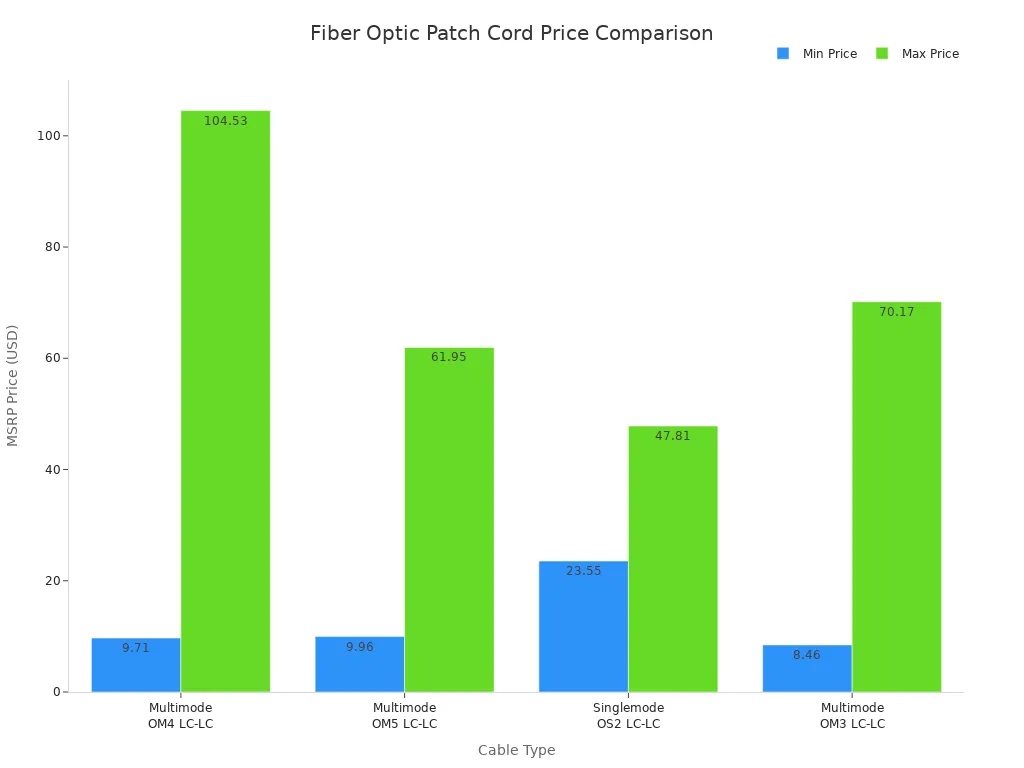
Single-mode patch cords cost more at first. You pay extra for better materials and connectors. Over time, single-mode cables save money in big networks because you do not replace them as much. Multimode patch cords work best for short distances and cost less to put in. You spend less on workers and tools.
Tip: Always check the full cost, including setup and fixing, not just the price.
Performance in real-world scenarios
Performance is important when you use patch cords in data centers, telecom, or factories. You need to pick the fiber type that fits your network's needs. The table below compares single-mode and multimode patch cords in real jobs:
|
Aspect |
Single-Mode Fiber |
Multimode Fiber |
|---|---|---|
|
Distance Suitability |
Good for long-distance jobs |
Good for short-distance jobs |
|
Bandwidth Capability |
Handles high-bandwidth tasks |
Handles lower bandwidth tasks |
|
Installation Ease |
Needs skilled workers |
Easier to install and connect |
|
Power Consumption |
Usually uses more power |
Usually uses less power |
|
Cost |
Costs more at first, saves later |
Cheaper for short jobs |
Single-mode fiber is best for long-distance and high-speed work. You see it in backbone networks and FTTH projects. Multimode fiber is easier to set up and fits short links in data centers. You save money and time with multimode in offices and campus networks.
- Multimode fiber is often cheaper for short distances.
- Single-mode fiber saves money as distance and speed needs grow.
- Single-mode fiber works well for long trips and fast data because it has a small core and one light path. Multimode fiber has a bigger core and many light paths, so it is a good choice for fast data over short spaces.
Note: Pick the fiber type that matches your network's distance and speed needs. This helps you avoid problems and extra costs.
Industry use cases
- You see fiber optic patch cord types in many industries. Each job has special needs and benefits.
- Optical fiber is used in factories to send data and control signals between machines.
- It helps with remote watching and control of equipment and processes.
- Factories use fiber optic assemblies in automation systems for real-time monitoring and control.
- These systems connect sensors, robots, and control units, making sure data moves smoothly. This helps with fixing problems before they happen and checking quality.
- Car makers use fiber optics to connect robot arms with control systems. This cuts downtime and makes work more exact.
- In telecom, you use patch cords for FTTH, backbone links, and switching centers. Data centers need high-density patch cords for fast server connections and cloud services. Overhead line engineering uses armored and ruggedized patch cords to protect networks from weather and damage.
Callout: You make your network stronger, spend less on repairs, and get more value by picking the right patch cord for your industry.
ROI analysis
When you buy fiber optic patch cord types, you want to get good value for your money. ROI means how much you gain compared to what you spend. For business buyers like telecom companies, EPCs, and distributors, ROI is not just about picking the cheapest option. You should think about saving money over time, having a network that works well, and following industry rules.
Why does ROI matter for fiber optic patch cord types?
If your network breaks or needs lots of repairs, it costs a lot. Picking the right patch cord types helps you stop downtime, fix things less, and make your network last longer. You also follow strict rules like IEC 60793-1 and ITU-T G.652. This keeps your investment and your company's name safe.
Tip: Always think about the total cost, not just what you pay at first. The total cost includes putting in the cords, fixing them, replacing them, and following rules.
Key ROI Drivers for Fiber Optic Patch Cord Types
- Durability: Armored and ruggedized patch cords last longer in tough places. You do not need to replace them as much, so you save money over time.
- Performance: Single-mode patch cords can handle more data and go farther. You do not have to upgrade as soon as your network grows.
- Compliance: Certified patch cords help you pass checks and get more jobs. You do not get fined or have project delays.
- Efficiency: Good connectors like LC or MPO/MTP make setup faster. You spend less on workers and finish jobs quicker.
ROI Comparison Table
|
Factor |
Low-Quality Patch Cords |
High-Quality Patch Cords |
|---|---|---|
|
Initial Cost |
Lower |
Higher |
|
Replacement Rate |
Frequent |
Rare |
|
Downtime Risk |
High |
Low |
|
Compliance |
May fail audits |
Meets standards (IEC, ITU-T) |
|
Long-Term Savings |
Minimal |
Significant |
You can see the difference in real life. For example, a data center that uses high-quality, certified fiber optic patch cord types has fewer outages and can start new services faster. Telecom companies that use ruggedized or armored patch cords do not have to pay for repairs from weather or damage. EPCs that pick cords that follow the rules win more jobs and do not get in trouble.
Note: The right fiber optic patch cord types keep your network safe, help your company look good, and give you better value for your money.
When you plan your next job, think about what will help you most in the long run. Pick fiber optic patch cord types that fit your needs, follow the rules, and help your business grow. This way, you get the most out of every dollar you spend.
Selection guide

How to choose
Picking the right fiber optic patch cord types for your business needs a simple plan. You want your network to work well and last a long time. First, think about what your network needs. Write down how far the data must go, how fast it should move, and where you will put the cables. Match these needs to the fiber type, connector, and cable shape.
Follow these easy steps to help you choose:
- Assess your network needs: Find out how much data you need to send, how far it must travel, and where you will install the cords.
- Choose the fiber type: Pick single-mode for long trips or multimode for short, busy links.
- Select the connector: Choose a connector that fits your equipment and is easy to use.
- Determine the cable structure: Decide if you need simplex, duplex, ribbon, or armored cables for your setup.
- Check compliance: Make sure the patch cords follow rules like IEC 60793-1 and ITU-T G.652.
- Evaluate ROI: Think about all costs, like putting in, fixing, and replacing the cords.
Tip: Always ask for technical datasheets and certificates before you buy anything.
Supplier questions
When you look at suppliers, ask smart questions to get good products and service. Use the table below to help you talk with them:
|
Criteria |
Description |
|---|---|
|
Quality |
Makes sure data moves well and saves money over time. |
|
Performance Specifications |
Sets clear goals for checking how well the supplier does. |
|
Compatibility |
Makes sure cords work with your current systems. |
|
Supplier Reliability |
Checks things like fast deliveries and few broken items. |
|
Cost Efficiency |
Looks at the best value and savings when buying a lot. |
Ask your supplier these questions:
What rules do your patch cords follow?
Can you show recent test results or certificates?
How do you fix problems with warranties or support?
How fast do you deliver and how often are items broken?
Do you give discounts for big orders or custom cords?
Note: Good suppliers help you avoid problems and keep your projects running smoothly.
Quality and support
Quality and support are very important for your business. Check every shipment to see if it meets the rules. Test some cords for insertion loss and return loss. Keep all certificates and test results in your records.
Look for suppliers who give you:
- Clear warranty details and quick help when you need it
- Fast ways to replace or fix broken cords
- Updates about new products or recalls
Callout: Good support and strong quality help you avoid problems and keep your network safe.
Picking the right fiber optic patch cord types and a trusted supplier helps your network work well and gives you better value for your money.
You now know the main fiber optic patch cord types. These include single-mode, multimode, simplex, duplex, ribbon, armored, and ruggedized. Each type is made for a special business job.
Actionable Tips for B2B Buyers:
Pick the fiber type and connector that match your network's distance and speed.
Always make sure your cords follow IEC and ITU-T standards.
Choose suppliers who give good help and are trusted.
Remember: Using the right fiber optic patch cord type helps you save money, keeps your network safe, and makes sure you follow industry rules.
FAQ
Why should you choose single-mode fiber optic patch cord types for long-distance networks?
Single-mode fiber optic patch cord types send data farther with less signal loss. They give you more bandwidth and better value for big networks. Standards like ITU-T G.652 help make sure your network stays reliable for a long time.
Why do connector types matter for your network's performance?
Connector types change how well parts fit together and how good the signal is. Picking the right connector makes setup faster and lowers repair costs. Standards like IEC 61754 help you meet rules used around the world.
Why is compliance with certifications important when buying fiber optic patch cord types?
Certified patch cords help you follow safety and legal rules. You avoid fines and project delays. Certifications like RoHS and IEC 60793-1 show the patch cords are good quality and reliable for business buyers.
Why should you invest in armored or ruggedized fiber optic patch cord types?
Armored and ruggedized patch cords keep your network safe from damage, bad weather, and animals. You spend less on new cables and have less downtime. These patch cords meet tough standards like Telcordia GR-326 and IEC 60794 for hard places.
Why does jacket material selection impact your deployment?
Jacket material changes how safe, strong, and bendy the cable is. LSZH jackets help you pass strict fire rules in buildings. PE jackets are best for outdoor use. Picking the right jacket keeps your network safe and follows the rules.
Why do polishing types (UPC, APC) influence signal quality?
Polishing types change how much light bounces back and how much signal is lost. APC connectors lower interference for fast or video networks. UPC connectors cost less and work well for normal data jobs.
Why should you ask suppliers about technical support and warranty for fiber optic patch cord types?
Good technical support and clear warranty help you fix problems quickly. You avoid long network breaks and protect your money. Trusted suppliers give fast replacements and keep you updated.
Why is matching fiber type and connector to your application critical for ROI?
Matching fiber type and connector helps your network work well. You avoid problems with parts not fitting and save money on upgrades. Picking the right ones helps you save more and grow your business.