



Aerial Fiber Optic Cable: ADSS & Lashed Messenger Design, Span/Sag & Wind-Ice Loading, Hardware & Installation, and IEC 60794/GR-20 Compliance
When you pick an Aerial Fiber Optic Cable, you need to think about the strengths of ADSS and lashed messenger designs. ADSS cables work well for long spans and in utility areas. Lashed messenger cables are better for city telecom networks. You should look at span, sag, and environmental loading. These things affect safety and how long the cable lasts. Using the right hardware and installing it well makes the cable more reliable. It also means you will not need to fix it as much. IEC 60794/GR-20 compliance shows the cable is good quality. It also makes it easier for your business to buy.

Key Takeaways
- Pick ADSS cables for long spans in country areas. These cables hold themselves up and cost less to install.
- Lashed messenger cables work best in city networks. They are easy to upgrade and fit in tight spaces.
- Always check span and sag numbers. Good math stops cables from drooping and keeps people safe.
- Use cables that follow IEC 60794/GR-20 rules. These rules make sure cables are strong and work well in hard places.
- Pick the right hardware to hold your cables. Materials that do not rust help cables last longer and need less fixing.
- Check your cables often. Inspections find problems early and save money on repairs and lost time.
- Think about things like wind and ice. Pick cables that can handle your local weather.
- Plan your installation step by step. Careful planning lowers risks and helps your network work well.
Aerial Fiber Optic Cable Types
Aerial Fiber Optic Cable setups use two main designs. These are ADSS and lashed messenger. You should know how they are different before you pick one for your network.

ADSS Cable
Structure
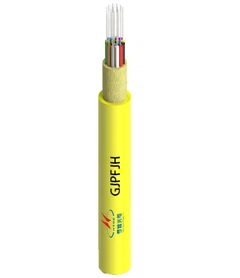
ADSS cables have a special design. They do not need a metal support strand. The cable holds all the weight by itself. ADSS cables have important parts:
|
Component |
Material(s) Used |
Purpose/Function |
|---|---|---|
|
Fiber Optic Strands |
High-quality silica glass |
Sends light signals far. |
|
Strength Members |
Aramid yarns, fiberglass, composite materials |
Helps the cable hold up under tension and wind. |
|
Central Tube |
Flexible polymer material |
Keeps fiber optic strands safe and in place. |
|
Outer Jacket |
Polyethylene (PE), PVC, thermoplastic materials |
Shields the cable from tough weather. |
|
Additional Coatings |
Filling compound, water-blocking material |
Makes the cable stronger and keeps water out. |
Tip: ADSS cables can hold themselves up. You do not need extra support hardware. This makes putting them up easier and saves money on work.
Applications
You can use ADSS cables in utility corridors and long country spans. They work well where poles are hard to reach. The self-supporting design is good for power lines and far-away telecom routes. ADSS cables are strong and last in bad weather and over long distances. You do not have to bond or ground these cables. This saves time and money.
Advantages of ADSS Cable:
Quick to install with just one cable.
Lower work costs because mounting is easy.
Tough cover and all-dielectric design stop damage from weather.
Good for long spans and country areas.
Keeps signals strong over long distances.
Lashed Messenger Cable
Components
Lashed messenger systems use a separate support strand. This strand is usually steel. The fiber optic cable is tied to the strand with lashing wire.
|
Component |
Description |
|---|---|
|
Messenger Wire |
Holds up aerial fiber optic cables and keeps them steady. |
|
Lashing Wire |
Ties the messenger wire and fiber optic cables together to make them stiff. |
|
Benefits of Lashing |
Keeps cables in place, lowers stress, helps cables last longer, cuts costs, makes setup easy, and lowers upkeep. |
Note: Lashed messenger designs let you add more cables later. You can also put equipment in the middle of the span. This makes it easier to upgrade your network.
Use Cases
Lashed messenger cables work best in cities and suburbs. You can use them for networks that change often. The open space on poles makes setup and fixing safer. Lashed messenger systems can hold many cables. You can grow your network without changing the support strand.
Typical Use Cases:
Busy city telecom networks.
Suburban setups with lots of changes.
Networks that need to grow and change.
Places that need mid-span gear or extra safety.
Comparison
Cost
|
Feature |
ADSS (All-Dielectric Self-Supporting) |
Lashed Messenger Aerial Fiber |
|---|---|---|
|
Support Structure |
No metal strand needed |
Needs steel strand |
|
Installation Time |
Faster (one cable) |
Slower (strand and cable) |
|
Labor Cost |
Lower (no bonding/grounding) |
Higher (more steps, upkeep) |
|
Upkeep |
Not much needed |
Needs more checks |
|
Material Cost |
Lower overall |
Higher because of extra hardware |
You spend less on ADSS cable setup because you only put up one cable. Lashed messenger systems need two setups. This means more work and more materials. ADSS also costs less to keep working over time.
Reliability
|
Feature |
ADSS (All-Dielectric Self-Supporting) |
Lashed Messenger Aerial Fiber |
|---|---|---|
|
Environmental Load Handling |
Cable takes all the weight |
Strand takes all the weight |
|
Protection Against Damage |
No extra armor |
Steel tape armor can be used |
|
Lifespan |
Lasts long with little upkeep |
Lasts long but needs checks |
|
Signal Integrity |
Stays strong over long distances |
Stays strong if strand is good |
|
Network Growth |
Fixed size |
Can grow bigger |
ADSS cables work well in country and utility places. You do not have to worry about strand rust or bonding. Lashed messenger cables are easy to upgrade. But you must check and fix the support strand often.
Key Point: Pick ADSS for long spans and less upkeep. Pick lashed messenger for city networks and if you want to grow later.
Span and Sag
Proper span and sag calculations ensure your Aerial Fiber Optic Cable installation remains safe, reliable, and cost-effective. You must balance cable tension, span length, and environmental factors to prevent excessive sag or mechanical failure.

Calculation
Formulas
You need to calculate sag and tension before installing cables. Sag is the vertical distance between the lowest point of the cable and a straight line between two poles. Tension is the force pulling the cable tight.
Sag Formula (Approximate):
Sag = (W × L²) / (8 × T)
Where:
W = Weight of cable per unit length (N/m)
L = Span length (m)
T = Tension in cable (N)
Tension Guidelines:
Maximum tension should not exceed 30% of the cable's minimum breaking strength.
Sag should be less than 2% of the span length.
For example, if you have a 150-foot span, you should allow for a typical sag of 2.5 feet. This accommodates thermal expansion and contraction and keeps the cable safe.
Examples
Suppose you install a cable with a span of 100 meters (328 feet) and a cable weight of 1.2 kg/m. You want to keep sag below 2 meters.
Calculate tension needed:
Sag limit: 2 meters
Weight: 1.2 kg/m × 9.81 = 11.77 N/m
Span: 100 meters
T = (W × L²) / (8 × Sag) T = (11.77 × 100²) / (8 × 2) T = (11.77 × 10,000) / 16 T = 117,700 / 16 T = 7,356 N
You must check that this tension does not exceed 30% of the cable's minimum breaking strength.
Terrain Impact
Terrain affects how you plan spans and sag. You must adjust for hills, valleys, and obstacles.
Allow for sag to handle temperature changes.
Typical sag for a 150-foot span is 2.5 feet.
Use shorter spans in rough terrain to reduce stress.
Increase anchor strength in windy or icy areas.
Best Practices
Follow these steps to optimize span and sag:
- Ensure support structures can handle cable weight and tension.
- Maintain tension at 10–20% of the cable's rated tensile strength.
- Comply with standards for cable height: at least 4.5 meters over roads, 3.5 meters over walkways.
- Space hooks at 50 cm intervals to support mechanical performance.
- Use mid-span supports for spans over 100 meters.
- Conduct route surveys to identify obstacles and plan anchor points.
- Use corrosion-resistant materials for anchors.
- Inspect regularly for sag, jacket damage, and corrosion, especially after storms.
Tip: Proper planning and regular inspection reduce maintenance costs and extend cable life.
Wind and Ice Loading

Environmental Factors
Wind and ice can hurt your Aerial Fiber Optic Cable setup. Wind makes cables move and shake. Strong wind or storms can snap cables or break poles. Ice forms in cold weather and adds heavy weight. This extra weight can stretch cables and make them sag. Sometimes, poles can even fall down.
The weather in your area matters a lot when planning.
How fiber optic cables, especially OPGW, work in cold places and tough climates is very important. Keeping transmission lines safe means stopping ice problems to avoid big failures and keep power on.
You need to think about the climate zone for your project. Some places never get ice, but others get ice over 1 inch thick.
OPGW must handle strong forces from wind and ice.
Cables are made to work in all kinds of weather, from no ice to lots of ice.
Mitigation
Strategies
You can lower wind and ice risks by picking good gear and using smart ways to install it.
Use the Right Equipment: Pick cables made for your weather. Tough cables and trusted parts help protect against snow and ice.
Use Raceways and Conduit: Put cables in raceways or conduits to keep out ice, snow, and water. These covers stop damage and save money on repairs.
Other ways to help include:
- Make spans shorter where wind or ice is bad.
- Use stronger poles and anchors for heavy loads.
- Put anti-icing coats on cable jackets.
- Place supports closer together to stop sag.
Tip: Always use IEC 60794 and IEEE rules for picking and installing cables. These rules help keep cables safe and working in tough weather.
Inspection
Checking cables often keeps your network safe and working.
Look at cables after storms or ice for sag or damage.
Check poles and anchors for bending or stress.
Watch for cracks or wear on cable jackets and hardware.
Write down what you find and fix problems fast.
You should make a regular inspection plan. Use drones or climbing teams for hard-to-reach spots. Record everything and do repairs when needed.
Regular checks and quick fixes protect your cables and keep your network working well.
Hardware and Installation

ADSS Hardware
You must use the right hardware for ADSS cables. ADSS hardware holds the cable up without a messenger wire. Each part helps keep the cable safe and working well for a long time. The table below lists common ADSS hardware and what each one does:
|
Hardware Type |
Description |
|---|---|
|
ADSS Fiber Optic Cable |
Used for power and telecom lines. It does not need a support wire. |
|
PLP FIBERLIGN® Downlead Cushion |
Holds cable to poles or towers. It stops the cable from getting squeezed too hard. |
|
PLP FIBERLIGN® Lite Support |
Gently supports the cable on low voltage lines. |
|
PLP FIBERLIGN® Dielectric Medium Tension Dead-end Kit |
Spreads out pulling and squeezing forces. It keeps the cable safe from being pulled too much. |
Tip: Pick hardware that does not rust. This makes your cable last longer and saves money on repairs.
Messenger Hardware
Messenger cables need special hardware to stay in place. You must pick hardware that fits your cable and pole size. These are important parts for messenger systems:
Pole attachments
Cable clamps
Supports
Maclean Senior Industries Gimlet Point Lag Screw – ¼" x 2" (MSI J8722)
Maclean Senior Industries Lashing Support Bell Spacers
Maclean Senior Industries 3 Bolt Suspension Straight Clamp – ¼" to 7/16" Strand Diameter (MSI SI-1740)
Note: Use hardware made from galvanized or stainless steel. These do not rust and can handle bad weather.
Installation Steps
Planning
You need to plan before putting up an Aerial Fiber Optic Cable. Start by checking the cable route. Work with everyone involved to make a good plan. Make sure there is enough space between cables and power lines. This is very important on shared poles. Check if old poles can handle the new cable. Decide if you need extra support for the poles. Pick places for splices that are easy to reach. Do not install cables when it is wet outside. Make sure your team knows how to work on poles safely.
Execution
Follow each step to put up the cable. For lashed messenger cables, first put up the steel messenger wire. Use a trailer to pull the fiber optic cable along the messenger. Tie the cable to the messenger with a lasher. For ADSS cables, attach the cable right to the poles with the right hardware. Always check that the hardware fits the cable and can hold the right amount of pull. Look at every connection to make sure it is tight and straight. Write down each step to keep track and follow the rules.
Checking your cables often and using the right hardware stops big problems. Good setups save money and help your network work better for a long time.
Challenges
When you put up aerial fiber optic cable, you face many problems. These problems can change how well your project works. They can also make it cost more and not last as long. If you know about these problems, you can plan better. You can stop mistakes that cost a lot of money. You want your network to work well and last for years. So, you need to know why these problems matter. You also need to know how to fix them.
The table below shows the most common problems. It also gives ways to solve them:
|
Challenge |
Solution |
|---|---|
|
Excessive pulling force |
Use tension monitors, add cable lubricants, install pull boxes, use good pulling grips |
|
Environmental factors |
Pick the right cable, use weather-proof conduits, think about temperature changes, add grounding systems |
|
Fiber end-face contamination |
Clean carefully, use cleaning tools, check with microscopes, keep dust caps on |
|
Splice loss management |
Use good splicing methods, pick fusion splicing gear, test with OTDR, train workers |
|
Right-of-way and permitting complexities |
Make good permit plans, talk to authorities early, work with utility companies |
|
Underground obstacle navigation |
Find utilities first, use directional drilling, keep good records |
|
Access to confined spaces |
Get space entry certificates, use air equipment, work with a buddy |
|
End-to-end performance validation |
Test both ways with OTDR, check insertion loss, write down performance numbers |
|
Troubleshooting intermittent issues |
Test with different wavelengths, use long-term monitors, keep good records |
You will also face other problems when you install cables:
Bad weather can slow down your work and hurt cables. Storms or quick temperature changes make work unsafe. They can also damage cable jackets.
Animals and plants can cause trouble. Rodents might chew cables. Thick plants can block poles or anchor spots.
Talking to your team and moving gear is hard in rough places. You may have trouble getting people or equipment where you need them.
You can have problems with cable tension. If you pull too hard, fibers can break. If you pull too little, cables sag and signals get weak.
Saving money is always important. Moving heavy gear and using special tools can make your project cost more.
You should fix these problems early to keep your money safe. Good planning, the right gear, and skilled workers help you finish on time and avoid extra repairs.
If you know why these problems happen, you can make better choices. You can pick the best cable, hardware, and ways to install. This helps your aerial fiber optic cable network work well, pass checks, and give your business good results.
IEC 60794/GR-20 Compliance
When you select cables for your network, you need to make sure they meet strict standards. IEC 60794 and GR-20 set the rules for how Aerial Fiber Optic Cable must perform. These standards help you get cables that last longer, work better, and keep your network safe.

Requirements
You must follow several key requirements to meet IEC 60794 and GR-20 standards. These rules cover everything from the fiber itself to how the cable handles tough weather.
Fiber Types: You need to use fibers with the right core and cladding size. The standards also set rules for how much light the fiber can lose and how it handles different signals.
Cable Design: The cable must have a strong structure. You need the right fiber layout, strength members, and protective jackets. The cable must resist water, sunlight, and other outdoor hazards.
Mechanical and Environmental Properties: Your cable must handle crushing, impacts, bending, and pulling. It must work in hot and cold weather, resist fire, and not break down in sunlight.
Optical Performance: The cable must keep signal loss low. It must support high bandwidth and keep signals clear over long distances.
Note: These standards also cover both single-mode and multimode fibers. You must use cables that meet the needs of outside plant (OSP) networks.
Testing
You need to test your cables to prove they meet the standards. These tests check how the cable works in real-world conditions.
|
Testing Procedure |
Description |
|---|---|
|
Performance Testing |
Checks how the cable and fibers work under stress and in different settings. |
|
Tensile Strength Testing |
Measures how much pulling force the cable can take before it breaks. |
|
Environmental Testing |
Tests if the cable keeps working when exposed to wind, rain, ice, and sun. |
You should only use cables that pass all these tests. This helps you avoid failures and costly repairs.
Reliability
When you use cables that meet IEC 60794 and GR-20, you get better reliability. These standards require tough tests that show how the cable will last over time.
|
Testing Method |
Standard |
What It Proves |
|---|---|---|
|
Heat Age Test Method |
IEC 60794-1 F9 |
Shows the cable can handle long-term heat exposure. |
|
Low High Bend Test Method |
FOTP-37, IEC 60794-1 E11 |
Proves the cable stays strong when bent many times. |
|
Temperature Cycle Test |
FOTP-3, IEC 60794-1 F1 |
Checks if the cable works after hot and cold cycles. |
GR-20-CORE requires cables to work from -40°C to +85°C.
IEC 60794-1-2 includes tests for water, moisture, and temperature changes.
Tip: When you choose compliant cables, you lower your risk of outages. You also reduce maintenance costs and keep your network running longer.
You can trust that a cable meeting these standards will stand up to harsh weather, heavy loads, and years of use. This gives you peace of mind and helps your business avoid costly downtime.
Commercial Benefits
If you buy an Aerial Fiber Optic Cable system, you want it to help your business. You need solutions that save money, work fast, and give good support. These things help you reach your goals and keep your network working well.

ROI
You want your money to come back fast and last a long time. Aerial fiber systems cost less to put in and fix. You save money because you need less hardware and fewer workers, especially with ADSS designs. You also do not have to fix cables often, so your network stays up and your budget is safe.
Main reasons ROI gets better:
Fast setup means your business does not stop for long.
Fewer workers and steps lower labor costs.
Strong cables mean you do not replace them much.
Good performance keeps your customers happy.
Tip: Picking the best cable and hardware helps you get more value and lowers risks.
Deployment
You want your network ready fast. How quickly you finish depends on the cable system you pick. ADSS cables are good for long routes. Mini-ADSS cables help FTTH projects go faster because they are light and easy to use.
|
Cable Type |
Deployment Characteristics |
Timeline Impact |
|---|---|---|
|
ADSS |
Backbone solution for long spans (200–1000m) |
Standard timelines for long spans |
|
Mini-ADSS |
Optimized for FTTH access (50–200m), lighter handling |
Compressed timelines by 20–30% in FTTH projects due to simpler logistics and reduced civil works |
You can finish FTTH jobs up to 30% faster with mini-ADSS cables. This means you reach customers sooner and start making money.
Why deployment is important:
Quick setup gives faster service.
Simple plans lower project risks.
Less digging saves money and stops delays.
Support
You need good help during and after setup. B2B buyers want full services, smart engineers, and help with repairs. You want partners who test, upgrade, and fix things quickly.
|
Service Type |
Description |
|---|---|
|
Turnkey OSP Fiber Optic Services |
Focus on safety and efficiency with investment in skilled personnel and advanced equipment. |
|
Fiber Optics |
Comprehensive services including installation, maintenance, and upgrades for various cabling needs. |
|
Fiber Optic Testing Equipment |
Quality assurance with on and offsite services tailored to client requirements. |
You get:
Help from engineers
Building services
Splicing and testing
Regular maintenance
Note: Good support keeps your network strong and stops downtime. You protect your money and keep your business moving ahead.
When you pick an aerial fiber optic cable, think about your span. Look at the weather and how your network might grow. ADSS is good for long spans in the country. It does not need much fixing. Lashed messenger is better for city networks that change a lot.
Check the cable details, make sure the hardware is strong, and see if the vendor helps you.
Always pick cables that follow IEC 60794/GR-20 rules. This keeps your network safe and working well.
Talk to certified suppliers. They help you save money and make sure your network follows the rules.
FAQ
Why should you choose ADSS cable for rural deployments?
ADSS cable is good for long spans in the country. You do not need a support wire with it. This saves time and money when you install it. The cable stands up to bad weather. It does not need much fixing. You get strong performance and spend less.
Why does span and sag calculation matter for aerial fiber optic cable?
Span and sag calculation keeps your cable safe and steady. It stops too much sag or tension. This helps avoid breaks and weak signals. Planning well helps you follow safety rules. It also makes your cable last longer.
Why is IEC 60794/GR-20 compliance important for your network?
IEC 60794/GR-20 compliance shows your cable meets world standards. You get strong performance and cables that last. It lowers the chance of outages and repairs. Compliance helps you pass checks and win contracts.
Why do wind and ice loading affect aerial fiber optic cable reliability?
Wind and ice put extra stress on your cable and supports. This can cause sagging, breaks, or poles falling down. Picking the right cable and hardware keeps your network safe. Checking often and smart setup help stop downtime.
Why should you consider lashed messenger cable for urban networks?
Lashed messenger cable lets you upgrade city networks easily. You can add cables or gear without trouble. The design fits crowded poles and changing setups. You get safer installs and easier fixes for busy networks.
Why does hardware selection impact aerial fiber optic cable performance?
Hardware keeps your cable safe and stops damage. Using rust-proof and matching parts helps cables last longer. You avoid big repairs and outages. Good hardware keeps your network strong in tough places.
Why does regular inspection reduce maintenance costs for aerial fiber optic cable?
Regular checks find problems before they get worse. You fix sag, jacket damage, or rust early. This keeps your network working and saves money. Scheduled checks protect your cables and make them more reliable.
Why does choosing the right cable type improve ROI for your business?
Picking the best cable type cuts install and repair costs. ADSS saves work in the country. Lashed messenger helps city networks grow. You finish jobs faster, fix less, and keep customers happy. Your money comes back quickly.