





Different Types of Fiber Optic Cable: Features, Uses, and Performance Comparison
You have to pick between single-mode and multimode cables, which are two main types of fiber optic cable. This choice is important for your business network. The type of cable you choose can change how well your network works. It also affects how much money you make back. Your decision on the types of fiber optic cable changes how far data can go. It also changes how fast data moves. The costs you pay now and later will be different too.
|
Cost Category |
Description |
|---|---|
|
Capital Expenditures |
You pay for cables, hubs, and setup at the start. This changes how much money you get back first. |
|
Operating Expenditures |
You pay for fixing things and using power. These costs change how well your network works over time. |
|
Revenue Models |
Money from subscriptions and services helps your business make money. |
Key Takeaways
- Pick single-mode fiber if you need to connect far places. It is very fast and does not lose much signal.
- Use multimode fiber for short connections. It costs less and is simple to set up.
- Use specialty and armored fibers in harsh places. They keep the cables safe from harm.
- Think about what your network needs before picking a cable. This can stop you from needing upgrades later.
- Look at how much money you can spend. Multimode fiber costs less at first, but single-mode fiber can save money over time.
- Make sure your supplier has the right certificates. This means you get good cables and help if needed.
- Plan for your business to grow. Pick cables that can handle more data later.
- Buy a lot of cables at once for big jobs. This saves money and makes sure you have enough cables.
Types of Fiber Optic Cable

When you set up a network, you pick from three main types of fiber optic cable. Each type has special features and works for different business needs. Picking the right cable changes how fast your network is. It also affects how reliable it is and what you pay over time. You need to match the cable to your use, where you put it, and how much you want to grow.
|
Category |
Characteristics |
Applications |
|---|---|---|
|
Single-Mode Fiber |
Small core (9 microns), one light path, goes far |
Used for long-distance, fast communication |
|
Multimode Fiber |
Bigger core (50 or 62.5 microns), many light paths, goes shorter |
Used for short-distance like LANs |
|
Plastic Optical Fiber |
Made of plastic, bends easily, works for short distances |
Used in electronics, short links |
|
Armored Fiber |
Strong and protected, good for tough places |
Used in factories and rough areas |
|
Bend-Insensitive Fiber |
Made to stop signal loss when bent, easy to install |
Used in data centers, crowded spaces |
Tip: Think about how far you need to send data, your budget, and if you want to grow later before you pick a cable.
Single-Mode Fiber
Single-mode fiber sends data very far. It has a small core, only 9 microns wide. This lets light travel in one way. The design helps stop signal loss and gives high speed. You use single-mode fiber for big networks, phone lines, and links that go many kilometers. It costs more, but you get fast and steady service for busy places.
Key Features:
Core size: 9 microns
Works for long distances
High speed and bandwidth
Harder to install and fix
Best for: Long-distance links, data centers, and networks that last
Multimode Fiber
Multimode fiber is good for short connections. It has a bigger core, 50 or 62.5 microns wide. This lets many light paths move inside. It is easier to set up and costs less. You use multimode fiber for LANs, offices, and school networks. It works well for most jobs under 300 meters.
Key Features:
Core size: 50 or 62.5 microns
Good for under 300 meters
Enough speed for most businesses
Easier to install and fix
Best for: LANs, office networks, and saving money
Specialty and Armored Fiber
Specialty fiber optic cables solve problems in tough places. Armored fiber has extra layers like steel or Kevlar. This keeps it safe from crushing, animals, and water. Bend-insensitive fiber can bend in tight spots and still work well. Plastic optical fiber bends easily and is used for short links in electronics.
Key Features:
Extra protection
Made for tough or crowded places
Easy to install in many ways
Best for: Factories, outdoor spots, and data centers with tight spaces
Note: You lower risk and get better value when you pick the right cable for your business and future plans.
Single-Mode Fiber Features

Core Size and Structure
Single-mode fiber has a very small core. The core is about 9 microns wide. This is much smaller than multimode fiber. Only one light path can go through the core. This helps stop signal loss and keeps data clear. The cladding around the core is 125 microns wide. The core and cladding sizes are 9/125 microns. This design lets strong light move through the cable. It also helps stop signal loss, so data can travel far.
|
Feature |
Description |
|---|---|
|
Core Size |
9µm, supports single light path |
|
Cladding Size |
125µm, protects and guides the light |
|
Attenuation |
Low, due to minimal light reflection |
|
Wavelengths |
1310 nm and 1550 nm commonly used for optimal performance |
Tip: The way single-mode fiber is built helps you get fast and steady connections for your business.
Transmission Distance
Single-mode fiber can send data very far. It works up to 10 kilometers without repeaters. The signal stays strong over long distances. You do not need to fix it often. This saves you time and money. If you need to link buildings or far places, single-mode fiber is a good choice.
Sends data farther than multimode fiber.
Keeps the signal strong and safe.
Great for telecom, big companies, and city networks.
Bandwidth and Speed
Single-mode fiber gives you the fastest speeds. It can handle lots of data at once. This is good for big businesses and new technology. The cable uses special light sources for fast data transfer. You can use it for fast internet, cloud, and safe messages. There are no slowdowns.
Has more bandwidth than multimode fiber.
Gives fast connections for hard jobs.
Lets your network grow in the future.
Note: Picking single-mode fiber helps your business grow and lowers risk. You get steady service, spend less on repairs, and make your money back.
Typical Applications
You pick single-mode fiber when you need to send data far. It moves data fast and does not lose much signal. This cable is used in big networks today. You see it where people want strong and future-ready connections.
Why do businesses pick single-mode fiber?
You want your network to stay quick and steady as you grow. Single-mode fiber helps with that. It works best for busy places with lots of data. You get the most out of it when you link buildings, campuses, or cities.
Here are the main ways people use single-mode fiber:
Telecommunications Networks
Single-mode fiber is used in big telecom networks. It sends voice, video, and data across cities and countries. Telecom companies use it because it can go far and carry lots of data.
Data Center Interconnects
Single-mode fiber links data centers in a city or region. It keeps data moving fast and safe. Cloud companies and big businesses use it for backup and disaster recovery.
Enterprise Campus Networks
You connect office buildings or campus sites with single-mode fiber. It helps your business run well, even if sites are far apart. You avoid slow networks and get ready for upgrades.
Metropolitan Area Networks (MANs)
Single-mode fiber builds networks across a city. Governments, schools, and big groups use it to link many places in one area.
Long-Haul and Submarine Cables
Single-mode fiber is used in undersea and long-distance cables. It works for thousands of miles without losing signal. This makes it key for global internet and data.
|
Application Area |
Why Single-Mode Fiber? |
Example Users |
|---|---|---|
|
Telecom Backbone |
Goes far, carries lots of data, low signal loss |
AT&T, Verizon, China Mobile |
|
Data Center Interconnect |
Fast, safe, grows with your needs |
Google, Amazon, Microsoft |
|
Campus/Enterprise Networks |
Reliable links, ready for the future |
Universities, Corporations |
|
Metropolitan Area Networks |
Connects city sites, helps growth |
City Governments, ISPs |
|
Submarine/Long-Haul |
Works for very long distances, needed for global data |
International Carriers |
Note: Rules like ITU-T G.652 and G.655 show how single-mode fiber should work. You should look at these rules when you compare fiber optic cable types for your project.
You lower risk and get more value when you use single-mode fiber for these jobs. You also get your network ready for new tech and more data in the future.
Multimode Fiber Features

Core Size and Structure
Multimode fiber has a bigger core than single-mode fiber. The core is either 50 or 62.5 microns wide. This lets many light paths move through at once. It is easier to line up the light source with the cable. This makes putting in the cable faster and cheaper. The cladding wraps around the core and keeps the light inside. This helps the signal stay strong. You can use LEDs or VCSELs with multimode fiber. These are cheaper than laser diodes. The cable works well for high data rates over short distances. It also makes it easy to upgrade your network.
|
Feature |
Multimode Fiber Value |
|---|---|
|
Core Diameter |
50 µm / 62.5 µm |
|
Cladding Diameter |
125 µm |
|
Light Source |
LEDs / VCSELs |
|
Installation |
Quick and cost-effective |
Tip: Pick multimode fiber if you want to save money and finish your network faster in places like offices or data centers.
Transmission Distance
Multimode fiber is best for short distances. You can send data up to 300 meters with regular cable. Some types can go up to 550 meters. The big core lets many light modes travel, but this causes more signal loss. The signal gets weaker as the distance grows. This is why multimode fiber is not good for long trips. It works well for LANs, server rooms, and campus buildings. You do not need to buy costly repeaters or amplifiers.
Multimode fiber is good for short links between devices.
The signal stays strong for high bandwidth over short runs.
You spend less on gear and repairs.
|
Feature |
Single-Mode Fiber |
Multimode Fiber |
|---|---|---|
|
Core Diameter |
9 µm |
50 µm / 62.5 µm |
|
Distance Capability |
Up to 10 km |
300m - 550m |
|
Attenuation |
Low |
Higher |
Note: Most businesses use multimode fiber when the cable stays inside one building or campus.
Bandwidth and Speed
Multimode fiber gives you lots of bandwidth, but not as much as single-mode fiber. It can handle up to 28,000 MHz*km. This is enough for most companies. You can use it for video calls, cloud work, and sending big files. The cable works with cheaper transceivers, so you save money. For short distances, you get fast speeds and steady data.
Multimode fiber is fast for short connections.
You can make your network faster as your needs grow.
You do not pay extra for long-distance features you will not use.
|
Feature |
Benefit for Short-Distance Applications |
|---|---|
|
High bandwidth capabilities |
Supports high data transfer rates over limited distances |
|
Cost-effectiveness |
Generally cheaper than single mode fibers, making it affordable |
|
Signal integrity |
Maintains performance over short distances with heavy bandwidth requirements |
If you want to get the most for your money and keep things simple, multimode fiber is a smart pick for short business networks.
You should think about using multimode fiber for your next project. It gives you good value, saves money, and works well when you need short cables and lots of speed.
Typical Applications
You pick multimode fiber for fast, steady links over short spaces. This cable works well when you want good speed but do not want to spend too much. Many companies use multimode fiber inside their buildings. It is easy to put in and lets data move quickly.
Why do companies like multimode fiber?
It is a good choice for LANs, data centers, and links between buildings. You can use cheaper transceivers and simple connectors with this cable. You save money at the start and later on repairs. The cable can handle lots of data, so your network can do video calls, cloud work, and send big files without slowing down.
Note: Multimode fiber follows rules like ISO/IEC 11801 and TIA-568. These rules help make sure it works well in business places.
Here are some common ways to use multimode fiber:
Office LANs:
You link computers, printers, and servers in one building. Multimode fiber keeps your network quick and steady as your team gets bigger.
Data Centers:
You connect storage, switches, and servers in racks or rooms. Short cables in data centers make multimode fiber a smart, cheap pick.
Campus Networks:
You join many buildings on a campus, like schools or hospitals. Multimode fiber moves voice, video, and data between places with no trouble.
Industrial Automation:
You use multimode fiber in factories to link control systems and sensors. The cable does not get messed up by electrical noise, so things run well.
Audio/Visual Systems:
You set up multimode fiber for meeting rooms and event spaces. The cable sends clear video and sound over short distances.
|
Application Area |
Why Choose Multimode Fiber? |
Typical Users |
|---|---|---|
|
Office LANs |
Fast, easy to install, affordable |
Enterprises, SMBs |
|
Data Centers |
High bandwidth, short runs, low cost |
Cloud providers, IT firms |
|
Campus Networks |
Supports multiple buildings, scalable |
Universities, hospitals |
|
Industrial Automation |
Immune to EMI, reliable in harsh environments |
Manufacturers, EPCs |
|
AV Systems |
Delivers HD signals, simple setup |
Event venues, corporations |
You should think about multimode fiber if you want a network that can grow and use new tech. This cable gives you choices and helps you save money. When you look at Types of Fiber Optic Cable, multimode fiber is best for short, fast business networks.
Tip: Always check what your network needs and if you plan to grow. Multimode fiber gives you good speed, low cost, and steady service for most business networks.
Specialty and Armored Fiber

Specialty and armored fiber optic cables help keep your network safe. You pick these cables when you want less risk and lower costs. They also help your network work well for a long time. Armored fiber is strong and works in hard places. Specialty fiber, like bend-insensitive and plastic optical fiber, helps with tricky setups.
Armored Cable Benefits
Armored fiber optic cables keep your network safe from damage. The armor protects the glass inside the cable. This means you fix things less often. Your network does not stop working as much. You save money because the cables last longer and need less fixing.
|
Feature/Benefit |
Description |
|---|---|
|
Enhanced Protection |
Armor keeps glass fibers safe from crushing and bending. |
|
Durability |
Handles tough places better than regular cables. |
|
Resistance to Rodents |
Armor stops rodents from chewing the cable. |
|
Lower Maintenance Costs |
Fewer fixes and replacements save you money. |
|
Flexibility |
Stays flexible for hard wiring jobs. |
|
Enhanced Security |
Armor helps stop tampering and keeps your data safe. |
Tip: If you want to keep your network safe and spend less on repairs, armored fiber is a good pick for your business.
Environmental Suitability
You need fiber optic cables that work in tough places. Armored and specialty fibers handle wet, dirty, and hot or cold spots. You can put them outside, underground, or in factories. You do not have to worry about damage. These cables can take sunlight and keep working when things change fast.
|
Environment Type |
Description of Use |
|---|---|
|
Hazardous Areas |
Handles lots of dust, oil, gas, and wet spots. |
|
Areas with Physical Damage |
Steel jackets protect from crushing and hits but stay flexible. |
|
Outdoor Environments |
Handles wet, sunlight, and big temperature changes. |
|
Industrial Settings |
Keeps working in tough places and stops damage. |
|
Underground Facilities |
Protects from dangers under the ground. |
|
Areas Prone to Rodent Damage |
Stops rodents and other animals from hurting the cable. |
You lower risk and make your network stronger when you use cables made for your space.
Industry Use Cases
Many industries use specialty and armored fiber optic cables. Telecom companies use them outside and underground. EPC contractors use armored fiber in factories and plants. Distributors suggest these cables for places with lots of risk or rodent problems. Specialty fibers, like bend-insensitive types, help in crowded data centers and tight spots.
Common use cases include:
Telecom backbone jobs in cities and country areas
Factory automation in plants and factories
Underground networks for utilities and transport
Data centers with lots of wires and little space
Oil, gas, and mining sites with dangerous conditions
|
Industry/Application |
Why Use Armored/Specialty Fiber? |
Example Users |
|---|---|---|
|
Telecom Networks |
Strong outdoor and underground connections |
AT&T, Verizon, China Mobile |
|
Industrial Automation |
Stops damage from tough places and chemicals |
EPC contractors, manufacturers |
|
Utilities & Transport |
Lasts long underground and outside |
Utility companies, railways |
|
Data Centers |
Bend-insensitive fiber for tight spots |
Cloud providers, IT firms |
|
Oil & Gas |
Safe in dangerous and risky places |
Energy companies |
When you buy specialty and armored fiber optic cables, you get better value, fewer problems, and a network ready for the future.
Performance Comparison

Speed and Distance
It is important to know how each fiber optic cable works for speed and distance. Single-mode fiber is the fastest and can send data the farthest. Multimode fiber is good for short distances and still moves data quickly. Specialty and armored cables add extra protection but follow the same speed and distance as their main type.
|
Type |
Core Diameter (µm) |
Distance Capability |
Bandwidth Capability |
Light Source |
Typical Use Cases |
|---|---|---|---|---|---|
|
Single-mode |
8 to 10 |
Up to 80 km (with equipment) |
Highest, low signal loss |
Laser-based |
Telecom, data centers, MANs |
|
Multimode |
50 to 62.5 |
Up to 550 m (OM4, 10 Gbps) |
High for short runs, more distortion |
LED/VCSEL |
LANs, video, short data links |
|
Specialty/Armored |
Varies |
Matches core type |
Matches core type |
Varies |
Industrial, outdoor, harsh sites |
Tip: If you need to send data far, like across cities or between schools, use single-mode fiber. For offices or data centers, multimode fiber is fast enough and costs less.
Single-mode fiber has a small core that keeps light in one path. This lets you send data over 10 kilometers, and with special tools, up to 80 kilometers. Multimode fiber has a bigger core, so more light paths fit inside, but this causes more signal loss. You can use OM3 or OM4 multimode fiber for up to 550 meters at 10 Gbps. Specialty cables, like armored or bend-insensitive types, keep the same speed and distance as their main fiber but add protection for tough places.
Cost Factors
You want to keep costs low when you build or fix your network. Single-mode fiber costs more to buy and put in. The parts and setup are harder. Multimode fiber is cheaper and easier to install. Specialty and armored cables cost the most because they have extra layers to protect them.
|
Construction Type |
Average Cost per Foot |
Use Case |
|---|---|---|
|
Indoor/Outdoor Plenum |
$2.00 |
General indoor/outdoor use |
|
Armored |
Up to $7.00 |
Harsh environments, extra protection |
|
Direct Burial |
$3.50 - $8.00 |
Underground installations |
|
Aerial |
$2.50 - $6.50 |
Overhead installations |
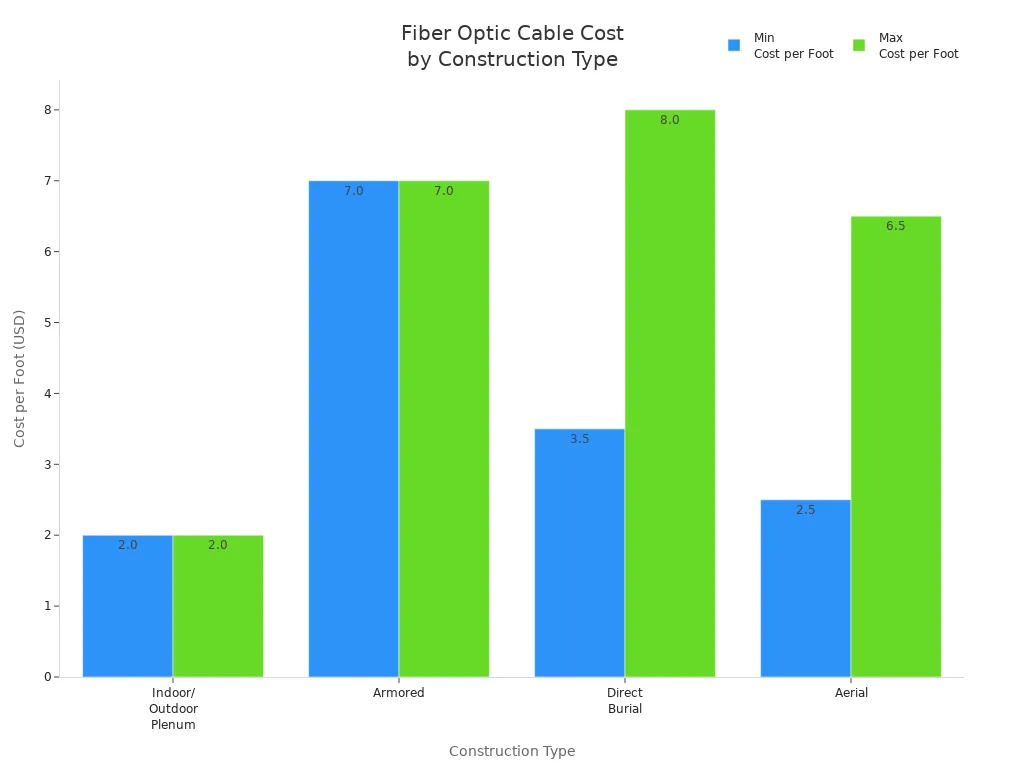
Single-mode fiber systems cost more because you need laser parts and careful work. Over time, you might save money because you do not need to upgrade as much. Multimode fiber is cheaper to buy and install, especially for short cables. But you might pay more later if you need repairs or upgrades. Specialty and armored cables cost the most per foot, but they help stop damage and keep your network working.
Note: You should think about both the first cost and what you will spend later. Single-mode fiber is good for the future, while multimode fiber helps you save money at the start. Specialty cables protect your network in hard places.
Suitability for Applications
You need to pick the right cable for your business. Single-mode fiber is best for long-distance and fast jobs. Multimode fiber is good for short-distance and high-speed needs. Specialty and armored cables are best for tough or risky places.
Quick Reference Table:
|
Fiber Type |
Best For |
Lifespan |
Standards/Brands |
|---|---|---|---|
|
Single-mode |
Telecom, data centers, city networks |
25+ years |
ITU-T G.652, Corning SMF |
|
Multimode |
Office LANs, data centers, campus links |
15-20 years |
ISO/IEC 11801, OM3/OM4 |
|
Armored/Specialty |
Factories, outdoors, underground |
20+ years |
Belden, Prysmian, OFS |
Single-mode fiber: You get the best for telecom, backbone, and data center links. The cable lasts over 25 years and meets ITU-T G.652 rules.
Multimode fiber: You save money on LANs and short data center cables. The cable supports OM3/OM4 rules and lasts up to 20 years.
Specialty/Armored fiber: You protect your network in factories, outside, or underground. Brands like Belden and Prysmian make cables that stop crushing, rodents, and chemicals.
If you work in telecom, EPC, or distribution, you lower risk and get more value by picking the right cable for your space and plans.
Key Factors for Industrial Environments:
Strong and flexible
Handles water, chemicals, and hot or cold weather
Protects from hits and follows safety rules
Summary List:
Pick single-mode fiber for long distances and future growth.
Choose multimode fiber for short, fast links and lower costs.
Use specialty or armored fiber for tough or risky places.
You make the best choice when you look at speed, distance, cost, and what your business needs. The Types of Fiber Optic Cable you pick will decide how strong, cheap, and useful your network is for many years.
Choosing the Right Fiber Optic Cable

Application Needs
You need to pick a fiber optic cable that fits your business. The right cable helps your network work well and saves money. First, think about what you need. If you connect far-away places or run a telecom network, single-mode fiber is best for long distances and lots of data. For offices, data centers, or cloud work, multimode fiber is cheaper and fast for short spaces. Specialty cables, like armored or bend-insensitive types, keep your network safe in tough spots like factories or outside.
Tip: Always think about where you will use the cable and what you need it to do. Military jobs may need MIL-SPEC cables. Factories need cables with extra protection.
|
Criteria |
Description |
|---|---|
|
Application Requirements |
Pick a cable that fits your space and job (MIL-SPEC for military, armored for factories) |
|
Mode of Transmission |
Single-mode for far, low signal loss; multimode for close, saves money |
|
Core Diameter |
Single-mode: 8–10µm; Multimode: 50–62.5µm |
|
Distance of Transmission |
Single-mode: up to 40km; Multimode: 550m–2km |
|
Bandwidth |
Single-mode: unlimited; Multimode: up to 28,000 MHz*km |
|
Speed of Transmission |
Single-mode: 10–40Gbps; Multimode: 100Mbps–10Gbps |
|
Attenuation |
Single-mode: 0.4–1dB/km; Multimode: higher |
|
Cable Construction |
Good for inside, outside, business, or factory use |
Pick your cable by thinking about how far you need to send data, how much data you need, and where you will put the cable. This helps you avoid problems and lets your network grow later.
Budget Considerations
How much money you have matters when picking a cable. You want to spend smart now and save money later. Single-mode fiber costs more to buy and put in. You pay more for laser parts and special workers. Multimode fiber is easier and cheaper to set up, so you save on work costs. For most offices and data centers under 600 meters, multimode fiber gives you the best deal.
|
Aspect |
Single-Mode Fiber |
Multimode Fiber |
|---|---|---|
|
Cable Cost |
Higher |
Lower |
|
Transceiver Cost |
1.5–5x more |
Less expensive |
|
Installation Complexity |
More complex |
Easier |
|
Effective Range |
Beyond 600 meters |
Up to 500–600 meters |
Think about both the first price and what you will pay later. Multimode fiber saves money for short runs. Single-mode fiber costs more at first but can save money if you need to upgrade later. Specialty cables, like armored ones, cost more at the start but help stop damage and keep your network working.
💡 Multimode fiber is the best deal for offices and data centers up to 600 meters.
Supplier Selection
Picking a good supplier keeps your network safe and working well. You should buy from companies that follow rules like ANSI/TIA-568 and ISO/IEC 11801. Brands like Belden, CommScope, and Corning need you to test the cable for a warranty. This makes sure you get good products and help if something goes wrong.
"Certification testing will always be required for warranty, no matter how many cables you use." – Frank Straka, Panduit
Choose suppliers who:
Follow important cable rules
Give you warranty if you test the cable
Offer help and clear instructions
Have done good work in your field
You lower risk and get more for your money when you pick a supplier with strong warranties and help. Good suppliers help you avoid big repair bills and make sure your network works as it should.
Note: Always check if your supplier has the right papers and warranty before you buy. This keeps your network safe and ready to grow.
Procurement Tips for B2B Buyers

Quality Standards
You must check quality standards before buying fiber optic cable. Good standards help your network work well and lower risk. Groups like IEC, ASTM, and TIA make strict rules for cable safety and how long it lasts. If you pick cables that follow these rules, you protect your money and get better value over time.
Always ask your supplier for papers that show the cable meets these standards. This helps you avoid problems and keeps your network running.
Here are some important standards for fiber optic cables:
|
Standard |
Description |
|---|---|
|
IEC 60793-1 |
Sets rules for fiber size and how it works |
|
IEC 60793-2 |
Lists what different fiber types need to do |
|
ITU-T G.652 |
Tells how single-mode fiber should work for long trips |
|
ASTM |
Checks cable materials to make sure they last |
|
TIA |
Makes rules for telecom cables |
|
FOA |
Gives tips for putting in cables and training |
You should also pick suppliers who follow FOA and Telcordia rules. These rules help cables work well in telecom and other big projects. If you buy cables that meet these rules, you lower risk and make your network stronger.
Bulk Orders
Buying in bulk helps you save money when you get fiber optic cable. You pay less for each cable when you order a lot. Suppliers give better prices for big orders. This way, you also spend less on shipping and paperwork, so you can use your budget better.
Bulk orders help you finish projects on time because you always have enough cable. You keep your supplies neat and avoid running out.
Here are some good things about buying in bulk:
Lower prices help you spend less.
Fewer shipments mean cheaper freight costs.
Less paperwork saves time.
Always having cable stops delays.
Easy supply management makes work faster.
|
Strategy |
Description |
|---|---|
|
Bulk Purchasing |
Big orders save money and get better deals |
|
Quality Control |
Careful checks make sure products are always good |
|
Supplier Reliability |
Good suppliers deliver on time and help customers |
You get more control over your supplies when you buy in bulk. This helps you manage costs and learn about market prices. You can make better deals and get good cable for your network.
Support and Warranty
Support and warranty are important when you buy fiber optic cable. Good suppliers give warranties to protect your money and make sure products are good. You should pick companies with clear warranty rules and helpful customer service.
A strong warranty lowers risk and keeps your network working well.
Here is a comparison of warranty offerings from leading suppliers:
|
Company |
Warranty Details |
|---|---|
|
Optical Cable Corporation |
Gives warranties and promises good products |
|
Fibramérica |
Promises reliable cables and easy-to-understand claim rules |
You get more help from suppliers who check quality and answer quickly. Fibramérica, for example, makes sure all cables are good and explains how to use the warranty. This support helps you fix problems fast and keep your network up.
If you focus on support and warranty when you buy, you protect your business from surprise costs and network problems. You also build better relationships with suppliers, which means better service and more value later.
Tip: Always read warranty and support rules before you order. This helps you get good fiber optic cable and make the most of your money.
You should pick fiber optic cables by thinking about how far data must go, how much data you need to send, and how much money you can spend. Single-mode fiber is good for sending data very far and does not lose much signal. Multimode fiber is better for short distances and costs less. Specialty cables help keep your network safe in tough places.
|
Type |
Attenuation (dB/km) |
10Gb Distance |
Cost (Transceiver) |
|---|---|---|---|
|
Single-mode |
0.22–0.36 |
10km |
$10.00 |
|
Multimode |
1.0–3.0 |
70m |
$9.00 |
Always buy from certified suppliers. This helps you get fast speeds and good help later. Check what your network needs, look at your space, and talk to experts. Doing this helps you avoid mistakes and get the most for your money.
FAQ
Why should you choose single-mode fiber optic cable for long-distance networks?
Single-mode fiber optic cable is best for sending data far. It gives you the fastest speed and lets data travel the longest way. You lose less signal, so your network stays strong. This cable helps your network last longer. Telecom and big companies save money over time. They do not need to upgrade as often.
Why does multimode fiber work best for short office links?
Multimode fiber is good for short distances in offices. It can move lots of data quickly over short runs. You pay less to put it in and use cheaper parts. Offices and data centers can set up networks fast. They get steady and quick service for their LANs.
Why do armored fiber optic cables lower your network risk?
Armored fiber optic cables are tough and protect your network. They stop damage from crushing, animals, and rough places. You fix things less and your network works longer. Factories and outdoor spots get a safer and stronger network.
Why is supplier certification important when buying fiber optic cable?
Certified suppliers follow important rules for fiber optic cable. You get cables that are tested and safe. You also get a warranty and help if something breaks. This lowers the chance of problems. Businesses keep their networks safe and protect their money.
Why should you consider future growth when selecting fiber optic cable?
Picking the right fiber optic cable helps your network grow. You do not have to spend more on upgrades later. Single-mode fiber can handle more data as you grow. Multimode fiber is good for what you need now in short spaces.
Why do installation costs differ between single-mode and multimode fiber?
Single-mode fiber is harder to install and needs special lasers. This makes it cost more to set up. Multimode fiber uses simple parts and is easier to put in. You save money at first with multimode. But single-mode is better for long runs and saves money later.
Why do standards like ITU-T G.652 and ISO/IEC 11801 matter for your project?
These standards make sure fiber optic cables work well and fit together. Your network will be safe and reliable if you follow them. Using these rules helps you avoid problems. It also helps you get warranty support.
Why should you buy fiber optic cable in bulk for large projects?
Buying lots of cable at once saves you money. You pay less for each cable and get them faster. You do not run out of cable during your project. Big buyers finish jobs quicker and lower their risks.