





FTTx (Fiber to the x) is the umbrella term for a family of fiber-based broadband access architectures. FTTH (Fiber to the Home) is one specific model within that family, where fiber runs all the way to an individual residence. The key difference between any two FTTx models comes down to where the fiber terminates and what medium carries the signal for the remaining distance.
If you work in broadband planning, telecom procurement, or network design, you have probably encountered FTTx, FTTH, FTTB, FTTC, and FTTN used loosely - sometimes as if they mean the same thing. They do not. Understanding where each model draws the line between fiber and other media is the foundation for making sound deployment and procurement decisions.
This guide breaks down the FTTx family in practical terms: what each model means, how they compare, how a typical FTTH network is built, and what architecture choices actually affect cost, scalability, and long-term upgrade potential.
What Is FTTx in Telecom?
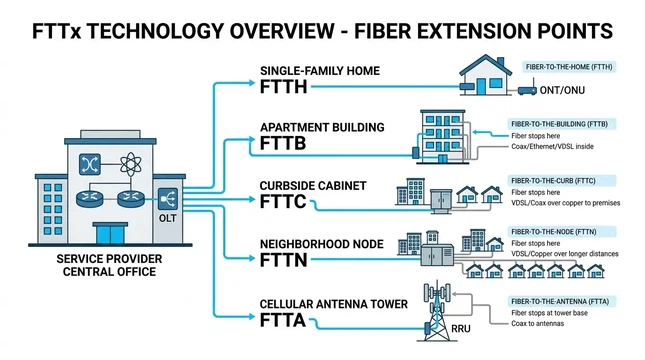
FTTx stands for Fiber to the x, where "x" represents the termination point of the fiber: a home, a building, a curb-side cabinet, a neighborhood node, or even a wireless antenna. In telecom, FTTx is not a single technology. It is a category that includes every last-mile architecture where optical fiber cable replaces some or all of the traditional copper or coaxial path between the service provider's network and the end user.
The closer fiber reaches to the subscriber, the more bandwidth and stability the connection can deliver. That principle drives most of the industry's migration toward deeper fiber deployments. The ITU-T, which develops the international standards behind PON-based fiber access (including the G.984 GPON and G.9807.1 XGS-PON series), has built its entire optical access roadmap around progressively pushing fiber further into the network. The Fiber Broadband Association reports that FTTH deployment in the United States surpassed 11.8 million homes passed in 2025 alone, with cumulative coverage now exceeding 98 million homes - a clear sign of where the industry is heading.
FTTx vs FTTH: Key Differences
The relationship is straightforward: FTTx is the broad category; FTTH is one specific member of it. Every FTTH network is an FTTx deployment, but not every FTTx deployment is FTTH.
In an FTTH deployment, fiber extends all the way to the individual home or living unit. There is no copper or coaxial segment between the distribution network and the subscriber. This is the most fiber-intensive residential access model, and it removes the last-mile bottleneck that limits bandwidth, symmetrical performance, and upgrade flexibility in other FTTx variants.
Other FTTx models - FTTB, FTTC, FTTN - stop the fiber at an intermediate point and rely on copper, coax, or structured cabling to bridge the remaining distance. Each model represents a different trade-off between deployment cost, construction complexity, and long-term performance ceiling.
What About FTTP?
A related term that frequently causes confusion is FTTP (Fiber to the Premises). In many industry contexts, FTTP is broader than FTTH: it can encompass both FTTH and FTTB, covering any deployment where fiber reaches the boundary of a property - whether that property is a single-family home or a multi-tenant building. As the commonly referenced FTTx taxonomy notes, FTTP and FTTH are sometimes used interchangeably, but they are not always synonyms. If you are writing specifications, RFPs, or technical content, it is worth being precise about which term you mean.
Types of FTTx: FTTH, FTTB, FTTC, FTTN, and FTTA
FTTH (Fiber to the Home)
Fiber terminates at the subscriber's home or individual living unit. An Optical Network Terminal (ONT) inside or on the exterior wall of the home converts the optical signal into Ethernet, voice, and video outputs. Because the entire path from the central office to the home is fiber, FTTH provides the highest available bandwidth, the lowest latency, and the strongest upgrade path - operators can increase capacity by upgrading electronics at either end without replacing the fiber plant.
FTTH is the standard choice for greenfield residential builds and is increasingly common in brownfield upgrades where operators are willing to invest in pulling FTTH drop cable to each unit. For single-family neighborhoods, FTTH is usually the cleanest long-term answer because it avoids the performance ceiling that any non-fiber final segment introduces.
FTTB (Fiber to the Building)
Fiber reaches the building, typically terminating at a basement equipment room or a riser closet, but does not extend individually to each unit. The last segment inside the building is handled by Ethernet, coax, or existing structured cabling. A building-level ONU (Optical Network Unit) handles the optical-to-electrical conversion and distributes service to tenants.
FTTB is common in apartment blocks, office buildings, and multi-dwelling units (MDUs). In many MDU environments, FTTB is more practical than unit-by-unit FTTH because building access agreements, internal wiring constraints, and construction logistics often make it impractical to run individual fiber drops to every apartment. The trade-off is that the in-building segment can become a bandwidth constraint as subscriber demands grow - particularly if the internal wiring is older copper that does not support multi-gigabit speeds.
FTTC (Fiber to the Curb)
Fiber extends to a street-level cabinet or distribution point near the subscriber premises. The remaining distance - usually a few hundred meters at most - is covered by copper (often supporting VDSL2 or G.fast). FTTC gives a significant performance boost over pure copper networks by shortening the copper segment, which directly improves achievable speeds and signal quality.
Operators often deploy FTTC as a transitional strategy: it upgrades service levels faster and at lower cost per premises than FTTH, but it preserves a copper bottleneck that will eventually need to be replaced if demand continues to grow. In practice, FTTC works best when the remaining copper runs are short and in good condition.
FTTN (Fiber to the Node)
Fiber reaches a neighborhood cabinet or node, which can serve hundreds of subscribers over a larger geographic area than a single FTTC cabinet. The last mile from the node to each premises typically uses existing copper or coaxial plant. FTTN is common in brownfield environments where an operator wants to improve broadband performance without the cost and disruption of replacing every final drop.
The fundamental limitation is distance. The longer the copper run between the node and the home, the worse the achievable speeds. For subscribers far from the node, FTTN may deliver only marginally better performance than legacy DSL. This makes FTTN a weaker long-term play compared to FTTH or even FTTC - and it is one reason many operators who initially deployed FTTN have since begun overbuilding with deeper fiber.
FTTA (Fiber to the Antenna)
FTTA serves wireless infrastructure rather than end users directly. Fiber connects to cell towers, distributed antenna systems, or remote radio heads, replacing copper-based fronthaul and backhaul links. FTTA cable is purpose-built for these applications, often with ruggedized connectors and outdoor-rated jackets. As 5G networks expand with denser small-cell deployments, FTTA is becoming a larger share of overall fiber deployment - a reminder that FTTx is not limited to residential broadband.
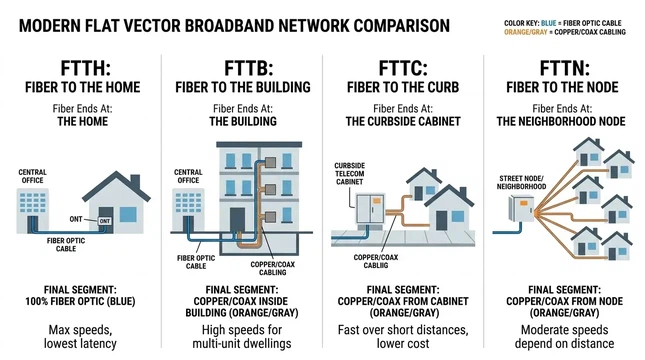
FTTH vs FTTB vs FTTC vs FTTN: Side-by-Side Comparison
| Model | Fiber terminates at | Final segment medium | Typical use case | Key trade-off |
|---|---|---|---|---|
| FTTH | Individual home or unit | Fiber (end to end) | Single-family homes, premium broadband | Highest performance and upgrade headroom; higher per-premises construction cost |
| FTTB | Building entry or riser | Ethernet, coax, or copper inside the building | Apartments, offices, MDUs | Efficient shared deployment; in-building segment limits per-unit bandwidth ceiling |
| FTTC | Street-level cabinet | Copper (VDSL2, G.fast) | Transitional upgrades in existing copper areas | Faster rollout than FTTH; performance limited by remaining copper length and quality |
| FTTN | Neighborhood node | Copper or coax | Brownfield broadband improvement | Least disruptive to existing plant; weakest long-term scalability among FTTx options |
The practical implication: any non-fiber final segment becomes the performance bottleneck. That segment constrains maximum bandwidth, limits symmetrical upload/download capability, introduces more points of failure, and caps the upgrade path. When an operator later wants to support 10G symmetrical service or low-latency applications, the copper or coax tail has to be replaced - which effectively means rebuilding the last mile.
How an FTTH Network Works: Components and Signal Path
A typical FTTH network has three core functional layers. Understanding them helps when evaluating equipment choices, FTTx architecture options, or vendor proposals.

OLT (Optical Line Terminal)
The OLT sits in the service provider's central office or headend. It is the network-side endpoint that aggregates subscriber traffic and connects the fiber access network to the provider's core IP or transport network. In a PON deployment, a single OLT port can serve dozens of subscribers through passive splitting - which is a major reason PON-based FTTx is cost-effective at scale.
ODN (Optical Distribution Network)
The ODN is everything between the OLT and the ONT: feeder fiber, distribution fiber, drop cables, splice closures, and - in PON architectures - passive optical splitters. The ODN contains no powered equipment, which means lower maintenance costs and higher reliability compared to active distribution networks. Splitter ratios commonly range from 1:32 to 1:128, depending on the PON standard and the operator's design parameters.
ONT (Optical Network Terminal)
The ONT is the subscriber-side device that terminates the fiber and converts the optical signal into usable interfaces - typically Ethernet ports for data, and in some configurations, ports for voice or RF video overlay. In residential FTTH, the ONT is usually installed inside the home or in an outdoor enclosure on the building exterior.
The signal path in an FTTH network follows this chain: central office → OLT → feeder fiber → splitter(s) → distribution fiber → drop cable → ONT → subscriber devices.
FTTH Architecture: PON vs Active Ethernet and Split Topologies
Choosing between architecture options is where deployment planning gets consequential. Two decisions matter most: the transport technology (PON or Active Ethernet) and the split topology (home run, centralized, or distributed).
PON vs Active Ethernet in FTTH Networks
Most FTTH deployments today use some form of PON (Passive Optical Network). In a PON architecture, passive splitters in the ODN divide the optical signal so that one OLT port serves multiple subscribers without any powered equipment in the field. The dominant standards are GPON (ITU-T G.984, providing 2.5 Gbps downstream / 1.25 Gbps upstream) and XGS-PON (ITU-T G.9807.1, providing symmetrical 10 Gbps). The ITU-T's next-generation standard, 50G-PON (G.9804), pushes capacity to 50 Gbps per wavelength and is designed to coexist on the same fiber plant as GPON and XGS-PON - meaning operators can upgrade without replacing their ODN.
Active Ethernet (also called Point-to-Point Ethernet or P2P) uses dedicated fiber or active switching equipment to give each subscriber a direct connection back to the headend. This provides dedicated bandwidth per subscriber and simplifies traffic isolation, but it requires more fiber strands or more active equipment in the field, which increases both CAPEX and OPEX. Active Ethernet tends to appear in enterprise-oriented deployments or in networks where the operator prioritizes dedicated SLAs over shared-infrastructure cost efficiency.
For most residential and mixed-use FTTH builds, PON wins on economics. Active Ethernet makes more sense when the deployment serves primarily business customers with stringent uptime and bandwidth guarantees, or when the subscriber density is too low to justify the shared infrastructure model of PON.

Home Run Architecture
In a home run (or point-to-point) topology, each subscriber has a dedicated fiber path from the central office to the premises - no splitters, no sharing. This provides the maximum possible bandwidth per subscriber and the simplest fault isolation: a fiber break affects only one customer. The trade-off is significant: home run designs require the most fiber, the largest cable sizes, and the most splicing labor. They also demand more OLT ports, since there is no passive splitting to share port capacity. Home run is most practical in low-density deployments or situations where future bandwidth demands are expected to be very high.
Centralized Split Architecture
A centralized split design places a single splitter location - usually at or near the central office or at a fiber distribution hub - and runs individual fibers from the splitter to each subscriber. This is the most common architecture in dense suburban and urban FTTH builds. It simplifies splitter management, makes troubleshooting more straightforward (because all splits happen at one known location), and keeps the feeder fiber count low. The main limitation is that distribution fiber runs can be long, which increases material cost in spread-out geographies.
Distributed Split Architecture
In a distributed split design, splitting happens at two or more stages - for example, a first-stage split at a cabinet and a second-stage split closer to the subscriber. This reduces the total fiber count in portions of the network and can lower construction costs in some geographies. However, distributed splitting introduces more components in the ODN, increases the number of splice and connection points, and can make fault localization more complex. Operators who choose distributed split architectures need to weigh the fiber savings against the additional operational complexity over the life of the network.

Choosing the Right Architecture
Architecture selection depends on several concrete factors rather than a single "best" answer:
- Subscriber density: Higher density favors PON with centralized splitting. Lower density may justify home run or Active Ethernet.
- CAPEX constraints: PON with centralized or distributed split minimizes upfront fiber and equipment costs. Home run has higher initial investment.
- Upgrade path: All PON architectures built on standard ODN infrastructure can migrate from GPON to XGS-PON to 50G-PON by swapping OLT cards and ONTs - without touching the fiber plant. Home run provides the most headroom per subscriber.
- Operational complexity: Centralized split is easiest to troubleshoot. Distributed split adds field components. Home run has the simplest per-subscriber fault isolation but the most fiber to manage.
- Target service mix: Residential broadband overwhelmingly favors PON. Enterprise-grade dedicated SLAs may favor Active Ethernet or home run.
How to Choose the Right FTTx Model for Your Deployment

The right FTTx model depends on the specific deployment environment, not on which model sounds best in the abstract. Here are the decision dimensions that matter most in real network planning:
Greenfield vs brownfield. In a greenfield build with no existing infrastructure, FTTH is almost always the right choice. The incremental cost of running fiber to each home - rather than stopping at a cabinet or building - is relatively small when you are already trenching or stringing new cable. In a brownfield environment with existing copper or coax plant, the calculus is different: FTTC or FTTN can deliver meaningful improvements faster and at lower cost, buying time while the operator plans a full FTTH overbuild.
Single-family vs multi-dwelling. For single-family home neighborhoods, FTTH is standard practice. For MDUs, FTTB is often more realistic because it avoids the need to negotiate individual unit access, run fiber through complex in-building pathways, and install ONTs in every apartment. However, operators building new MDUs or doing major renovations increasingly choose unit-level FTTH because the long-term bandwidth ceiling of FTTB depends entirely on the quality of in-building wiring.
Upgrade timeline. If the network needs to support 1G today and 10G or higher within the next five to ten years, FTTH with a PON architecture provides the smoothest upgrade path. FTTC and FTTN will hit hard bandwidth ceilings as subscriber demand grows, requiring eventual fiber extension to the premises anyway.
Budget and deployment speed. FTTN and FTTC can be deployed faster and at lower per-premises cost than FTTH, which matters when the goal is to reach as many subscribers as possible within a fixed budget or timeline - for example, in government-funded rural broadband programs. The trade-off is that these models accumulate technical debt that must be addressed later.
For a deeper look at how these models apply in real FTTH project deployments, operator case studies and solution architectures provide useful reference points.
Common Mistakes When Discussing FTTx and FTTH
Using FTTx and FTTH interchangeably. FTTx is the family; FTTH is one member. Conflating them creates confusion in technical documents, RFPs, and regulatory filings - especially when the distinction between "fiber to the home" and "fiber to the building" or "fiber to the node" has real implications for service levels and subscriber experience.
Assuming FTTP always means FTTH. In many contexts, FTTP is broader and includes FTTB. If a vendor or operator describes their network as "FTTP," it is worth clarifying whether fiber reaches each individual unit or stops at the building level.
Treating 5G as a replacement for fiber. 5G and fiber are complementary, not competitive. 5G base stations - especially the dense small-cell deployments that deliver the highest speeds - require fiber backhaul and fronthaul to function. Every 5G expansion effectively drives more fiber deployment through FTTA and related infrastructure. The Broadband Forum's work on PON-based mobile backhaul (TR-331) makes this relationship explicit: PON infrastructure serves both fixed broadband subscribers and mobile base stations on the same fiber plant.
Ignoring architecture when comparing FTTx models. Two networks can both be labeled "FTTH" but perform very differently depending on whether they use GPON or Active Ethernet, centralized or distributed splitting, and what split ratios they employ. The FTTx label tells you where the fiber ends; the architecture tells you how the network actually performs.
FAQ
Q: Is FTTH The Same As FTTx?
A: No. FTTx is the umbrella term for all fiber-to-the-x access models. FTTH is one specific model within that family - the one where fiber reaches the individual home. Other FTTx models include FTTB (building), FTTC (curb), and FTTN (node).
Q: Is FTTP The Same As FTTH?
A: Not always. FTTP (Fiber to the Premises) is often used as a broader term that includes both FTTH and FTTB. Some operators and standards bodies use FTTP and FTTH interchangeably, but in strict usage, FTTP can refer to any deployment where fiber reaches the property boundary - including buildings where internal distribution uses non-fiber media.
Q: Which Is Better: FTTH Or FTTN?
A: FTTH provides significantly higher bandwidth, lower latency, symmetrical upload/download capability, and a stronger long-term upgrade path. FTTN is less expensive to deploy initially because it reuses existing copper plant for the last mile, but the copper segment limits achievable speeds - especially for subscribers far from the node. For any network intended to support multi-gigabit services over the next decade, FTTH is the stronger choice.
Q: What Equipment Is Used In An FTTH Network?
A: The three core components are the OLT (Optical Line Terminal) at the provider side, the ODN (Optical Distribution Network) in between - which includes fiber optic cables, splitters, splice closures, and connectors - and the ONT (Optical Network Terminal) at the subscriber side. Additional components include indoor FTTx cables, patch cords, and distribution frames.
Q: Is FTTH Always Based On PON?
A: No. While the majority of residential FTTH deployments worldwide use PON technology (primarily GPON or XGS-PON), FTTH can also be built using Active Ethernet with dedicated point-to-point fiber connections. The choice between PON and Active Ethernet depends on subscriber density, service requirements, and cost structure - not on the FTTx model itself.
Q: Does FTTB Count As Full Fiber?
A: It depends on the definition. FTTB delivers fiber to the building, but the connection from the building's distribution point to each individual unit typically uses copper or Ethernet cabling. Most industry bodies and regulators do not classify FTTB as "full fiber" or "all fiber" because the subscriber's actual connection includes a non-fiber segment. If a network claims to be "full fiber," it should mean fiber reaches the individual unit - which is FTTH.
Conclusion
FTTx describes a spectrum of fiber access architectures, from FTTN at the shallow end to FTTH at the deepest. The right choice depends on the deployment environment, budget, timeline, and long-term service ambitions. For operators building networks that need to support 10G and beyond, FTTH with a PON-based architecture provides the most cost-effective combination of performance, scalability, and upgrade flexibility. For transitional or constrained environments, FTTB, FTTC, and FTTN serve as pragmatic stepping stones - with the understanding that the non-fiber final segment will eventually need to be addressed.
The terminology becomes much simpler once you focus on one question: where does the fiber end? Everything else - the performance, the cost, the upgrade path, the operational complexity - follows from that answer.