





In this article, Hengtong will guide you from an engineer's perspective on how to quickly understand and remember the fiber optic cable color code of optical fibers. On the installation site, it's often a headache to encounter unskilled workers who struggle with 24-core, 48-core, or 96-core fibers, even making mistakes in plugging them in. To quickly train installation personnel, showing them this article is enough.
What is the 12-fiber optics color code sequence table?
This article will guide you, from an engineer's perspective, to quickly learn how to interpret the color codes of optical fibers. What is the 12-core color sequence table?
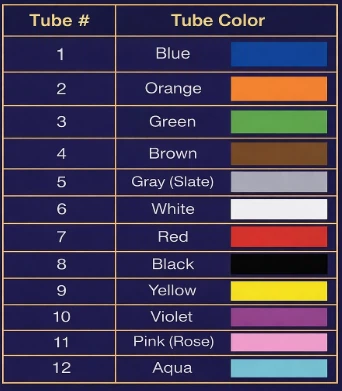
12 core fiber optic cable color code (TIA-598) = Fiber core numbers 1 to 12
The construction workers at the site told me that these issues were the most troublesome for them. Firstly, in low-light conditions and dusty computer rooms, it is very easy to confuse the blue core, the cyan core, the gray core, the white core, the purple core and the pink core due to the color differences caused by aging cables, resulting in incorrect cores and rework. Secondly, most of the on-site accidents occurred in the second and third rounds of 24, 48 and 96 cores, where 13 cores were mistaken for 1 core, causing all the splicing and fiber jumping to be completely disordered. Hengtong wants to tell you that at the site, first determine the numbers and then use the colors for confirmation. The table below clearly shows the corresponding numbers and colors.
TIA-598 12 fiber optic color code chart
What should we do if the optical fiber has more than 12 cores?
When the number of cores in the optical cable exceeds 12, the colors will cycle in the order of 1-12. Let me give you an example to help you understand. When it reaches the 13th core, it actually corresponds to the 1st core. To distinguish which round it is, Hengtong will use methods such as stripes, ring labels, printing, and grouping during the production process to make the distinction.
How to identify the color code fiber optic cable of buffer tubes and loose tubes?
At the construction site, construction workers usually see the pipe first and then the optical fiber core inside the pipe. However, many people mistake the pipe number and pipe color for the fiber core number. Moreover, when changing suppliers, some suppliers distinguish by using 12 colors, while others distinguish based on printed characters or ring labels. The methods of distinction will vary from factory to factory. Therefore, Hengtong will next show you how to identify the color code of the buffer pipe.
How to Identify the color code for fiber optics of Loose Tube cable?
The color of the buffer tube enables you to quickly identify which group it belongs to, while the color of the optical fiber helps you quickly determine the position of the fiber within that group.
1. First, you need to confirm which group's buffer tube you are looking for. At the construction site of Hengtong, there will be completion sheets, connection sheets, and patch panel records. These documents will lead you to the corresponding buffer tube.
2. After finding the tube, follow the 12-color sequence table to find the fiber core number.
3. Finally, even on the connection panel, you still need to place the fibers according to the tube number and fiber number and record them.
How to identify the Fiber Optic Color Code of the Buffer Tube cable?
In many loose tube optical cables, the color of the buffer tube basically follows the same 12-color sequence as the fiber core colors in line with the order of the fiber core colors. There is no mysticism behind this; it's simply to avoid making the site look like a "blind box" scenario: First, lock the grouping by the tube color find the right tube first, then in the tube, follow the 12-color sequence to identify the specific fiber cores. If the tube colors are mixed up or you don't refer to the completion list and just rely on your intuition to find, it will be very easy to get confused when opening the cable for 96-core or 144-core cables. It will also be more difficult to match correctly in the subsequent connection box.
How to identify the fiber optic color codes of twisted-pair optical fiber cables?
The color identification of ribbon optical cables and loose tubes is quite similar. However, based on Hengtong's rich on-site experience, for ribbon optical cables, the optical cable manufacturers usually mark the serial numbers and barcodes on the cable body or packaging. In the patch panel, the cables are grouped by the number. Each ribbon is actually a group of neatly arranged optical fiber cores. There is no clockwise rotation. Just confirm the ribbon number and you can proceed. Locate the optical fiber cores according to the color sequence table mentioned above.
How are ribbon fibers numbered?
A ribbon optical cable is usually divided into 8 cores, 12 cores, and 16 cores. Each of them will have a band number and a mark. On-site, you should confirm the band number and identify them one by one in the order of 12 colors. Finally, record it properly.
Why are ribbon optical cables the most commonly used in data centers?
In data centers or data center parks, there are numerous ports that are frequently modified. Equipment engineers are most concerned about mistakenly selecting the wrong core or misplacing the labels. These troublesome issues can all be solved by ribbon optical cables. Because the grouping structure of ribbon optical cables is very clear, they can well adapt to high-density wiring and the fiber arrangement will be very neat. If you, as a purchasing manager, need to pursue efficiency, reduce error rates or reduce rework costs, ribbon optical cables are also a good choice worth considering.
How to identify the color of the outer sheath of the optical cable?
Hengtong will kindly inform you that the color of the outer sheath of the optical cable can only be used for a quick judgment, but it cannot be used as an absolute identification standard. First, conduct a preliminary screening based on the color, and then check the printed words and specification sheet on the optical cable to avoid any errors.
What does the color of the sheath usually indicate?
Then someone might ask, what information can be obtained from the color of the sheath? The color of the optical cable's sheath is often used to quickly distinguish whether it is a single-mode or multi-mode optical cable in different scenarios. However, in the field, many outdoor optical cables have black sheaths, so relying solely on the appearance color can easily lead to misjudgment, especially for outdoor optical cables, custom optical cables, and those with different standards in different regions.
Jacket Color Code Quick Reference
|
Fiber Type |
Common Jacket Color |
Notes (Common Exceptions) |
|
OS2 (Single-mode) |
Yellow |
Outdoor cables are often black (UV/weather resistant) |
|
OM1 / OM2 (Multimode) |
Orange |
Some vendors may use different shades by region/market |
|
OM3 / OM4 (Multimode) |
Aqua / Purple |
Color systems vary; aqua is common, purple appears in some schemes |
|
OM5 (Multimode) |
Lime Green |
Most consistent in practice, but still confirm by legend |

Why is it necessary to identify the color of the connector?
Hengtong interviewed many engineers. They were most afraid of inserting the UPC/APC connectors incorrectly. If this happened, it would directly cause link abnormalities in the project, and then they would have to go through the process of reworking and conducting one-by-one troubleshooting.

Common Misjudgments of Fiber Optic Color Codes
Case 1: Mixed optical cables / multi-fiber types coexist, relying on color for "imagination" - the result is failed tests, and even when connecting the wrong fiber type, it can still "barely work"
During the main line renovation in a certain park, there were all kinds of cables in the lines: 50, 62.5 multimode, single-mode, and even a cable with a mixture of single-mode and multimode. During the rush work, everyone was in a hurry and just relied on the color to connect the cables. No one paid careful attention to the small text on the sheath, and the records were never checked.
As a result, things got messed up at the patch panel: some single-mode cables were connected into multimode ones, and some 50 and 62.5 cables were mixed together. The worst part was that when a red light pen was used to check it immediately after the work was done, it was still working, and even low-speed services could run normally. Everyone thought there was nothing wrong.
Later, when the business volume increased, problems started to arise: this one could run, that one was aging, and it would shake from time to time. The problem became more obvious when the park was upgrading to 10 Gigabit Ethernet. The test results showed a bunch of unsatisfactory optical losses, and no matter how much they were tinkered with, it was still unstable. Eventually, they had to take the difficult route and gradually troubleshoot: they had to lie on the ground to read the printed text, and search along the port one by one. They found where the mix occurred and reconnected it, separating the cables and re-labeling them. Anyone who didn't label them clearly would not be allowed to move.
Case 2: Both OM1 and OM2 are orange. The equipment engineer accidentally connected OM1 to OM2 without realizing it. The problem was only discovered when the attenuation increased.
That time overseas, we really got a big surprise. The client's computer room was filled with orange cables. Everyone just assumed "all multimodes are interchangeable" without even thinking. But after the link was put online, problems emerged one after another: some worked, some occasionally lost the connection, and the insertion loss margin was extremely tight during testing. We could only lie on the ground and read the small text on the shielding sheath, comparing the ports and making a little check. Finally, we realized: They connected the old 62.5/125 (OM1) and 50/125 (OM2) together in the same link - although they both looked orange on the outside, the core diameters were different, and the loss budget was completely exhausted. Later, there was no other choice but to conduct a comprehensive network-wide check, and uniformly label the OM1/OM2 zones and ports; any cables without labels were strictly prohibited from being moved, and we no longer relied on "feeling" by color.
Case 3: The engineer thought it didn't matter whether it was an optical fiber or not, so he simply plugged them together. Eventually, the mixed use of UPC and APC led to high loss and reflection in the data center.
In FTTH/PON and data centers, UPC and APC are often used together. Some people only care about the interface appearance (SC/LC can be plugged directly), regardless of whether it is UPC or APC; others only rely on the color, without checking the requirements on the port. The most troublesome thing is that if you plug it in too hard, it will cause incorrect loss and return loss, and when the link shakes, the ONU/OLT will start to report optical alarm; if you plug it in too hard, the reflection will be too large, and the module will be constantly running under the stress, which indeed has the risk of "ruining" the transmitting end. In the end, troubleshooting is no longer as simple as "try changing the jumper", and it may have to be traced all the way to the panel, module, or even the equipment side and replaced together, which increases the labor cost and time.
FAQ
What is the color code for fiber optic cable?
After the cable is laid on site, the core colors mostly follow the 12-color sequence specified in TIA-598. When you go to the patch panel and look for the core number, you basically rely on this sequence to save time.
However, don't take the colors as the "standard answer". When dealing with custom cables or when different manufacturers have different practices, relying solely on your eyes can easily lead to mistakes. The easiest solution is to read the label on the sheath. There's no need to fuss: Legend, specification sheets, and test results are the only ones that count.
What are the 12 colors of fiber in order?
Blue, Orange, Green, Brown, Gray/Slate, White, Red, Black, Yellow, Violet, Pink/Rose, Aqua
What does OS1, OS2, OM1, OM2, OM3, and OM4 mean?
These are the names of the types and grades of optical fibers:
OS1/OS2: Single-mode fiber. In the engineering field, OS2 is more commonly used in outdoor, main campus backbone networks and long-distance applications.
OM1/OM2/OM3/OM4: Multi-mode fiber. OM1 is typically 62.5/125; OM2/OM3/OM4 are mostly 50/125; OM3/OM4 are more commonly found in high-speed links in data centers.
Does fiber cable color matter?
It is useful and can really help you do it faster. However, do not be too superstitious. It is normal for the outdoor optical cable to have a large black sheath (for weather resistance and UV protection), and there can be minor accidents like fading, rewiring, and missing labels.
So, to determine the type of the fiber, you have to guess - first look at the printed words on the sheath, if you are not sure, then check the reference materials, and if you are really unsure, measure it.
How to identify fiber optic type?
The regular operation process of Hengtong Factory is as follows:
Firstly, pay attention to the printed characters (identifications) on the cable jacket. Many cable labels will be repeatedly printed. You can usually see some content repeated (for certain projects, it may repeat approximately every 1 meter, depending on the manufacturer/model). Usually, OS2, OM3, OM4 will be directly printed on it, and sometimes it may also include fiber optic type standards such as G.652D, G.657A1/G.657A2, etc.
Can't read the printed characters clearly?
Don't guess blindly. Check the specification sheet/completion form to see exactly what this section is, and where it starts and ends.
Still unsure? Then measure: Use an optical source and power meter to measure the insertion loss first; to find out "which section has the problem/where there is a mix-up", then use an OTDR to test it again, which is faster.
What is normally color coded on a fiber cable?
Generally, it can be viewed in two layers:
Inside the cable: The color of the buffer tube, the band number/color of the band, and the color of the single core, which are used for grouping and identifying the cores.
Outside the cable: The color of the sheath can only be used as a reference. Especially outdoors, it basically relies on the black sheath to achieve a "unified style". To confirm the type, reading the Legend is the most reliable method.