



Fiber Optic Cable Connector Types: Comparison, Standards & Use Cases
A Fiber Optic Cable Connector links fiber optic cables together. It makes a safe and low-loss path for light signals. Picking the right connector is important. Different connectors change how networks work, how well they perform, and how much they cost to fix. The most used connector types are:
- LC: Small design, good for crowded spaces, 36.7% market share in 2022.
- SC: Push-pull lock, simple to set up.
- FC: Screw-on style, works well where things shake.
- ST: Bayonet shape, used in older networks.
- MPO: Holds many fibers, helps with fast data.

- CS: Tiny size, ready for future crowded setups.
The Fiber Optic Connectors market was $6.94 billion in 2025. It keeps growing as more people need them for telecom and data centers. Picking the right connector can help save money and stop network problems.
Key Takeaways
- Fiber optic connectors join cables and keep signals strong. Picking the right one is important for your network to work well.
- LC connectors are small and fit in tight places like data centers. They let you use many ports and move data quickly.
- SC connectors are simple to use and not expensive. They work well for telecom and old networks but need more space.
- FC connectors have a screw-on design that keeps them secure. They are great for places with lots of shaking and keep connections steady.
- MPO connectors link many fibers at the same time. This saves space and time and is needed for fast data centers.
- CS connectors are small and made for new setups. They help air move and stop messes in small spaces.
- Always look for IEC and TIA/EIA standards when picking connectors. This makes sure they work together and stops network problems.
- Buying good connectors saves money over time. It cuts down on repairs and keeps your network working well.
Fiber Optic Cable Connector Types
LC Connector
The LC connector is used in many new networks. It is small, so you can fit more in tight places. This makes it good for crowded spots like data centers. LC means "Lucent Connector." It has a 1.25mm ceramic ferrule. The latch is easy to use.
Key Features:
Small size, half as big as SC or FC.
Low insertion loss, helps signal stay strong.
Comes in single-mode and multimode types.
Works with PC, UPC, and APC polish for return loss.
Typical Applications:
Data centers use LC for patch panels.
Telecom uses LC for fiber-to-the-home.
Enterprise networks use LC for video and cloud.
Medical and industrial systems need LC for accuracy.
Tip: LC duplex connectors let you send and get data at the same time.
Technical Data & Standards:
Made with zirconia ceramic ferrule and plastic housing.
Tensile strength meets IEC 61754-20 and TIA/EIA-604-10.
Salt spray test passes IEC 61300-2-26, no rust after 48 hours.
Can be used for over 500 cycles.
Cost is moderate and good for crowded setups.
SC Connector
The SC connector has a square shape and locks with a push-pull. SC means "Subscriber Connector." It uses a 2.5mm ceramic ferrule. SC is easy to use and works well. Many telecom and Ethernet networks use SC because it is cheap and strong.
Advantages:
Simple to connect and take out.
Good signal with low insertion loss.
Strong fit and lasts long.
Low cost, good for big projects.
Disadvantages:
Takes up more space than LC.
Not best for crowded panels.
Harder to manage cables in tight racks.
Used less in new systems because of size.
Typical Applications:
Used in Gigabit Ethernet networks.
Used in telecom offices.
Used in fiber-to-the-home setups.
Used in older enterprise networks.
Technical Data & Standards:
Made with zirconia ceramic ferrule and polymer housing.
Tensile strength meets IEC 61754-4 and TIA/EIA-604-3.
Salt spray test meets IEC 61300-2-26.
Can be used for over 1000 cycles.
Cost is low, good for saving money.
|
Feature |
LC Connector |
SC Connector |
|---|---|---|
|
Ferrule Diameter |
1.25mm |
2.5mm |
|
Typical Lifespan |
500+ cycles |
1000+ cycles |
|
Material |
Ceramic/Plastic |
Ceramic/Polymer |
|
Cost |
Moderate |
Low |
|
Density |
High |
Medium |
|
Standards |
IEC 61754-20 |
IEC 61754-4 |
FC Connector
FC connectors are used where high performance is needed. FC means "Ferrule Connector." It has a round screw-on design and a 2.5mm ceramic ferrule. The screw keeps the connection safe, even if things shake or move.
Key Features:
Screw-on style stops it from coming loose.
High performance with low insertion loss.
Great for single-mode fiber.
Comes in PC, UPC, and APC polish types.
Typical Applications:
Used in data centers for backbone links.
Used in SANs for server connections.
Used in high-speed computing for safe links.
Used in test and measurement tools.
Note: FC connectors work best where shaking or movement might cause problems.
Technical Data & Standards:
Made with zirconia ceramic ferrule and metal housing.
Tensile strength meets IEC 61754-13 and TIA/EIA-604-4.
Salt spray test passes IEC 61300-2-26, no rust after 72 hours.
Can be used for over 500 cycles.
Cost is moderate to high, but worth it for good performance.
|
Connector |
Ferrule Diameter |
Typical Applications |
Features |
Lifespan |
Cost |
Standards |
|---|---|---|---|---|---|---|
|
LC |
1.25mm |
Data centers, telecom |
Small size, easy latch |
500+ |
Moderate |
IEC 61754-20 |
|
SC |
2.5mm |
Ethernet, telecom |
Push-pull, low cost |
1000+ |
Low |
IEC 61754-4 |
|
FC |
2.5mm |
Datacom, SAN, HPC |
Screw-on, high performance |
500+ |
Moderate |
IEC 61754-13 |
Picking the right Fiber Optic Cable Connector depends on how crowded your network is, where it is, and how long you need it to last. Always check IEC and TIA/EIA standards to make sure it works well and fits your needs.
ST Connector
The ST connector is used in old and industrial fiber optic systems. ST means "Straight Tip." It has a bayonet twist-lock that keeps it steady. This lock stops it from coming loose by accident. Inside, a ceramic ferrule lines up the fiber just right. It also keeps the end safe from harm.
|
Characteristic/Application |
Description |
|---|---|
|
Bayonet Twist-Lock Mechanism |
Stays stable and does not unplug easily. |
|
Ceramic Ferrule |
Keeps the fiber lined up and safe from damage. |
|
Insertion Loss (IL) |
Usually less than 0.3 dB, so signals stay strong. |
|
Return Loss (RL) |
High RL means less reflection, so signals stay clear. |
|
Primary Applications |
Used in old networks, factories, school labs, and military. |
ST connectors work with both single-mode and multimode fibers. They support PC and UPC polish types to lower signal loss. ST connectors are good if things shake or move a lot. They are easy to put in and take out.
Tip: ST connectors are still used in training labs and military places. They are tough and have a simple lock.
MPO Connector
MPO connectors help you manage lots of fiber cables in data centers. MPO stands for "Multi-fiber Push-On." You can connect up to 12 fibers in one small connector. This saves space and makes cable work easier. The push-pull design lets you install and remove them fast. This is quicker than using single connectors.
MPO connectors make cable work easier and use less space.
You can set them up faster than older connectors.
MPO connectors hold up to 12 fibers in a small size.
They give more bandwidth and better data speeds.
These are great for data centers that need fast data.
MPO connectors link many fibers at once, making things work better.
You will see MPO connectors in big data centers, telecom rooms, and company networks. They work with both single-mode and multimode fibers. You can pick PC, UPC, or APC polish for best results. MPO connectors help you cut down on downtime and save money. They make your network easy to upgrade later.
Note: MPO connectors are key for fast data centers and telecom jobs. Their small, smart design helps you handle lots of data with less trouble.
CS Connector
CS connectors are new and made for modern data centers. CS means "Compact Small." Their tiny size helps you use space better. You can fit more ports when space is tight. CS connectors use a push-pull system, so they are easy to use. This also helps stop damage during setup.
|
Benefit |
Description |
|---|---|
|
Compact Size |
Takes up less space, helps air flow, and stops cable mess. |
|
Higher Port Density |
Lets you fit more ports in each rack, so you get more links. |
|
Lower Insertion Loss |
Sends signals well with less loss. |
|
Easier Installation |
Push-pull style makes setup and fixing simple. |
|
Better Airflow Management |
Small size lets air move, so things stay cool and cost less to cool. |
CS connectors work with both single-mode and multimode fibers. They have low insertion loss and high return loss, so data moves well. CS connectors meet world standards, so they fit with old systems. If you want to make your network last longer and save money, CS connectors are a good choice.
Alert: CS connectors help you save rack space, keep things cool, and add more links. They are great for new data centers.
Comparison of Connector Types
Physical Design
When you choose a Fiber Optic Cable Connector, the physical design matters. Each connector type has a different size, shape, and way it connects. These differences affect how many connectors you can fit in a panel, how easy it is to manage cables, and what equipment you can use.
|
Connector Type |
Size (Ferrule) |
Compatibility |
Unique Features |
|---|---|---|---|
|
LC |
1.25mm |
Data centers, enterprise networks |
Smaller size, dense routing |
|
SC |
2.5mm |
Wide range of equipment |
Simple, cost-effective |
|
ST |
2.5mm |
General use |
Cylinder design, reliable |
|
FC |
2.5mm |
High-vibration environments |
Threaded coupling, secure |
|
MPO |
Multi-fiber |
High-density connections |
Supports multiple fibers |
|
CS |
1.25mm |
Data centers |
Compact, high-density |
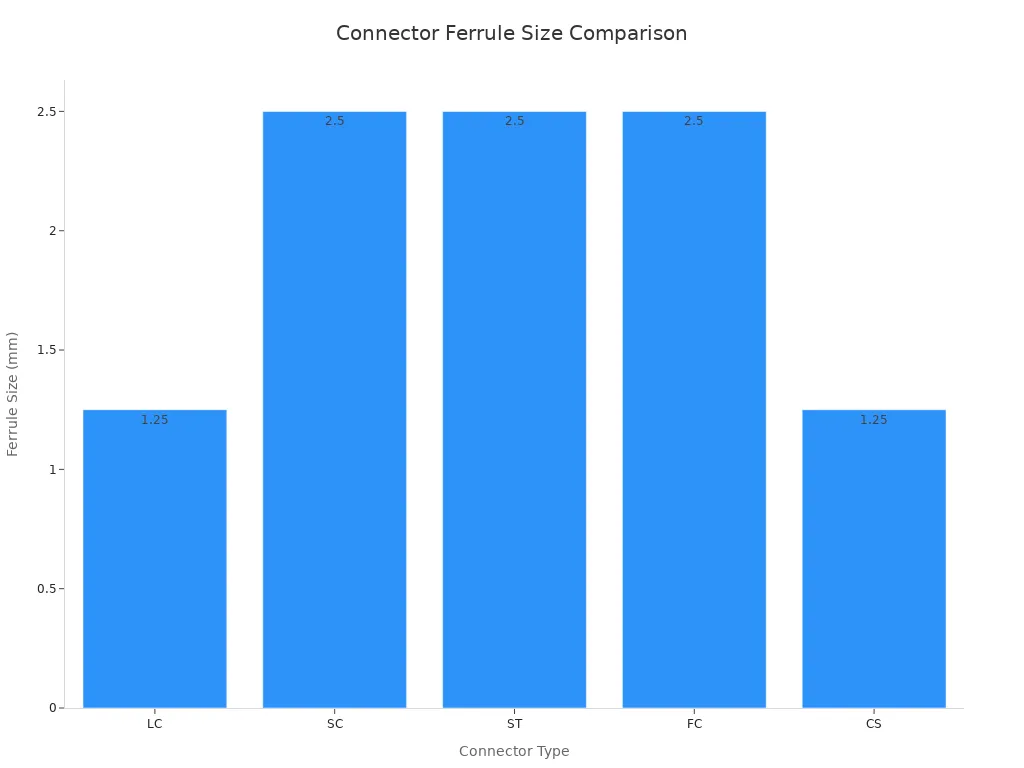
LC and CS connectors use a 1.25mm ferrule. You can fit more of them in a small space.
SC, ST, and FC connectors use a 2.5mm ferrule. These take up more room but work with many devices.
MPO connectors hold many fibers in one connector. You can connect up to 12 or even 24 fibers at once.
FC connectors have a screw-on design. This keeps them tight in places that shake or move.
Tip: If you need high port density, LC, CS, or MPO connectors give you more connections in less space.
Performance
Performance is key when you build a network. You want connectors that keep your signal strong and clear. Two main things to check are insertion loss and return loss.
Insertion loss shows how much signal you lose when you connect two fibers. Lower is better.
Return loss shows how much signal bounces back toward the source. Higher is better.
|
Connector Type |
Typical Insertion Loss |
Typical Return Loss (PC/UPC/APC) |
|---|---|---|
|
LC |
< 0.2 dB |
45-60 dB (UPC/APC) |
|
SC |
< 0.2 dB |
45-60 dB (UPC/APC) |
|
ST |
< 0.3 dB |
35-55 dB (UPC) |
|
FC |
< 0.2 dB |
45-60 dB (UPC/APC) |
|
MPO (Single-mode APC) |
< 0.35 dB |
> 50 dB |
|
MPO (Multimode PC) |
< 0.35 dB |
20 dB |
|
CS |
< 0.2 dB |
55-60 dB (UPC/APC) |
LC, SC, FC, and CS connectors all offer low insertion loss and high return loss. You get strong, clear signals.
MPO connectors handle many fibers at once. Single-mode MPO with APC polish gives you return loss over 50 dB. Multimode MPO with PC polish gives you about 20 dB.
ST connectors have slightly higher insertion loss. They work well for older or less demanding systems.
Note: Always check the polish type-PC, UPC, or APC. APC polish gives you the best return loss and lowest reflectance.
Durability
You want connectors that last. Durability means the connector can handle many plug-ins and tough environments without losing performance. This helps you avoid downtime and lower maintenance costs.
|
Property |
Specification |
|---|---|
|
Insertion Loss |
< 0.2 dB |
|
Plugging/Unplugging Cycles |
> 500 times without performance loss |
|
Working Temperature Range |
-40℃ to 75℃ |
|
Material Properties |
Metal or ceramic for alignment sleeve |
Most connectors last for over 500 plug-in cycles. SC connectors can last for more than 1,000 cycles.
High-quality connectors use ceramic or metal parts. These materials keep the fiber aligned and safe.
You can use these connectors in hot or cold places. They work from -40℃ to 75℃.
FC connectors work best in places that shake or move. The screw-on design keeps them tight.
ST connectors are tough and easy to use in labs or factories.
If you need long-term reliability, pick connectors with strong materials and high cycle ratings. This protects your network and saves you money over time.
Installation
When you plan a fiber optic network, you want connectors that make installation fast, safe, and reliable. The right connector type can save you time and lower your risk of costly mistakes. You need to know why some connectors are easier to install than others.
Here are the main factors that affect installation ease:
Minimum Bend Radius: You must keep the cable's minimum bend radius during installation. If you bend the cable too much, you risk higher signal loss or even breaking the fiber. Connectors with smaller form factors, like LC and CS, help you manage tight spaces and keep bends gentle.
Connector Design: Push-pull connectors such as SC, LC, and CS let you install and remove cables quickly. You do not need special tools. FC connectors use a screw-on design, which takes more time but gives a secure fit in places with vibration.
Port Density: High-density connectors, like LC, CS, and MPO, let you fit more connections in one panel. This makes cable management easier and reduces clutter.
Polish Type: APC connectors need careful alignment during installation. UPC and PC connectors are easier to handle but may not give the same performance in high-speed networks.
Skill Level Required: Some connectors, like MPO, need careful alignment and cleaning. You may need trained staff for these. Simple connectors, like SC and LC, are easier for most technicians.
Tip: Always check the installation guide for each connector type. Following best practices helps you avoid downtime and keeps your network running smoothly.
Cost
Cost plays a big role when you choose fiber optic connectors for large-scale projects. You want to know why some connectors cost more and how that affects your budget and long-term ROI.
Here is a quick comparison of connector costs:
|
Connector Type |
Cost |
|---|---|
|
SC |
$$ |
|
LC |
$$ |
|
FC |
$$$ |
|
ST |
$$$ |
|
MPO/MTP |
$* |
SC and LC connectors offer a balance between cost and performance. You often see them in enterprise and telecom networks.
FC and ST connectors cost more. You pay for extra durability and secure connections, which matter in harsh or high-vibration environments.
MPO connectors stand out for large deployments. They let you connect many fibers at once. This lowers the cost per fiber and speeds up installation. You save on labor and reduce downtime, which boosts your ROI.
Note: If you want to cut costs and future-proof your network, MPO connectors give you the best value for high-density and high-speed applications.
Fiber Optic Cable Connector Standards
IEC Standards
Before you pick a Fiber Optic Cable Connector, you should know the main world standards. The International Electrotechnical Commission (IEC) makes the rules for fiber optic connectors. These rules help connectors from different brands work together. They also make sure the connectors are good quality. If you use IEC standards, your network will have fewer problems. Buying connectors is easier too.
Here are some important IEC standards for fiber optic connectors:
|
Standard Code |
Description |
|---|---|
|
IEC 60793-1-1 |
Fiber measurement methods and test procedures |
|
IEC 60794-1-1 |
General specifications for fiber cables |
|
IEC 61300-1 |
Environmental testing of components |
|
IEC 61300-3-35 |
Visual inspection of fiber connector endfaces |
|
IEC 61754 |
Fiber optic connector interfaces |
These rules tell you how to test fibers and check for dirt. They also help you make sure connectors fit together. If you work in telecom, data centers, or factories, always check if your connectors follow these IEC codes. This helps you stop network problems and saves money on repairs.
Tip: IEC 61300-3-35 is very important for checking connector ends. Clean connectors work better and stop network trouble.
TIA/EIA Standards
In the United States, two groups set the main rules for fiber optic connectors. They are the Telecommunications Industry Association (TIA) and the Electronic Industries Alliance (EIA). These TIA/EIA rules decide how connectors are made and how they work together. If you use connectors that follow TIA/EIA rules, they will fit and work in your network.
The TIA/EIA rules help decide the shape and size of connectors. They also set limits for signal loss. At TIA meetings, top companies try to get their connectors into new rules, like TIA/EIA-568B. This means only the best and most useful connectors are picked. Your network will work well now and with future upgrades.
Note: Always ask your supplier if their connectors follow the newest TIA/EIA rules. This helps you avoid problems and keeps your network working for a long time.
Certification
Certification shows that a fiber optic connector meets the right rules. You want connectors that pass tough tests for being clean and working well. Certification checks the connector endface in different parts. Each part has its own rules for passing or failing.
|
Zone |
Description |
PASS/FAIL Criteria |
|---|---|---|
|
A |
Core |
Most stringent requirements for cleanliness |
|
B |
Cladding |
Less stringent than Zone A |
|
C |
Adhesive |
Contamination does not result in FAIL |
|
D |
Contact |
Contamination does not result in FAIL |
Zone A, the core, must be very clean. Even a tiny bit of dirt can make it fail. Zones C and D are not as strict. If you buy certified connectors, you lower the chance of signal loss and network problems. This saves you money and keeps your network working well.
Alert: Always choose certified connectors. They help you avoid expensive fixes and keep your network strong.
Quality Assurance
Quality assurance is very important for fiber optic cable connectors. It helps your network work well and stops surprise problems. If you use quality assurance, you avoid losing signals and wasting money on repairs. In places like telecom, data centers, and big company networks, quality assurance makes sure connectors work the same way every time.
You might ask why quality assurance is needed for these connectors. Here are some main reasons:
Quality assurance makes sure connectors work well and last long.
Good materials and careful building make connectors strong.
Testing at each step finds problems early and meets standards.
Installing connectors the right way keeps signals clear and safe.
Tip: Pick suppliers who use strong quality assurance steps. This helps stop network problems and saves you money later.
A good quality assurance plan has a few important steps:
|
Step |
Description |
|---|---|
|
Material Selection |
Use the best ceramics, metals, and plastics for strong connectors. |
|
Manufacturing Control |
Watch each step to find and fix problems fast. |
|
Endface Inspection |
Look for dirt or scratches on connector ends. |
|
Performance Testing |
Check for low signal loss and good signal return. |
|
Installation Training |
Teach workers to use connectors the right way and not break them. |
When you ask for quality assurance, you get more than just a connector. You save money because you fix things less often. Your network works better, even when you need more from it. You also follow industry rules, which helps you buy and upgrade later.
Note: Quality assurance is not just a simple step. It protects you from hidden costs and network trouble. Always make it important when you buy fiber optic connectors.
Use Cases
Data Centers
Data centers need to grow and work faster all the time. Fiber optic connectors are important for this job. LC and CS connectors help you fit more cables in small spaces. This means you can add more connections in each rack. MPO connectors let you connect many fibers at once. This makes setting up faster and keeps cables neat.
|
Connector Type |
Main Benefit |
Typical Scenario |
|---|---|---|
|
LC |
High port density |
Blade server racks |
|
MPO |
Multi-fiber, fast setup |
Spine-leaf network topologies |
|
CS |
Space-saving, airflow |
Hyperscale data halls |
You want less downtime and lower repair costs. Using connectors that follow IEC and TIA/EIA rules helps your network work well. Fast setup means you spend less time and money. This helps your business make more profit.
Tip: Pick VSFF connectors like CS to get ready for the future. They let you add more cables without needing more space.
Telecom
Telecom companies need connectors that work well over long distances. They also need to handle tough weather. SC and FC connectors are strong and good for main offices or outside. FC connectors screw on tight, so they do not come loose when things shake.
You often build fiber-to-the-home (FTTH) networks. LC connectors are small and easy to use in homes. MPO connectors help move lots of data between big network centers.
SC connectors: Good for main office panels.
FC connectors: Best for outside and hanging lines.
LC connectors: Great for FTTH and home use.
MPO connectors: Used in city and main network lines.
You need to think about price, strength, and if parts fit together. Using standard connectors makes repairs easier and keeps things simple. Picking the right connector stops service breaks and saves money.
Note: Always check if connectors meet industry rules. This helps your network work well for a long time.
Enterprise Networks
Businesses need to handle more data and grow fast. High-density connectors are key for modern networks. They help you add more cables quickly and make upgrades easy.
High-density connectors in cable bundles help you keep up with more data and fiber needs. You can fit more cables in less space. This makes it easy to grow new sites and set up old ones faster.
MPO and MTP connectors let you send many signals at once. This gives you more speed and makes cables easier to manage.
VSFF connectors are flexible and save space in data centers. They also help air move better, so things stay cool.
You should pick connectors that fit your needs:
Connector Type: Choose based on space and what fits.
Application Environment: Think about if it is inside or outside.
Transmission Requirements: Pick for how far and how fast you need.
You want less downtime and fewer repairs. Using certified connectors and good quality checks keeps your network strong. Buying high-density connectors helps you save money and grow in the future.
Alert: Picking the right connectors helps you avoid big upgrade costs. It keeps your business running without problems.
Industrial
Industrial places are tougher for fiber optic connectors than offices or data centers. There is dust, shaking, and big changes in temperature. You also need fast and safe connections. Picking the right connector helps you stop problems and keeps your machines working.
You need connectors that can take rough use and still work well. In factories and power plants, machines shake and workers move cables a lot. The connector must stay tight and not come loose. This helps you spend less on repairs and keeps signals strong.
Here is a simple table showing which connectors work best in tough places:
|
Connector Type |
Key Features |
Suitability for Industrial Environments |
|---|---|---|
|
ST |
Bayonet-style lock, quick to connect, strong, safe |
Made for tough places, great for factory networks |
|
FC |
Threaded connection, stops signal loss, steady in shaking, works with single-mode |
Good in places that shake a lot, keeps connections safe |
ST connectors are used a lot in factories. Their bayonet lock is easy to use and hard to pull out by mistake. This works well for multimode fiber, which is used for short links in factories. FC connectors have a screw-on design. This keeps them tight even when things move or shake. FC connectors are best for tools and long control systems.
Tip: If your factory shakes or you change cables often, pick ST or FC connectors. They help stop cables from coming loose and keep your network working.
Industrial fiber optic networks also need to fight dust and water. Look for connectors with boots or dust caps. These small parts help a lot in tough places.
You want less downtime and fewer costly fixes. Using connectors made for factories protects your money and helps your machines last longer. This keeps your business running well and helps you reach your goals.
Choosing the Right Connector
Environment
Think about where you will use the Fiber Optic Cable Connector. The right connector keeps your network safe and working well. Different places have different risks. Outside, there can be water, dust, and big temperature changes. Factories have shaking and chemicals. Data centers need connectors that fit in small spaces and let air move.
Here are some things to check:
Sealing Type: Pick connectors that seal out water or gas. This stops rust and keeps signals strong.
Connector Shell Material: Use strong materials like stainless steel or titanium. These last longer and do not break easily.
Finishing Options: Choose finishes that stop rust. This helps connectors last longer outside or in factories.
Tip: Make sure the connector matches where you put it. This helps you avoid expensive repairs and keeps your network running.
Performance Needs
Your network needs good connectors to work well. You want strong data flow, low signal loss, and easy fixes. Different jobs need different connector features.
Data centers need connectors for fast speeds and lots of cables.
Factories need connectors that handle shaking, dust, and moving.
The fiber type-single-mode or multimode-changes which connector is best.
Insertion loss and return loss must be low for good networks.
The polish style (PC, UPC, APC) affects how clear the signal is.
Some connectors, like EB types, handle mistakes and wear better.
Easy cleaning and fixing help lower downtime.
Note: Always check the connector's specs for insertion loss, return loss, and polish style. This makes sure your network works as it should.
Budget
You need to think about price and value over time. The cost depends on the connector type, quality, and how well it is made. Better connectors cost more but last longer and need fewer repairs.
Here are some cost tips:
Connector types cost different amounts for different jobs.
Good materials and careful making cost more but work better.
Buying in bulk and quick setup can save money.
Cheaper connectors may break more and cost more to fix.
|
Cost Consideration |
Description |
|---|---|
|
Total Cost of Ownership |
Save money by buying in bulk and easy setup. |
|
Connector Types |
Pick the type that fits your needs and budget. |
|
Maintenance Costs |
Buy good connectors to avoid lots of repairs. |
Alert: Spending more on the right connector now saves money later. You avoid surprise problems and expensive fixes.
Supplier Evaluation
Picking the right supplier for fiber optic cable connectors is very important. It affects how well your network works and how much you spend on repairs. A good supplier gives you quality products and helps you fix problems fast. This saves you money and keeps your network running.
Why Check Suppliers?
A trusted supplier helps stop connector problems. This means your network does not go down and you avoid big repair bills.
If your supplier checks quality, you get fewer broken parts. You do not have to fix things as much, so you save money.
Good technical help lets you fix issues quickly. Your projects stay on track.
Main Things to Look For:
Quality and Reliability
Pick suppliers with ISO 9001 certification. This means they follow strong rules for making things. They should also follow IEC 61300-3-35. This rule tells them how to check connector ends. It helps you keep your network working well.
Product Range
Choose suppliers with many products. This helps you find what you need for different jobs, like data centers or factories.
Technical Support
You need a supplier who answers questions fast. Their staff should know a lot. Good help makes fixing and setting up easier.
Price and Value
Try to get a good deal, but do not pick cheap over quality. Spending more on good connectors now saves you money later.
Eco-Friendly Choices
Many buyers want suppliers who care about the planet. These suppliers help you follow rules and company goals.
Global Delivery
Suppliers with offices in many places can send you products faster. This helps with big projects and quick orders.
Reputation
Check what other customers say. If people trust the supplier and get their orders on time, it is a good sign.
IEC 61300-3-35 gives rules for checking fiber optic connector ends. It tells you what is okay and what is not. This helps you get connectors that work well and last long.
Supplier Evaluation Checklist:
Does the supplier give you certificates for each order?
Do they use the right tools and clean the connectors?
Can they show you reports if you ask?
Do they help you after you buy and offer training?
If you check your supplier carefully, you protect your network and save money. Your connectors will work well for a long time. This helps your business do better and stay ahead of others.
Challenges and Solutions
Compatibility
Fiber optic connector compatibility is very important for your network. If connectors do not match, your network can stop working. This can cost a lot of money to fix. Picking the right connector type helps your data move smoothly. It also lowers repair costs. You want to stop signal loss and mistakes during setup. These problems can hurt your business.
There are some common compatibility problems. These can make your network weaker. You might see weaker signals or more errors. Sometimes, connectors can even break. These issues often happen when you install new parts or upgrade old ones. Mixing different connector types or polish styles can cause trouble. You need to fix these problems to protect your network and get the most value.
Here is a table that shows common compatibility problems and how to fix them:
|
Compatibility Issue |
Description |
Solution |
|---|---|---|
|
Connector Damage |
Connectors can break if you do not install them carefully. |
Pick the right connector and clean it with a lint-free cloth. |
|
Connector Alignment |
If connectors are not lined up, signals get weak. |
Use a polishing tool to line up and clean connectors. |
|
Cable Cutting |
Cutting cables wrong can make signals weak. |
Use the right tools to cut fiber optic cables. |
|
Connector Installation |
Bad installation can make connectors loose or broken. |
Make sure connectors are tight and use the right tools to check them. |
You can stop most compatibility problems by doing these things:
Pick connectors that fit your fiber type and polish style.
Teach your team how to use the right tools and methods.
Check connectors to make sure they are clean before you connect them.
Use special tools to check alignment and stop signal loss.
Buy from suppliers who sell certified and standard connectors.
Tip: Using connectors that match and the right tools helps your network work better. You will have less downtime and spend less on repairs.
You want your network to work well and be ready for upgrades. Fixing compatibility problems helps you reach these goals. It also makes your network stronger in the fiber optic business world.
Support
Getting good support for fiber optic cable connectors helps you feel safe. It also protects the money you spend on your network. You want your network to work well all the time. Fast help and quick fixes mean less waiting and fewer problems. Good technical support and after-sales service stop mistakes and keep your business going.
When you pick a connector supplier, look for one that gives full support. This means they help with technical questions, fixing problems, warranty, and training your team. You need experts who answer fast and help before small issues get big.
Why does support matter for B2B buyers?
Fast help means your network is down for less time.
Experts help you fix things, so you spend less on repairs.
Warranty and replacements protect your network and save money.
Training and guides help your team do better work.
Good support makes you feel ready for upgrades and changes.
Tip: Always ask about support before you buy. Good support means less stress and better value for your money.
Here is a table that shows what good support looks like for fiber optic cable connector buyers:
|
Support Feature |
Benefit for Your Business |
Why It Matters |
|---|---|---|
|
Technical Assistance |
Fast troubleshooting and expert advice |
Keeps your network running |
|
After-Sales Service |
Warranty, replacements, and repairs |
Reduces unexpected costs |
|
Training Resources |
Guides, videos, and onsite training |
Improves installation quality |
|
Documentation |
Manuals and datasheets |
Helps with compliance and upgrades |
|
Response Time |
Quick answers to urgent questions |
Minimizes downtime |
You want a supplier who helps you right away if something goes wrong. Suppliers with 24/7 support, online chat, and account managers make your job easier. They help you plan upgrades, keep track of parts, and stop mistakes.
Support for fiber optic cable connectors is more than just fixing things. It is about working together so your business can grow. When you buy connectors, you want them to last a long time. Good support keeps your network strong, your team smart, and your costs low.
Alert: Picking a supplier with strong support is smart. It helps you avoid problems, spend less on repairs, and get more from your network.
If you want your network to last, make support a top choice when you buy fiber optic cable connectors. This helps you stay ahead and keeps your business running smoothly.
You must pick the right fiber optic connector for your network. LC and CS connectors let you fit many ports in data centers. SC and FC connectors are strong and work well in telecom and factories. MPO connectors help you handle lots of fibers at once.
|
Connector Type |
Best Use Case |
Key Benefit |
|---|---|---|
|
LC, CS |
Data centers |
High density |
|
SC, FC |
Telecom, industry |
Durability |
|
MPO |
Large deployments |
Fast installation |
Always look at standards like IEC and TIA/EIA. Choose certified suppliers to save money and avoid repairs. Ask experts or suppliers for advice that fits your needs.
References
IEC 61754, TIA/EIA-604, Fiber Optic Association
Supplier datasheets and technical guides
FAQ
Why should you choose LC connectors for data centers?
LC connectors let you fit more ports in small racks. You can add more connections without needing extra space. This helps lower downtime and makes fixing things easier. LC connectors also give strong signals and make upgrades simple. You save money over time and your network works better.
Why do telecom operators prefer SC and FC connectors?
SC and FC connectors have strong locks that keep them in place. They work well even when things get rough or shake. These connectors follow important rules, so they fit with other equipment. You get fewer service breaks and spend less on repairs.
Why is standards compliance important for fiber optic connectors?
If your connectors meet standards, they work with many brands. This stops problems when you mix equipment. Your network stays up and you follow the rules. You protect your money and can upgrade easily later.
Why do B2B buyers invest in MPO connectors?
MPO connectors let you join many fibers at once. You set up faster and pay less for labor. This helps with fast data and future growth. Your network is stronger and cables are easier to manage.
Why does connector polish type matter?
The polish type changes how clear your signal is. APC polish gives you the best signal with less bounce back. You get fewer mistakes and better performance. Picking the right polish helps you avoid hard fixes.
Why should you evaluate suppliers before purchasing connectors?
Checking suppliers helps you buy good connectors. You get products that are tested and support when needed. This means fewer broken parts and less downtime. Your network lasts longer and is easier to fix.
Why do industrial environments require special connector types?
Factories and plants have dust, shaking, and hot or cold spots. You need connectors like ST or FC that can handle these tough places. They keep your network working and help you spend less on repairs. Your business runs better and has fewer problems.